Owned by OfficeBooks. A vendor may propose a correction to a fact — never to a score or a rank.
T
TailwindReview 2026: Pinterest scheduler with keyword research and AI Pin creation, priced per Pinterest account and metered in credits
Social Media Management · SaaS & Productivity
Verified · vs tailwindapp.com/pricing Watch price
Price from
$17.99/Pinterest account/mobilled annuallyVendor: “Pin Scheduling & Creation $17.99 per Pinterest account/mo billed annually ($29.99 billed monthly; Pinterest SEO or Pinterest Engagement $11.99 per Pinterest account/mo billed annually, $14.99 billed monthly); one-time free trial actions, no credit card required”
Free plan
—No answer shownTailwind’s pages disagree: its SmartPin page says “Free plan available” and its Keyword Research page offers a “Forever Free plan”, but its credits help article says new accounts get a one-time set of free trial actions and calls the monthly-credit Free plan legacy. A trial is not a free plan, so we show no answer.
—No answer shownnot in our data · shown only from 10+ reviewsNot in our review data. We show a G2 score only after reading it on a profile with 10 or more reviews.
—No answer shownNo change recorded since the first reading we hold (24 Oct 2026).
Pricing verified 24 Oct 2026 · always confirm the current offer on the vendor’s site.
We verify
List prices and plan names as written, whether a lasting free plan exists, the billing unit where the vendor states it, third-party scores with 10+ reviews, and the page and date we read them.
We do not verify
Negotiated discounts, regional prices and taxes, anything behind a sales call, how well features work (we read documentation; we do not test), uptime, support or security. Opinions on those live in Tier 2.
Tailwind plans, in the vendor's words
Plan
Price
Included
Free start (one-time trial actions)
$0
No credit card. Each Pinterest account gets a one-time set of 10 scheduled Pins, 5 SmartPin generations, 5 Ghostwriter generations, 5 keyword searches and 3 Turbo boosts, which do not reset monthly. Feature pages say “Free plan available” and the Keyword Research page offers a “Forever Free plan”, but the credits help article says new accounts get one-time trial actions and calls the monthly-credit Free plan legacy. The help article on current Free plan limits answered “you may need to sign in first”, so we could not confirm a lasting free plan for new accounts.
Pin Scheduling & Creation
$17.99 per Pinterest account/mo billed annually ($29.99 billed monthly)
300 credits a month per Pinterest account; scheduling a Pin costs 1 credit. Pin Scheduler with SmartSchedule and Pin spacing, SmartPin and Ghostwriter, automated weekly Pin creation, website sync and SEO-optimized Pin filenames. The only one of the three products that schedules Pins (the Bundle includes it).
Pinterest SEO
$11.99 per Pinterest account/mo billed annually ($14.99 billed monthly)
50 credits a month. Keyword research and tracking: related terms, keywords by URL or page on your site, unlimited keyword tags and the keywords Pinterest matched to your Pins. A keyword search or Board keyword check costs 1 credit; SEO credits cannot be spent on scheduling Pins.
Pinterest Engagement
$11.99 per Pinterest account/mo billed annually ($14.99 billed monthly)
50 credits a month. Tailwind Turbo: earn Turbo Pins 2x faster, earn unlimited Turbo Pins and boost Pins for up to 90 days. A boost costs 7, 12 or 15 credits for 30, 60 or 90 days. Credits only work inside the product they came with, so this plan does not schedule Pins.
Bundle (all three)
$29.98 per Pinterest account/mo billed annually ($44.98 billed monthly)
400 credits a month for all three products on one Pinterest account; the vendor labels it Best Value. Bought separately the three cost $41.97/mo on annual billing or $59.97/mo on monthly billing, and the help center puts the annual saving at $180 a year against paying monthly.
Extra credits
$10 per 100 credits
Buy any time or turn on auto-refill. Purchased credits roll over; included credits do not. For plans started on or after August 20, 2026 auto-refill stays off until you turn it on, and automatic refills are capped at 3 charges per Pinterest account in a rolling 30-day window.
Legacy Pro, Advanced and Max
Not sold to new subscribers
Replaced on September 25, 2026. Existing subscribers keep their plan, limits and price while the subscription stays active, and legacy plans (Pro, Advanced, Max and the older Plus plans) are the only ones that still schedule to Instagram and Facebook. Scheduling on them uses a monthly post allowance rather than credits. Cancelling or downgrading to Free ends a legacy plan for good, and switching to the current plans cannot be undone.
Price history · every reading logged
We hold one reading of this price, so there is no history to chart yet. We will not draw a curve from fewer than two points.
All readings (1)
Every reading we hold of Tailwind's listed price
Date
Result
Read on
First reading we hold: “Pin Scheduling & Creation $17.99 per Pinterest account/mo billed annually ($29.99 billed monthly; Pinterest SEO or Pinterest Engagement $11.99 per Pinterest account/mo billed annually, $14.99 billed monthly); one-time free trial actions, no credit card required”
Propose a correction to a price, free plan or billing unit, with evidence from your own site. An editor reads it before anything changes; a correction never touches a score or a rank.
Written by people. Signed, dated, and kept apart from the facts above.
Who writes what on this page: each source, who writes it, their incentive, and what OfficeBooks checks
Source
Who writes it
Their incentive
Checked by OfficeBooks?
Editor's verdict and review
OfficeBooks research desk. Desk research from documentation; no hands-on test.
A commission only on links to partner programmes, disclosed beside the link. It never changes a score.
Yes · It is ours: every figure in it comes from the sources listed.
Creator stacks
Independent creators, named on every take
Whatever each creator declares on each take: none, a commission, sponsorship or employment. OfficeBooks credits them with the clicks and demo bookings they refer.
Partly · The facts beside their take, read live. Not their opinion; an editor reviews each stack before it is listed.
G2 and Trustpilot ratings
Those platforms' reviewers
Set by each platform. Some invite or reward reviews.
Partly · Only the score and review count, on the date shown. We do not vet the reviews.
Sponsored slot
The vendor who booked it
Paid placement.
No · The copy is the vendor's. Labelled "Sponsored · not ranked"; never in a table, score, shortlist or search result.
Verified facts (Tier 1)
OfficeBooks research desk
None. Vendors cannot pay to change a fact, a score or a rank.
Yes · On the vendor's own pages where it publishes them, otherwise on the sources listed; always with the date.
Editor's verdict
updated
“Tailwind is now a Pinterest specialist and should be judged as one. For a blog or shop that runs on Pinterest traffic it brings together SmartSchedule and Pin Spacing, interval and bulk scheduling, weekly SmartPin drafts, unlimited Collaborators and an MCP server at no extra price, from $17.99 a month per Pinterest account billed annually ($29.99 monthly) for scheduling; keyword research with Pinterest search volume where available is the separate Pinterest SEO tool. The trade-offs are real: new accounts cannot schedule Instagram or Facebook, every scheduled Pin and AI draft spends a credit from a monthly allowance that does not roll over, the free start is a one-time set of trial actions, early cancellation is not refunded, and its Trustpilot score is 3.0. Use the trial actions to check the workflow, work out your monthly Pin volume against the credits, and choose a multi-network tool if Pinterest is only one of your channels.”
Best for
Bloggers and online shops that rely on Pinterest traffic
Virtual assistants and small teams managing Pinterest accounts, with unlimited Collaborators
Pinterest marketers who want keyword research and AI Pin drafts next to the scheduler
Watch out for
New accounts have been Pinterest-only since late September 2026: no Instagram or Facebook scheduling, and the Smart.bio link-in-bio page does not work
Actions are metered in credits: 1 per scheduled Pin, 300 a month on the scheduling plan, included credits do not roll over, and credits only work inside the product they came with
OBOfficeBooks Editorial · Research desk · desk research from documentation, no hands-on test
Creator takes belong to their authors and are not verified by OfficeBooks; each creator declares their tie to the vendor on every take. OfficeBooks earns a commission only on links to partner programmes, disclosed beside each link. None of this changes Tier 1.
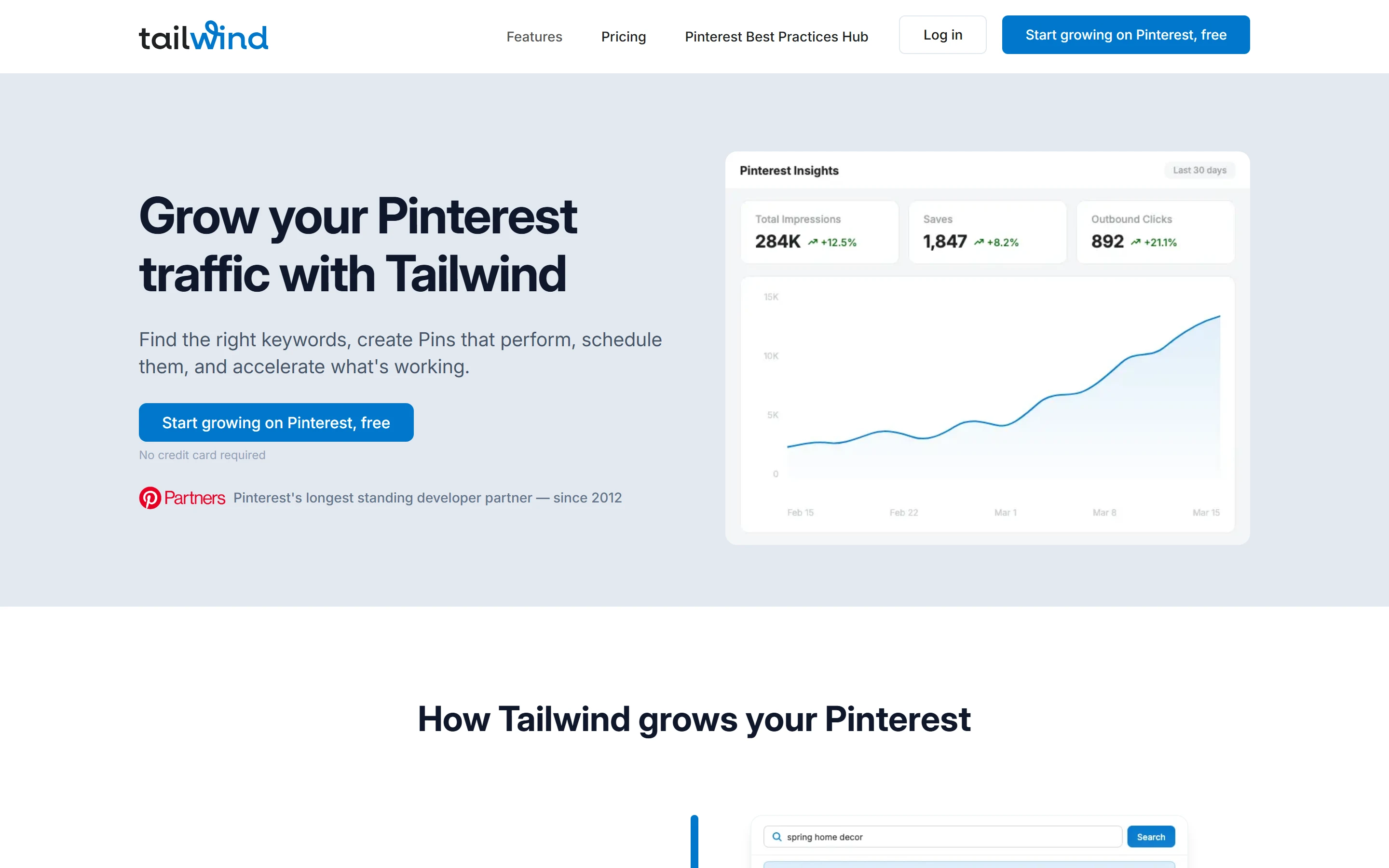
Tailwind is a Pinterest marketing tool. Its homepage headline is “Grow your Pinterest traffic with Tailwind”, and it lays out four steps: find keywords with Keyword Research, create Pins with SmartPin, schedule them with SmartSchedule, and push the ones that work with Turbo. An MCP server and a REST API let AI assistants such as Claude, ChatGPT and Cursor create, schedule and check Pins.
The company says it is made in New York City and Oklahoma City, and its About page names the founders as Alex and Danny. The homepage reports 1.5M+ creators, 2M+ Pins published every month and 15 years helping creators grow on Pinterest, and calls Tailwind Pinterest’s longest standing developer partner, since 2012. The pricing and About pages give 1,000,000+ brands and members, a lower bound the homepage figure does not contradict, and the About page dates the first version of Tailwind to 2015, which sits awkwardly with the homepage’s 15 years and its partnership since 2012.
Pinterest only for new accounts since September 2026
Tailwind’s About page says it became known as a leader in Pinterest and Instagram marketing, but new customers now get Pinterest only. Since September 25, 2026 it has sold three Pinterest tools, and the help center says: “The current plans are for Pinterest. Scheduling to Instagram and Facebook is available only on legacy plans.” Accounts created since late September 2026 are on a Pinterest-only plan type that cannot connect Instagram or Facebook, and features that need Instagram, such as the Smart.bio link-in-bio page, do not work on them.
The website has followed. On October 23, 2026 the old tailwindapp.com/instagram address redirected to the homepage, /facebook and /tiktok returned 404 errors, and the footer’s By Network column listed only Pinterest Marketing. Some help articles still mention Instagram, Facebook and Smart.bio, but the plans article says only legacy plans schedule to Instagram and Facebook. If you need Instagram, TikTok or LinkedIn in the same tool, see the multi-network schedulers in the comparison below.
Pro, Advanced and Max, and the older Plus plans, are now legacy. Their subscribers keep the plan, its limits and its price while the subscription stays active, and can still move between Pro, Advanced and Max. Cancelling or downgrading to Free ends a legacy plan for good, and once you switch to the current plans you cannot go back. On a legacy plan, scheduling draws on a monthly post allowance rather than credits.
Scheduling Pins: SmartSchedule, spacing and bulk tools
Pins are drafted in the Pin Scheduler, a drag-and-drop scheduler where you pick boards and times and queue Pins to auto-publish. SmartSchedule builds the time slots from your account’s engagement data and spreads Pins evenly across waking hours, 5 AM to 11 PM. Pin Spacing keeps Pins that link to the same URL from going out back to back (7 days apart by default), and interval scheduling publishes one Pin to several boards spread over several days. Tailwind can schedule Rich Pins, Carousel Pins and Simplified Pins.
For volume, the Pin Scheduler uploads up to 100 images at once from your computer, CSV import creates drafts from media already hosted online and accepts video Pins as well as images, and browser extensions for Chrome, Safari, Edge and Firefox batch-schedule images from any web page. The vendor says 40% of Pins published via Tailwind are created with the extension.
Tailwind describes itself as an official Pinterest Marketing Partner that publishes scheduled Pins through Pinterest’s official API. Its pricing FAQ adds that Pins scheduled through Tailwind are 54% more likely to go viral than manually published ones. Read that with care. The study page behind it, tailwindapp.com/pinterest/scheduling-and-publishing, says “High-traffic Pins were up to 54% more likely to have been published through Tailwind”: it measured success by outbound clicks, not virality, and its comparison group was Pins “scheduled through other tools or published directly”, not only manual ones. The study covered 1.2 million organic Pins from 17,000+ accounts (2023 to 2024), calls the 54% finding a correlation, not a controlled experiment, and says Tailwind users may simply be more experienced or more consistent.
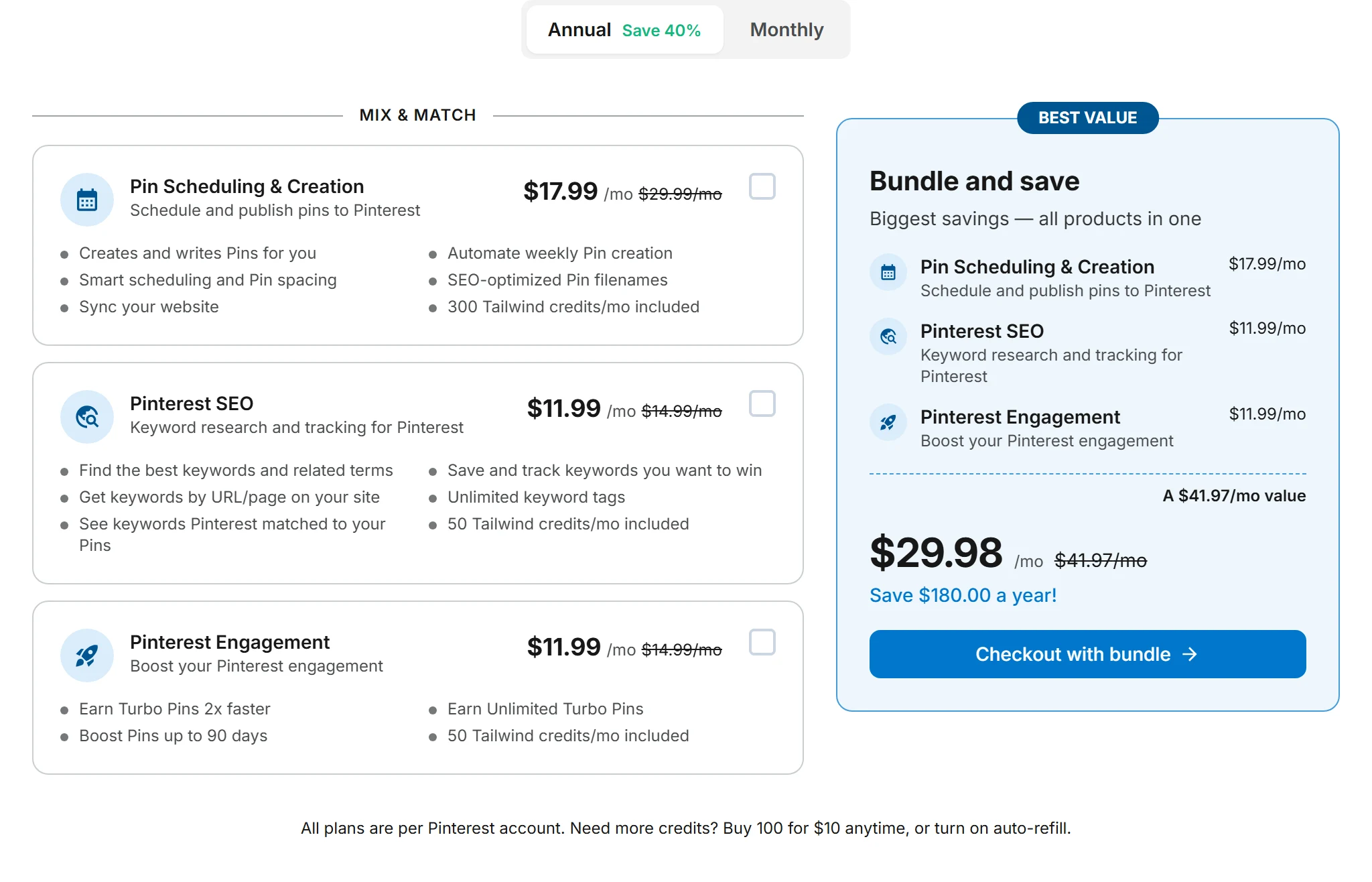
Each product is priced per Pinterest account. With annual billing, the pricing page’s default, Pin Scheduling & Creation is $17.99 a month, Pinterest SEO and Pinterest Engagement are $11.99 each, and the Bundle of all three is $29.98. On monthly billing the same plans cost $29.99, $14.99, $14.99 and $44.98. Annual prices are a monthly equivalent charged once a year. If you manage several Pinterest accounts, each one needs its own subscription and gets its own credits.
Credits pay for actions. As of September 29, 2026 a scheduled Pin costs 1 credit, a Ghostwriter generation 1, a SmartPin generation 3 (basic) or 7 (premium), a keyword search or Board keyword check 1, and a Turbo boost 7, 12 or 15 for 30, 60 or 90 days. The monthly allowance is 300 credits on Pin Scheduling & Creation, 50 on Pinterest SEO and on Pinterest Engagement, and 400 on the Bundle. Included credits refresh each billing month and do not carry over, credits can only be spent inside the product they came with, and SmartPin spends credits on its automatic weekly drafts too. Extra credits cost $10 per 100 and roll over. Auto-refill is off on plans started since August 20, 2026 until you turn it on, and is capped at 3 refills per Pinterest account in a rolling 30 days.
Worked examples from the published prices, for one Pinterest account: Pin Scheduling & Creation costs $215.88 a year on annual billing ($17.99 × 12, charged once) or $359.88 over twelve months at $29.99. Its 300 credits cover up to 300 scheduled Pins a month, about 10 a day, if they go to nothing else; 20 basic SmartPin drafts would use 60 of them and leave 240 for scheduling. Buying Pin Scheduling & Creation plus Pinterest SEO separately costs $29.98 a month on annual billing or $44.98 monthly, exactly the Bundle price, and the Bundle adds Pinterest Engagement and gives 400 credits instead of 350. The Bundle costs $359.76 a year on annual billing against $539.76 at the monthly price, the $180 difference the vendor quotes. A business with three Pinterest accounts on Pin Scheduling & Creation pays $647.64 a year on annual billing.
Monthly plans are pay-as-you-go and can be cancelled at any time; annual plans are billed upfront. Tailwind does not refund early cancellation: service continues to the end of the paid period, then the account reverts to the Free plan. Verified non-profits get 50% off any product. You can start without a card, using a one-time set of trial actions per Pinterest account (10 scheduled Pins, 5 SmartPin generations, 5 Ghostwriter generations, 5 keyword searches and 3 Turbo boosts).
AI tools: SmartPin, Ghostwriter and the MCP server
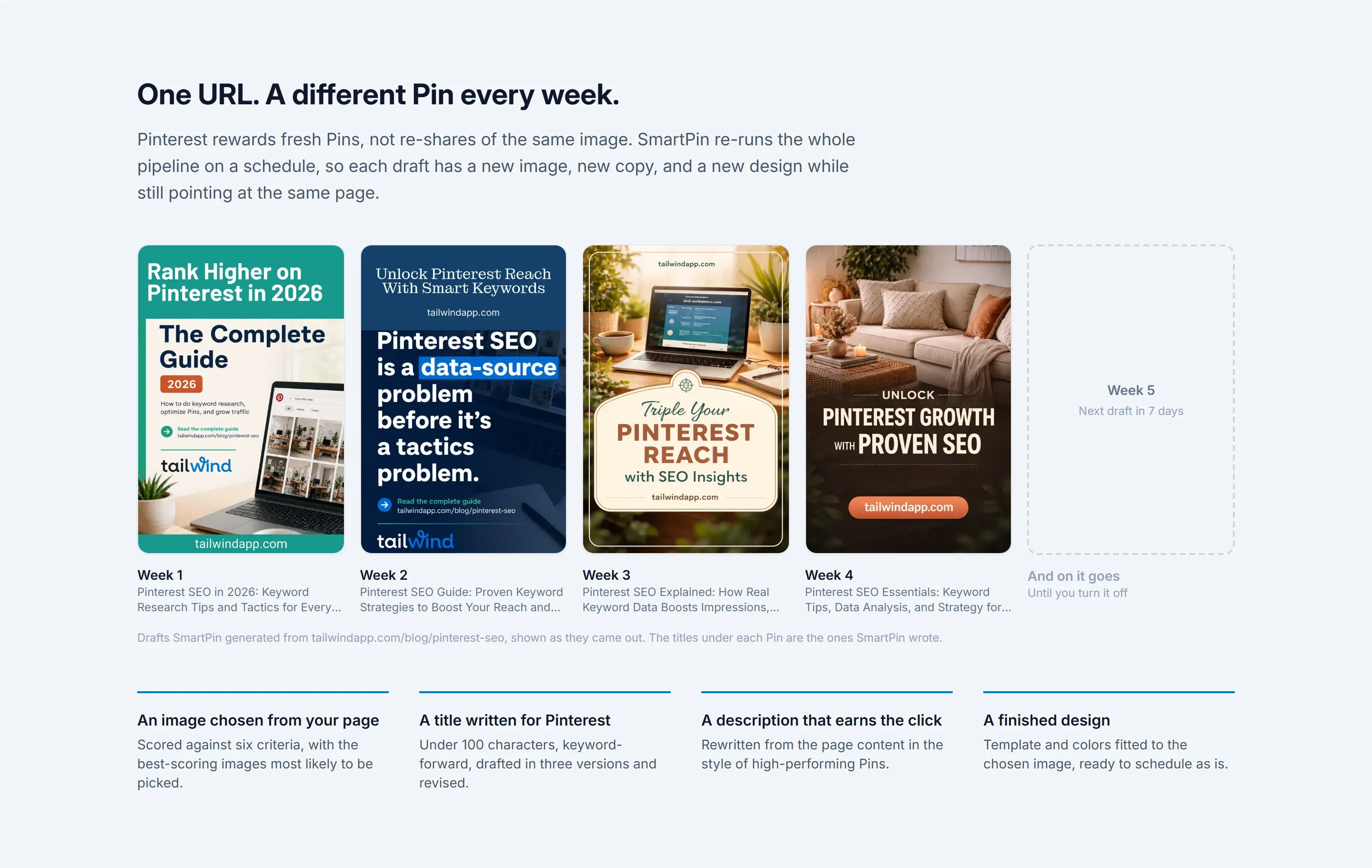
SmartPin takes a URL, scores the images on the page, writes a Pinterest title (under 100 characters, drafted three ways and revised) and a description, and lays out a finished Pin. The draft lands in your account for review; nothing is published until you schedule it. Every week by default it repeats the whole process for the same URL, so each draft has a new image, new copy and a new design. You can change the frequency, ask for a Pin straight away or switch automatic generation off. SmartPin replaced the retired SmartLoop, which re-shared existing Pins, and the vendor reports more than 200,000 Pins generated by SmartPin in the last 90 days.
Ghostwriter writes Pin titles, descriptions and alt text for 1 credit per generation and is included in Pin Scheduling & Creation. Tailwind Create, which designs many Pins at once from one photo and URL, still appears in the site menu but is not named on the current plan cards.
The Tailwind MCP server, on a page published October 14, 2026, connects ChatGPT, Claude, Claude Code, Claude Desktop, Codex, Cursor, Gemini, OpenCode and any MCP client to your Pinterest accounts, although the vendor’s Gemini steps say custom apps need a personal Google account, age 18 or older, in the US, with Keep Activity turned on and Gemini set to English. You sign in with your Tailwind account, then ask in plain language to generate Pins from a URL, schedule them into your SmartSchedule slots or report on outbound clicks. Everything is also available as a REST API at api-v1.tailwind.ai, using OAuth 2.1 with PKCE or an API key, with a limit of 5,000 requests per API key per day. There is no separate price: actions count against your plan as in the app, and reading accounts, boards, the queue and analytics is free.
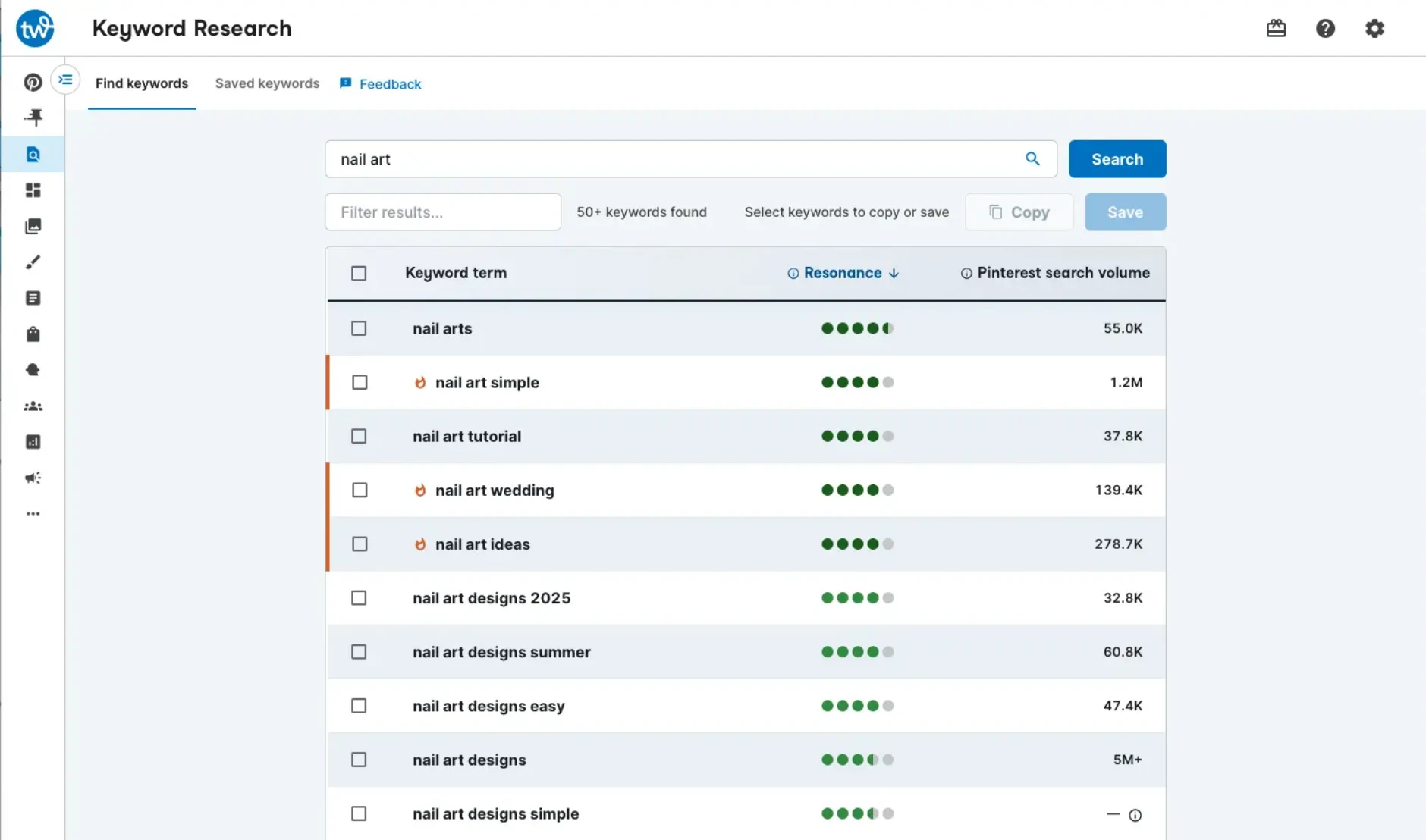
Keyword Research, part of Pinterest SEO, ranks keyword ideas with a Resonance Score built from Pinterest type-ahead suggestions, guided and visual suggestions, Pinterest Trends, audience size estimates from Pinterest’s ads data, shopping intent and relevance to your seed term. It shows Pinterest search volume when that is available, and the vendor notes that Resonance is a comparative signal, not a guarantee of performance. Each search costs 1 credit. The plan also tracks saved keywords, suggests keywords by URL or page on your site and shows the keywords Pinterest matched to your Pins.
Analytics sit under Insights. Profile Performance charts Pin Count and Follower Count, and Impressions, Saves, Pin Clicks and Outbound Clicks, for any date range. Board Insights ranks your boards on the last 30 days or the most recent 5,000 Pins, sortable by saves, impressions, Pin clicks, outbound clicks or Pin count. Both Insights help articles are dated June 23, 2026, before the September plan change, and neither the current plan cards nor the plans article names Insights, so check that it comes with the plan you buy; the MCP page says account and per-Pin analytics are free to read through the MCP server.
Turbo, sold as Pinterest Engagement, is a community where creators like, comment on and save each other’s Turbo Pins; the more you engage, the more of your own Pins you can add, and a boost runs for 30, 60 or 90 days. Tailwind Communities is still in the site menu, and its page claims more than 20,000 Communities, but it is not named on any current plan card.
Who Tailwind fits, and who should look elsewhere
Tailwind suits bloggers, creators and online shops whose traffic comes from Pinterest and who want scheduling, keyword research and fresh-Pin generation in one place, with Pinterest guardrails such as Pin Spacing built in. The annual Pin Scheduling & Creation plan at $17.99 a month per Pinterest account ($29.99 on monthly billing) is the way in, and adding Pinterest SEO brings you to the Bundle price. Virtual assistants and small teams get unlimited Collaborators with draft approval, and people who already work in Claude, ChatGPT or Cursor can drive it through the MCP server.
It is the wrong buy if you need Instagram, Facebook, TikTok or LinkedIn in the same tool, because new accounts cannot connect them. Buffer, Later, Hootsuite, Sprout Social, Planoly and Metricool all schedule Pinterest alongside other networks; Buffer, Planoly and Metricool list free plans on their pricing pages, and Later’s help center describes a Free plan with limited scheduling that its pricing page does not show. High-volume pinners should do the credit maths first: the scheduling plan allows 300 scheduled Pins a month at most, and SmartPin and Ghostwriter draw on the same allowance.
The catches
On Trustpilot, Tailwind scored 3.0 (Average) from 304 reviews when we read the page in October 2026. G2’s page answered with a bot check, so we show no G2 score. Several older vendor pages are out of date or disagree with each other: the vendor’s own Pinterest tools comparison still lists a $14.99/mo Plus price, and the homepage’s since 2012 sits beside the About page’s 2015 launch.
The free start is a one-time set of trial actions, not a monthly allowance: the credits help article calls the monthly-credit Free plan legacy, although feature pages still advertise a Free plan, and the help article on current Free plan limits needs a login. Credits do not roll over, SmartPin keeps spending them on automatic weekly drafts, refunds are not given for early cancellation, and each extra Pinterest account is a separate subscription.
Strengths
Built around Pinterest: SmartSchedule time slots, Pin Spacing (7 days apart by default), interval scheduling across boards, and Rich, Carousel and Simplified Pins
Bulk tools: upload up to 100 images at once, CSV import that also takes video Pins, and browser extensions for Chrome, Safari, Edge and Firefox
Modular pricing: buy scheduling, SEO or engagement on its own, and the help center publishes a credit price list for the main actions (as of September 29, 2026)
SmartPin turns one URL into a new Pin draft every week and never publishes a draft until you schedule it
Unlimited Collaborators on the current plans, with Viewer posts held for admin approval
MCP server and REST API at no separate price, for ChatGPT, Claude, Cursor, Gemini and other MCP clients
No card needed to start, monthly plans cancel any time, and auto-refill is off by default on plans started since August 20, 2026
Watch out for
New accounts have been Pinterest-only since late September 2026: no Instagram or Facebook scheduling, and the Smart.bio link-in-bio page does not work
Actions are metered in credits: 1 per scheduled Pin, 300 a month on the scheduling plan, included credits do not roll over, and credits only work inside the product they came with
The free start is a one-time set of trial actions (10 scheduled Pins); the help center calls the monthly-credit Free plan legacy, and its article on what stays free afterwards sits behind a login
Priced per Pinterest account, so every extra account needs its own subscription
No refunds for early cancellation, and annual plans are billed upfront
SmartPin keeps generating weekly drafts in the background and spends credits even when you are not logged in
Trustpilot shows 3.0 from 304 reviews (read October 2026)
Older vendor pages are stale or inconsistent: its own Pinterest tools comparison still lists a $14.99/mo Plus price, and the About page dates the first version of Tailwind to 2015 while the homepage claims 15 years on Pinterest and a developer partnership since 2012
Key features
Feature
What it does
Pin Scheduler
Drag-and-drop scheduler where you draft Pins, pick boards and times, and queue them to auto-publish to Pinterest. Schedules Rich, Carousel and Simplified Pins. Upload takes up to 100 images at once from your computer, and CSV import (for media already online) accepts video Pins as well as images.
SmartSchedule
Generates posting time slots from your account’s engagement data and spreads Pins evenly across waking hours, 5 AM to 11 PM, with spacing between slots.
Pin Spacing and interval scheduling
Pin Spacing keeps Pins that link to the same URL from publishing back to back (7 days apart by default). Interval scheduling publishes one Pin to several boards spread over several days.
SmartPin
Reads a URL, picks an image from the page, writes a title and description and lays out a finished Pin draft, then makes a new, different draft from the same URL every week by default. Nothing is published until you schedule it. 3 credits per basic generation, 7 per premium.
Ghostwriter
AI copy for Pin titles, descriptions and alt text, 1 credit per generation. Included in Pin Scheduling & Creation.
Keyword Research
Ranks Pinterest keyword ideas with a Resonance Score built from type-ahead suggestions, guided search, Pinterest Trends, audience size, shopping intent and relevance to your seed term, and shows Pinterest search volume when it is available. 1 credit per search; part of Pinterest SEO.
Turbo
Community engagement: members like, comment on and save each other’s Turbo Pins, and the more you engage, the more of your own Pins you can add. Boosts run 30, 60 or 90 days for 7, 12 or 15 credits; part of Pinterest Engagement.
Insights
Profile Performance charts Pin Count and Follower Count, plus Impressions, Saves, Pin Clicks and Outbound Clicks for a date range you choose. Board Insights ranks boards on your last 30 days or most recent 5,000 Pins. Both help articles are dated June 23, 2026, before the September plan change, and no current plan card or the plans article names Insights.
Tailwind MCP and API
Connects ChatGPT, Claude, Claude Code, Codex, Cursor, Gemini, OpenCode and other MCP clients to your Pinterest accounts to make, schedule and check Pins (the vendor’s Gemini steps say custom apps need a personal Google account, age 18 or older, in the US, with Keep Activity turned on and Gemini set to English). REST API at api-v1.tailwind.ai with OAuth 2.1 (PKCE) or API keys, 5,000 requests per key per day. No separate price; reading data is free.
Browser extension and website sync
Extensions for Chrome, Safari, Edge and Firefox batch-schedule images from any web page, and website sync pulls content from Shopify, WordPress, Squarespace and more. The vendor says 40% of Pins published via Tailwind are created with the extension.
Collaborators
Unlimited on the current plans, each with their own login. Admins get full access, including plans and billing; Viewers work in drafts, and their posts go to an admin for approval before publishing.
Multi-network: Pinterest (photo, GIF and video Pins) sits beside Facebook, Instagram, TikTok, LinkedIn, Threads, Bluesky, YouTube Shorts and more. Its free plan covers up to 3 channels with 10 scheduled posts per channel at a time, and Essentials is $5 per channel a month billed yearly ($6 monthly) with unlimited posts under a 5,000-per-channel fair-use cap. Tailwind’s current plans cover Pinterest only.
Starter is $18.75 a month billed yearly ($25 monthly) for one social set, one profile each on Instagram, Facebook, TikTok, Pinterest, LinkedIn, YouTube, Threads and Snapchat, with up to 30 posts per profile a month and a 14-day free trial; Later’s help center also lists a Free plan for a limited number of posts each month. Tailwind’s scheduling plan is $17.99 a month billed annually ($29.99 monthly) for one Pinterest account with 300 credits, enough for 300 Pins if spent on nothing else.
Standard is $99 per user a month billed annually for up to 10 social accounts with unlimited scheduled posts and a 14-day trial, and its Pinterest scheduler can post to several accounts or boards at once. Tailwind costs less for Pinterest alone ($17.99 per Pinterest account a month on annual billing) but posts nowhere else for new customers.
Essentials is $79 per seat a month on annual billing ($99 billed monthly) for up to 5 social profiles. Sprout’s pricing table includes Pinterest on Essentials, but its Pinterest help article names only Standard, Professional and Advanced, so confirm before buying. 30-day free trial with no credit card. Tailwind bills per Pinterest account, not per seat, and allows unlimited Collaborators on its current plans.
Keeps a free plan of one workspace, one user and 10 posts a month, and paid plans start at $14 a month billed annually ($16 billed monthly), a flat price per plan rather than per user. A social set covers one each of Instagram, Facebook, X, Pinterest, LinkedIn, YouTube, Threads and TikTok, and Pinterest auto-posts from its web and mobile apps. Tailwind adds Pinterest-specific tools such as SmartSchedule, Pin Spacing and Pinterest keyword research, but covers no other network for new accounts.
Its free plan manages 1 brand with up to 20 posts a month across that brand’s networks (all except LinkedIn and Twitter, so Pinterest is included) and includes Metricool MCP, which the pricing table marks Limits may apply on Free. Starter is $20 a month billed annually ($25 monthly) for up to 5 brands with unlimited publishing under a fair-use policy whose base threshold, in the legal terms, is 600 posts per brand a month. Both vendors offer an MCP server; Tailwind’s connects to Pinterest accounts only.
You can start without a credit card, and each Pinterest account gets a one-time set of trial actions: 10 scheduled Pins, 5 SmartPin generations, 5 Ghostwriter generations, 5 keyword searches and 3 Turbo boosts. They do not reset monthly; once they are used, the help center says to subscribe to the tool you want to keep using. Feature pages say “Free plan available” and the Keyword Research page offers a “Forever Free plan”, but the credits help article says new accounts get one-time trial actions and calls the monthly-credit Free plan legacy. The help article on current Free plan limits answered “you may need to sign in first”, so we could not confirm a lasting free plan for new accounts.
How much does Tailwind cost?
Per Pinterest account per month: Pin Scheduling & Creation is $17.99 billed annually or $29.99 billed monthly, Pinterest SEO and Pinterest Engagement are $11.99 or $14.99 each, and the Bundle of all three is $29.98 or $44.98. Annual prices are monthly equivalents charged once a year, so scheduling alone costs $215.88 a year on annual billing. Extra credits are $10 per 100, and verified non-profits get 50% off any product.
Can Tailwind still post to Instagram or Facebook?
Not on the current plans. The help center says scheduling to Instagram and Facebook is available only on legacy plans, and accounts created since late September 2026 cannot connect Instagram or Facebook at all, so Smart.bio, the Instagram link-in-bio page, does not work for them either. Legacy Pro, Advanced and Max subscribers keep their plan and its features while the subscription stays active.
How do Tailwind credits work?
Each plan includes a monthly allowance per Pinterest account: 300 credits with Pin Scheduling & Creation, 50 each with Pinterest SEO and Pinterest Engagement, and 400 with the Bundle. As of September 29, 2026, scheduling a Pin costs 1 credit, a Ghostwriter generation 1, a SmartPin generation 3 (basic) or 7 (premium), a keyword search or Board keyword check 1, and a Turbo boost 7, 12 or 15 for 30, 60 or 90 days. Included credits refresh each billing month and do not carry over, while purchased credits roll over. Credits can only be spent inside the product they came with, so SEO credits cannot schedule Pins.
Is there a limit on how many Pins I can schedule?
You can schedule as far ahead as you like; the limit is your credits. On Pin Scheduling & Creation that means at most 300 scheduled Pins a month if the credits go to nothing else, and fewer if SmartPin or Ghostwriter use some. When you schedule through the MCP server, a Pin is charged when it enters the queue, drafts are free, and moving a queued Pin does not charge again.
Is Tailwind safe to use with Pinterest?
Tailwind says it is an official Pinterest Marketing Partner and publishes scheduled Pins through Pinterest’s official API, and its help center puts account risk on spammy patterns such as duplicate flooding rather than on scheduling itself. Its pricing FAQ also says Pins scheduled through Tailwind are 54% more likely to go viral. The study page behind the figure (tailwindapp.com/pinterest/scheduling-and-publishing) says high-traffic Pins were up to 54% more likely to have been published through Tailwind; it measured outbound clicks rather than virality, compared them with Pins scheduled through other tools or published directly, and calls the finding a correlation, not a controlled experiment.
Can I cancel and get a refund?
Monthly plans can be cancelled at any time, and annual plans are billed upfront for the year. Tailwind does not refund early cancellation: you keep the service until the end of the period you paid for, then the account reverts to the Free plan.
Can a virtual assistant or team member use my account?
Yes. The current plans allow unlimited Collaborators, each with their own login. An Admin has full access, including plans and billing; a Viewer works in drafts, and their posts go to an admin for approval before publishing. Collaborators can see every account added to the dashboard.
Does Tailwind work with ChatGPT or Claude?
Yes, through the Tailwind MCP server, which the vendor says works with ChatGPT, Claude, Claude Code, Claude Desktop, Codex, Cursor, Gemini, OpenCode and any MCP client (the vendor’s Gemini steps say custom apps need a personal Google account, age 18 or older, in the US, with Keep Activity turned on and Gemini set to English). You sign in with your Tailwind account, and actions such as scheduling count against your plan as they would in the app. There is no separate price for MCP or the REST API, which allows 5,000 requests per API key per day.
Is there a Tailwind discount?
The pricing page lists two: annual billing, which the toggle labels Save 40% (the saving works out at 40% on Pin Scheduling & Creation, 20% on Pinterest SEO and Pinterest Engagement, and about 33% on the Bundle, all per Pinterest account), and 50% off any product for verified non-profits, who apply by email with their documentation. The link to Tailwind on this page opens the standard homepage, which shows no extra discount or extended trial.
What happened to SmartLoop?
SmartLoop, which re-shared existing Pins on a loop, was retired. The vendor says SmartPin replaced it: instead of re-pinning the same image, it generates a new Pin with a new image, new copy and a new design from your URL.
Tailwind ratings on other platforms
Independent user ratings from third-party review sites, linked here for transparency.
These are not our editorial score, are captured on the date shown, and may have changed since.
Free. Nobody pays for rooms, and vendors never see their notes or votes.Or start a new room.
Book a demo
Tailwind does not take demo requests through OfficeBooks yet, so we do not collect your details for it. Tailwind's own site: tailwindapp.com ↗
Affiliate link: we earn a commission if you buy, at no cost to you.
Verified deal
Annual billing saves up to 40% (40% on Pin Scheduling & Creation, $17.99 vs $29.99 a month per Pinterest account; 20% on Pinterest SEO or Engagement); verified non-profits get 50% off any product
Free. Creators add data-ref with the referral id from their creator page to be credited for the clicks they send. The card updates when we re-verify and never changes a score.
Tailwind
Our rating 4.0/5 · Pin Scheduling & Creation $17.99 per Pinterest account/mo billed annually ($29.99 billed monthly; Pinterest SEO or Pinterest Engagement $11.99 per Pinterest account/mo billed annually, $14.99 billed monthly); one-time free trial actions, no credit card required