—No answer shownnot in our data · shown only from 10+ reviewsNot in our review data. We show a G2 score only after reading it on a profile with 10 or more reviews.
—No answer shownNo change recorded since the first reading we hold (24 Oct 2026).
Pricing verified 24 Oct 2026 · always confirm the current offer on the vendor’s site.
We verify
List prices and plan names as written, whether a lasting free plan exists, the billing unit where the vendor states it, third-party scores with 10+ reviews, and the page and date we read them.
We do not verify
Negotiated discounts, regional prices and taxes, anything behind a sales call, how well features work (we read documentation; we do not test), uptime, support or security. Opinions on those live in Tier 2.
Buffer plans, in the vendor's words
Plan
Price
Included
Free
$0
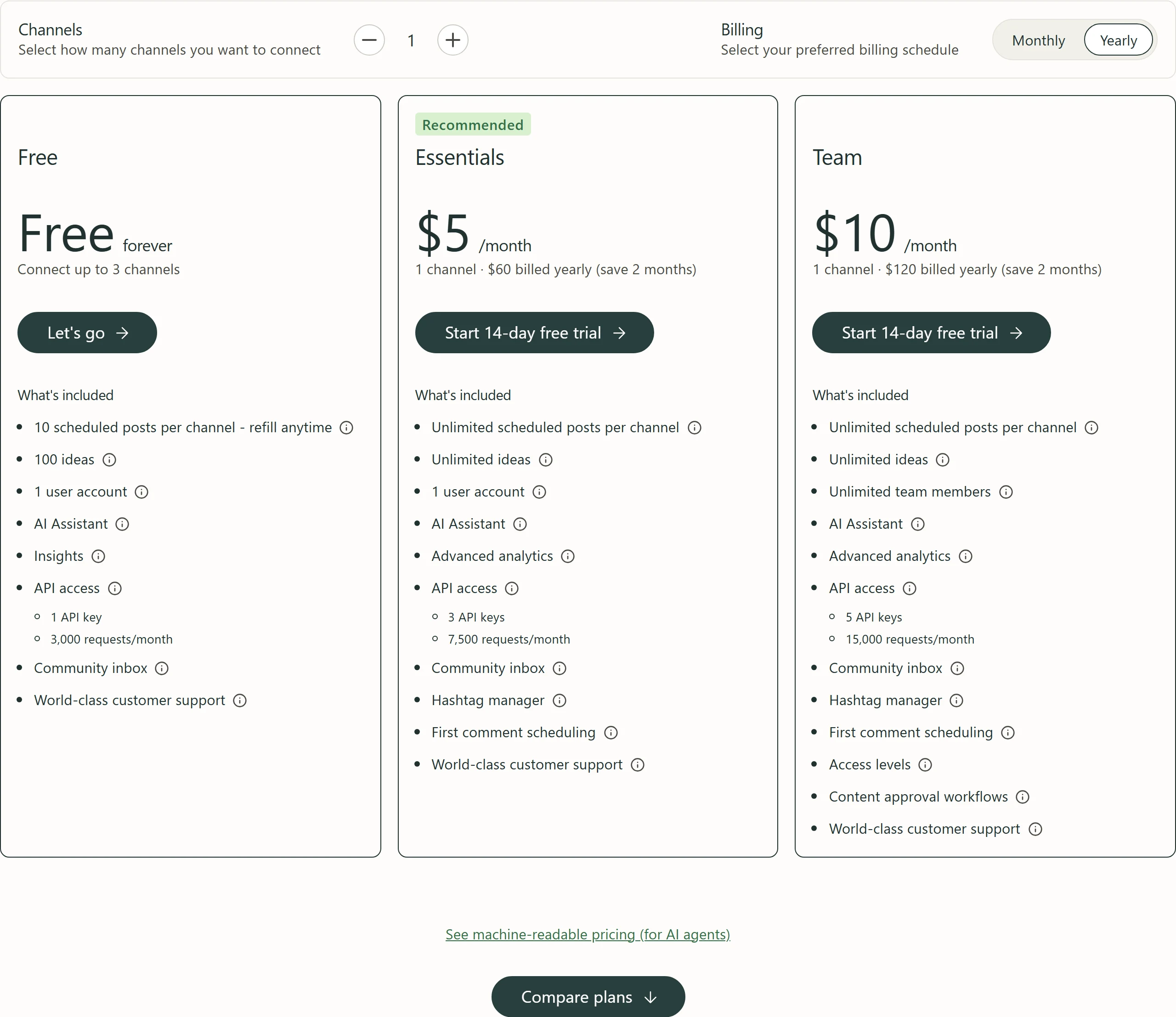
Free forever, no credit card, up to 3 channels. 10 scheduled posts per channel at a time (a slot refills when a post publishes), 100 ideas, 3 tags, 1 threaded post, 1 user, AI Assistant, Insights with 30 days of history, community inbox with 5 AI reply suggestions a week and 1 saved reply, 1 API key (3,000 requests per 30 days), email support.
Essentials
$5/channel/mo billed yearly ($6 billed monthly)
Labelled Recommended on Buffer’s pricing page. $60 a year per channel on yearly billing. Monthly per-channel rate falls with volume: $6 for channels 1–10, $4 for 11–25, $3 for 26–50, $1 from 51. Unlimited scheduled posts (fair-use cap of 5000 posts per channel), unlimited ideas, 250 tags, 1 user, advanced analytics with unlimited history, reports, custom UTM parameters, hashtag manager, first comment scheduling, channel groups, custom video covers, notes, 3 API keys (7,500 requests per 30 days). 14-day free trial.
Team
$10/channel/mo billed yearly ($12 billed monthly)
$120 a year per channel on yearly billing. Monthly per-channel rate: $12 for channels 1–10, $4 for 11–25, $3 for 26–50, $2 from 51. Everything in Essentials plus unlimited users, approval workflows, custom access and permissions, branded reports and 5 API keys (15,000 requests per 30 days). 14-day free trial.
Price history · every reading logged
We hold one reading of this price, so there is no history to chart yet. We will not draw a curve from fewer than two points.
All readings (1)
Every reading we hold of Buffer's listed price
Date
Result
Read on
First reading we hold: “Free plan (up to 3 channels); paid from $5/channel/mo billed yearly ($6 billed monthly)”
Propose a correction to a price, free plan or billing unit, with evidence from your own site. An editor reads it before anything changes; a correction never touches a score or a rank.
Written by people. Signed, dated, and kept apart from the facts above.
Who writes what on this page: each source, who writes it, their incentive, and what OfficeBooks checks
Source
Who writes it
Their incentive
Checked by OfficeBooks?
Editor's verdict and review
OfficeBooks research desk. Desk research from documentation; no hands-on test.
A commission only on links to partner programmes, disclosed beside the link. It never changes a score.
Yes · It is ours: every figure in it comes from the sources listed.
Creator stacks
Independent creators, named on every take
Whatever each creator declares on each take: none, a commission, sponsorship or employment. OfficeBooks credits them with the clicks and demo bookings they refer.
Partly · The facts beside their take, read live. Not their opinion; an editor reviews each stack before it is listed.
G2 and Trustpilot ratings
Those platforms' reviewers
Set by each platform. Some invite or reward reviews.
Partly · Only the score and review count, on the date shown. We do not vet the reviews.
Sponsored slot
The vendor who booked it
Paid placement.
No · The copy is the vendor's. Labelled "Sponsored · not ranked"; never in a table, score, shortlist or search result.
Verified facts (Tier 1)
OfficeBooks research desk
None. Vendors cannot pay to change a fact, a score or a rank.
Yes · On the vendor's own pages where it publishes them, otherwise on the sources listed; always with the date.
Editor's verdict
updated
“Buffer is a sound pick for creators and small businesses that post to a few networks. The Free plan covers 3 channels with the AI Assistant and no credit card, the first paid channel costs $5 a month on yearly billing, and Team gives unlimited users and approvals without per-seat pricing; a business with 4 channels pays $240 a year on Essentials or $480 on Team, billed yearly. Know the limits before you upgrade. The bill counts every channel, including the ones that were free, Essentials has a single user, and Pinterest support stops at publishing and basic analytics, with no comment replies in Buffer’s community inbox and no Pinterest keyword research on any Buffer page we read. Buffer’s own pages also disagree on the yearly discount and give different scheduling caps. If Pinterest is your main channel, compare it with a Pinterest-first tool such as Tailwind before paying for a year.”
Best for
Creators and small businesses posting to a few networks
Small teams that want unlimited users and approvals without per-seat pricing
Brands publishing to Bluesky, Threads, Mastodon or Substack alongside the usual networks
Watch out for
Upgrading from Free means paying for every connected channel, including the ones that were free, and a Start Page counts as a channel
Pinterest support is publishing plus basic analytics: Buffer’s engagement features (replying to comments in the community inbox) are not available for Pinterest, advanced analytics is not included, and no Buffer page we read mentions Pinterest keyword research
OBOfficeBooks Editorial · Research desk · desk research from documentation, no hands-on test
Creator takes belong to their authors and are not verified by OfficeBooks; each creator declares their tie to the vendor on every take. OfficeBooks earns a commission only on links to partner programmes, disclosed beside each link. None of this changes Tier 1.
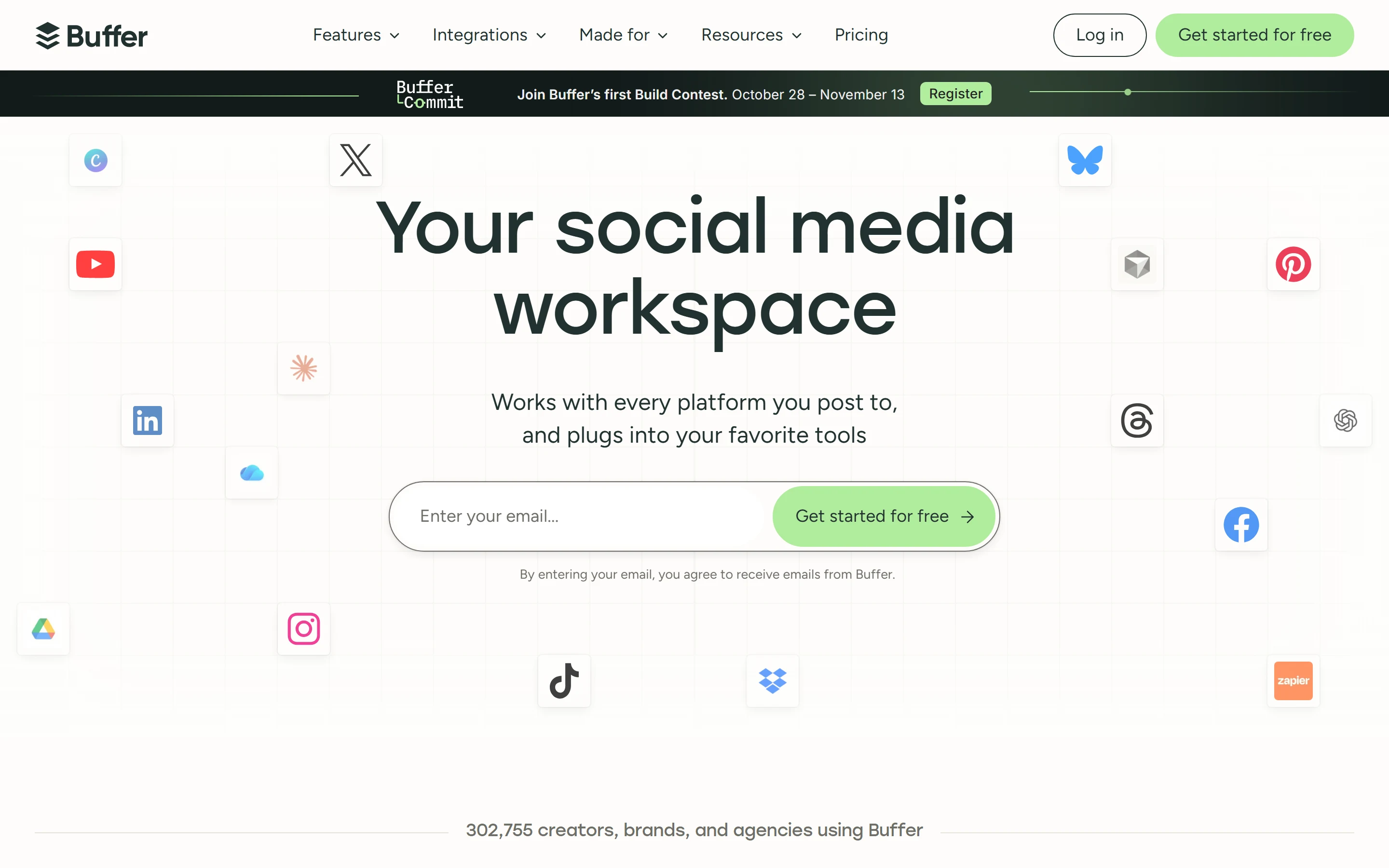
Buffer is a social media scheduling and publishing tool. Its homepage calls it “Your social media workspace” and lists 12 networks it publishes to: Facebook, Instagram, TikTok, LinkedIn, Threads, Bluesky, YouTube Shorts, Pinterest, Google Business, Mastodon, X and Substack. Around the queue and calendar sit an ideas space called Create, a community inbox for replying to comments, Insights for analytics, an AI Assistant, a Start Page link-in-bio builder and, on the Team plan, approval workflows. It runs in the browser, with iOS and Android apps and a browser extension.
Buffer started in November 2010 as a Startup Sprint project to solve a problem its founder and CEO, Joel Gascoigne, had: he wanted to space out when his tweets were sent. It has been a fully remote company since 2013, and its Terms of Use are issued by Buffer, Inc. It publishes its own company numbers, and they do not agree: the homepage gives 302,755 monthly active users (the same figure as the “creators, brands, and agencies using Buffer” strip in the capture above) and 84,217 total customers, while its public metrics page showed 277,201 monthly active users and 82,006 customers when we read both on October 24, 2026.
Pinterest and Instagram in Buffer
Pinterest scheduling is on every plan, Free included. You can schedule photo, GIF and video pins, choosing the board, title, description and link for each, connect several Pinterest accounts with a different board for each, and crosspost pins to Instagram, Facebook, TikTok, Threads and other networks. The Help Center sets the limits: one media item per pin, video from 4 seconds to 15 minutes and up to 1GB, images up to 10MB, GIFs up to 3MB, 500 characters per post, and 25 posts per 24 hours once you verify your email (5 without). Pinterest profiles and topics cannot be tagged through Buffer.
Buffer gives two queue limits for paid plans: the Pinterest page says up to 10 pins at a time on Free and up to 2,000 at a time on paid plans, while the pricing FAQ gives a general fair-use cap of 5000 posts per channel and does not say whether Pinterest has a lower limit. Buffer’s channel table gives Pinterest business accounts basic analytics but not advanced analytics, and personal accounts none. Pinterest Insights shows a summary of impressions, views and saves, a per-pin table you can sort by impressions, saves or clicks, and AI Takeaways, and backfills 90 days of impressions and views when you connect. Buffer’s engagement features (replying to comments in the community inbox) are not available for Pinterest, and no Buffer page we read mentions Pinterest keyword research, which Tailwind sells as a separate Pinterest SEO product. The help center does say you can publish a pin to a board marked secret.
Instagram Business and Creator accounts get every column in that channel table: automatic and notification publishing, basic and advanced analytics, and community engagement. You can schedule image posts, video posts, carousels of up to 10 images, Stories and Reels. Auto-publishing, advanced analytics, locations and comment replies need a professional account linked to a Facebook Page; personal profiles get notification publishing only. Buffer’s Instagram FAQ says Reels and Stories switch to notification publishing when Instagram’s API cannot auto-publish them, with common triggers including music, stickers, links, collaborators and unsupported sizes or lengths; those posts go out as a notification and you finish them in Instagram. The community inbox covers comments on posts and Reels but not DMs or Story replies, and first comment scheduling is on paid plans only.
There are three plans. Free costs nothing, needs no credit card and connects up to 3 channels, with 10 scheduled posts per channel at a time, 100 ideas and 1 user. Essentials and Team are billed per channel: on yearly billing, the state the pricing page opens in, Essentials is $5 and Team $10 per channel per month ($60 and $120 a year); on monthly billing they are $6 and $12. Team adds unlimited users, approval workflows, access permissions and branded reports. Both paid plans start with a 14-day free trial, and an account with no payment details drops back to Free when it ends. Buffer says its pricing was last updated in November 2025.
Worked examples from those prices. A creator posting to Instagram, TikTok and Pinterest fits the Free plan at $0, as long as 10 queued posts per channel is enough. Moving those 3 channels to Essentials costs $18 a month billed monthly or $15 a month billed yearly ($180 a year), because the formerly free channels are charged too. A small business with Instagram, Facebook, LinkedIn and Google Business, 4 channels, pays $24 a month billed monthly or $20 a month billed yearly ($240 a year) on Essentials, which includes 1 user. Giving a second person access means Team: $48 a month billed monthly or $40 a month billed yearly ($480 a year) for the same 4 channels, with unlimited users.
Rates fall as you add channels. On monthly billing, channels 1 to 10 cost $6 each on Essentials and $12 on Team, channels 11 to 25 cost $4 on both, 26 to 50 cost $3, and from channel 51 it is $1 on Essentials and $2 on Team. Buffer’s own examples put 10 channels at $60 a month on Essentials billed monthly ($50 yearly) and $120 on Team ($100 yearly); at 25 channels the same rates come to $120 a month on Essentials and $180 on Team, billed monthly. Nonprofits and charities get 50% off paid plans. Two details are worth checking at checkout: the plan cards describe yearly billing as save 2 months, about 17% ($60 instead of $72 a year per Essentials channel), while the billing FAQ says 20%; and Buffer accepts cards only (Visa, Mastercard, American Express, JCB, Discover and Diners Club), not PayPal, checks or bank transfers.
AI Assistant, Insights and reports
The AI Assistant, which creates, refines and repurposes posts, is on every plan, Free included, and Buffer says it can be used without limits. It is based on OpenAI’s API: the text you type into it is shared with OpenAI, but Buffer says your account details, media files and the rest of your work are not. In the community inbox, AI reply suggestions are capped at 5 a week on Free and unlimited on paid plans. Buffer also offers an MCP server and a public API, so you can ask AI tools such as Claude or ChatGPT about your recent performance; the pricing table lists Claude and ChatGPT integrations on every plan.
Insights covers 11 networks: Facebook, Instagram, TikTok, LinkedIn, Threads, YouTube, X, Pinterest, Bluesky, Mastodon and Substack. Free keeps 30 days of history; paid plans keep unlimited history and add a performance overview with period-over-period comparisons, custom analytics filtered by tag or channel, custom UTM parameters and report exports as CSV, PDF or markdown. Branded reports with your logo and a cover page are Team only, while AI Takeaways, plain-language notes on what is working and what to try next, are on every plan. Depth also depends on the network: in Buffer’s channel table, advanced analytics covers Facebook pages, Instagram business and creator accounts, LinkedIn pages and X, while Pinterest business accounts, TikTok, YouTube Shorts, Threads, Bluesky and Mastodon get basic analytics only.
Who Buffer fits, and who it does not
Buffer fits creators and small businesses that post to a handful of networks and want to start free: 3 channels, the AI Assistant and 30 days of analytics cost nothing, and the first paid channel is $5 a month on yearly billing. It also suits teams that would otherwise pay per seat, because Team includes unlimited users at a per-channel price, and brands that publish to Bluesky, Threads, Mastodon or Substack alongside the usual networks.
It fits less well if Pinterest is your main channel. Buffer’s engagement features (replying to comments in the community inbox) are not available for Pinterest, it gives Pinterest business accounts basic analytics only, and no Buffer page we read mentions Pinterest keyword research; Tailwind, which prices its plans per Pinterest account, is built around that job. If you run dozens of accounts, the bill still grows with every channel even at the lower volume rates, so compare it with tools priced per user or per brand. If you need direct messages in one inbox, note that on Instagram the inbox covers comments on posts and Reels, not DMs or Story replies. The plans list email support and a self-service knowledge base as the support options.
What to check before you pay
The Free plan is tight in places: 10 scheduled posts per channel at a time, 3 tags, 1 threaded post, 1 saved reply and 30 days of Insights history, while first comment scheduling, the hashtag manager, channel groups and custom video covers are paid only. On paid plans, unlimited scheduling is subject to a fair-use cap of 5000 posts per channel. Essentials is still one user, and approvals and access permissions need Team.
Buffer’s pages also disagree on details or leave them unclear. Yearly billing is save 2 months on the plan cards and a 20% discount in the FAQ. The Pinterest page allows 2,000 pins at a time on paid plans, while the pricing FAQ gives a general fair-use cap of 5000 posts per channel without saying whether Pinterest has a lower limit. First comment scheduling covers Instagram, Facebook or LinkedIn in the pricing page’s plan comparison, but Instagram or LinkedIn in its machine-readable version, and Pinterest is in neither. If one of these matters to you, ask Buffer to confirm it before you commit to a year.
Strengths
Free plan with up to 3 channels, no credit card and the AI Assistant without usage limits
Paid plans start at $5 per channel per month billed yearly ($6 monthly), and per-channel rates fall after 10 channels
Publishes to 12 networks: Facebook, Instagram, TikTok, LinkedIn, Threads, Bluesky, YouTube Shorts, Pinterest, Google Business, Mastodon, X and Substack
Team includes unlimited users, approval workflows and per-channel access permissions at a per-channel price
Pinterest scheduling (photo, GIF and video pins, with board, title, description and link) on every plan, Free included
Publishes a machine-readable pricing page and a per-channel table of which features each network supports
50% off paid plans for nonprofits and charities, and two-factor authentication on every plan
Watch out for
Upgrading from Free means paying for every connected channel, including the ones that were free, and a Start Page counts as a channel
Pinterest support is publishing plus basic analytics: Buffer’s engagement features (replying to comments in the community inbox) are not available for Pinterest, advanced analytics is not included, and no Buffer page we read mentions Pinterest keyword research
Essentials includes 1 user; approvals, access permissions and branded reports need Team at $10 per channel per month billed yearly ($12 monthly)
Buffer’s pages disagree or leave things unclear: yearly billing is save 2 months on the plan cards but a 20% discount in the FAQ, and the Pinterest page allows 2,000 pins at a time on paid plans while the pricing FAQ gives a general fair-use cap of 5000 posts per channel, without saying whether Pinterest has a lower limit
Instagram personal profiles get reminder publishing only, Reels and Stories with music, stickers, polls, links or collaborators, or in unsupported sizes or lengths, must be finished in Instagram, and the inbox shows no DMs or Story replies
The Free plan keeps 10 scheduled posts per channel at a time and 30 days of Insights history; first comment scheduling and the hashtag manager are paid only
Payment by card only: no PayPal, checks or bank transfers
Key features
Feature
What it does
Publishing to 12 networks
Queue, visual content calendar, duplicate posts, link shortening and a browser extension on every plan, publishing to Facebook, Instagram, TikTok, LinkedIn, Threads, Bluesky, YouTube Shorts, Pinterest, Google Business, Mastodon, X and Substack. Reminder notifications let you finish posts natively on Instagram, TikTok and YouTube.
Threads, first comments and covers
Threaded posts to X, Bluesky, Threads and Mastodon: 1 on Free, unlimited on paid plans. First comment scheduling, the hashtag manager, channel groups and custom video covers (Facebook, Instagram and TikTok) are on paid plans only.
Create (ideas)
Store ideas and drafts, sort ideas into kanban-style columns in a board view, and use templates of social post ideas. 100 ideas and 3 tags on Free; unlimited ideas and 250 tags on paid plans.
Community inbox
Reply to comments on Instagram, Facebook, LinkedIn, Threads, Bluesky, X, TikTok, Google Business Profile, YouTube and Mastodon posts, with a comment score, comment insights and turning comments into posts. AI reply suggestions: 5 a week on Free, unlimited on paid plans. Not available for Pinterest.
Insights
Analytics for 11 networks. Free keeps 30 days of history; paid plans keep unlimited history and add a performance overview, custom analytics by tag or channel, custom UTM parameters and exports as CSV, PDF or markdown. Branded reports are Team only; AI Takeaways are on every plan.
AI Assistant
Creates, refines and repurposes posts on every plan, Free included, without usage limits. It is based on OpenAI’s API, and the text you type into it is shared with OpenAI.
Start Page
A link-in-bio landing page with links to your content, on every plan. It counts as a channel towards your plan.
Approvals and permissions
Team plan only: members draft posts and submit them for approval, admins or managers review, edit and approve them before they are scheduled, and access is set per channel. Notes for internal comments are on both paid plans.
API, MCP server and integrations
A public API and an MCP server for AI tools such as Claude and ChatGPT. API limits: 1, 3 or 5 keys and 3,000, 7,500 or 15,000 requests per 30 days on Free, Essentials and Team. The integrations directory lists 24 apps, and the pricing table puts Canva, Google Drive and Photos, Dropbox, Zapier, Make, n8n, IFTTT, Claude and ChatGPT on every plan.
Security
Two-factor authentication on every plan, with codes by email or authenticator app, and a responsible disclosure program for reporting security issues.
Built around Pinterest: its plans are priced per Pinterest account, and it sells a Pinterest SEO product for keyword research and tracking. Buffer spreads one per-channel price across 12 networks, and no Buffer page we read mentions Pinterest keyword research.
Standard is $99 per user per month billed annually for up to 10 social accounts, and reviewing and approving content with your team is listed from Advanced ($399 per user per month billed annually). Buffer bills per channel rather than per user, and Team includes unlimited users and approvals.
Starter is $18.75 a month billed yearly ($25 monthly) for 1 social set (8 profiles, one of each network), 1 user and up to 30 scheduled posts per profile a month (counted when scheduled). Buffer prices each channel instead: 3 channels on Essentials cost $15 a month billed yearly, 4 cost $20.
Its free plan allows 10 posts per month per workspace for 1 user, and analytics needs a paid plan. Buffer’s Free plan keeps up to 10 scheduled posts per channel at a time on 3 channels, refilling as posts publish, and includes Insights with 30 days of history.
Its cheapest plan, Essentials, is $79 per seat per month billed annually ($99 monthly) for up to 5 social profiles; Standard, $199 per seat per month with annual billing, is the first plan card that lists “Consolidated inbox and collaboration tools”. Buffer’s Team plan includes unlimited users at $10 per channel per month billed yearly.
Its free plan manages 1 brand with up to 20 posts a month and 30 days of analytics, and leaves out LinkedIn and Twitter. Buffer’s Free plan connects up to 3 channels and also keeps 30 days of Insights history.
Yes. The Free plan is free forever, needs no credit card and connects up to 3 channels. It allows 10 scheduled posts per channel at a time (a slot refills when a post publishes), 100 ideas, 3 tags, 1 user, the AI Assistant without usage limits, Insights with 30 days of history and the community inbox with 5 AI reply suggestions a week. First comment scheduling, the hashtag manager and approvals are not included.
How much does Buffer cost?
Paid plans are priced per channel. Essentials is $5 per channel per month billed yearly ($60 a year) or $6 billed monthly; Team is $10 billed yearly ($120 a year) or $12 billed monthly. Monthly rates fall with volume, to $4 per channel for channels 11 to 25, $3 for 26 to 50, and $1 (Essentials) or $2 (Team) from channel 51. Buffer’s own example: 10 channels cost $60 a month on Essentials billed monthly or $50 billed yearly, and $120 or $100 on Team.
What counts as a channel?
One social account you connect, such as a single Instagram profile, Facebook page or LinkedIn page; Buffer’s example is that five brands with an Instagram and a Facebook page each make 10 channels. A Start Page also counts as a channel. When you upgrade from Free you pay for every channel, including the ones you had on the Free plan.
Can Buffer schedule Pinterest pins?
Yes, on every plan including Free. You can schedule photo, GIF and video pins, choose the board, title, description and link, and post to several Pinterest accounts with a different board for each. The Pinterest page allows 10 pins at a time on Free and up to 2,000 at a time on paid plans, while the pricing FAQ gives a general fair-use cap of 5000 posts per channel without saying whether Pinterest has a lower limit, and the Help Center limits Pinterest to 25 posts per 24 hours once you verify your email. Buffer’s engagement features (replying to comments in the community inbox) are not available for Pinterest, and Pinterest business accounts get basic analytics, not advanced analytics.
Does Buffer post to Instagram automatically?
For Business and Creator accounts linked to a Facebook Page, yes: image posts, video posts, carousels of up to 10 images, Stories and Reels can publish automatically. Personal profiles only get notification publishing, where you finish the post in Instagram. Reels and Stories with music, stickers, polls, links or collaborators, or in unsupported sizes or lengths, switch to notification publishing and have to be finished in Instagram, because Instagram’s API cannot auto-publish them.
Is there a free trial?
Yes, 14 days on the paid plans. If you have not entered payment details when it ends, the account is moved to the Free plan automatically. You can also start on the Free plan without a trial.
Does Buffer’s AI cost extra?
No. The AI Assistant is on every plan, Free included, and Buffer says it can be used without limits. It is based on OpenAI’s API, and the text you type into it is shared with OpenAI. AI reply suggestions in the community inbox are capped at 5 a week on Free and unlimited on paid plans.
Does Buffer offer discounts?
Nonprofits and charities get 50% off paid plans. Yearly billing is cheaper as well: the plan cards call it save 2 months ($60 instead of $72 a year per Essentials channel), while the billing FAQ calls it a 20% discount.
How can I pay for Buffer?
By card: Visa, Mastercard, American Express, JCB, Discover or Diners Club. Buffer says it cannot accept PayPal, checks or bank transfers.
Buffer ratings on other platforms
Independent user ratings from third-party review sites, linked here for transparency.
These are not our editorial score, are captured on the date shown, and may have changed since.
Free. Creators add data-ref with the referral id from their creator page to be credited for the clicks they send. The card updates when we re-verify and never changes a score.
Buffer
Our rating 4.3/5 · Free plan (up to 3 channels); paid from $5/channel/mo billed yearly ($6 billed monthly)
Tailwind schedules Pins, finds Pinterest keywords and drafts new Pins with AI; new accounts are Pinterest-only. Start free with no credit card, using a one-time set of trial actions.
Affiliate link: OfficeBooks may earn a commission if you buy, at no cost to you. It opens Tailwind’s standard homepage, with no extra discount, and it never changes a score or a ranking.
Affiliate link: OfficeBooks may earn a commission if you buy, at no cost to you. It never changes a score or a ranking.