—No answer shownnot in our data · shown only from 10+ reviewsNot in our review data. We show a G2 score only after reading it on a profile with 10 or more reviews.
—No answer shownNo change recorded since the first reading we hold (24 Oct 2026).
Pricing verified 24 Oct 2026 · always confirm the current offer on the vendor’s site.
We verify
List prices and plan names as written, whether a lasting free plan exists, the billing unit where the vendor states it, third-party scores with 10+ reviews, and the page and date we read them.
We do not verify
Negotiated discounts, regional prices and taxes, anything behind a sales call, how well features work (we read documentation; we do not test), uptime, support or security. Opinions on those live in Tier 2.
Planoly plans, in the vendor's words
Plan
Price
Included
Free
$0
Not sold and not shown in the plan picker: an account without a paid subscription is on it. 1 workspace, 1 user, 10 posts per month per workspace, resetting on the 1st (UTC). Connecting channels, grid planning, scheduling and reminders work; analytics, the Media Library, the AI caption writer, the Idea Generator, Quick Schedule, Canva, stock media, comments, and the Instagram inbox and automations need a paid plan. The pricing FAQ describes it as available in the mobile app with 10 uploads per month, while the help center counts posts and says uploading media does not count toward the limit.
Starter
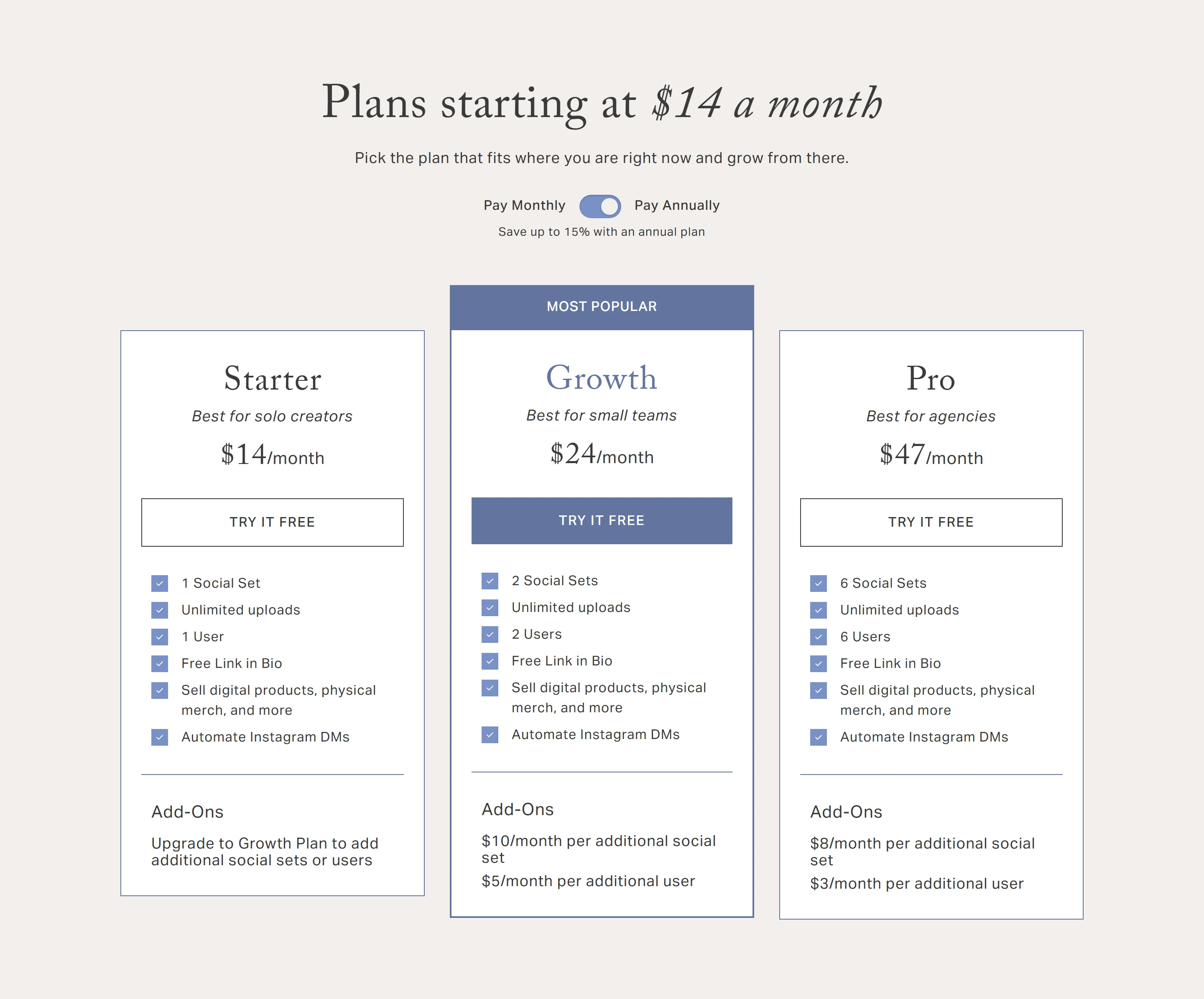
$14/mo billed annually ($16 billed monthly)
Best for solo creators, per the vendor. 1 social set, 1 user. The pricing page lists unlimited uploads and the help guide unlimited posts, while the homepage card says up to 60 uploads per month. Free Link in Bio, selling digital products and merch, Instagram DM automation. No add-ons: move to Growth or Pro for more social sets or users.
GrowthPOPULAR
$24/mo billed annually ($28 billed monthly)
Marked Most Popular. 2 social sets, 2 users, unlimited uploads. Add-ons: $10/month per extra social set and $5/month per extra user. The Content Marketplace add-on is available.
Pro (Professional in the help center)
$47/mo billed annually ($55 billed monthly)
Best for agencies, per the vendor. 6 social sets, 6 users, unlimited uploads. Add-ons: $8/month per extra social set and $3/month per extra user. The Content Marketplace add-on is available.
Price history · every reading logged
We hold one reading of this price, so there is no history to chart yet. We will not draw a curve from fewer than two points.
All readings (1)
Every reading we hold of Planoly's listed price
Date
Result
Read on
First reading we hold: “Free plan (10 posts per month); paid from $14/mo billed annually ($16 billed monthly)”
Propose a correction to a price, free plan or billing unit, with evidence from your own site. An editor reads it before anything changes; a correction never touches a score or a rank.
Written by people. Signed, dated, and kept apart from the facts above.
Who writes what on this page: each source, who writes it, their incentive, and what OfficeBooks checks
Source
Who writes it
Their incentive
Checked by OfficeBooks?
Editor's verdict and review
OfficeBooks research desk. Desk research from documentation; no hands-on test.
A commission only on links to partner programmes, disclosed beside the link. It never changes a score.
Yes · It is ours: every figure in it comes from the sources listed.
Creator stacks
Independent creators, named on every take
Whatever each creator declares on each take: none, a commission, sponsorship or employment. OfficeBooks credits them with the clicks and demo bookings they refer.
Partly · The facts beside their take, read live. Not their opinion; an editor reviews each stack before it is listed.
G2 and Trustpilot ratings
Those platforms' reviewers
Set by each platform. Some invite or reward reviews.
Partly · Only the score and review count, on the date shown. We do not vet the reviews.
Sponsored slot
The vendor who booked it
Paid placement.
No · The copy is the vendor's. Labelled "Sponsored · not ranked"; never in a table, score, shortlist or search result.
Verified facts (Tier 1)
OfficeBooks research desk
None. Vendors cannot pay to change a fact, a score or a rank.
Yes · On the vendor's own pages where it publishes them, otherwise on the sources listed; always with the date.
Editor's verdict
updated
“Planoly fits a creator or small business whose social plan starts with the Instagram grid. $14 a month billed annually buys one social set across eight networks, a visual planner, and a link-in-bio store that takes no cut of sales, and a 14-day free trial lets you check it first. Growth and Pro stay flat-priced for 2 and 6 users, which keeps small-team costs predictable. Look elsewhere if you need an inbox or automations beyond Instagram, analytics beyond Instagram, Pinterest, TikTok and LinkedIn, a formal approval step, or deeper Pinterest tools, since each pin goes to one existing board. Confirm the upload limit and the annual total at checkout, because Planoly’s own pages disagree on both.”
Best for
Creators and small businesses that plan an Instagram-first feed
Creators who want a link-in-bio store bundled with their scheduler
Small teams and agencies running up to six social sets on one flat-priced plan
Watch out for
The inbox and the comment and DM automations cover Instagram only, and analytics covers only Instagram, Pinterest, TikTok and LinkedIn
The team guide describes review by comments and @mentions with no separate approval step, and seats are capped at 1, 2 or 6 before add-ons (Starter cannot add any)
OBOfficeBooks Editorial · Research desk · desk research from documentation, no hands-on test
Creator takes belong to their authors and are not verified by OfficeBooks; each creator declares their tie to the vendor on every take. OfficeBooks earns a commission only on links to partner programmes, disclosed beside each link. None of this changes Tier 1.
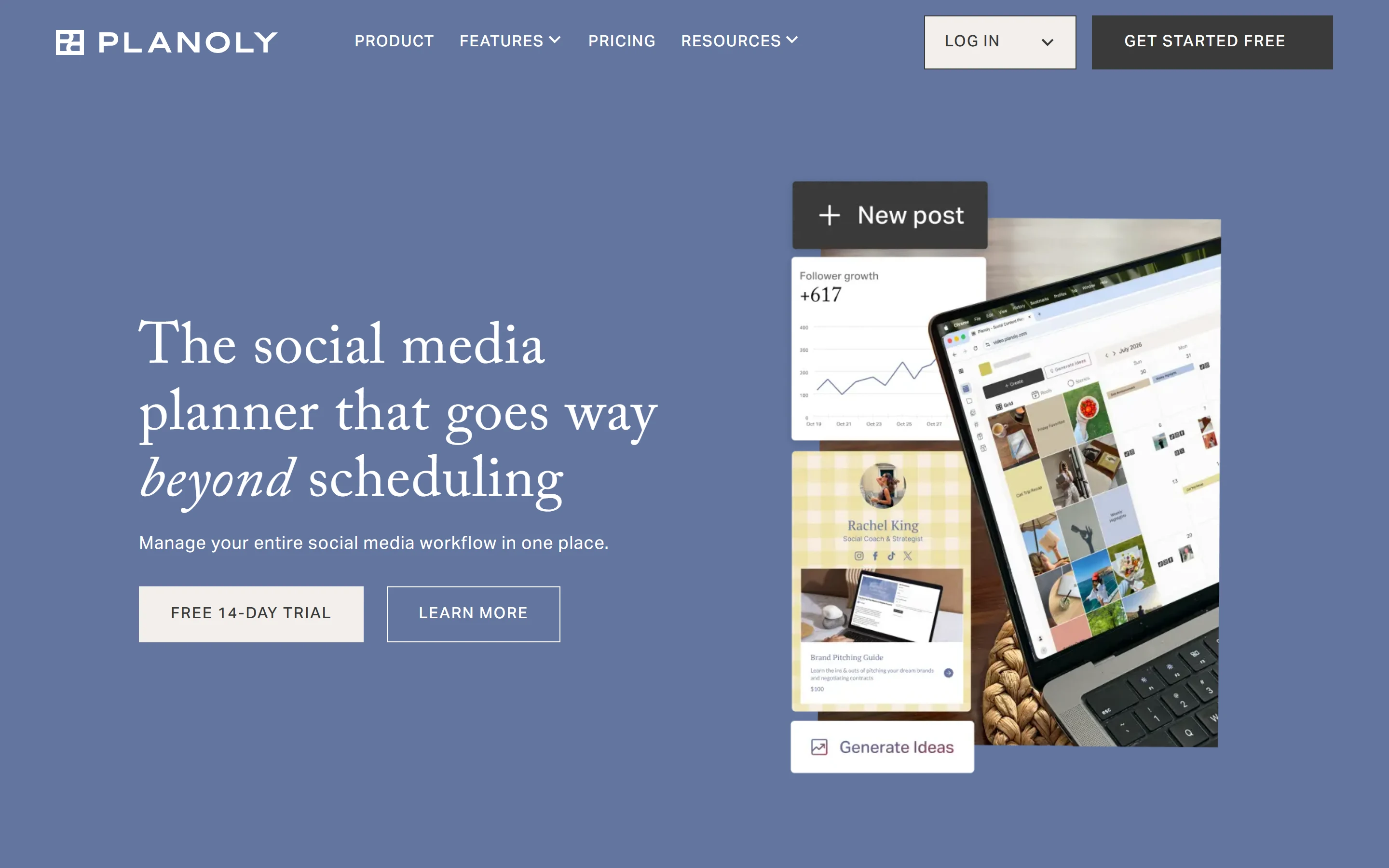
Planoly is a social media planner with a web app and an iOS and Android app. Its homepage calls it the social media planner that goes way beyond scheduling: one calendar for planning, auto-posting or reminders, an Instagram grid preview, a media library, AI writing tools, Instagram comment and DM automations, analytics, and a link-in-bio store called Creator Store.
The company says it launched in 2016 as the first visual Instagram planner, and its pricing page says it invented grid planning; we did not verify either claim independently. The site’s structured data names the legal entity as Planogram, LLC, and the homepage says it is trusted by 8M+ small business owners, creators and social media managers, a figure the vendor reports and we did not check.
Pinterest and Instagram in Planoly
Instagram is where Planoly started, and it gets the most tools. The grid planner previews the feed and lets you rearrange posts and placeholders before anything goes live. Auto-post handles posts, carousels, Reels and Stories: a carousel auto-posts up to 10 items (20 if you switch it to a reminder and post by hand), a story auto-posts one item, captions run to 2,200 characters, and hashtags are capped at 30 across the caption and the first comment. Videos with original audio auto-post to Reels. Planoly’s pages disagree on Instagram music: the auto-post page says a track from Instagram’s music library means a push reminder to post natively, while the help center’s auto-post limits guide (updated October 20, 2026) says a catalogue sound attaches to a single-video Post/Reel when Instagram is linked through a Facebook Page, and is reminder-only on Stories. Tagging users, locations, collaborators and products needs the Instagram account linked to a Facebook Business page.
Two engagement features work on Instagram only. The inbox gathers comments and DMs from connected Instagram accounts, with assignment, labels and saved replies, and automations send a DM when someone comments, replies to a story or messages you with one of up to 10 keywords. An automation added to a post from the post builder needs that post to auto-post through Planoly. One set up on the Automations page can cover every post on the account, including posts published without Planoly, and DM automations need no post at all. Both features need a paid plan. The post builder has no alt text field, so alt text has to be added in the Instagram app once the post is live.
Pinterest is one of the seven auto-post networks, on both web and mobile. A pin takes one image or video, a board (the only required field), a description of up to 800 characters, and an optional title of up to 100 characters and destination link, which must start with http:// or https://. Pins must be scheduled at least 10 minutes ahead; images can be up to 20 MB and videos up to 300 MB, between 4 seconds and 15 minutes long.
The Pinterest guide lists what is not supported: carousels, product tagging, posting one pin to several boards, and creating a new board from Planoly, which has to be done in Pinterest first. The Pinterest analytics tab reports impressions, engagements, pin clicks and saves, plus top pins, top video pins and recent pins. We found no Pinterest-specific tools beyond these on the pages we read, so accounts that live on Pinterest may want a dedicated Pinterest tool alongside it.
There are three paid plans, and each includes users rather than charging per seat. Starter is $14 a month billed annually or $16 billed monthly, with 1 social set and 1 user; Growth is $24 or $28 with 2 of each; Pro is $47 or $55 with 6 of each. A social set is up to one account of each network. Annual plans are billed upfront, and the pricing page, which opens on annual prices, says that saves up to 15%; at these rates the saving is 12.5% on Starter, 14.3% on Growth and 14.5% on Pro. Every paid plan starts with a 14-day free trial.
Worked from those prices: a solo creator on Starter pays $168 a year on annual billing, or $192 paying monthly. A two-person small business on Growth pays $288 a year, or $336 monthly, and a third person adds $5 a month. An agency that needs eight social sets pays $63 a month on Pro with annual billing ($47 plus two extra sets at $8), against $84 on Growth ($24 plus six extra sets at $10). Starter cannot add sets or users at all.
Check the details at checkout. The homepage plan cards say Starter includes up to 60 uploads per month, while the pricing page lists unlimited uploads and the help guide, updated October 22, 2026, says unlimited posts; the homepage’s annual total for Pro also does not match 12 times the $47 monthly rate. A Content Marketplace add-on for editable Canva templates is sold on Growth and Pro, with no price on the pages we read. Cancelling takes effect at the end of the paid period, and there is no pause option.
AI tools, the MCP connector and analytics
The AI Caption Writer takes what the post is about and who it is for, then returns three caption options in a chosen voice (Basic, Professional, Witty, Casual, Bold or a custom one), which you can shorten, lengthen or rephrase before applying them per channel. The Idea Generator, on the web only, returns three ideas with a topic, a concept and a hook, and allows ten regenerations per session. Both need a paid plan, a free trial included.
The Planoly MCP connector links an AI assistant to your account; the setup guide covers Claude, ChatGPT, Claude Code and Gemini CLI. The assistant can list workspaces and channels, browse the media library, edit and schedule drafts and read Instagram analytics. Sign-in is OAuth, and the /ai page says the assistant cannot connect or disconnect social channels. The two pages differ on scope: the /ai page calls the access workspace-scoped, while the setup guide says the token reaches every workspace you are a member of, with each request naming one.
Analytics is a paid feature covering Instagram, Pinterest, TikTok and LinkedIn over the last 7, 30 or 90 days. Instagram reports accounts reached, content views, total interactions and new followers, with demographics and per-post results, and needs a Business or Creator account. LinkedIn analytics needs a page you administer and lists only posts created through Planoly. Planoly fetches every figure from the networks rather than calculating it, and the guide lists no analytics tab for Facebook, YouTube, Threads or X.
Who Planoly suits, and who it does not
It suits a creator or small business that plans visually around Instagram and posts to a few other networks. Starter covers up to one account on each of the eight networks for $14 a month billed annually, and the Creator Store link-in-bio page can sell digital products, bookings and merch with no cut taken by Planoly (Stripe and PayPal still charge their fees). Small teams get users included: members create and schedule posts and comment with @mentions, while only the owner invites people and handles billing. Agencies can show clients planned posts through Plan Report links that need no login and expire after 48 hours, 7, 14 or 30 days.
It fits less well when engagement and reporting matter beyond Instagram, since the inbox and automations are Instagram-only and analytics covers four networks; when a team needs a formal approval step, which the team guide does not describe; when X is a main channel, because X is reminder-only; or when Pinterest is the main channel and you need multi-board pinning or board management.
Where Planoly falls short
The free plan is narrow: 10 posts a month per workspace and none of the analytics, Media Library, AI, Quick Schedule, inbox or automation features. Bulk create saves drafts only, up to 20 per session, so each post still has to be scheduled afterwards, and both bulk create and the Idea Generator are web-only. Instagram media cannot get alt text inside Planoly.
Planoly’s own pages disagree on the Starter upload limit, the Pro annual total, the free plan (the pricing FAQ puts it in the mobile app with 10 uploads a month; the help center says any account without a subscription gets 10 posts a month per workspace, and that uploading media does not count toward the limit), Instagram music (a push reminder on the auto-post page; a sound on a single-video Reel through a Facebook-linked account in the help center), whether the MCP connector needs a paid plan (not for drafting and scheduling in the setup guide; listed among paid-plan features in the paid-plan guide), the MCP connector’s workspace scope, and analytics coverage (the homepage claims analytics across all your accounts; the analytics guide lists only Instagram, Pinterest, TikTok and LinkedIn). On Trustpilot, Planoly scored 3.2 out of 5 from 61 reviews when we read the profile on October 23, 2026. G2 blocked our reader, so we have no G2 figure.
Strengths
Low entry price for a multi-network planner: Starter is $14 a month billed annually ($16 monthly), and every paid plan has a 14-day free trial
Auto-posts to Instagram, Facebook, TikTok, YouTube, LinkedIn, Threads and Pinterest from the web and mobile apps, with push reminders for X
Visual Instagram grid planner: preview and rearrange the feed, and drop placeholders into the grid and calendar before content is ready
Plans are flat-priced, not per user, with 1, 2 or 6 users included; on Pro an extra user is $3 a month and an extra social set $8
Creator Store link-in-bio and selling is included with every core plan, and Planoly takes no cut of sales (Stripe or PayPal fees still apply)
The Planoly MCP connector lets Claude, ChatGPT, Claude Code and Gemini CLI draft and schedule posts and read Instagram analytics, with OAuth sign-in
Plan Report shares upcoming posts with a client through a read-only link that needs no login and expires after 48 hours to 30 days
Watch out for
The inbox and the comment and DM automations cover Instagram only, and analytics covers only Instagram, Pinterest, TikTok and LinkedIn
The team guide describes review by comments and @mentions with no separate approval step, and seats are capped at 1, 2 or 6 before add-ons (Starter cannot add any)
Pinterest support is basic: one image or video per pin, one existing board per pin, no carousels and no board creation from Planoly
X is reminder-only: Planoly notifies you and you finish the post in the X app
The free plan allows 10 posts a month per workspace and leaves out analytics, the Media Library, the AI tools, Quick Schedule, and the Instagram inbox and automations
Vendor pages disagree: the homepage Starter card says up to 60 uploads a month where the pricing page says unlimited, and the homepage annual total for Pro does not equal 12 times the $47 monthly rate
No alt text field for Instagram media in the post builder; alt text has to be added in the Instagram app after posting
Subscriptions cannot be paused, and plans bought through the App Store or Google Play must be cancelled there
On Trustpilot it scored 3.2 out of 5 from 61 reviews when we read the profile on 23 Oct 2026
Key features
Feature
What it does
Visual planner and grid preview
Preview the Instagram grid and rearrange posts until the feed looks right; placeholders reserve grid and calendar slots before content is ready. The calendar also highlights holidays, pop-culture moments and trending video formats, updated weekly.
Auto-post and reminders
Auto-posts to Instagram, Facebook, TikTok, YouTube, LinkedIn, Threads and Pinterest. X posts go out as push reminders with the caption ready to paste. Instagram Stories with catalogue music are reminder-only; the help center says a single-video Reel can carry catalogue music on a Facebook-linked account, while the auto-post page says music means a reminder. Videos with original audio auto-post to Instagram Reels and TikTok.
Quick Schedule and Best Time to Post
Save up to 50 weekly time slots per workspace. Best Time to Post adds up to three suggested times a day from Meta’s online-followers insight and needs an Instagram professional account linked to a Facebook page. Paid plans only.
Bulk create
A web table that turns up to 20 media files into drafts in one session, with shared channels, captions and interval dates. It only saves drafts; each one is scheduled afterwards.
AI Caption Writer
Writes three caption options from a brief and a target audience, in a Basic, Professional, Witty, Casual, Bold or Custom voice, with Shorten, Lengthen and Rephrase. Web and mobile; paid plans only, a free trial included.
Idea Generator
Returns three post ideas, each with a topic, a concept and a hook, from a description of your business and audience. Web only, ten regenerations per session, paid plans only.
Analytics
Reports for Instagram, Pinterest, TikTok and LinkedIn over the last 7, 30 or 90 days; the Pinterest tab shows impressions, engagements, pin clicks and saves. Every figure is fetched from the network. Paid plans only.
Instagram inbox and automations
One inbox for Instagram comments and DMs, with assignment, labels and saved replies. Automations send a DM when a comment, story reply or DM matches up to 10 keywords, with up to 10 messages; one added from the post builder needs that post to auto-post, while the Automations page can also cover posts published outside Planoly. Paid plans only.
Team comments and Plan Report
Members create and schedule posts and review through comments and @mentions on posts and media. Plan Report shares upcoming posts on a public read-only link that expires after 48 hours, 7 days, 14 days or 30 days.
Creator Store
Link-in-bio page for links, digital products, courses, 1:1 bookings, memberships and merch, included with every core plan with no Planoly cut of sales. Connects to Stripe or PayPal for payments, Shopify for physical goods, and Zoom or Google Meet for bookings.
Planoly MCP
Lets Claude, ChatGPT, Claude Code and Gemini CLI list workspaces and channels, browse the media library, edit and schedule drafts and pull Instagram analytics through https://mcp.planoly.com/mcp. The MCP setup guide says drafting and scheduling through it work without a paid plan, within the free plan’s 10 posts a month, although Planoly’s paid-plan guide lists Social Posting MCP among paid-plan features.
Tailwind’s pricing page sells Pinterest-only products, priced per Pinterest account: Pin Scheduling & Creation is $17.99 a month on annual billing ($29.99 monthly). Planoly’s $14 Starter covers Pinterest among eight networks, but each pin goes to one existing board and boards cannot be created from Planoly.
Buffer prices by connected channel: its free plan connects up to 3 channels with 10 scheduled posts per channel, and Essentials is $60 billed yearly for one channel. Its Team plan lists unlimited team members and content approval workflows, where Planoly includes 1, 2 or 6 users and reviews content through comments.
Hootsuite is priced per user: Standard is $99 per user per month on annual billing for up to 10 social accounts, and reviewing and approving content with your team is listed on Advanced at $399 per user per month billed annually. Planoly Pro is $47 a month billed annually ($55 monthly) for 6 users and 6 social sets.
Later Starter is $18.75 a month billed yearly ($25 monthly) for 1 social set and 1 user, with up to 30 scheduled posts per profile a month; approvals and a social inbox start on Growth at $37.50 a month billed yearly. Planoly Starter is $14 a month billed annually ($16 monthly) and its pricing page lists unlimited uploads, though its inbox covers Instagram only.
Sprout Social is priced per seat: Essentials is $79 per seat a month on annual billing ($99 billed monthly) for 5 social profiles, with a 30-day free trial. Planoly charges a flat monthly price that includes 1, 2 or 6 users.
Metricool’s free plan covers 1 brand and up to 20 posts a month (LinkedIn and Twitter excluded), against Planoly’s 10 posts a month. Its paid Starter is from $20 a month on annual billing ($25 monthly) for up to 5 brands, and Advanced adds a post approval system.
There is a limited free plan. An account without a paid subscription gets 1 workspace, 1 user and 10 posts per month per workspace, and can connect channels, plan the grid, schedule posts and set reminders. Analytics, the Media Library, the AI caption writer, the Idea Generator, Quick Schedule, Canva, comments, and the Instagram inbox and automations need a paid plan. Planoly does not sell the free plan; its pricing FAQ says it is available in the mobile app with 10 uploads per month, while the help center counts posts and says uploading media does not touch the limit.
How much does Planoly cost?
Starter is $14 a month billed annually or $16 billed monthly, Growth is $24 or $28, and Pro is $47 or $55, in USD, each a flat price for the plan rather than per user. At the annual-billing rates, a year works out to $168, $288 and $564 (12 × the monthly rate). Planoly’s homepage Pro card says “$444 billed annually”, which does not match, so confirm the total at checkout. Growth adds social sets at $10 a month and users at $5; Pro adds them at $8 and $3; Starter cannot add either.
Is there a free trial?
Yes. Every paid plan has a 14-day free trial, and if you have never had a Planoly trial you are not charged until it ends. If you already pay for a plan through the App Store or Google Play, buying a web plan charges you right away.
Which social networks does Planoly support?
Eight: Instagram, Facebook, TikTok, YouTube, X, LinkedIn, Threads and Pinterest. All except X auto-post; X is reminder-only, so Planoly notifies you at the scheduled time and you post in the X app. Facebook connects a Page, not a personal profile, and LinkedIn connects your personal profile or a Company Page you administer.
Can Planoly schedule Pinterest pins?
Yes. Pins auto-post from the web and mobile apps. Each pin takes one image or video and a board, which is the only required field, plus a description of up to 800 characters and an optional title and destination link; pins must be scheduled at least 10 minutes ahead. Carousels, product tagging, posting one pin to several boards and creating boards from Planoly are not supported.
Does Planoly have an approval workflow?
Its team guide describes reviewing content by commenting on posts and media items, with @mentions that send an email and a push notification, and does not describe a separate approval step. Comments need a paid plan. For clients without a login, Plan Report shares a read-only view of planned posts.
Can I cancel or pause a Planoly subscription?
You can cancel at any time, and the cancellation takes effect at the end of the billing period you already paid for. There is no pause option. Subscriptions bought in the iOS or Android app have to be cancelled with Apple or Google Play, and deleting the app or your account does not cancel them. When a subscription ends, the account drops to the free plan and Planoly does not delete your posts or media.
Does Planoly work with Claude or ChatGPT?
Yes, through the Planoly MCP connector at https://mcp.planoly.com/mcp, which the setup guide covers for Claude, ChatGPT, Claude Code and Gemini CLI. You sign in with OAuth, so the assistant never sees your password, and tools that create, change or delete something are marked so the AI client asks you first. The setup guide says drafting and scheduling do not need a paid Planoly plan (posts still count toward the free plan’s 10 a month), although Planoly’s paid-plan guide lists Social Posting MCP among paid-plan features; the media library, analytics and report links do need one, and the vendor says ChatGPT access needs a paid ChatGPT plan.
Planoly ratings on other platforms
Independent user ratings from third-party review sites, linked here for transparency.
These are not our editorial score, are captured on the date shown, and may have changed since.
Free. Creators add data-ref with the referral id from their creator page to be credited for the clicks they send. The card updates when we re-verify and never changes a score.
Planoly
Our rating 4.0/5 · Free plan (10 posts per month); paid from $14/mo billed annually ($16 billed monthly)
Tailwind schedules Pins, finds Pinterest keywords and drafts new Pins with AI; new accounts are Pinterest-only. Start free with no credit card, using a one-time set of trial actions.
Affiliate link: OfficeBooks may earn a commission if you buy, at no cost to you. It opens Tailwind’s standard homepage, with no extra discount, and it never changes a score or a ranking.
Affiliate link: OfficeBooks may earn a commission if you buy, at no cost to you. It never changes a score or a ranking.