Owned by OfficeBooks. A vendor may propose a correction to a fact — never to a score or a rank.
S
Sprout SocialReview 2026: Per-seat social media management suite that centralizes publishing, engagement and analytics across major social networks
Social Media Management · SaaS & Productivity
Verified · vs sproutsocial.com/pricing Watch price
Price from
$79/seat/mobilled annuallyVendor: “Essentials from $79 per seat/month billed annually ($99 per seat/month billed monthly); no free plan, 30-day free trial”
—No answer shownnot in our data · shown only from 10+ reviewsNot in our review data. We show a G2 score only after reading it on a profile with 10 or more reviews.
—No answer shownNo change recorded since the first reading we hold (24 Oct 2026).
Pricing verified 24 Oct 2026 · always confirm the current offer on the vendor’s site.
We verify
List prices and plan names as written, whether a lasting free plan exists, the billing unit where the vendor states it, third-party scores with 10+ reviews, and the page and date we read them.
We do not verify
Negotiated discounts, regional prices and taxes, anything behind a sales call, how well features work (we read documentation; we do not test), uptime, support or security. Opinions on those live in Tier 2.
Sprout Social plans, in the vendor's words
Plan
Price
Included
Essentials (new)
$79 per seat/month billed annually ($99 per seat/month billed monthly)
Publishing-focused plan labelled NEW. 5 social profiles, 10 Sprout Queue messages per day, collaborative content calendar, optimal send times, ViralPost in the Queue, profile and post-level reporting, 100 Trellis AI credits per seat per month. No all-in-one social inbox and no brand keywords. The pricing table marks Pinterest Included, but Sprout’s Pinterest help article names only Standard, Professional and Advanced.
Standard
$199 per seat/month billed annually ($249 per seat/month billed monthly)
5 social profiles, all-in-one social inbox with 90 days of conversation history, 10 brand keywords per group, 10 Queue messages per day. Adds WhatsApp, Glassdoor, TripAdvisor, Trustpilot, Yelp and Google’s business messages. Premium Analytics and Listening can be added from this plan up.
ProfessionalPOPULAR
$299 per seat/month billed annually ($399 per seat/month billed monthly)
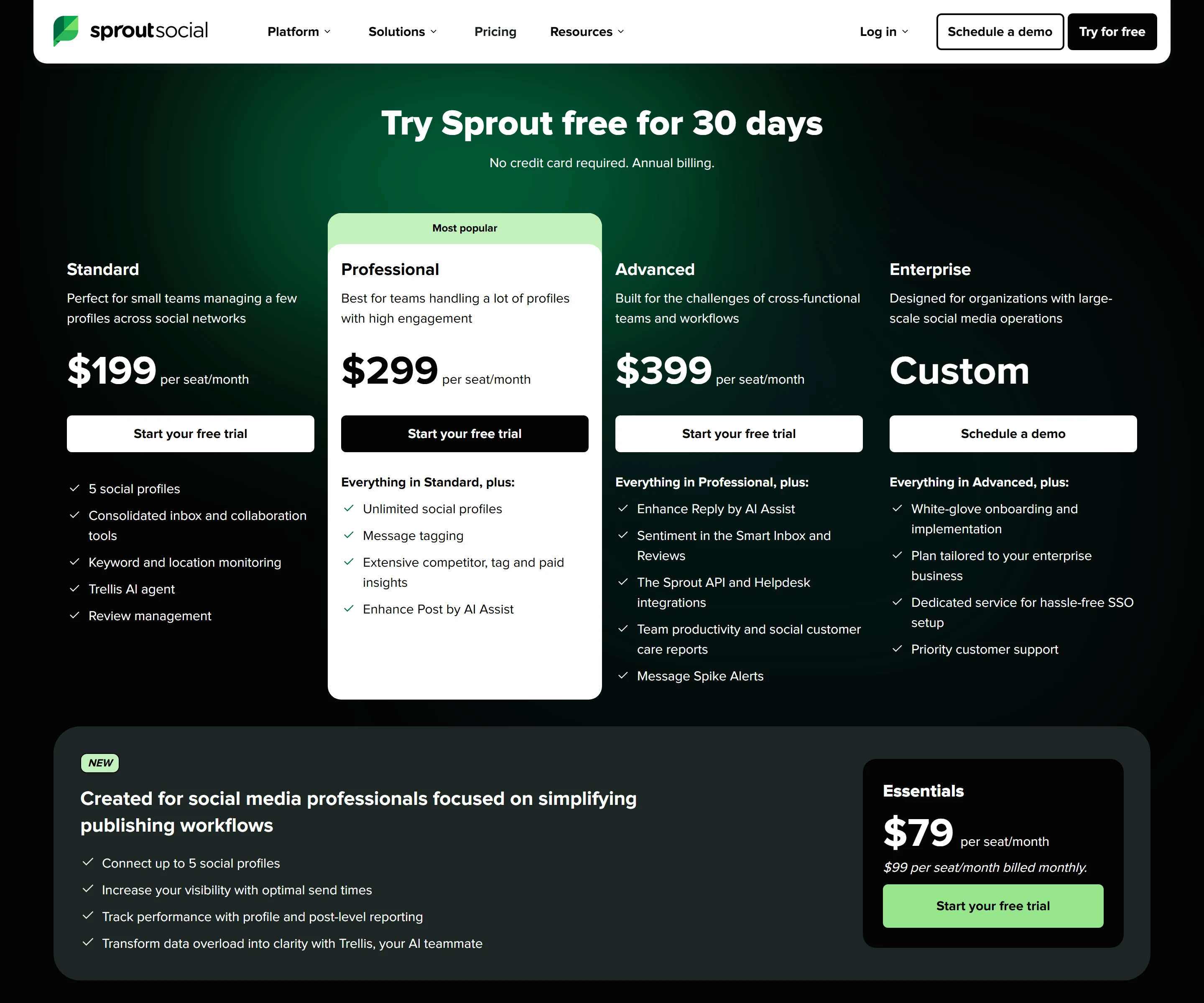
Labelled Most popular. Sprout’s /trial/ page offers the 30-day free trial on Professional, and the pricing page also shows a Start your free trial button on the Essentials, Standard and Advanced cards. Unlimited social profiles, full conversation history, 20 Queue messages per day, bulk scheduling, Instagram grid planning, message approval workflow, Enhance Post by AI Assist, and Facebook, X and Instagram competitor reports. Special pricing for US nonprofits.
Advanced
$399 per seat/month billed annually ($499 per seat/month billed monthly)
Unlimited social profiles, 30 Queue messages per day, 20 brand keywords per group, external approval workflow (reviewers need no Sprout login), Enhance Reply by AI Assist, scheduled report delivery, IP whitelisting and feature visibility controls. Special pricing for US nonprofits.
Enterprise
Custom
Priced through a demo. The plan card lists white-glove onboarding and implementation, a plan tailored to the business, dedicated service for SSO setup and priority customer support.
Trellis Plus (add-on)
$28 per user/month billed annually ($35 per user/month billed monthly)
Extended credits for the Trellis AI agent, subject to fair use limits. Every plan already includes 100 Trellis credits per seat per month, reset monthly.
Premium Analytics and Listening (add-ons)
Not published; schedule a demo
Each sold as an individual add-on to Standard and up, per the pricing page; the integrations page says Listening can be added to any Sprout plan. The integrations page lists Listening sources as Bluesky, Facebook, Instagram, Reddit, TikTok, Tumblr, X, YouTube and the Web; Pinterest is not a source (Sprout’s FAQ page gives an older list that includes Snapchat and omits TikTok and Bluesky).
Price history · every reading logged
We hold one reading of this price, so there is no history to chart yet. We will not draw a curve from fewer than two points.
All readings (1)
Every reading we hold of Sprout Social's listed price
Date
Result
Read on
First reading we hold: “Essentials from $79 per seat/month billed annually ($99 per seat/month billed monthly); no free plan, 30-day free trial”
Propose a correction to a price, free plan or billing unit, with evidence from your own site. An editor reads it before anything changes; a correction never touches a score or a rank.
Written by people. Signed, dated, and kept apart from the facts above.
Who writes what on this page: each source, who writes it, their incentive, and what OfficeBooks checks
Source
Who writes it
Their incentive
Checked by OfficeBooks?
Editor's verdict and review
OfficeBooks research desk. Desk research from documentation; no hands-on test.
A commission only on links to partner programmes, disclosed beside the link. It never changes a score.
Yes · It is ours: every figure in it comes from the sources listed.
Creator stacks
Independent creators, named on every take
Whatever each creator declares on each take: none, a commission, sponsorship or employment. OfficeBooks credits them with the clicks and demo bookings they refer.
Partly · The facts beside their take, read live. Not their opinion; an editor reviews each stack before it is listed.
G2 and Trustpilot ratings
Those platforms' reviewers
Set by each platform. Some invite or reward reviews.
Partly · Only the score and review count, on the date shown. We do not vet the reviews.
Sponsored slot
The vendor who booked it
Paid placement.
No · The copy is the vendor's. Labelled "Sponsored · not ranked"; never in a table, score, shortlist or search result.
Verified facts (Tier 1)
OfficeBooks research desk
None. Vendors cannot pay to change a fact, a score or a rank.
Yes · On the vendor's own pages where it publishes them, otherwise on the sources listed; always with the date.
Editor's verdict
updated
“Sprout Social suits teams that share social publishing, replies and reporting, and that value 24/5 live phone and chat support and SOC 2 and ISO documentation. It is expensive: Standard to Advanced cost $199 to $399 per seat per month on annual billing, paid upfront, and the features many teams buy it for, such as bulk scheduling, Instagram grid planning, approvals and competitor reports, start at Professional, which is $3,588 per seat a year. Essentials, at $79 per seat/month billed annually, is a cheaper way in for publishing and basic reports, but it has no inbox and Sprout’s own pages disagree on whether it includes Pinterest. Pinterest-first accounts should know that Sprout publishes only single-image and single-video Pins and has no Pinterest inbox, listening or ads tools. Use the 30-day Professional trial, which needs no card, to check the workflows you would pay for.”
Best for
Teams that share social publishing, replies and reporting across several profiles
Businesses that want 24/5 live phone and chat support on every plan
Organisations that need SOC 2 Type 2 and ISO 27001 documentation from a social media tool
Watch out for
Expensive per seat: $199 to $399 per seat/month for Standard to Advanced on annual billing, paid upfront for the whole term, or $249 to $499 month to month
Bulk scheduling, Instagram grid planning, message approvals and competitor reports start at Professional ($299 per seat/month on annual billing)
OBOfficeBooks Editorial · Research desk · desk research from documentation, no hands-on test
Creator takes belong to their authors and are not verified by OfficeBooks; each creator declares their tie to the vendor on every take. OfficeBooks earns a commission only on links to partner programmes, disclosed beside each link. None of this changes Tier 1.
Sprout Social is a social media management suite that runs as a web app, with mobile apps for iOS and Android. Its homepage headline is “Powerful tools for social media management”, and its integrations page says it centralizes publishing, monitoring, engagement and analytics across major social networks. That page lists 11 social platforms (Bluesky, Facebook, Instagram, LinkedIn, Pinterest, Reddit, Snapchat, Threads, TikTok, X and YouTube) plus Facebook Messenger and WhatsApp for messaging. The mobile apps cannot publish to Snapchat, Reddit or Bluesky.
Sprout launched in 2010, and its Chicago office is at 131 S. Dearborn St. Its security page says it has more than 30,000 paying customers, and its About page lists 1,400+ global employees and names Ryan Barretto as chief executive. Day to day, the work runs through Compose and a collaborative content calendar for publishing, the Smart Inbox for replies (from Standard up), reports, and Trellis, an AI agent with a monthly credit allowance on every plan.
Pinterest in Sprout: what works and what does not
Sprout says it is an official Pinterest Marketing Partner. Connecting needs a Pinterest Business Account; personal accounts cannot be connected. From Compose you can publish single-image and single-video Pins, choose one or more existing boards or create a new board (it is created when the Pin publishes), and schedule Pins for a set time, through the Queue, or with ViralPost picking the time. Every Pin needs an image or video, a board and a Destination URL, and generic shorteners such as bit.ly do not work. Images can be up to 20 MB in JPG, PNG or GIF, with 735×1102 pixels (2:3) recommended; videos can be up to 2GB and 4 seconds to 5 minutes long, in MP4, MP4v or MOV. The integration page also says you can preview how future Pins will appear on your boards before posting.
Reporting covers Pinterest in a dedicated Pinterest Profiles Report and in the cross-network Profile, Post and Tag Performance reports. Profile metrics have no backfill, post metrics are backfilled, and both update daily. The gaps are real. Idea Pins, Carousel Pins and Shopping or Product Pins cannot be published. There is no Smart Inbox for Pinterest, because, the help article says, Pinterest has no messaging or comment API for third parties. Pinterest is not a Listening source, and competitor reports, paid reporting and Pinterest Ads management are not available.
Which plans include Pinterest is unclear. The pricing table marks Pinterest Included on Essentials, Standard, Professional and Advanced, while the help article says Pinterest is on all Sprout plans and then names only Standard, Professional and Advanced. Pinterest profiles also count toward the profile limit, which is 5 on Essentials and Standard. If Pinterest matters to you, ask Sprout to confirm Essentials support before buying that plan.
Instagram publishing and planning
Sprout can publish Instagram single-image posts, videos, Reels, carousels of up to 10 items and Stories without story notes directly; Instagram Live videos and polls are not supported. Collaborative posts with up to 5 Instagram accounts can be scheduled and published from Sprout, and the Instagram integration page offers a customized SproutLink page to drive traffic to your website.
The planning tools are tiered. Every plan has the collaborative content calendar, optimal send times in Compose, ViralPost in the Queue, hashtag suggestions, a built-in image editor and Generate Alt Text by AI Assist. Instagram grid planning, bulk scheduling and Enhance Post by AI Assist need Professional or Advanced. Instagram profiles count toward the 5-profile limit on Essentials and Standard, and Facebook, X and Instagram competitor reports start at Professional.
The pricing page has no monthly/annual switch. It shows annual-billing prices, and its hero says “No credit card required. Annual billing.” Per seat per month on annual billing, Essentials is $79, Standard $199, Professional $299 and Advanced $399; Enterprise is custom, through a demo. The page’s FAQ gives month-to-month prices of $99, $249, $399 and $499, and says annual billing is a one-time upfront payment for the entire subscription term. The plans also differ in limits: Essentials and Standard allow 5 social profiles and 10 Queue messages a day, while Professional and Advanced allow unlimited profiles and 20 or 30 Queue messages a day.
Worked examples, computed only from the stated prices. A solo creator on Essentials pays $948 a year upfront on annual billing, or $1,188 over twelve months on monthly billing. A small business with two seats on Standard, the first plan with the social inbox, pays $4,776 a year on annual billing or $5,976 month to month. Instagram grid planning, bulk scheduling and approvals need Professional: one seat costs $3,588 a year on annual billing or $4,788 monthly, and three seats cost $10,764 or $14,364. Trellis Plus, if you need more AI credits, adds $336 per user a year on annual billing.
Add-ons raise the total. Premium Analytics and Listening are each sold as add-ons to Standard and up, and the pricing page shows no price for either; Influencer Marketing is sold separately and needs no Sprout plan. US nonprofits can get special pricing on Professional and Advanced. You can switch plans at any time, even during the trial, and online payment is by major credit card or PayPal.
Trellis, AI Assist and reporting
Trellis is Sprout’s AI agent. Every plan includes 100 Trellis credits per seat each month, and the allowance resets monthly; Trellis Plus, for teams that need more, costs $28 per user/month on annual billing or $35 on monthly billing. AI Assist is tiered separately: Generate Alt Text is on every plan, Enhance Post starts at Professional and Enhance Reply is Advanced only. Sprout says customer data is never used to train third-party models, including OpenAI, and that customers can opt out of its OpenAI integration entirely.
Analytics covers Facebook, X, Instagram, Bluesky, Threads, LinkedIn, TikTok, Pinterest and YouTube. Optimal Send Times examines 16 weeks of audience data, and posts can be scheduled up to 180 days ahead. Every plan includes profile and post-level reporting; Facebook, X and Instagram competitor reports start at Professional; scheduled report delivery is Advanced only; and Premium Analytics is a separate add-on.
Support, security and compliance
Every plan includes 24/5 live phone and chat support and two-factor authentication; IP whitelisting and feature visibility controls are Advanced only. The Trust Center lists a SOC 2 Type 2 audit, ISO 27001 and ISO 27701 certification, alignment with GDPR and CCPA/CPRA, a CSA STAR Level 1 assessment and PCI DSS attestations. To cancel, open Settings, choose Billing & Plan and click Deactivate my Account.
Who it fits, and who it does not
It fits teams that share publishing, replies and reporting across many profiles and will use what Professional adds: unlimited profiles, full conversation history, bulk scheduling, approvals and competitor reports. It also fits buyers who want live phone and chat support on every plan, or who need SOC 2 and ISO documentation from a social tool.
It fits less well if you are a solo creator or small shop on a tight budget: even Essentials costs $948 per seat a year upfront and has no inbox. It is a weak match for Pinterest-first accounts that need Idea Pins, Carousel Pins, Shopping Pins, Pinterest comments or ads, and for Instagram planners who want grid planning at the Essentials or Standard price. There is no free plan to fall back on after the 30-day trial.
Honest drawbacks
Price is the main one. Per-seat prices run from $79 to $399 a month on annual billing, paid upfront, or $99 to $499 month to month, and Listening and Premium Analytics cost extra on top. Bulk scheduling, Instagram grid planning, approvals and competitor reports sit at Professional or higher, so a team that needs them pays $299 per seat a month on annual billing, not $79.
Sprout’s own pages disagree in places. The Pinterest help article does not name Essentials while the pricing table includes Pinterest on it; the integrations page says Listening can be added to any plan while the pricing page says Standard and up; the pricing table’s network list leaves out Bluesky, which the integrations page and the analytics page include; and the integrations page lists TikTok and Bluesky as Listening sources but not Snapchat, while the FAQ’s Listening answer names Snapchat and leaves out TikTok and Bluesky.
On Trustpilot, Sprout Social’s profile showed a TrustScore of 1.8 out of 5, labelled Poor, from 88 reviews when we read it on October 23, 2026. Read that with care: the page says the company has no recent history of asking for reviews and has replied to 30% of negative reviews, and the profile includes reviews that appear to be about other products, such as one praising Sproutgigs and one about a resume app. G2 blocked our reader, so we have no G2 figure.
Strengths
Every plan includes 24/5 live phone and chat support
Its integrations page lists 11 social platforms, including Instagram, TikTok, Pinterest, Threads and Bluesky, plus Facebook Messenger and WhatsApp for messaging
Instagram publishing covers single images, video, Reels, carousels of up to 10 items, Stories and collaborative posts with up to 5 accounts
Posts can be scheduled up to 180 days ahead, with optimal send times and ViralPost timing on every plan
Every plan includes 100 Trellis AI credits per seat each month, and Sprout says customer data is never used to train third-party models
The Trust Center lists SOC 2 Type 2, ISO 27001 and ISO 27701; two-factor authentication is on every plan
30-day free trial of Professional with no credit card
Watch out for
Expensive per seat: $199 to $399 per seat/month for Standard to Advanced on annual billing, paid upfront for the whole term, or $249 to $499 month to month
Bulk scheduling, Instagram grid planning, message approvals and competitor reports start at Professional ($299 per seat/month on annual billing)
No free plan, only a 30-day trial
Pinterest support is partial: single-image and single-video Pins only, and no Pinterest inbox, listening, competitor reports, Shopping Pins or ads management
Listening and Premium Analytics cost extra, and the pricing page shows no price for either
Essentials has no social inbox, and Standard keeps 90 days of conversation history
Vendor pages disagree on whether Essentials includes Pinterest, on which plans can add Listening and on which networks Listening covers
Key features
Feature
What it does
Compose and the content calendar
Publish to connected profiles from one Compose window and a collaborative content calendar, on every plan. Posts can be scheduled up to 180 days ahead, and every plan has hashtag suggestions, a built-in image editor and Generate Alt Text by AI Assist.
Sprout Queue and ViralPost
Queued posts can use ViralPost timing on every plan. The Queue takes 10 messages a day on Essentials and Standard, 20 on Professional and 30 on Advanced. Optimal Send Times in Compose examines 16 weeks of audience data.
Smart Inbox
An all-in-one social inbox from Standard up, with 90 days of conversation history on Standard and full history on Professional and Advanced. Not on Essentials, and not available for Pinterest.
Pinterest publishing
Single-image and single-video Pins to one or more boards, or to a new board created when the Pin publishes, scheduled for a set time, through the Queue or with ViralPost. Needs a Pinterest Business Account; no Idea, Carousel or Shopping Pins.
Instagram publishing
Single images, videos, Reels, carousels of up to 10 items and Stories without story notes, plus collaborative posts with up to 5 accounts. Instagram grid planning is on Professional and Advanced. No Live videos or polls.
Reporting
Analytics for Facebook, X, Instagram, Bluesky, Threads, LinkedIn, TikTok, Pinterest and YouTube. Facebook, X and Instagram competitor reports start at Professional; scheduled report delivery is Advanced only; Premium Analytics is a separate add-on.
Trellis AI agent
100 Trellis credits per seat per month on every plan, reset monthly. Trellis Plus adds extended credits for $28 per user/month on annual billing or $35 on monthly billing.
AI Assist
Generate Alt Text on every plan, Enhance Post from Professional and Enhance Reply on Advanced only.
Approval workflows
A message approval workflow from Professional up. The external approval workflow, which lets reviewers check posts before they are published without logging in to Sprout, is Advanced only.
Asset imports
The publishing page says assets can be created in Sprout or imported from Canva, Bynder, Adobe Experience Manager, Dropbox or Google Drive.
Listening (add-on)
The integrations page lists Listening sources as Bluesky, Facebook, Instagram, Reddit, TikTok, Tumblr, X, YouTube and the Web; Pinterest is not a source (Sprout’s FAQ page gives an older list that includes Snapchat and omits TikTok and Bluesky).
Worth comparing if Pinterest is your main channel: Sprout publishes only single-image and single-video Pins, cannot publish Idea or Carousel Pins, and has no Pinterest inbox, listening, competitor reports or ads management.
Compare the cost of one person publishing: Sprout’s cheapest plan, Essentials, is $79 per seat/month on annual billing ($99 monthly), with 5 profiles and no social inbox.
Compare per-seat cost and support: on Sprout, Standard to Advanced cost $199 to $399 per seat/month on annual billing, and every plan includes 24/5 live phone and chat support.
For Instagram-led planning, note that Sprout keeps Instagram grid planning and bulk scheduling for Professional ($299 per seat/month on annual billing) and Advanced.
If analytics is the priority, Sprout’s Facebook, X and Instagram competitor reports start at Professional, scheduled report delivery is Advanced only, and Premium Analytics is a separate add-on.
No. Sprout offers a free 30-day trial of Sprout Professional, and you do not need a credit card to start it. When the trial ends you pick a plan and enter payment details; Professional is then $299 per seat/month billed annually.
How much does Sprout Social cost?
Per seat per month on annual billing: Essentials $79, Standard $199, Professional $299 and Advanced $399. Enterprise is custom. Month-to-month billing costs $99, $249, $399 and $499. Annual billing is a one-time upfront payment for the whole term, so one Professional seat costs $3,588 for a year on annual billing, against $4,788 over twelve months on monthly billing.
Can Sprout Social schedule Pinterest Pins?
Yes, single-image and single-video Pins. In Compose you choose one or more existing boards or create a new one, then schedule the Pin for a set time, add it to the Queue or let ViralPost pick the time. Each Pin needs media, a board and a Destination URL, and generic shorteners such as bit.ly do not work. You need a Pinterest Business Account. Idea Pins, Carousel Pins and Shopping Pins are not supported, and Pinterest comments and messages cannot be handled in Sprout.
Which plan do I need for Instagram grid planning?
Professional or Advanced. The pricing table marks Instagram grid planning, bulk scheduling and Enhance Post by AI Assist as not included on Essentials or Standard.
What is Trellis and what does it cost?
Trellis is Sprout’s AI agent. Every plan includes 100 Trellis credits per seat per month, and the allowance resets monthly. Teams that need more can upgrade to Trellis Plus for $28 per user/month on annual billing or $35 per user/month on monthly billing. Sprout says customer data is never used to train third-party models, including OpenAI, and customers can opt out of its OpenAI integration entirely.
Is social listening included?
No. The pricing page sells Listening and Premium Analytics as individual add-ons to Standard and up and shows no price for them; the integrations page says Listening can be added to any Sprout plan. The integrations page lists Listening sources as Bluesky, Facebook, Instagram, Reddit, TikTok, Tumblr, X, YouTube and the Web; Pinterest is not a source (Sprout’s FAQ page gives an older list that includes Snapchat and omits TikTok and Bluesky).
Does Sprout Social offer nonprofit pricing?
Yes, on the Professional and Advanced plans, for nonprofit organizations in the US.
Can I change plans or cancel?
You can switch plans at any time, even during the trial. Online payment is by major credit card or PayPal. To cancel, open Settings, choose Billing & Plan, click Deactivate my Account and follow the prompts.
Sprout Social ratings on other platforms
Independent user ratings from third-party review sites, linked here for transparency.
These are not our editorial score, are captured on the date shown, and may have changed since.
Free. Nobody pays for rooms, and vendors never see their notes or votes.Or start a new room.
Book a demo
Sprout Social does not take demo requests through OfficeBooks yet, so we do not collect your details for it. Sprout Social's own site: sproutsocial.com ↗
Plain link: we earn nothing from it.
Verified deal
30-day free trial of Sprout Professional with no credit card; annual billing brings Professional from $399 to $299 per seat/month (25% off)
Free. Creators add data-ref with the referral id from their creator page to be credited for the clicks they send. The card updates when we re-verify and never changes a score.
Sprout Social
Our rating 4.2/5 · Essentials from $79 per seat/month billed annually ($99 per seat/month billed monthly); no free plan, 30-day free trial
Tailwind schedules Pins, finds Pinterest keywords and drafts new Pins with AI; new accounts are Pinterest-only. Start free with no credit card, using a one-time set of trial actions.
Affiliate link: OfficeBooks may earn a commission if you buy, at no cost to you. It opens Tailwind’s standard homepage, with no extra discount, and it never changes a score or a ranking.
Affiliate link: OfficeBooks may earn a commission if you buy, at no cost to you. It never changes a score or a ranking.