The full review
What is Notion?
Notion is an AI workspace that puts docs, wikis, projects, databases, and AI in a single tool. Notion bills itself as the AI workspace that works for you, and the homepage frames the product around three pillars — capture knowledge, find answers, and automate busywork.
Everything in Notion is built from blocks — the to-do checkboxes, paragraphs, bullet points, and other pieces of content you add to a page — while teamspaces give teams dedicated areas to work together without creating information silos. That structure is why one workspace can hold a company wiki, a product roadmap, meeting notes, and a personal task list without feeling stitched together.
One system of record for team knowledge

Notion's core pitch is bringing everything into one system of record, and daily use bears that out. Docs and wikis live beside structured databases, the Web Clipper pulls content in from the browser, and a template gallery gives teams a running start. Notion Calendar connects multiple calendars so schedules sit next to project work, while offline support on desktop and mobile keeps recent and favorite pages available when the connection drops.
Notion AI, agents, and meeting notes
The Business plan is where Notion's AI story gets serious. Notion Agent completes multi-step tasks using context from your workspace, connected apps, and the web. AI Meeting Notes transcribes and summarizes calls with no bot joining, Enterprise Search reaches into connected tools like Slack and GitHub, and Research mode applies deeper reasoning to produce detailed reports. Free and Plus users get a limited trial of these capabilities — enough to judge whether the upgrade earns its keep.
Beyond the built-in assistant, Custom Agents handle repetitive tasks autonomously on a credit-based model, and the Workers beta extends Notion with custom code to build agent tools, sync external data, and trigger Notion workflows.
Databases that do real project work
Notion databases are the backbone for project management. Subtasks, dependencies, custom properties, and filters keep databases organized, and charts turn that data into donut, bar, and line visualizations. Forms capture, organize, and act on responses right inside Notion, automations set statuses, assignees, and property values without manual edits, and one-way database syncs bring Jira, GitHub, and Asana data inside Notion. On Business, granular database permissions let collaborators edit only their assigned rows — a genuinely useful control for agencies and cross-team projects.
Any page can be published to the web on a notion.site domain, and paid plans unlock customized Sites with your own favicon, custom header bar, light or dark mode, and search engine indexing controls. Connections tie the workspace to Slack, Google Drive, GitHub, and more, while link previews unfurl pull requests and Figma artboards inside a doc. A public API and webhooks round things out for teams building bespoke integrations.
Plans, security, and administration
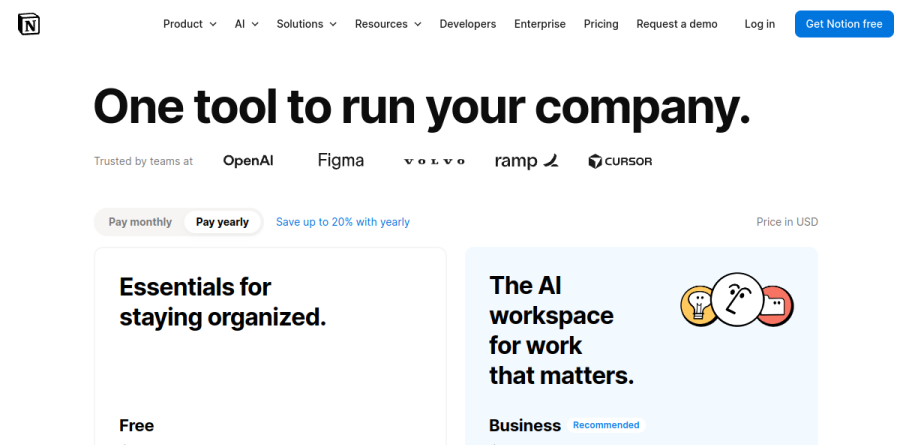
The Free plan is genuinely usable for individuals, with block limits only kicking in for multi-member workspaces. Plus removes upload and chart caps for small teams; Business adds the AI suite along with SAML SSO and private teamspaces; Enterprise layers on SCIM provisioning, audit logs, advanced security controls, and zero data retention with its LLM providers — a notable commitment given how central AI has become. Students and educators get Plus free with a one-member limit and a school email. Notion's homepage states that 98 percent of the Forbes Cloud 100 use it, which tracks with how often the product shows up in startup stacks.
Who should choose Notion
Notion fits teams that want docs, wikis, and project tracking in one place instead of scattered across five tools, and the Business tier now doubles as a credible AI platform on that foundation. Startups, product teams, agencies, and solo operators all map well onto its flexible structure. It is not ideal for teams that need a rigid, opinionated project tracker out of the box or spreadsheet-grade number crunching — dedicated tools still win those jobs. For everyone else, the Free plan makes trying it a low-risk decision.
Strengths
- Genuinely all-in-one: notes, wikis, databases, docs, and lightweight PM in one app
- Extremely flexible databases, templates, and page-building blocks
- Generous free plan with unlimited pages plus free Calendar and Mail
- AI (Notion Agent, Meeting Notes, Enterprise Search) now built into paid tiers
Watch out for
- Steep learning curve; blank-canvas flexibility overwhelms new users
- Per-seat pricing adds up fast for larger teams
- Full AI power and admin controls gated behind $20 Business tier
- Native mobile apps and offline mode feel slower than desktop web
Key features
| Feature | What it does |
|---|
| Databases & views | Relational databases with table, board, calendar, timeline, and gallery views for tracking anything |
| Wikis & docs | Nested pages, teamspaces, and verified wikis for company knowledge bases |
| Notion Agent & AI | Built-in AI that chats, writes, autofills, and searches across your workspace and connected apps |
| Notion Calendar | Free standalone calendar app that syncs Google Calendar with Notion databases |
| Notion Mail | AI-assisted email client that connects Gmail to your Notion workspace |
| Templates & connections | Thousands of templates plus integrations to Slack, Google Drive, GitHub, and more |
How Notion compares
| Alternative | How it differs |
|---|
| Coda | Closest all-in-one doc-plus-database rival; stronger built-in automations, smaller template ecosystem |
| ClickUp | Heavier project-management focus with more native PM features; busier, steeper UI |
| Obsidian | Free, local-first markdown notes for individuals; no real-time team collaboration |
Head-to-head: Notion vs Confluence
Frequently asked questions
Is Notion free?
Yes. Notion has a free plan for individuals with unlimited pages and blocks, the Notion Calendar and Notion Mail apps, databases, and up to 10 guest collaborators. Limits include a 5 MB file-upload cap and only trial-level AI. Paid plans start at Plus for $10 per user per month billed annually.
How much does Notion cost?
Notion Free is $0. Plus is $10 per user per month billed annually (about $12 monthly), and Business is $20 per user per month annually (about $24 monthly). Enterprise is custom-quoted through sales. A Custom Agents AI add-on costs $10 per 1,000 monthly credits on top of Plus or Business.
Is Notion AI included in the price?
Partly. All plans include trial or limited Notion Agent access, but the flagship AI features (Notion Agent, AI Meeting Notes, Enterprise Search) are bundled into the $20 Business plan. Notion retired the old standalone $10 AI add-on; heavy AI users can buy Custom Agents credits at $10 per 1,000 per month.
What are the best Notion alternatives?
Coda is the closest all-in-one doc-and-database rival with stronger automations. ClickUp suits teams wanting heavier project management. Obsidian is a free, local-first markdown notes app for individuals. Confluence and Microsoft Loop are options for companies already inside Atlassian or Microsoft 365 ecosystems.
Notion vs Obsidian: which is better?
Notion is a cloud-based, all-in-one team workspace with databases, wikis, and real-time collaboration, starting free and $10 per user monthly for teams. Obsidian is a free, offline, markdown notes app that stores files locally and excels at personal knowledge management but lacks native team collaboration and structured databases.
Notion ratings on other platforms
Independent user ratings from third-party review sites, linked here for transparency.
These are not our editorial score, are captured on the date shown, and may have changed since.