The full review
What is Evernote?
Evernote is a note-taking and personal knowledge app that the vendor markets as a second brain, with a homepage promise that you can remember everything and tackle any project with your notes, tasks, and schedule in one place. Underneath the slogan it is a synced repository: you capture something once, file it into notebooks and spaces, tag it, and pull it back later from Windows, Mac, iOS, Android, or the web.
The site organizes the product around four verbs, Capture, Organize, Recall, and Share, and that framing is honest. Evernote is less a writing environment than a filing and retrieval system with a capable editor attached.
Capture is where Evernote earns its keep. Web Clipper, available for all major browsers, saves articles, web pages, and PDFs straight into an account, and the vendor says it can strip distracting ads and sidebars from a page or grab a selective screen capture instead. You can annotate a clip with highlights and text, then title it, tag it, and route it into the right notebook before it ever lands. Document Scanning handles the paper side, attachments cover documents, images, and audio recordings inside a note, and Evernote also accepts content emailed straight in.
Search and recall inside Evernote
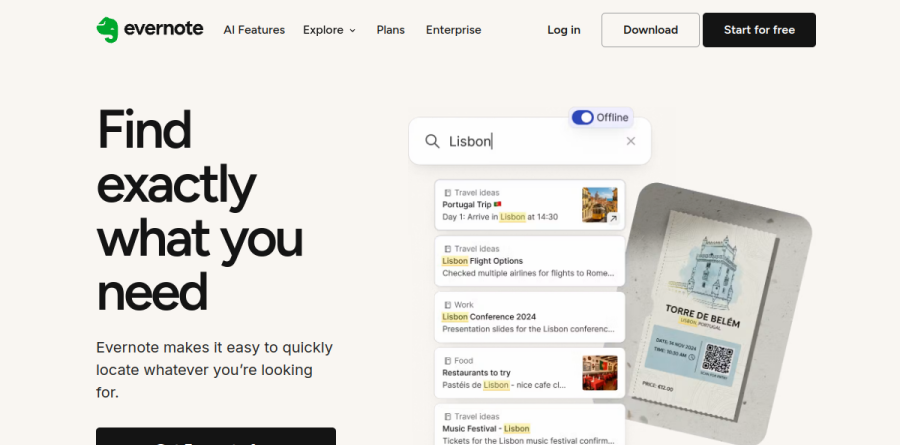
Retrieval keeps long-time users in place. Evernote states that Advanced Search finds text inside PDFs, Office documents, presentations, and images, and that it locates words in handwritten notes, whiteboard photos, and Post-It notes. Filters narrow by keyword, date, or the location where a note was written, frequently used search terms can be saved as shortcuts, and AI-Powered Search lets you query notes in natural language. Semantic Search is listed on the compare-plans page as an Advanced and Enterprise feature rather than something the Starter tier includes.
Tasks and Calendar for daily execution

Tasks sit inside notes rather than in a separate app, which keeps a to-do attached to the context that produced it. You can set due dates, make a task recurring, add reminders, assign work to other people, and watch progress on what you delegated. Views can be sorted by assignee, by note, or by due date. Evernote Calendar surfaces events alongside that work, and external calendars from Google or Microsoft Outlook can be connected so meeting prep and notes live on one screen.
AI features and integrations
Evernote lists an AI Assistant that searches, organizes, and enriches notes from a chat interface, AI Transcribe for recording and summarizing meetings, AI editing for writing and translating, and a mobile-only AI Cleanup that tidies messy notes. The marketing site also promotes AI Meeting Note Taker, AI Rewrite, AI Text To Speech, AI Diagrams, and AI Detector, alongside ecosystem utilities including PDF Editor, PDF Converter, Online Notepad, Word Counter, and Citation Generator. Evernote now advertises an MCP connection too, letting Claude, ChatGPT, and other compatible tools read your notes. Integrations cover Google Gmail, Drive, and Calendar, Microsoft Outlook, and Slack.
Plans, limits, and team controls
Four plans are on offer: Free, Starter, Advanced, and Enterprise. Free is deliberately narrow, capping notes, notebooks, spaces, tags, attachments, storage, and synced devices tightly enough to serve as an evaluation rather than a home. Starter raises each of those ceilings but includes no AI features; the AI layer — Assistant, Semantic Search, Transcribe, Edit, Cleanup, and the MCP connection — begins at Advanced. Advanced removes them, subject to a footnote about protective limits against abuse. Enterprise adds business data ownership, centralized account administration and user management, user activity history with detailed logs, Single Sign-On, a dedicated Customer Success Manager, and priority queue support. The vendor lists a seven-day trial on paid plans, fourteen days for Enterprise, and a student discount on Starter.
Who should choose Evernote
Evernote suits people carrying a large, messy archive that has to stay findable: consultants with client documents, researchers clipping sources, students scanning handwritten lecture notes, anyone whose useful information arrives as receipts, contracts, and whiteboard photos. The OCR reaches into PDFs, Office docs, images, presentations, scanned documents, handwriting, whiteboard photos, and Post-It notes, and the Google, Outlook, and Slack integrations fit teams already working there. It is not the right pick if you want a structured wiki with relational databases and block-level linking, or a local-first plain-text vault you fully own.
Strengths
- Best-in-class Web Clipper plus OCR search across notes, PDFs and images
- Mature, reliable cross-platform sync on Windows, macOS, iOS, Android and Web
- Advanced adds genuinely useful AI: semantic search, transcribe, edit and cleanup
- Built-in Tasks with reminders and Google/Outlook calendar integration
Watch out for
- Free plan is nearly unusable: 50 notes lifetime and just 1 notebook
- Expensive vs rivals — Advanced is $249.99/year, Starter $99/year
- Prices have risen repeatedly since Bending Spoons acquired Evernote in 2023
- Month-to-month billing costs notably more (~$14.99 Starter, ~$24 Advanced)
Key features
| Feature | What it does |
|---|
| Web Clipper | Save full web pages, articles, screenshots and PDFs straight into notebooks |
| OCR & search | Finds text inside images, scans and PDFs; Advanced adds AI Semantic Search |
| Tasks & Calendar | Create tasks with due dates and reminders and connect Google or Outlook calendars |
| AI tools (Advanced) | AI Assistant, AI Transcribe, AI Edit and AI Cleanup on the Advanced plan |
| Document scanning | Scan and digitize documents, business cards and handwriting from mobile |
| Templates & Home | Customizable Home dashboard and a library of ready-made note templates |
How Evernote compares
| Alternative | How it differs |
|---|
| Notion | Far more generous free tier; flexible docs plus databases; often cheaper |
| Microsoft OneNote | Completely free with effectively unlimited notes; great for Windows/Office users |
| Obsidian | Free, local-first markdown; optional sync ~$5/mo; strong for power users |
Frequently asked questions
Is Evernote free?
Yes, but the free plan is very limited. You get just 50 notes total — a lifetime cap, not monthly — plus one notebook, sync on a single device, and 1GB of monthly uploads. Once you hit 50 notes you can still view, edit and export them, but you can't create new ones. Paid Starter begins at $99/year.
How much does Evernote cost?
Evernote is free for up to 50 notes. Paid Starter costs $99/year (about $8.25/month billed annually), and Advanced is $249.99/year (about $20.83/month); month-to-month billing runs higher, roughly $14.99 and $24. Enterprise is custom-priced through sales. Prices rose in November 2025 when Bending Spoons replaced the older Personal and Professional plans with Starter and Advanced.
What are the best Evernote alternatives?
The strongest alternatives are Notion, Microsoft OneNote and Obsidian. Notion offers a generous free tier plus flexible docs and databases; OneNote is completely free with effectively unlimited notes; and Obsidian is free, local-first markdown with optional sync around $5/month. All three beat Evernote's 50-note free cap. Apple Notes and Google Keep suit lighter, simpler needs.
Evernote vs Notion: which is better?
It depends on your workflow. Notion's free plan is far more generous and doubles as a wiki and database, while Evernote's free tier stops at 50 notes. Evernote wins on fast capture, its Web Clipper and OCR search across images and PDFs. For flexible all-in-one workspaces choose Notion; for quick, searchable note capture Evernote is simpler.
Is Evernote worth it in 2026?
For most people, no. The free plan's 50-note lifetime cap makes it impractical, and paid tiers are pricey at $99/year (Starter) or $249.99/year (Advanced). It's worth paying only if you depend on Evernote's Web Clipper, OCR search and reliable cross-device sync. Otherwise free rivals like OneNote and Obsidian cover the same core features.
Evernote ratings on other platforms
Independent user ratings from third-party review sites, linked here for transparency.
These are not our editorial score, are captured on the date shown, and may have changed since.