The full review
What is ClickUp?
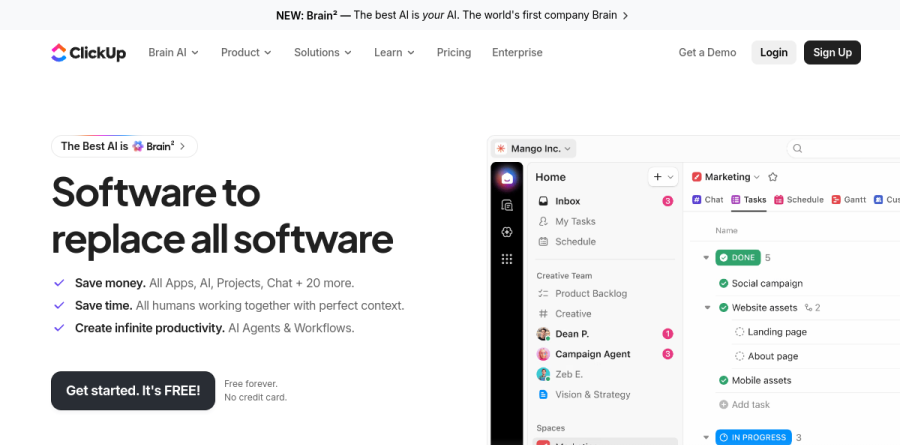
ClickUp is a work management platform that bundles tasks, documents, chat, whiteboards, dashboards and time tracking into a single workspace. The homepage frames the pitch bluntly: more than 100 products meant to replace fragmented software, so teams stop paying for and switching between a dozen separate tools. Work is organized into Spaces and Folders, with up to 200 Folders per Space, and Nested Subtasks add up to 7 levels of hierarchy beneath a task.
In practice it behaves less like a to-do app and more like a configurable operating layer for a whole company. The same underlying record can be a bug for engineering, a lead for sales, or a campaign brief for marketing, because custom task types, custom fields and custom statuses let each team shape the object around its own process.
How teams run work inside ClickUp

The view switcher does most of the heavy lifting here. One List can be rendered as a Kanban board for standup, a Gantt chart for delivery planning, a Calendar for scheduling, or an Everything view that rolls the entire workspace into a single queue. Sprints, Sprint points, Epics and Milestones cover agile delivery, while Task Relationships and Dependencies make plain what must finish before the next step begins. My Tasks and Home give each person a personal cockpit of assigned work, reminders and recent activity.
Docs, chat and collaboration in one workspace
ClickUp Docs and Wikis sit beside tasks rather than in a separate application, so a spec stays linked to the work it describes. ClickUp Chat pulls conversation into the same surface, and Clips let someone record a quick screen walkthrough instead of writing three paragraphs. Whiteboards and Mind Maps handle early planning, Forms capture intake requests, and Proofing gives designers a place to collect feedback directly on an asset. For agencies and services teams, Time Tracking, Timesheets and Time Estimates close the gap between planned effort and actual effort.
ClickUp Brain and the agent layer

AI is where ClickUp has clearly concentrated its recent effort. ClickUp Brain lives inside the workspace with visibility into tasks, docs and conversations, which is what allows it to answer a question without being briefed. The vendor reports that Brain routes each job to a suitable frontier model, naming Claude, ChatGPT and Gemini under one subscription, with Deep Search reaching across connected apps and the open web. Above that sits an agent layer: ClickUp lists prebuilt Super Agents including an Intake Agent that standardizes project kickoff, an Assign Agent that determines task owners and a PM Agent that tracks deliverables and timelines.
Plans, administration and scale
The ladder reads cleanly. Free Forever covers unlimited tasks and unlimited free members on modest storage, Unlimited opens up Gantt charts, integrations, custom fields and unrestricted storage, and Business adds the reporting and control most scaling companies want: dashboards with advanced cards, Sprint Points and Reporting, Portfolio Workload Management, webhooks and Google SSO. Enterprise layers on SAML SSO with SCIM provisioning, custom roles, audit logs, data residency and a customer success manager. AI is sold separately through the Brain AI and Everything AI add-ons, each bundling a monthly allowance of AI Super Credits. ClickUp lists SOC 2 Type II, ISO 27001, GDPR and HIPAA among its compliance credentials.
Who should choose ClickUp
ClickUp suits teams consolidating a sprawling stack, the kind of company paying separately for a project tool, a docs tool, a whiteboard, a chat app and an AI assistant. It rewards operators who enjoy building systems, because automations, custom fields, templates and dashboards all pay back configuration effort. Cross-functional organizations gain the most, since marketing, engineering, HR and leadership can each run a tailored space. It is not ideal for a small team wanting something opinionated straight out of the box: the breadth that makes ClickUp powerful also means an empty workspace can feel daunting, and a pair of freelancers tracking a simple backlog will adopt a lighter tool far faster.
Strengths
- Genuinely usable Free Forever plan with unlimited members and tasks
- Massive all-in-one feature set (tasks, docs, whiteboards, chat, goals) at a low per-seat price
- Highly customizable with 15+ views including List, Board, Gantt, Timeline and Mind Maps
- Competitive pricing: Unlimited at $7/user/mo undercuts most rivals
Watch out for
- Steep learning curve; the sheer number of features overwhelms new users
- ClickUp Brain AI is a paid add-on billed on every seat, which can nearly double your bill
- Performance can lag on large, complex workspaces
- Free plan storage is very limited (~100MB) and key features (SSO, Workload) are gated behind Business
Key features
| Feature | What it does |
|---|
| All-in-one workspace | Combines tasks, Docs, Whiteboards, Chat, Goals and reminders so teams can drop several separate tools. |
| 15+ views | See work as List, Board (Kanban), Gantt, Calendar, Timeline, Mind Map, Table and more from the same data. |
| ClickUp Brain AI | Optional AI add-on for writing, summaries, task automation and Q&A across your workspace, with premium models on higher tiers. |
| No-code Automations | Trigger-action rules to move tasks, assign owners and post updates; monthly action limits rise with each paid tier. |
| Dashboards & reporting | Custom dashboards with 50+ widgets for workload, sprint velocity, time tracking and portfolio reporting. |
| Native time tracking & workload | Built-in timers, estimates and Workload view to see who is over- or under-capacity without a third-party tool. |
How ClickUp compares
| Alternative | How it differs |
|---|
| Monday.com | Slicker, more visual UI and easier onboarding; comparable-to-higher per-user pricing with fewer built-in modules. |
| Asana | Cleaner task and workflow management favored by larger teams; less customizable and thinner on docs/whiteboards. |
| Notion | Stronger for docs, wikis and lightweight databases; weaker on Gantt, time tracking and heavy project management. |
Head-to-head: ClickUp vs Asana
Frequently asked questions
Is ClickUp free?
Yes. ClickUp's Free Forever plan costs $0 and supports unlimited members and unlimited tasks, with Kanban boards, calendars, Docs and basic reporting. It's capped at roughly 100MB of file storage and about 100 automation runs per month, and limits some advanced views. It's genuinely usable for individuals and small teams, though busy teams outgrow it fast.
How much does ClickUp cost?
Paid plans start at $7 per user/month for Unlimited and $12 per user/month for Business, both billed annually. Month-to-month pricing rises to $10 and $19 respectively. Enterprise is custom-quoted. ClickUp Brain, the AI layer, is a separate add-on from $9 per user/month and is billed across every paid seat, not just AI users.
Is ClickUp Brain (AI) included in the price?
No. ClickUp Brain is a paid add-on, not bundled into Free, Unlimited or Business. It costs about $9 per user/month billed annually for standard Brain, or $28 per user/month for the Everything AI tier with premium models and more credits. Crucially, Brain bills every paid member in the workspace, so AI can nearly double your total cost.
What are the best ClickUp alternatives?
The closest alternatives are Monday.com, Asana and Notion. Monday.com offers a more polished, visual interface; Asana excels at clean task and workflow management for larger teams; Notion is stronger for docs, wikis and databases. Trello, Wrike and Jira are also common swaps. ClickUp usually wins on breadth and price, while rivals win on simplicity.
ClickUp vs Monday.com — which is better?
ClickUp packs more features per dollar, starting at $7 per user/month versus Monday.com's roughly $9-12, and bundles Docs, Whiteboards and Goals. Monday.com is easier to learn, with a cleaner, more colorful interface and smoother onboarding. Choose ClickUp for maximum capability and customization; choose Monday.com if you value simplicity and fast team adoption.
ClickUp ratings on other platforms
Independent user ratings from third-party review sites, linked here for transparency.
These are not our editorial score, are captured on the date shown, and may have changed since.