Owned by OfficeBooks. A vendor may propose a correction to a fact — never to a score or a rank.
P
PublerReview 2026: Social media scheduler for 13 networks with a free plan, priced by connected social account, whose REST API and MCP server come only with Business and Enterprise
Social Media Management · SaaS & Productivity
Verified · vs publer.com/plans Watch price
Price from
Freepaid from $4/mo for 1 social account · billed annuallyAs we read the vendor’s pricing: Free plan (3 social accounts, X excluded); Professional $4.00/mo billed yearly for 1 social account ($5.00 billed monthly); API and MCP from Business, $8.00/mo billed yearly for 1 social account ($10.00 billed monthly)
—No answer showncould not be read (HTTP 403)G2 refused our requests (HTTP 403) when we tried to read the profile on 6 Nov 2026, so we show no G2 score.G2 page →
—No answer shownNo change recorded since the first reading we hold (6 Nov 2026).
Pricing verified 6 Nov 2026 · always confirm the current offer on the vendor’s site.
We verify
List prices and plan names as written, whether a lasting free plan exists, the billing unit where the vendor states it, third-party scores with 10+ reviews, and the page and date we read them.
We do not verify
Negotiated discounts, regional prices and taxes, anything behind a sales call, how well features work (we read documentation; we do not test), uptime, support or security. Opinions on those live in Tier 2.
Publer plans, in the vendor's words
Plan
Price
Included
Free
$0
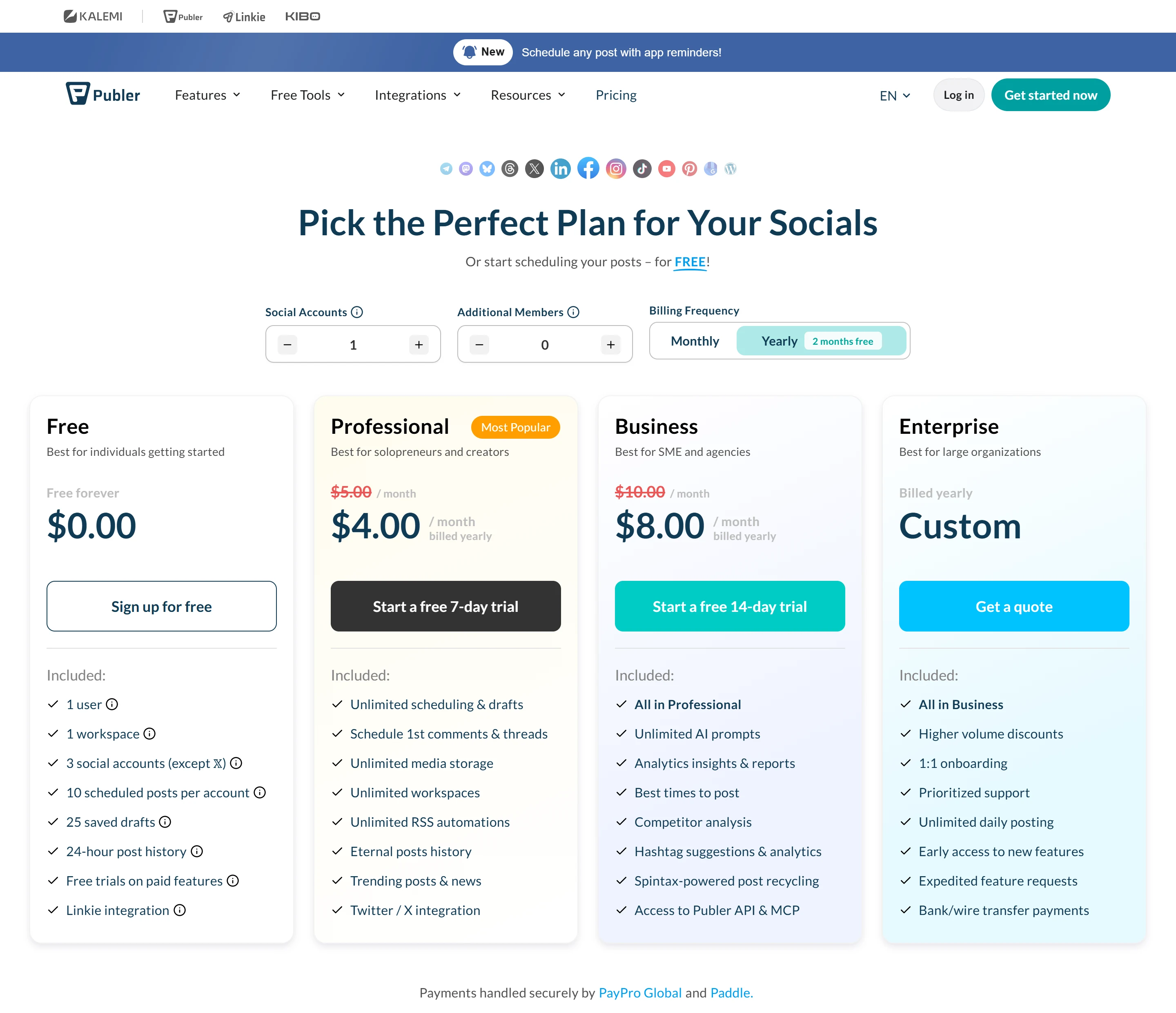
Free forever, not a trial, and no credit card. 1 user, 1 workspace and 3 social accounts, X excluded. Up to 10 scheduled posts can wait per account at a time (a slot frees once a post is published or deleted; publishing right away has no such limit), 25 saved drafts and 24-hour post history. Pinterest accounts need at least 100 followers or a claimed website on Free. Lets you try almost all paid features without entering a card. No API or MCP access.
ProfessionalPOPULAR
$4.00/mo billed yearly for 1 social account ($5.00 billed monthly)
Publer labels this plan Most Popular. Unlimited scheduling and drafts, first comments and threads, unlimited media storage, unlimited workspaces, unlimited RSS automations, eternal post history, trending posts and news, and X integration. Calculator totals on monthly billing: $12.00 a month for 3 social accounts, $20.00 for 5, $36.00 for 10 (the 10th is free); $28.80 a month billed yearly for 10. With 1 account, 1, 2 or 5 additional members make it $7.00, $9.00 or $15.00 a month on monthly billing. Free 7-day trial. No API or MCP access.
Business
$8.00/mo billed yearly for 1 social account ($10.00 billed monthly)
Everything in Professional plus unlimited AI prompts, analytics insights and reports, best times to post, competitor analysis, hashtag suggestions and analytics, Spintax-powered post recycling, and access to the Publer API and MCP server. Calculator totals on monthly billing: $21.00 a month for 3 social accounts, $35.00 for 5, $63.00 for 10 (the 10th is free); $50.40 a month billed yearly for 10. With 1 account, 1, 2 or 5 additional members make it $13.00, $16.00 or $25.00 a month on monthly billing. Free 14-day trial.
Enterprise
Custom, billed yearly
Quote-based. Everything in Business plus, on the plan card, higher volume discounts, 1:1 onboarding, prioritized support, unlimited daily posting (the card itself has no asterisk; the Daily Post Limits table shows Enterprise as “Unlimited *”, with a footnote that “you may still be limited by the social networks themselves”), early access to new features, expedited feature requests and bank or wire transfer payments. The plans page’s FAQ, by contrast, says anyone paying yearly can also pay by purchase order or wire transfer. Includes the API and MCP server.
Price history · every reading logged
We hold one reading of this price, so there is no history to chart yet. We will not draw a curve from fewer than two points.
All readings (1)
Every reading we hold of Publer's listed price
Date
Result
Read on
First reading we hold: Free plan (3 social accounts, X excluded); Professional $4.00/mo billed yearly for 1 social account ($5.00 billed monthly); API and MCP from Business, $8.00/mo billed yearly for 1 social account ($10.00 billed monthly)
Propose a correction to a price, free plan or billing unit, with evidence from your own site. An editor reads it before anything changes; a correction never touches a score or a rank.
Written by people. Signed, dated, and kept apart from the facts above.
Who writes what on this page: each source, who writes it, their incentive, and what OfficeBooks checks
Source
Who writes it
Their incentive
Checked by OfficeBooks?
Editor's verdict and review
OfficeBooks research desk. Desk research from documentation; no hands-on test.
A commission only on links to partner programmes, disclosed beside the link. It never changes a score.
Yes · It is ours: every figure in it comes from the sources listed.
Creator stacks
Independent creators, named on every take
Whatever each creator declares on each take: none, a commission, sponsorship or employment. OfficeBooks credits them with the clicks and demo bookings they refer.
Partly · The facts beside their take, read live. Not their opinion; an editor reviews each stack before it is listed.
G2 and Trustpilot ratings
Those platforms' reviewers
Set by each platform. Some invite or reward reviews.
Partly · Only the score and review count, on the date shown. We do not vet the reviews.
Sponsored slot
The vendor who booked it
Paid placement.
No · The copy is the vendor's. Labelled "Sponsored · not ranked"; never in a table, score, shortlist or search result.
Verified facts (Tier 1)
OfficeBooks research desk
None. Vendors cannot pay to change a fact, a score or a rank.
Yes · On the vendor's own pages where it publishes them, otherwise on the sources listed; always with the date.
Editor's verdict
updated
“Publer is a low-cost scheduler with a documented API, not an API product. The scheduler starts on a lasting free plan and costs $4.00 a month billed yearly ($5.00 monthly) for one account on Professional, across 13 networks including WordPress, Telegram and Bluesky. Developers and AI agents get a REST API that reaches into analytics and competitor data, a limit of 100 requests per 2 minutes and an MCP server with OAuth, but only from Business, which costs $8.00 a month billed yearly ($10.00 monthly) for 1 social account and $63.00 a month for 10 on monthly billing. The trade-offs are real: no official SDKs, no documented webhooks, inbox, DMs or ads, posts that you poll for results, daily caps per profile, docs that contradict themselves on the auth headers and the number of networks, a yearly discount described two ways and an ISO 27001 statement that does not say whether Publer is certified. Choose it if your team already runs its accounts in Publer and wants to automate them; if the API itself is what you are buying, compare it first with the API-first services listed below.”
Best for
Creators and small businesses that want a low-cost scheduler for up to 13 networks, starting on a free plan
Teams and agencies on Publer Business that want to schedule posts and pull analytics from their own scripts or tools
People who want Claude, ChatGPT, Cursor or another MCP client to draft and schedule posts in their Publer workspace
Watch out for
The API and MCP server come only with Business and Enterprise, Business accounts must be in good standing, and Publer says it has no public API available to everyone
Analytics insights and reports, best times to post, competitor analysis and unlimited AI prompts are also listed from Business up
OBOfficeBooks Editorial · Research desk · desk research from documentation, no hands-on test
Creator takes belong to their authors and are not verified by OfficeBooks; each creator declares their tie to the vendor on every take. OfficeBooks earns a commission only on links to partner programmes, disclosed beside each link. None of this changes Tier 1.
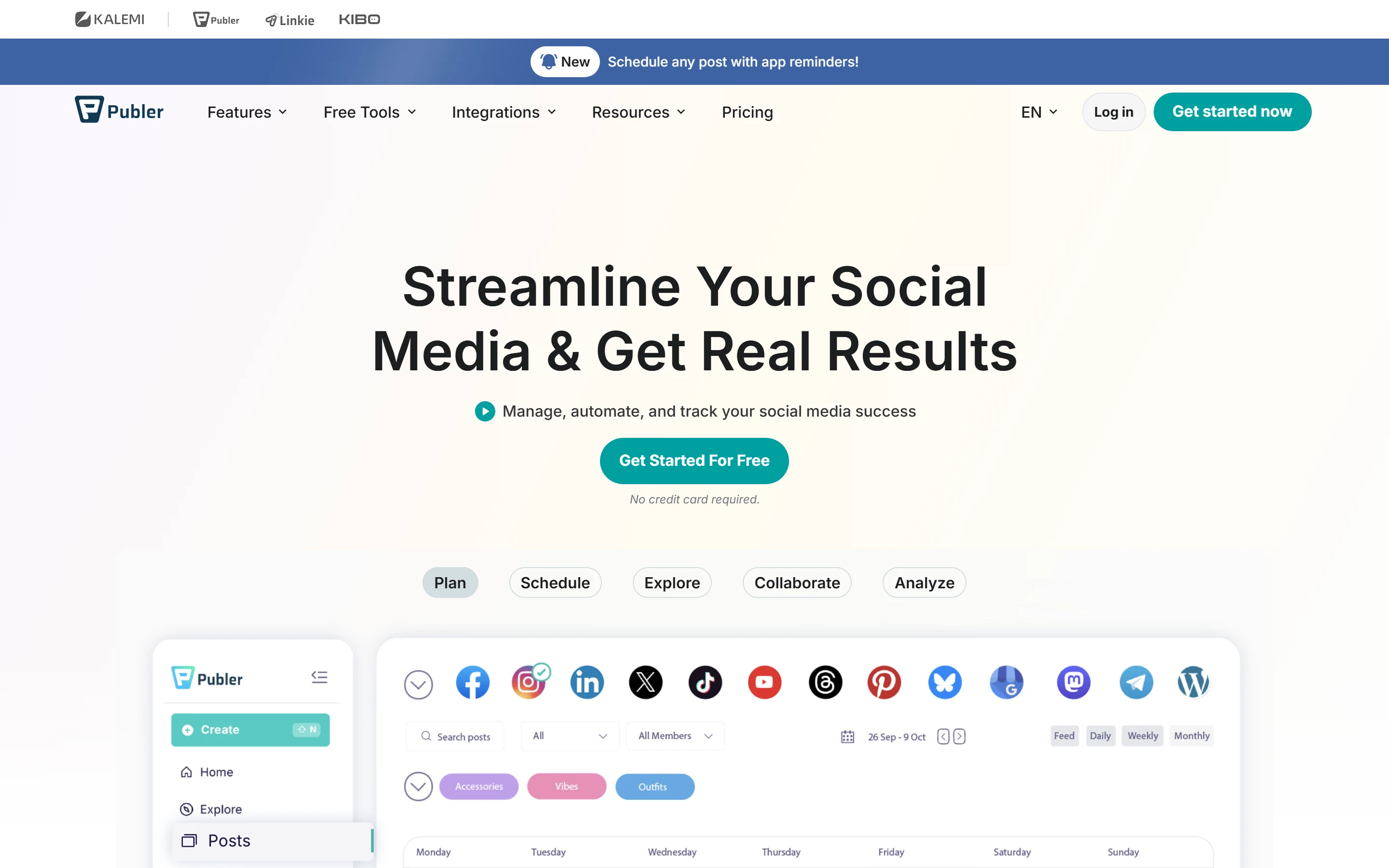
Publer is a social media management app. Its homepage leads with “Streamline Your Social Media & Get Real Results” and “Manage, automate, and track your social media success”, and its plans page lists 13 networks: Facebook, Instagram, TikTok, X, Threads, LinkedIn, Pinterest, Mastodon, Google Business Profiles, YouTube, Telegram, Bluesky and WordPress. Paid plans add unlimited scheduling, first comments and threads and RSS automations; Business adds unlimited AI prompts, analytics reports, competitor analysis, a REST API and an MCP server. The docs say the API brings “Publer’s social media scheduling, publishing, and analytics capabilities into your own applications, scripts, or services”.
That API is why Publer is compared here with API-first services, but it is part of a plan, not a product of its own. The docs say “The Publer API is available exclusively to Business and Enterprise customers”, and a help article adds that Publer “does not offer a public API that is available to everyone”: Business customers qualify only while their subscription is in good standing, with no failed or locked subscriptions.
The API is a RESTful JSON API, version 1, at https://app.publer.com/api/v1. Its docs list what it does: create, schedule and publish posts (text, images, videos, links, polls, carousels and PDFs), upload and manage media, list workspaces, accounts and users, and retrieve, update and delete posts. The posting endpoints include POST /api/v1/posts/schedule for scheduled posts and drafts and POST /api/v1/posts/schedule/publish for publishing at once, alongside PUT /api/v1/posts/:id, DELETE /api/v1/posts and POST /api/v1/media/from-url. Creating posts is asynchronous: you submit a batch request, receive a job ID and poll GET /api/v1/job_status/{job_id} until it completes. On networks, the docs conflict: the Overview lists the same 13 as the app, and the Creating Posts page gives a provider key for each (WordPress as wordpress_basic for self-hosted sites and wordpress_oauth for sites hosted on WordPress), but the API’s Networks page lists only 12, without WordPress. We report the conflict; we could not test it without a Business account.
Analytics are where it goes beyond publishing. The docs list endpoints for Charts, Post Insights (per-post metrics with filtering, sorting, pagination and a competitor mode), Hashtag Analysis, Best Times to Post, Members, Competitor Analysis and Export, so a dashboard or report can read Publer’s analytics without opening the app.
Post callbacks attach automations to each account in a post request: auto-share to other accounts, follow-up comments (or thread posts on some networks), and auto-delete or auto-hide, with conditions on the post’s age, reach or engagements. They are actions Publer takes on your posts, not webhooks that notify your application. The documentation index, 59 pages, has no page on reading or replying to comments, an inbox, direct messages, ads or webhooks, and Telegram Messages are posts to groups and channels, not DMs. The help center’s Automations category mentions webhooks and the API help article names a settings tab API & Webhooks, but no article we found documents a webhook, so we count those as undocumented rather than unsupported.
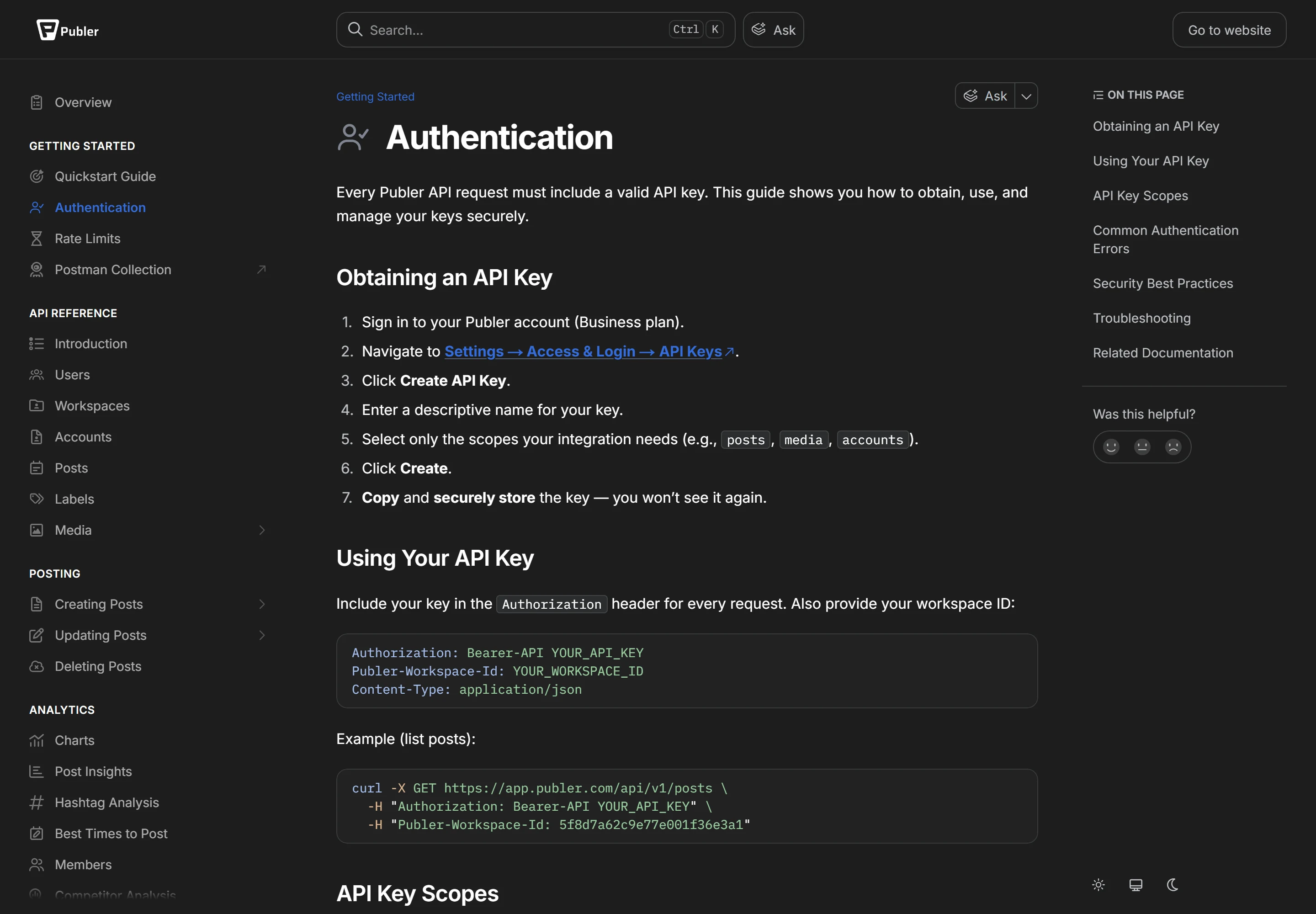
Every request carries an API key in the header Authorization: Bearer-API followed by the key. The docs disagree on the Publer-Workspace-Id header: the Authentication page says “Also provide your workspace ID” and lists a 403 error for a missing header, while the Overview marks it “Required on special cases”. Keys are created in the app on a Business account, and each carries scopes: workspaces, accounts, posts and media in the docs, with analytics also listed in the help article. Publer’s own pages disagree on the details. The Overview’s curl example sends Authorization: Bearer YOUR_API_TOKEN, while the specification and the Authentication page say Bearer-API; and API keys are managed under Settings → Access & Login → API Keys in the docs, Settings > API & Webhooks in the API help article and Settings > AI & Automations > MCP in the MCP article. We report the conflict; we could not check which is current without a Business account.
The rate limit is 100 requests per 2-minute fixed window, counted per user account across all of its API keys, which caps a user at 3,000 requests an hour. Going over returns HTTP 429, and the docs ask you to email support@publer.com with your expected volume if you need a higher limit.
Publer also caps posts per connected profile over a rolling 24 hours in UTC, with the same table on the plans page and in the docs. On Free, Professional and Business respectively: Facebook posts and Reels 12, 24 or 36 a day; Instagram posts and Reels 15, 20 or 25; TikTok 15, 20 or 25; X, Mastodon and Bluesky 25, 50 or 100; Threads 150, 200 or 250; LinkedIn profile posts 10, 12 or 14 and LinkedIn page posts 12, 18 or 24; Pinterest 12, 24 or 36; Google Business and YouTube 5, 10 or 15; WordPress 12, 18 or 24; Telegram 5, 10 or 15. Facebook and Instagram Stories have the same caps as their posts. Enterprise shows “Unlimited *”, and the table’s footnote says “you may still be limited by the social networks themselves”. Paid plans advertise unlimited scheduling, and Publer says it enforces these daily posting limits “to prevent spamming and abuse”. On paid plans, it says it “can always waive these limits for specific scenarios”, and it asks established news media companies, verified government agencies and publicly owned services to contact it.
MCP server, Zapier and the docs
Publer’s MCP server, at https://mcp.publer.com, is on Business and Enterprise. Its setup article, updated October 15, 2026, names Claude, ChatGPT and Cursor among MCP-compatible clients, and the help center also has a guide for Grok. You connect with OAuth, signing in to Publer and approving access without an API key, or with an API key, the option Publer labels No auth; with a key, what the AI client can do follows the scopes you gave that key.
Zapier is on every plan, Free included, so a no-code workflow can start without the API. Its triggers include Post Published, Post Failed and Post Approved, and its actions include Create Post, Post Immediately and Auto Comment.
The docs list no official SDKs. Instead there is a Postman collection, OpenAPI 3.1.1 snippets on the reference pages, an llms.txt index with a Markdown version of every page (append .md to the URL) and an Ask assistant built into GitBook, which helps when a coding agent is the one reading the docs.
Publer prices by the number of connected social accounts, plus any additional members. Each page or profile counts as one account (Publer’s example: 2 Facebook pages and 2 Instagram accounts count as 4), the plan owner is included in the price, and for every 9 paid social accounts, or 9 additional members, the 10th is free. The plans page opens on yearly billing with 1 social account: Free is $0.00, Professional $4.00 a month billed yearly ($5.00 on monthly billing), Business $8.00 a month billed yearly ($10.00 monthly), and Enterprise is a custom quote, billed yearly. Publer’s Most Popular badge sits on Professional. Only Business and Enterprise include the API and MCP server.
The page shows totals from a calculator rather than a rate per account. On monthly billing with no additional members, Professional came to $9.00 a month for 2 social accounts, $12.00 for 3, $20.00 for 5, $36.00 for both 9 and 10, $40.00 for 11 and $72.00 for 20; Business came to $17.00, $21.00, $35.00, $63.00, $63.00, $70.00 and $126.00 for the same counts. With 1 account, 1, 2 or 5 additional members made Professional $7.00, $9.00 or $15.00 a month and Business $13.00, $16.00 or $25.00. In the yearly view every figure was 80% of the monthly one: 10 accounts cost $28.80 a month on Professional and $50.40 on Business, billed yearly.
The yearly discount is described two ways. The billing toggle says Yearly, 2 months free, which over twelve months is about 16.7% off (our arithmetic), but the page’s FAQ says “When paying Yearly, you will earn a 20% discount”, and the yearly prices displayed are 20% lower ($4.00 against $5.00, $8.00 against $10.00). For Business with 1 account, two free months would come to $100.00 a year, while $8.00 a month billed yearly comes to $96.00. Check the total at checkout. The same page lists two more discounts: every 10th social account or additional member is free, with higher volume discounts on Enterprise, and charities and non-profit organizations get 50% off if they contact Publer with supporting documents, such as a copy of a 501(c)(3), before starting a subscription.
Worked examples from those figures, all with no additional members. A creator on Professional with 1 account pays $48.00 a year billed yearly, or $60.00 over twelve months at $5.00. A small product that wants to publish to its own 3 brand accounts through the API needs Business: $21.00 a month on monthly billing. An agency with 10 accounts on Business pays $63.00 a month on monthly billing, the same as for 9 because the 10th is free, or $50.40 a month billed yearly, $604.80 a year. VAT is not included. Payments are handled by PayPro Global or Paddle depending on your location, and Publer accepts PayPal or any major credit or debit card. Each payment can be refunded in full within 14 days; after that, the FAQ says “you’re still eligible for a refund, but a pro-rated refund and the discount for paying yearly will be waived”, and refunds are issued manually, so you have to contact Publer.
The Free plan is free forever, not a trial: 1 user, 1 workspace and 3 social accounts, X excluded. Each account can hold up to 10 scheduled posts at a time, and a slot frees once a post is published or deleted; publishing right away has no such limit. It also allows 25 saved drafts and keeps a 24-hour post history. X accounts can be connected only on a paid plan, which Publer puts down to the cost of X’s Enterprise API, and on Free a Pinterest account can be connected only if it has at least 100 followers or a claimed website. Keep three offers apart: the Free plan itself, the free trials of Professional (7 days) and Business (14 days), and the Free-plan feature that lets you try almost all paid features without entering a credit card.
Security and compliance
Two-factor authentication is available for users and their members. Publer’s Trust Center says it “aligns with ISO/IEC 27001:2022” and in the next sentence calls this a certification, so the page does not make clear whether Publer holds an ISO 27001 certificate; ask for it if your procurement needs one. The same page says Publer meets Google’s CASA framework, runs regular third-party penetration tests and complies with GDPR and CCPA/CPRA. These are Publer’s statements; we did not see the underlying reports.
Who Publer fits, and who should look elsewhere
Publer suits creators, small businesses and agencies that want a low-cost scheduler across up to 13 networks, starting free and moving to Professional at $4.00 a month billed yearly for one account. Its API makes most sense for teams that already run their social accounts in Publer and want to schedule posts, push media and pull analytics from their own scripts, internal tools or an AI agent: Business is $8.00 a month billed yearly ($10.00 monthly) for 1 account, the API allows 100 requests per 2 minutes, and the MCP server connects with OAuth.
Look elsewhere if the API itself is what you are buying. Publer’s API comes with a plan, not on its own: there is no public tier, no official SDK, no documented webhook, no documented endpoint for comments, an inbox, DMs or ads, and posting returns a job you have to poll. Compare the other services in our Social Media & Messaging APIs comparison before building a product on Publer’s API. If you only need a dashboard, compare Publer with the schedulers in our Social Media Management comparison, such as Buffer.
The catches
On Trustpilot, Publer scored 4.9 (Excellent) from 1,059 reviews when we read the page on November 6, 2026, and Trustpilot’s own note on the profile says the company has not invited customers recently, so reviews may not be representative. G2 and Capterra blocked our reads with bot checks, so we show no score from either. The About page’s “4.8 / 5 stars” links to Publer’s Customers page, which lists 4.8 of 5 for Trustpilot and for Capterra, 4.7 for G2 and 4.5 for Google. Those are Publer’s figures: we could not read G2 or Capterra to check them, and Trustpilot itself showed 4.9 when we read it.
Several of Publer’s pages contradict each other: the auth header, whether the Publer-Workspace-Id header is always required, the number of networks and the settings path for API keys differ between docs pages; the yearly toggle says 2 months free while the plans page’s FAQ says paying yearly earns a 20% discount and the prices show 20% off; the Enterprise card lists bank or wire transfer payments while the same FAQ offers purchase orders and wire transfers to anyone paying yearly; and the Trust Center calls ISO 27001 alignment a certification. Paid plans advertise unlimited scheduling but cap daily posts per profile. And the features developers and marketers are most likely to want, the API, MCP, analytics reports, competitor analysis and unlimited AI prompts, all start at Business.
Strengths
A lasting free plan, not a trial: 3 social accounts, up to 10 waiting scheduled posts per account and no credit card
Low entry price: Professional is $4.00 a month billed yearly ($5.00 monthly) for 1 social account, and every 10th account is free
Publishes to 13 networks, including Google Business Profiles, WordPress, Telegram, Mastodon, Threads and Bluesky
The REST API covers publishing and media as well as analytics, with endpoints for post insights, best times to post, hashtags and competitor analysis
API limit of 100 requests per 2-minute window per user account, and the docs invite you to ask for more
MCP server that connects with OAuth or an API key, for Claude, ChatGPT, Cursor and other MCP clients
Zapier integration on every plan, Free included
Docs built for machines as well as people: an llms.txt index, a Markdown copy of every page, OpenAPI snippets and a Postman collection
A full refund on request within 14 days of each payment; after that, Publer’s plans FAQ says you are “still eligible for a refund, but a pro-rated refund and the discount for paying yearly will be waived”
Watch out for
The API and MCP server come only with Business and Enterprise, Business accounts must be in good standing, and Publer says it has no public API available to everyone
Analytics insights and reports, best times to post, competitor analysis and unlimited AI prompts are also listed from Business up
The docs list no official SDKs and document no webhooks, comment replies, inbox, DMs or ads; post creation is asynchronous, so you poll a job ID for the result
Paid plans advertise unlimited scheduling, but daily posting caps per profile still apply, for example 25 Instagram posts and Reels a day on Business; Publer says it can waive these limits on paid plans for specific scenarios and asks established news media companies, verified government agencies and publicly owned services to contact it, while the networks’ own limits may still apply
Publer’s own pages contradict each other: one docs example sends Bearer instead of Bearer-API, the Overview marks the Publer-Workspace-Id header “Required on special cases” while the Authentication page asks for it on every request, the Overview lists 13 networks and the API’s Networks page 12, three pages name three settings paths for API keys, and yearly billing is labelled 2 months free while the plans page’s FAQ says paying yearly earns a 20% discount and the prices shown are 20% below monthly
The Free plan cannot connect X, keeps a 24-hour post history and accepts only Pinterest accounts with at least 100 followers or a claimed website
The Trust Center says Publer aligns with ISO/IEC 27001:2022, then calls it a certification, without making clear whether Publer holds a certificate
Additional members cost extra on Professional and Business, and VAT is not included in the listed prices
Key features
Feature
What it does
Publishing to 13 networks
Facebook (profiles, pages, locations and groups), Instagram (Business and Creator), TikTok, X, Threads, LinkedIn (profiles and pages), Pinterest, Mastodon, Google Business Profiles, YouTube channels, Telegram groups and channels, Bluesky and WordPress (hosted and self-hosted). Publer says it supports all post types, naming YT Shorts, IG Reels and LinkedIn PDFs. X needs a paid plan. Not every post is published automatically: the plans page’s FAQ says posts that “cannot be programmatically supported due to API limitations, such as posts for the Facebook Groups” are handled by a “semi-automation solution via push notifications / reminders”; its help article on Facebook Personal Profiles says Meta removed public API access for profiles, so you need the Publer mobile app to “share your posts to your Profile via push-notifications”; and Publer’s post-types help article says “only Business accounts support direct Instagram Stories, not Creator accounts”.
Scheduling and bulk tools
Unlimited scheduling and drafts, first comments and threads, unlimited workspaces and unlimited RSS automations from Professional up. Publer’s features menu says bulk scheduling takes up to 500 posts at once from a CSV file or other bulk options.
Publer API
RESTful JSON API, version 1, at https://app.publer.com/api/v1, for Business and Enterprise customers. Create, schedule and publish posts (text, images, videos, links, polls, carousels and PDFs), upload and manage media, list workspaces, accounts and users, and retrieve, update and delete posts. Post creation is asynchronous: you get a job ID and poll its status.
Analytics endpoints
Charts, Post Insights (per-post metrics with filtering, sorting, pagination and a competitor mode), Hashtag Analysis, Best Times to Post, Members, Competitor Analysis and Export.
Post callbacks
Automations attached to each account in a post request: auto-share to other accounts, follow-up comments (or thread posts on some networks), and auto-delete or auto-hide, with conditions on the post’s age, reach or engagements. They act on your posts; they are not webhooks that notify your application.
MCP server
At https://mcp.publer.com, on Business and Enterprise. Connect with OAuth, signing in to Publer without an API key, or with an API key (the option Publer labels No auth), in which case the key’s scopes set what the client can do. Publer names Claude, ChatGPT and Cursor among compatible clients, and its help center also has a guide for Grok.
Zapier
On every plan, Free included. Triggers include Post Published, Post Failed and Post Approved; actions include Create Post, Post Immediately and Auto Comment.
Developer documentation
Hosted on GitBook, with an llms.txt index of the docs, a Markdown version of every page (append .md to the URL), an Ask assistant, a Postman collection and OpenAPI 3.1.1 snippets on the reference pages. No official SDKs are listed.
Security
Two-factor authentication for users and their members. The Trust Center states ISO/IEC 27001:2022 alignment, Google CASA, regular third-party penetration tests and GDPR and CCPA/CPRA compliance.
Reviewed separately; compare network coverage and limits. Publer’s API docs list 13 networks in the Overview but 12, without WordPress, on the Networks page; X needs a paid plan, and posting is capped per profile each day, for example 25 Instagram posts and Reels on Business.
Reviewed separately. On Publer, unlimited AI prompts, analytics reports and API access all start at Business ($8.00 a month billed yearly or $10.00 billed monthly, for 1 social account).
Reviewed separately; compare how AI agents connect. Publer’s MCP server is on Business and Enterprise, and connects with OAuth or with an API key whose scopes set what the agent can do.
Reviewed separately; compare what each charges per connected account. Publer’s API comes only with Business: $10.00 a month on monthly billing for 1 social account, $21.00 for 3.
Reviewed separately. If you need messaging, note that Publer’s API documentation has no endpoints for comments, an inbox or direct messages; its Telegram Messages are posts to groups and channels.
Reviewed separately; compare what each charges to post from code. Publer’s API is part of its Business plan: $10.00 a month on monthly billing for 1 social account and $63.00 for 10, or $50.40 a month billed yearly for 10.
Ranked second to Publer in our Pinterest and Instagram scheduler comparison: for one Pinterest and one Instagram account, Publer Professional is $7.20 a month billed yearly and Buffer Essentials $10 a month billed yearly ($5 per channel), both read 2026-11-06. Publer’s Professional plan is $4.00 a month billed yearly ($5.00 monthly) for 1 social account, and does not include the API, which needs Business.
Yes: a RESTful JSON API, version 1, at https://app.publer.com/api/v1. It is available only to Business and Enterprise customers, and Business customers must be in good standing, with no failed or locked subscriptions; Publer says it does not offer a public API available to everyone. The API creates, schedules and publishes posts, manages media, lists workspaces, accounts and users, and reads analytics, including post insights, best times to post, hashtags and competitor analysis.
How much does the Publer API cost?
It is not sold on its own; it comes with the Business plan. Business costs $10.00 a month on monthly billing or $8.00 a month billed yearly for 1 social account, and Publer’s calculator showed $21.00 a month for 3 accounts and $63.00 for 10 on monthly billing, or $50.40 a month billed yearly for 10. Enterprise, which also includes the API, is a custom yearly quote. The docs mention no per-request charge; the limit is 100 requests per 2 minutes per user account.
Is Publer free?
Yes. The Free plan is free forever and needs no credit card: 1 user, 1 workspace and 3 social accounts (X cannot be connected), up to 10 scheduled posts waiting per account at a time, 25 saved drafts and 24-hour post history. Free users can also try almost all paid features without entering a card. That is separate from the free trials of the paid plans, 7 days on Professional and 14 days on Business. The API and MCP server are not included on Free.
What counts as a social account?
Each page or profile you connect. Publer’s example is that 2 Facebook pages and 2 Instagram accounts count as 4 social accounts. For every 9 paid social accounts the 10th is free, so 9 and 10 accounts cost the same ($36.00 a month on Professional and $63.00 on Business, on monthly billing). The plan owner is included in the price; additional members are charged on top, with the same 10th-free rule.
What are the Publer API rate limits?
The API allows 100 requests per 2-minute fixed window, counted per user account across all of its API keys, and returns HTTP 429 when you go over; for more, the docs ask you to email support@publer.com with your expected volume. Posts are capped separately, per connected profile over a rolling 24 hours in UTC: on Business, for example, 36 Facebook posts and Reels, 25 Instagram posts and Reels, 25 TikTok videos, 100 X posts, 24 LinkedIn page posts and 15 YouTube videos a day.
Does Publer work with Claude, ChatGPT or other AI agents?
Yes, through the Publer MCP server at https://mcp.publer.com, on Business and Enterprise. Publer names Claude, ChatGPT and Cursor among MCP-compatible clients and has a guide for Grok. You connect with OAuth, signing in to Publer without an API key, or with an API key, in which case the key’s scopes decide what the AI client can do. Zapier is also available on every plan.
Does the Publer API support webhooks, comments or DMs?
Not in the documentation we read. The docs index has no page on webhooks, reading or replying to comments, an inbox, direct messages or ads, and Telegram Messages are posts to groups and channels. The help center’s Automations category mentions webhooks and the API help article names a settings tab API & Webhooks, but no article we found documents a webhook, so ask Publer before relying on one. Post callbacks, which auto-share, add follow-up comments or delete posts on conditions, are automations on your posts, not notifications to your app.
Which networks does Publer support?
Thirteen in the app: Facebook, Instagram, X, LinkedIn, Pinterest, YouTube, TikTok, Google Business Profile, WordPress, Telegram, Mastodon, Threads and Bluesky. The API documentation disagrees with itself: the Overview lists the same 13, and the Creating Posts page gives a provider key for each (WordPress as wordpress_basic for self-hosted sites and wordpress_oauth for sites hosted on WordPress), but the API’s Networks page lists only 12, without WordPress. X accounts can be connected only on a paid plan, which Publer puts down to the cost of X’s Enterprise API, and on the Free plan a Pinterest account needs at least 100 followers or a claimed website. Not every post is published automatically: the plans page’s FAQ says posts that “cannot be programmatically supported due to API limitations, such as posts for the Facebook Groups” go out through push-notification reminders, its Facebook Personal Profiles article says posts to a personal profile also go out by push notification from the Publer mobile app, because Meta removed public API access for profiles, and Publer’s post-types help article says only Business accounts, not Creator accounts, support direct Instagram Stories.
Is Publer ISO 27001 certified?
Publer’s Trust Center does not make it clear. It says Publer “aligns with ISO/IEC 27001:2022” and then describes this as a certification, so ask Publer for the certificate if you need one. The same page says Publer meets Google CASA, runs regular third-party penetration tests and complies with GDPR and CCPA/CPRA. Two-factor authentication is available for users and their members.
Can I get a refund, and is there a discount?
Publer’s plans page says that for each payment you have 14 days to request a full refund. After that, in its words, “you’re still eligible for a refund, but a pro-rated refund and the discount for paying yearly will be waived”; we read that as a pro-rated refund without the yearly discount, so confirm with Publer. Refunds are issued manually, so you have to contact Publer. VAT is not included in its prices. The same page lists three kinds of discount. Yearly billing is described two ways: the toggle says 2 months free, about 16.7% off, while the page’s FAQ says paying yearly earns “a 20% discount” and the prices it displays are 20% below monthly ($8.00 against $10.00 a month on Business for 1 account). For volume, the 10th social account or additional member is free for every 9, and Enterprise adds higher volume discounts, unquantified. Charities and non-profit organizations get 50% off if they contact Publer with supporting documents, such as a copy of a 501(c)(3), before starting a subscription. Check the total at checkout. The link to Publer on this page opens its standard homepage; we have no discount code.
Publer ratings on other platforms
Independent user ratings from third-party review sites, linked here for transparency.
These are not our editorial score, are captured on the date shown, and may have changed since.
Free. Nobody pays for rooms, and vendors never see their notes or votes.Or start a new room.
Book a demo
Publer does not take demo requests through OfficeBooks yet, so we do not collect your details for it. Publer's own site: publer.com ↗
Plain link: we earn nothing from it.
Verified deal
Free plan with no credit card; free 7-day trial on Professional and 14-day trial on Business; yearly billing is labelled 2 months free, while the plans page’s FAQ says it earns a 20% discount and the prices shown are 20% below monthly; every 10th social account or additional member free; 50% off for charities and non-profits that send supporting documents before subscribing; full refund within 14 days of each payment
Free. Creators add data-ref with the referral id from their creator page to be credited for the clicks they send. The card updates when we re-verify and never changes a score.
Publer
Our rating 4.2/5 · Free plan (3 social accounts, X excluded); Professional $4.00/mo billed yearly for 1 social account ($5.00 billed monthly); API and MCP from Business, $8.00/mo billed yearly for 1 social account ($10.00 billed monthly)