—Not availablenot in our data · shown only from 10+ reviewsNot in our review data. We show a G2 score only after reading it on a profile with 10 or more reviews.
Trustpilot
—Not availablenot in our data · shown only from 10+ reviewsNot in our review data. We show a Trustpilot score only after reading it on a profile with 10 or more reviews.
Last price change
—Not availableNo change recorded since the first reading we hold (3 Oct 2026).
Pricing verified 3 Oct 2026 · always confirm the current offer on the vendor’s site.
We verify
List prices and plan names as written, whether a lasting free plan exists, the billing unit where the vendor states it, third-party scores with 10+ reviews, and the page and date we read them.
We do not verify
Negotiated discounts, regional prices and taxes, anything behind a sales call, how well features work (we read documentation; we do not test), uptime, support or security. Opinions on those live in Tier 2.
CodeRabbit plans, in the vendor's words
Plan
Price
Included
Free
$0
Unlimited public and private repositories, no credit card. On pull requests it writes summaries only (1 per developer per hour, up to 150 files). Reviews also run in the VS Code extension (3 per hour) and the CLI (3 per hour); the CLI docs describe Free reviews as basic static analysis, and full context-aware reviews need a paid plan. No chat, no linked repositories, community support.
Open source (public repositories)
$0
Team features on public repositories with no subscription. 1 to 10 PR reviews per hour depending on star count, 1 IDE and 3 CLI reviews per hour, 100 to 300 files per review, chat limit 25. Repositories with fewer than 10 stars must trigger reviews manually.
Agentic reviews on PRs and in the CLI, 1-click fixes, Learnings, loops with coding agents, agentic chat, linter and SAST tool support, Jira and Linear, built-in pre-merge checks, limited Change Stack. Limits: 5 PR, 5 IDE and 5 CLI reviews per developer per hour, 150 files per review, chat 50, 5 MCP connections, 1 linked repository.
New tier. Adds blast radius and architectural impact analysis, a security review of every PR and continuous security monitoring. Limits: 10 reviews per developer per hour, 300 files per review, chat 100, 15 MCP connections, 10 linked repositories, 20 custom pre-merge checks. Self-serve purchase is open only to USD-billed organisations; INR-billed organisations can choose Essentials or Team.
Enterprise
Custom, billed annually
Custom RBAC, SSO and audit logging, API access, self-hosting option (500+ seats), multi-org support, SLA support, dedicated CSM, payment through the Claude, AWS or GCP marketplace, vendor security review and agreement redlines, custom setup including ALB, EU SaaS deployment. Limits: 12 reviews per developer per hour, 300 files per review, chat 100, 20 MCP connections, 20 linked repositories.
Usage-based reviews (add-on)
$0.25 per reviewed file
Continues reviews past the hourly limits on Essentials, Team and Advanced. Admins choose Automatic, On demand or Off and set a monthly cap; billed as $1 credits that cover 4 files. Not available on INR or marketplace subscriptions. PRs over the plan’s file limit (up to 300 files) can be reviewed with usage pricing only on GitHub and GitHub Enterprise; PRs over 300 files cannot.
CodeRabbit Agent (separate)
$0.40 per agent minute
Cloud coding tasks, Slack and automations. Not included in any review plan and does not require one. Autofix and finishing touches also run as agent tasks: the first turn is free, but follow-up or revision turns are billed in agent minutes. Trial and free minutes are used first (the Agent page offers $50 of free minutes per user); admins can set a monthly spending cap.
Price history · every reading logged
We hold one reading of this price, so there is no history to chart yet. We will not draw a curve from fewer than two points.
All readings (1)
Every reading we hold of CodeRabbit's listed price
Date
Result
Read on
First reading we hold: “Free plan (PR summaries only); paid from $24/developer/mo billed annually ($30 billed monthly)”
Propose a correction to a price, free plan or billing unit, with evidence from your own site. An editor reads it before anything changes; a correction never touches a score or a rank.
Written by people. Signed, dated, and kept apart from the facts above.
Who writes what on this page: each source, who writes it, their incentive, and what OfficeBooks checks
Source
Who writes it
Their incentive
Checked by OfficeBooks?
Editor's verdict and review
OfficeBooks research desk. Desk research from documentation; no hands-on test.
A commission only on links to partner programmes, disclosed beside the link. It never changes a score.
Yes · It is ours: every figure in it comes from the sources listed.
Creator stacks
Independent creators, named on every take
Whatever each creator declares on each take: none, a commission, sponsorship or employment. OfficeBooks credits them with the clicks and demo bookings they refer.
Partly · The facts beside their take, read live. Not their opinion; an editor reviews each stack before it is listed.
G2 and Trustpilot ratings
Those platforms' reviewers
Set by each platform. Some invite or reward reviews.
Partly · Only the score and review count, on the date shown. We do not vet the reviews.
Sponsored slot
The vendor who booked it
Paid placement.
No · The copy is the vendor's. Labelled "Sponsored · not ranked"; never in a table, score, shortlist or search result.
Verified facts (Tier 1)
OfficeBooks research desk
None. Vendors cannot pay to change a fact, a score or a rank.
Yes · On the vendor's own pages where it publishes them, otherwise on the sources listed; always with the date.
Editor's verdict
updated
“CodeRabbit is a sensible first reviewer for teams that already work through pull requests on GitHub, GitLab, Azure DevOps or Bitbucket. Charging by seat, with the vendor saying only PR authors need one, keeps the bill close to real use if you size and manage seats: 10 authors cost $2,880 a year on Essentials or $5,760 on Team with annual billing. Know the limits before you buy. The Free plan only summarises private PRs, hourly caps and fair-usage throttling apply per developer, Triage and issue planning start at Team, a security review of every PR starts at Advanced, and on Martian’s last-month leaderboard about three in ten of its comments still lead to no code change (69.9% precision). Start with the quiet or chill profile and path filters, and keep a human approver on critical changes.”
Best for
Teams that ship through pull requests on GitHub, GitLab, Azure DevOps or Bitbucket
Maintainers of public open-source repositories
Teams using coding agents that want a review gate in the IDE or the CLI
Watch out for
The Free plan only summarises pull requests; full PR reviews on private repositories need a paid seat
Hourly per-developer caps (5 PR reviews on Essentials up to 12 on Enterprise) plus fair-usage throttling; overflow costs $0.25 per reviewed file
OBOfficeBooks Editorial · Research desk · desk research from documentation, no hands-on test
Creator takes belong to their authors and are not verified by OfficeBooks; each creator declares their tie to the vendor on every take. OfficeBooks earns a commission only on links to partner programmes, disclosed beside each link. None of this changes Tier 1.
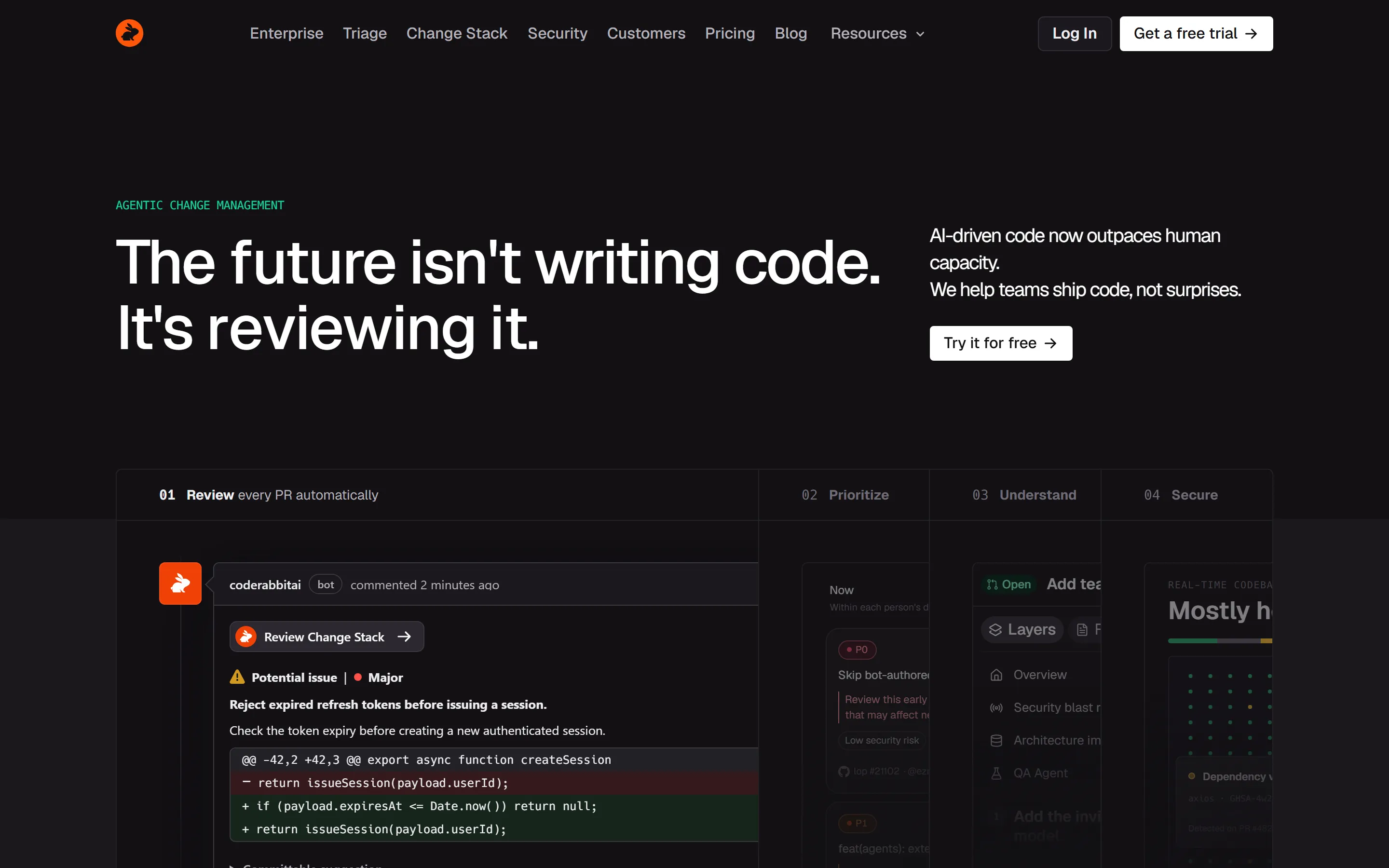
CodeRabbit is an AI code reviewer. Installed on a Git repository, it reviews pull requests automatically and posts inline findings, a walkthrough comment and a summary, and it also reviews local changes in a VS Code-compatible IDE extension and a command-line tool. The homepage now files this under agentic change management in four parts, Review, Triage, Change Stack and Security, with the line that AI-driven code now outpaces human capacity.
The vendor reports 17K customers and 6M repositories on its homepage. CodeRabbit was founded in 2023 and announced a $143 million Series C at a $1.5 billion valuation on August 12, 2026. It says it works with all programming languages, with proficiency that varies by language.
Once installed, CodeRabbit reviews a pull request automatically when it is opened against the repository’s default branch. Draft PRs are skipped unless you set drafts to true, and other target branches have to be added under base_branches. The first pass is a full review; later pushes get incremental reviews that cover only what changed since the last one, and by default incremental reviews pause after five reviewed commits.
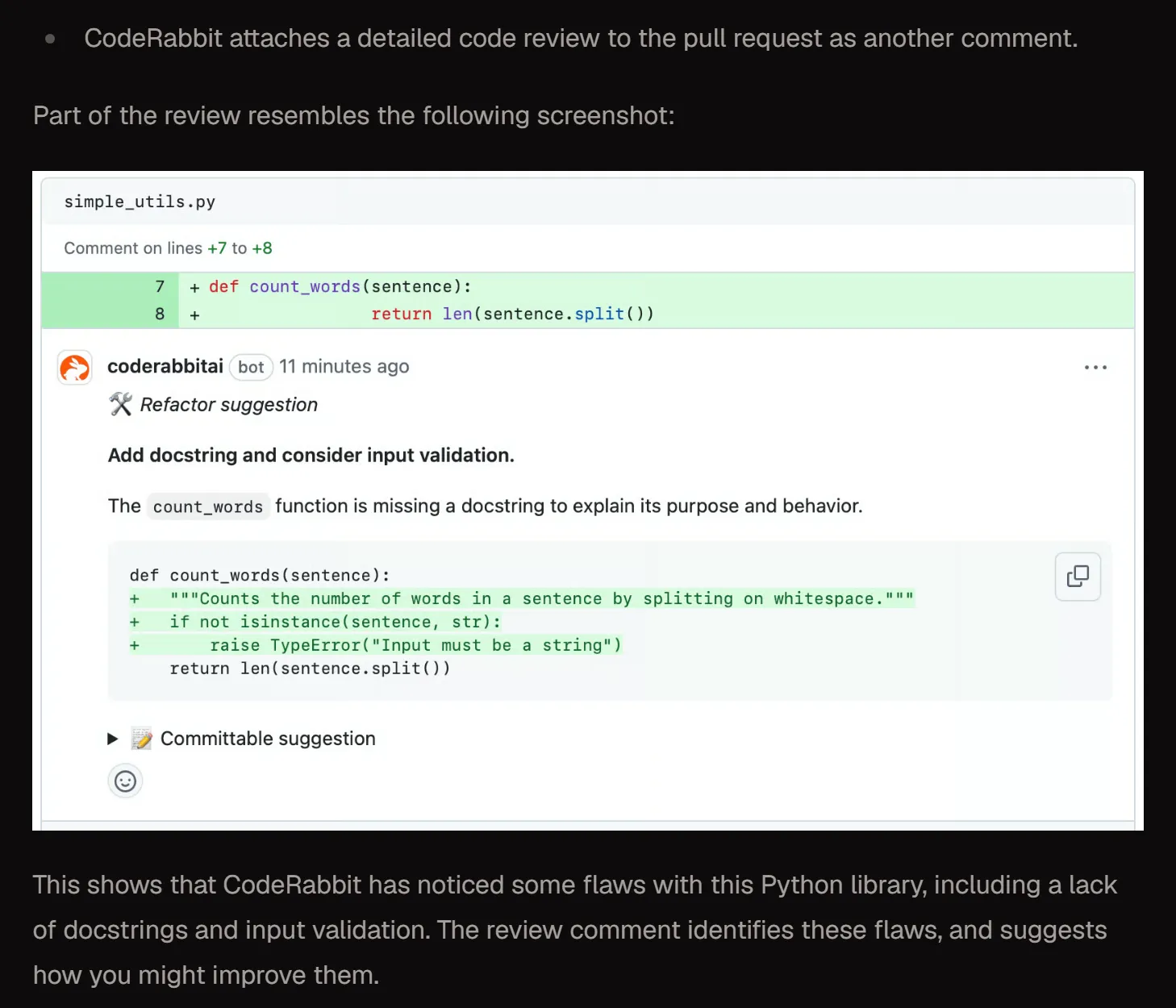
Each review runs in a sandboxed cloud environment with the full repository cloned, combining static analysers, linters and SAST tools with parallel agents for review, verification, chat, pre-merge checks and finishing touches. Findings arrive as inline comments like the vendor’s example above, where a refactor suggestion comes with a diff you can apply in one click. Mentioning @coderabbitai in a PR comment starts a chat with the bot in the thread.
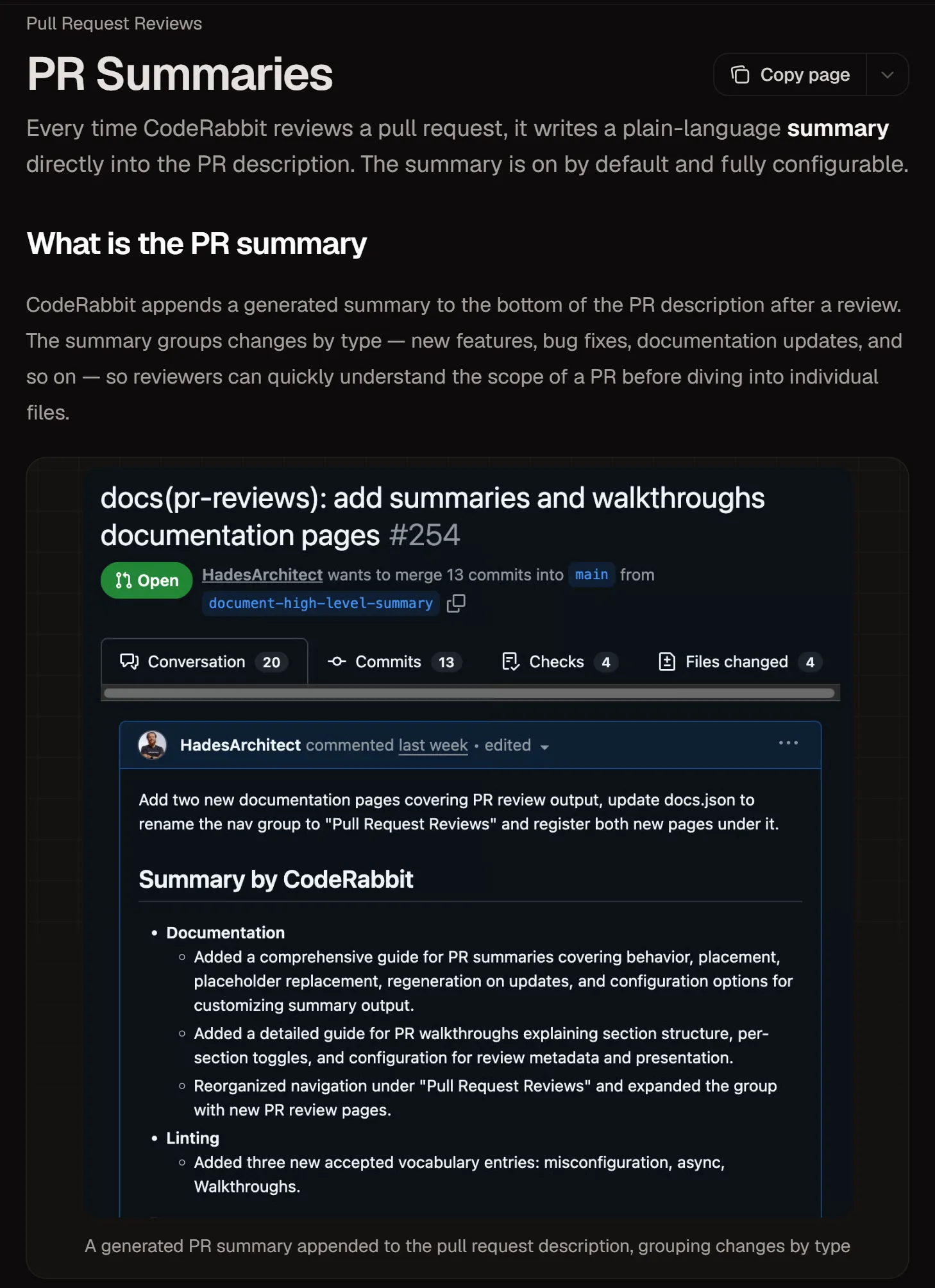
Every review appends a plain-language summary to the bottom of the PR description, grouped by change type, and regenerates it on each push. Separately, a walkthrough comment at the top of the thread summarises the changed files, draws Mermaid sequence diagrams when a PR changes how components interact, scores review effort from 1 (trivial) to 5 (very complex), and lists related issues and PRs with suggested labels and reviewers.
Every walkthrough section is on by default and each can be switched off. That includes the short poem at the end, which the docs say can be disabled for strictly professional output (reviews.poem: false).
Setting it up on your Git platform
Sign-up uses an existing GitHub, GitLab, Azure DevOps, Bitbucket Cloud or Bitbucket Data Center account and needs no credit card. On GitHub you click Authorize coderabbitai, pick the organisation and choose all repositories or only selected ones; you need owner-level permissions on at least one repository. The app asks for read-and-write access to checks, code, commit statuses, issues, pull requests and workflows, and organisations with an IP allow list must add 35.222.179.152/32, 34.170.211.100/32 and 136.113.208.247/32. GitHub Enterprise Cloud users on *.ghe.com follow the self-hosted GitHub guide.
The other platforms need an admin and a token. On GitLab.com a GitLab admin sets up a one-time token: a personal access token for a dedicated service account with the api, read_api and read_user scopes, or a group access token, which GitLab by default limits to Premium and Ultimate. CodeRabbit then configures the webhook itself, and GitLab sets a token with no expiry date entered to expire after 365 days. Azure DevOps can be connected only by admins, new organisations use a Microsoft Entra service principal, and the Edit Subscriptions permission must be set per project with the Azure CLI or PRs are never reviewed. Bitbucket Cloud needs a dedicated Bitbucket account for CodeRabbit and an Atlassian API token with repository, pull request, issue, workspace, webhook and pipeline scopes.
The commands you will use
Everything runs through comments that mention @coderabbitai. @coderabbitai review runs an incremental review of new changes and @coderabbitai full review starts again from scratch; each uses one review from the hourly allowance. @coderabbitai pause and @coderabbitai resume stop and restart automatic reviews, while @coderabbitai ignore goes in the PR description, not a comment, and switches reviews off for that PR until you remove it. @coderabbitai rate limit shows your remaining allowance without using a review.
For follow-up work, @coderabbitai autofix is on by default for paid plans on GitHub, GitLab, Azure DevOps and Bitbucket Cloud, and @coderabbitai autofix stacked pr delivers the fix as a stacked pull request. @coderabbitai generate unit tests needs the Team plan and works on GitHub, GitLab and Azure DevOps. @coderabbitai fix-ci needs the Team plan, runs on GitHub and Azure DevOps, and opens a stacked PR by default or commits directly with @coderabbitai fix-ci commit. @coderabbitai configuration prints the settings in force and where each came from, and @coderabbitai generate configuration opens a PR that adds a .coderabbit.yaml. @coderabbitai approve submits an approval only when reviews.request_changes_workflow is enabled, and since October 1, 2026 setting reviews.allow_author_approval to false stops PR authors from using @coderabbitai approve and @coderabbitai resolve on their own pull requests.
Where configuration lives
Repository settings go in a .coderabbit.yaml file in the repository root, and CodeRabbit uses the copy on the feature branch under review, so a config change takes effect in the PR that makes it. Since September 16, 2026 the same settings can be written in TypeScript as .coderabbit.config.ts, but a committed .coderabbit.yaml or .coderabbit.yml always takes precedence.
Settings can also come from the web UI and from a central coderabbit repository, and the sources do not merge unless inheritance is enabled. From highest priority: workspace global overrides, organisation global overrides, the repository file, the central coderabbit repository, repository UI settings, organisation UI settings, workspace settings, then defaults. @coderabbitai configuration shows which source each setting came from.
Keeping reviews useful: noise control
One lever is reviews.profile. Chill is the default and gives balanced feedback, assertive gives more and may feel nitpicky, and quiet, added on July 2, 2026, posts only critical and major issues that are also high-impact inline and groups everything else into collapsed sections of the review summary. tone_instructions sets a tone for reviews and chat in up to 250 characters.
Then narrow what gets reviewed. path_filters exclude files that do not benefit from review, such as lock files, binaries and generated code, using a ! prefix, and path_instructions attach plain-language guidance to specific paths; @coderabbitai emit path instructions opens a PR with suggestions from the past seven days. Automatic review can be limited by labels, skipped for PRs whose titles contain keywords such as WIP, and turned off for authors such as dependabot[bot]. The allowance is spent per push, not per commit, and web-UI edits or GitHub’s Update branch button each use a review.
Finally, teach it. Learnings are preferences CodeRabbit records from chat replies on PRs and issues; they appear under Learnings added and apply to later reviews, scoped to the repository, the organisation or auto (repository for public repos, organisation for private ones), with an optional admin approval delay of up to 30 days. CodeRabbit also reads agent instruction files already in the repository, including AGENTS.md, CLAUDE.md, GEMINI.md, .cursorrules, .windsurfrules and .github/copilot-instructions.md, and applies each to its own directory tree. File names are case-sensitive.
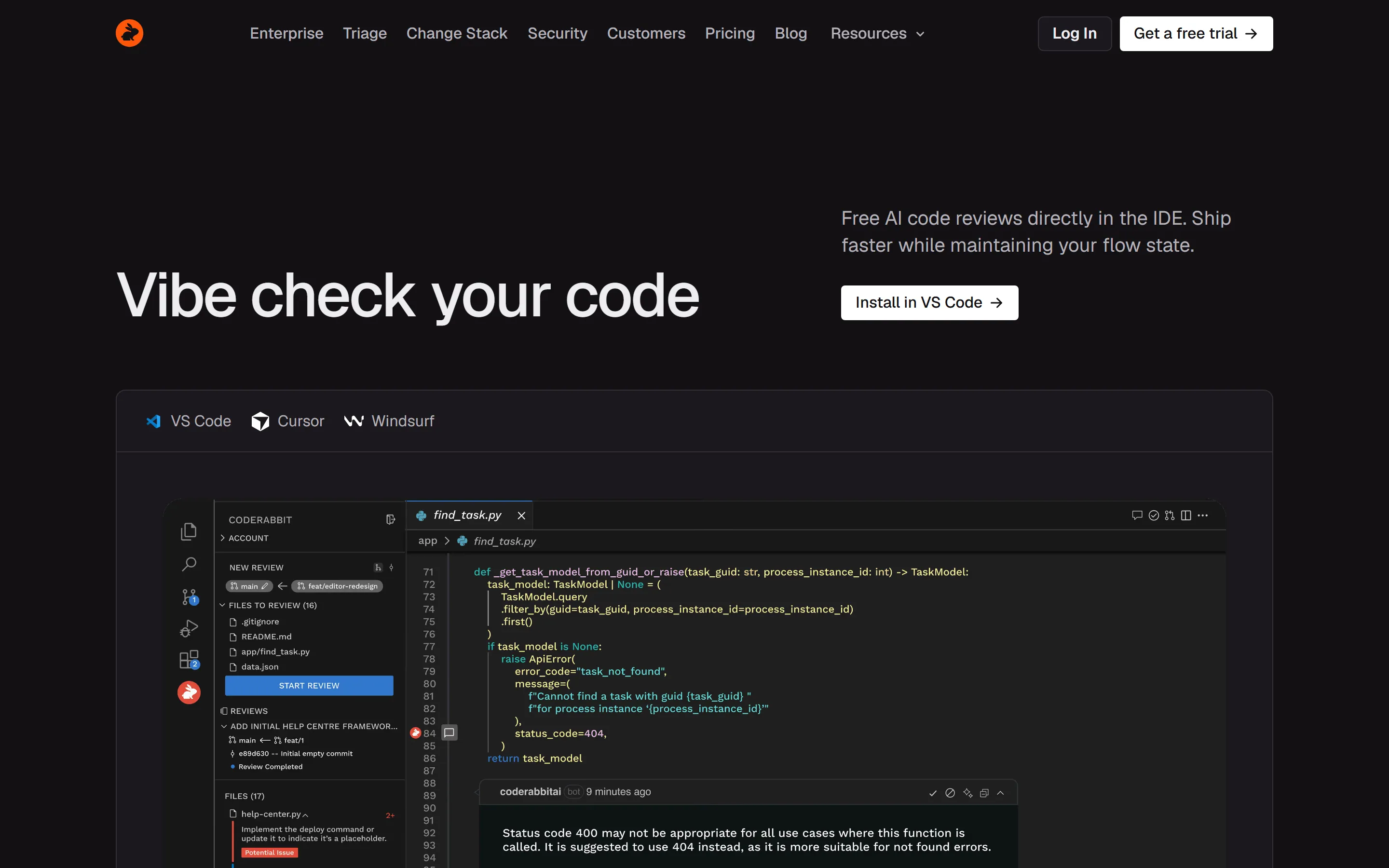
The extension runs in VS Code and any editor that supports VS Code extensions, including Cursor and Windsurf. Install it from the Extensions panel by searching for coderabbit (ID CodeRabbit.coderabbit-vscode) and log in. After you commit, it asks whether to start a review, and you can also review all changes, committed changes only or uncommitted changes only.
No subscription is needed: Free users get 3 IDE reviews per developer per hour. On paid plans the IDE review carries nearly all PR-review features; only chat, docstrings and unit-test generation stay PR-only. Findings can be handed to Copilot, Claude Code (CLI and extension), Codex CLI, OpenCode, Cline, Roo, Kilo Code or Augment Code, or copied to the clipboard for any other agent. On the VS Code Marketplace the extension had an average of 3.7 out of 5 from 28 ratings on October 3, 2026.
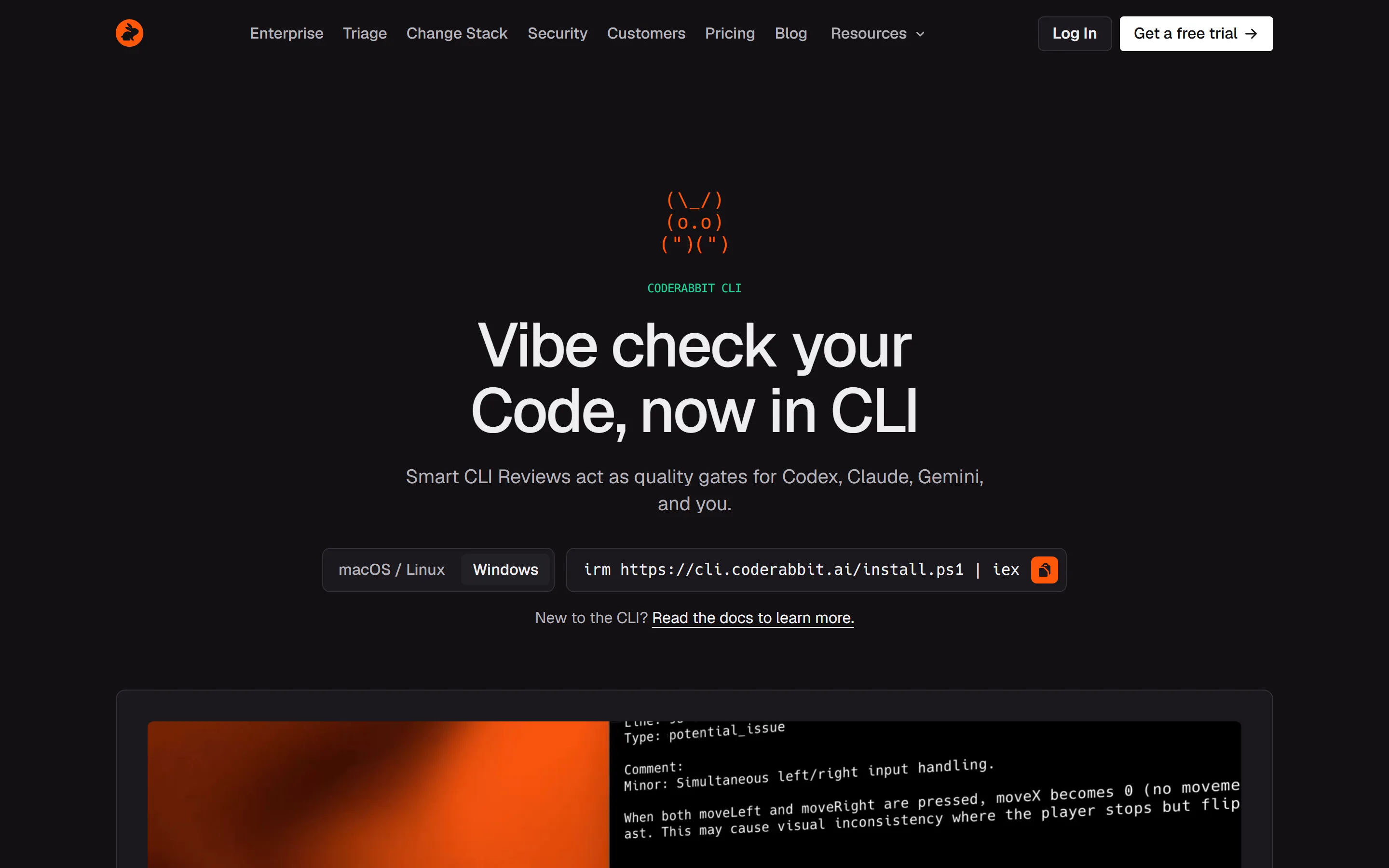
The CLI, labelled open beta in the docs, installs with curl -fsSL https://cli.coderabbit.ai/install.sh | sh on macOS and Linux, brew install coderabbit with Homebrew, or irm https://cli.coderabbit.ai/install.ps1 | iex in PowerShell. On Windows it is a signed native x64 build that installs per user without administrator rights, needs PowerShell 5.1 or 7 and Git, and adds both the coderabbit and cr commands. Sign in with cr auth login, adding --region eu for the EU region or --api-key for headless use.
coderabbit review checks tracked changes by default: committed, staged and unstaged edits. --committed, --uncommitted, --include-untracked and --base <branch> change the scope, --deep (CLI 0.8.0 and later) runs a deep review, and cr usage shows whether included reviews are available. Reviews can take 7 to 30+ minutes depending on scope. For coding agents, coderabbit review --agent emits NDJSON output, there are Claude Code and Cursor plugins, and coderabbit skills installs skills for Codex, Claude Code, Cursor, Gemini CLI and GitHub Copilot. CLI 0.7.0 removed the --plain, --fast, --interactive, --cwd and --prompt-only flags, so older scripts need --light, --dir or --agent instead.
Triage, Change Stack, Plan and finishing touches
Beyond single reviews, the plan decides what you get. Triage, in beta since August 13, 2026 and generally available on GitHub Cloud since September 15, 2026, ranks every open PR the organisation tracks in one cross-repository queue from P0 to P3 and explains each priority with its evidence. It needs Team or higher and a Review seat, is in beta on GitLab Cloud and, since September 29, 2026, self-managed GitLab, and does not support Bitbucket. Triage rules, which the Triage FAQ says remain specific to GitHub Cloud, can merge low-risk PRs, close stale ones after notice, fix failed CI and review feedback with Auto-fix PRs, and send recurring Slack reminders. Change Stack, still in preview, opens on GitHub, GitLab, Bitbucket and Azure DevOps (read-only on Azure DevOps); its core view is on every paid plan, its AI chat and coding-agent tasks need Team, and blast radius and architectural impact analysis need Advanced.
CodeRabbit Plan, also on Team, turns an issue on GitHub, GitLab, Azure DevOps, Jira or Linear into a coding plan for an agent; comment @coderabbitai plan on the issue to get one. Finishing touches split the same way: Autofix and docstrings are on Essentials, while unit tests, Fix CI, merge-conflict resolution, simplify and custom recipes need Team, and most are open beta. GitHub and Azure DevOps get all seven, GitLab lacks Fix CI, Bitbucket Cloud gets Autofix and docstrings, and Bitbucket Data Center only docstrings. Post-merge actions, on Team with up to five per organisation, run follow-up work after a merge, such as opening a follow-up PR or posting a report.
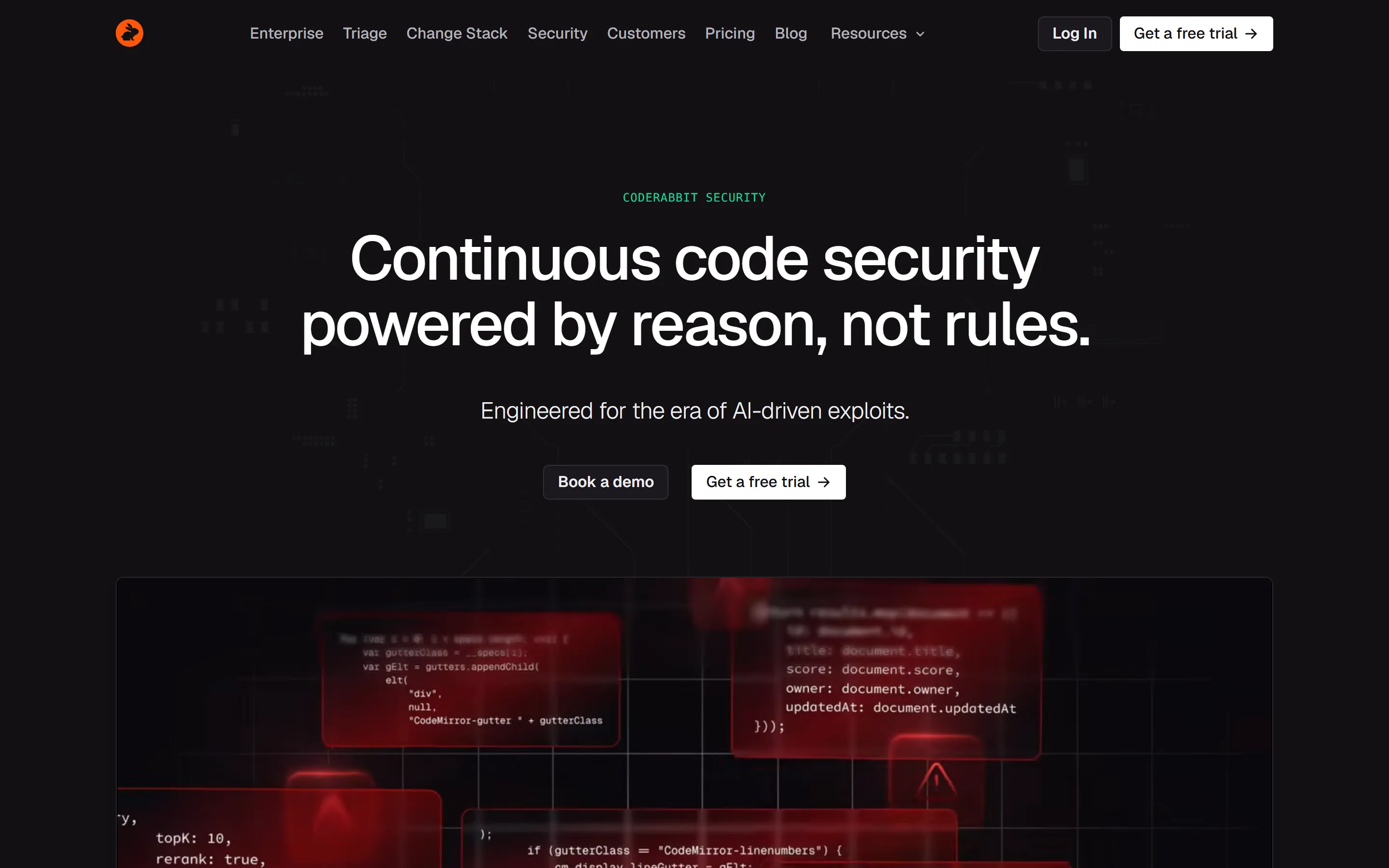
CodeRabbit Security, introduced in a vendor blog post on August 13, 2026 and still in open beta, works in four stages the vendor calls Map, Hunt, Verify and Fix with AI: it maps the attack surface, traces attack paths across files, checks and rejects false positives, and drafts fixes ranked by risk. A security review of every PR and continuous monitoring are included in Advanced and Enterprise. AI Deep Scan of a full codebase is usage-based and billed separately, even on those plans; the Security page describes it as a full-repo scan quoted up front by codebase size and offers a free sample scan.
Security runs on GitHub (including Enterprise Server), GitLab, Azure DevOps Services and Bitbucket Cloud, not on Bitbucket Data Center or Azure DevOps Server, and recurring scan schedules are GitHub-only. AI Deep Scan does no software composition analysis and produces no SBOM; dependency risk is covered separately, by the OSV-Scanner run in PR reviews and the dependency findings with CVE IDs that Security reports.
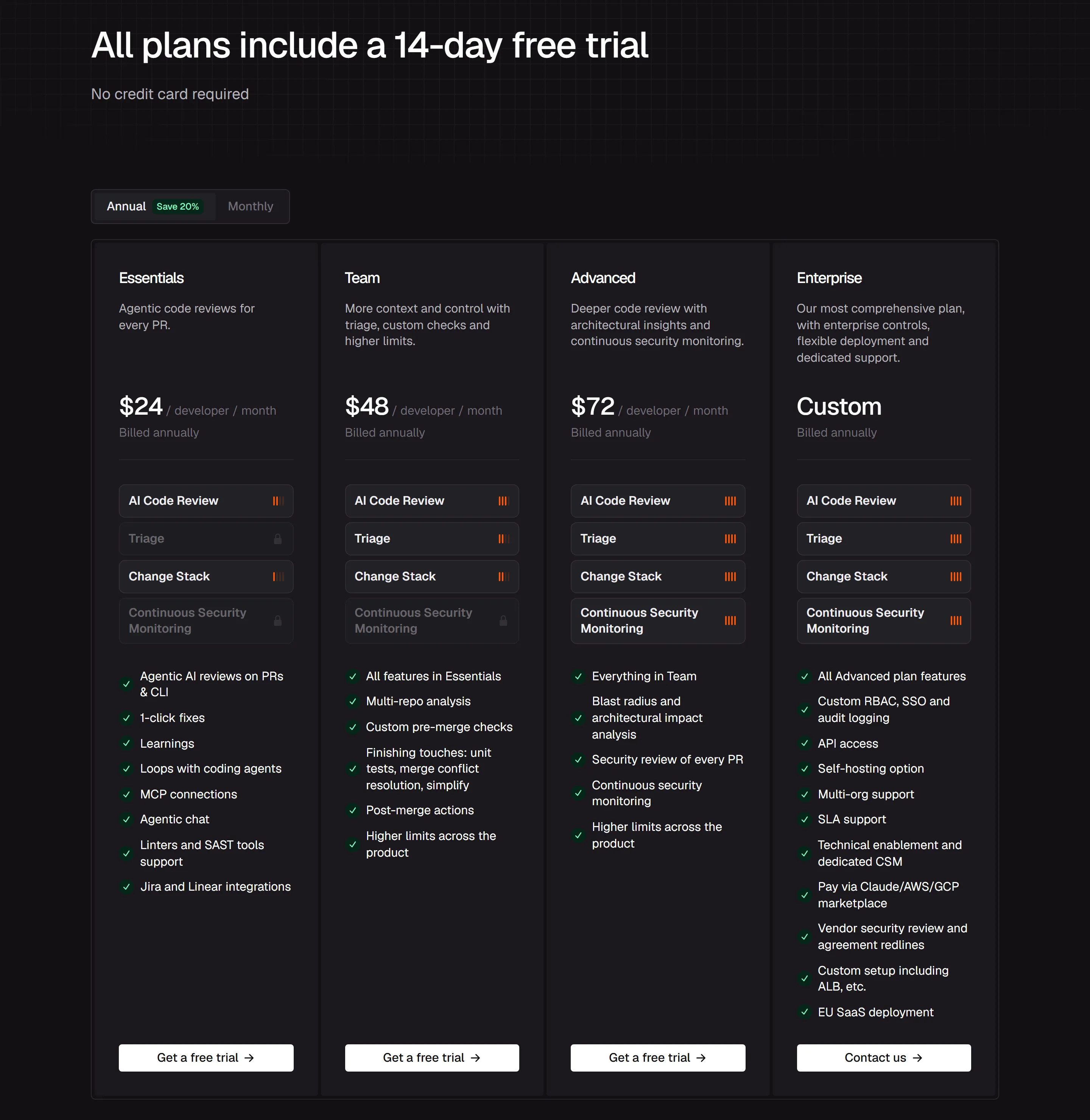
CodeRabbit lists Free plus four paid plans, and a separate open-source tier. Essentials is the old Pro and Team the old Pro Plus, at the same prices; Advanced is new. With annual billing, which the page says saves 20%, Essentials is $24, Team $48 and Advanced $72 per developer per month, and Enterprise is custom and shown as billed annually. The vendor says you are charged only for developers who create pull requests. Seats can be assigned by hand; on monthly plans an unassigned seat stays active and billed until the end of the billing cycle before it can be reassigned. In auto-approval mode, a seat whose holder has not raised a PR in 30 days moves to the next new user, and if every seat is taken CodeRabbit can add one at a prorated charge on non-Enterprise plans. Developers without a paid seat still get Free-tier reviews unless an admin disables enable_free_tier.
Worked example for a team where 10 developers open pull requests: a year costs $2,880 on Essentials, $5,760 on Team and $8,640 on Advanced with annual billing. Hourly limits per developer rise with the plan, from 5 PR reviews and 150 files per review on Essentials to 8 reviews and 300 files on Team, 10 on Advanced and 12 on Enterprise. Limits apply per developer identity, not per organisation, so if one bot account opens every PR the whole team shares one developer’s allowance.
Startups backed by a VC or accelerator with less than $25 million in funding can get 50% off Team for six months on an annual Team plan. Upgrades take effect immediately with prorated billing and downgrades at the end of the billing cycle. After a cancellation the organisation keeps access until the cycle ends, then drops to Free with its review history and configuration kept. Since September 29, 2026 OpenAI customers can also apply existing OpenAI spend commitments to CodeRabbit through the OpenAI Marketplace.
Monthly billing, overflow and the extras billed separately
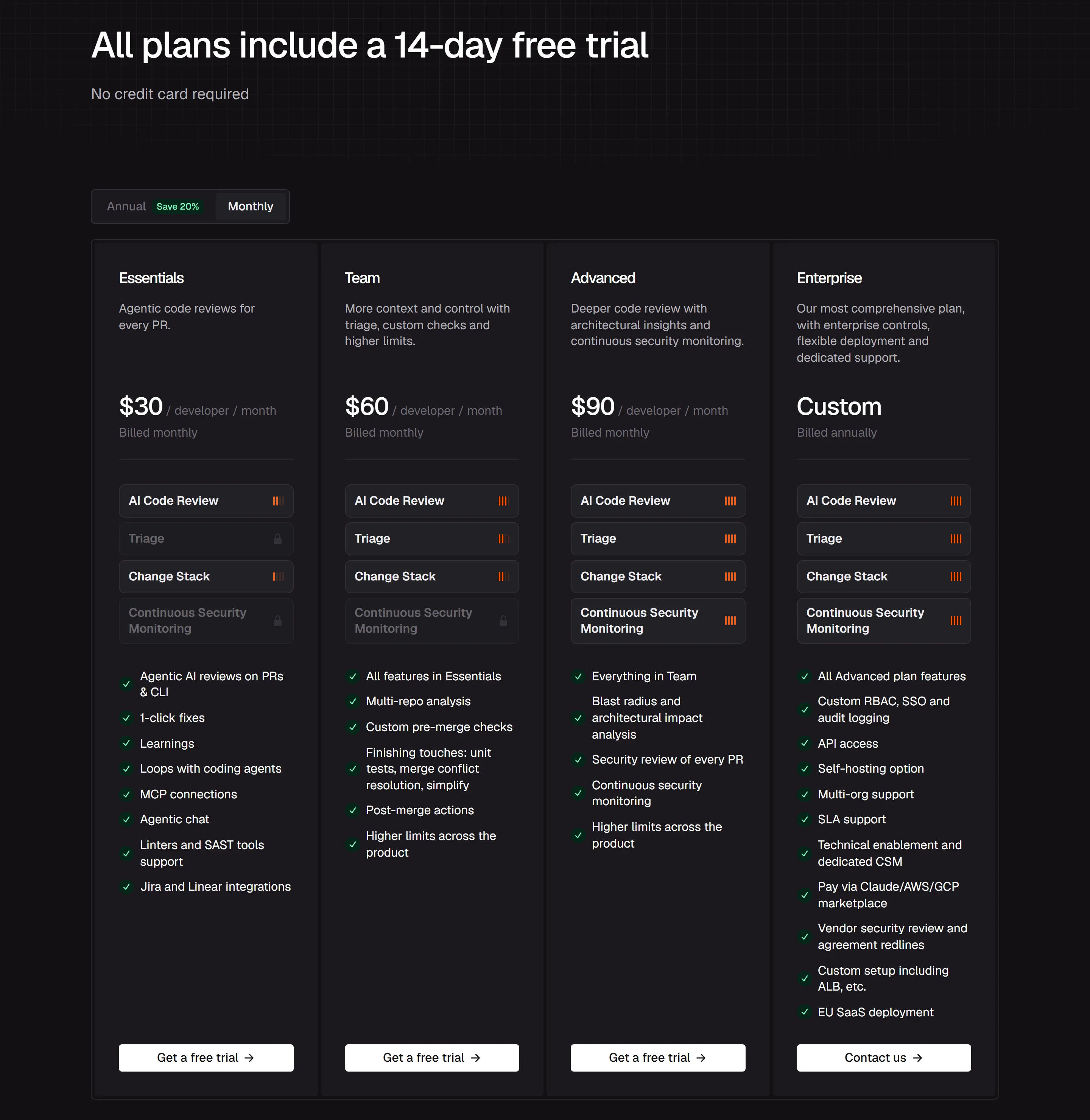
On monthly billing the same plans cost $30, $60 and $90 per developer per month, so the 10-author team above pays $3,600, $7,200 or $10,800 a year. Every plan starts with a 14-day free trial with no credit card, and eligible PR reviews past the rate limits are free during that first trial (CLI and IDE overages and usage-priced large-PR reviews are still charged). Organisations paying by card are billed for new users as soon as they are added; those paying by invoice are billed at the end of the month.
When a developer runs out of hourly reviews, usage-based reviews can carry on at $0.25 per reviewed file, sold as $1 credits that cover four files, so a review of 40 files costs $10. Admins choose Automatic, On demand or Off and set a monthly cap. The option covers Essentials, Team and Advanced, excludes INR and marketplace subscriptions, reviews PRs over the plan’s file limit only on GitHub and GitHub Enterprise, and cannot review PRs of more than 300 files. Heavy use also slows the refill: on Essentials, 60 or more reviews in the last seven days drops a developer to one review an hour, one at a time, and the same step comes at 70 on Team and 80 on Advanced, while enrolled Enterprise contracts drop to one review an hour at 90 delivered reviews. Subscriptions that began as Pro or Pro+ keep their earlier schedules.
CodeRabbit Agent, for cloud coding tasks, Slack and automations, is billed outside every review plan at $0.40 per agent minute, which is $24 an hour. Trial and free minutes are used first, the Agent page offers $50 of free minutes per user (125 minutes at that rate), and admins can set a monthly spending cap.
Data handling and compliance
For each review the repository is cloned in memory and discarded when the review ends, and source code is not kept afterwards unless review caching is on. Caching is on by default; caches are encrypted except for open-source projects, expire within seven days and are never used for training, and reviews.disable_cache: true turns caching off. CodeRabbit also stores vector representations of code for context and longer-lived data such as Learnings, and knowledge_base.opt_out: true deletes all stored knowledge-base data, learnings included, immediately and irrevocably. Opting out of all data retention at once is a self-hosted Enterprise option.
The docs FAQ says review code goes to OpenAI and/or Anthropic for reviewing only; the terms of service also allow other third-party model providers, and the Trust Center lists Baseten as an AI-services subprocessor. The docs and terms of service say customer code is not used to train models, by CodeRabbit or its model providers. The privacy policy carves out open-source projects: it says CodeRabbit uses OSS to train its systems. Model output logging for support is off by default. Servers are in the United States on Google Cloud; an EU region exists, and the pricing page lists EU SaaS deployment only on the Enterprise card. Enterprise SSO works with Okta, Microsoft Entra ID or any SAML 2.0 provider, with SCIM sync for Okta and Entra ID, plus custom roles and an audit log with a REST API for SIEM export.
The Trust Center lists SOC 2 Type 2, ISO 27001:2022 and GDPR. The current SOC 2 Type II report covers March 1, 2025 to February 28, 2026 and, like the zero-data-retention documents for OpenAI, Anthropic and Baseten, is available on request. The privacy policy also mentions HIPAA, but the Trust Center lists no HIPAA attestation. The DPA commits to 30 days’ notice of subprocessor changes and to incident notice without undue delay, with no fixed number of hours. In January 2025 Kudelski Security reported that RuboCop was running outside CodeRabbit’s sandbox; by the vendor’s account, credentials were rotated within 3 hours, a fix shipped within 12 hours, and no evidence of customer data access was found.
How accurate it is
CodeRabbit’s blog reports that on Martian’s Code Review Bench, using January to February 2026 data from nearly 300,000 PRs, it ranked first of ten tools on F1 at 51.2%, with 53.5% recall and 49.2% precision, which the post reads as roughly one comment in two leading to a code change. The same post says a 50-PR offline comparison gave it a lower F1. Martian’s own leaderboard for the last month, read on October 3, 2026, ranks it third on F1 at 61.6% (69.9% precision, 55.0% recall), behind Cubic Dev AI and Greptile.
No independent figure we found supports the vendor FAQ’s claim that CodeRabbit catches 95%+ of bugs; the benchmark the vendor cites measured its recall at 53.5% for January to February and 55.0% for the last month. The FAQ itself says CodeRabbit is designed to complement human review, not replace it.
Who it fits, and who it does not
It fits teams that ship through pull requests on a supported Git platform, especially where AI-generated code is arriving faster than people can review it, and teams that want the same reviewer in the IDE, the CLI and the PR. Maintainers of public repositories get PR reviews free with Team features, though repositories under 10 stars must trigger reviews by hand and the privacy policy says OSS code is used for training. Buyers who need audit evidence can request SOC 2 and ISO 27001 documents, and organisations with 500 or more seats can self-host.
It fits less well if you want free reviews of private PRs (Free only summarises them), if one bot account opens most of your PRs, if you are on Bitbucket and want Triage or most finishing touches, if your PRs routinely exceed 150 files on Essentials or 300 on higher plans, or if you need an SBOM or full software composition analysis (AI Deep Scan does neither). INR-billed organisations cannot buy Advanced self-serve. On any plan, start with the quiet or chill profile and path filters, watch the Review Usage page under Analytics for rate-limit hits, and keep a human approver on critical changes.
Strengths
Charged per developer who creates pull requests, not per member of the organisation
Free PR reviews on public repositories with Team features, with no application
Runs on GitHub, GitHub Enterprise Server, GitLab (cloud and self-managed), Azure DevOps, Bitbucket Cloud and Bitbucket Data Center
Detailed noise control: quiet, chill and assertive profiles, path filters, path instructions and Learnings
Reviews in the PR, the IDE extension and the CLI (paid plans get nearly all PR-review features in the IDE), with hand-off of findings to coding agents
SOC 2 Type 2 and ISO 27001:2022 listed on its Trust Center; customer code is not used for model training
Watch out for
The Free plan only summarises pull requests; full PR reviews on private repositories need a paid seat
Hourly per-developer caps (5 PR reviews on Essentials up to 12 on Enterprise) plus fair-usage throttling; overflow costs $0.25 per reviewed file
Triage, issue planning, unit-test generation and custom pre-merge checks start at Team; a security review of every PR starts at Advanced
Features vary by platform: no Triage on Bitbucket, and Bitbucket Cloud gets only Autofix and docstrings among finishing touches
On Martian’s last-month Code Review Bench leaderboard (read 3 Oct 2026) its precision is 69.9%, so about three in ten comments lead to no code change
The privacy policy excludes open-source projects from the no-training promise
Vendor pages disagree on details, such as which plan the trial starts on and whether it bundles 40+ or 50+ linters
Key features
Feature
What it does
Pull request review
Reviews PRs opened against the default branch automatically, then reviews only what changed on later pushes. Posts inline findings with committable fixes, a walkthrough comment and a summary in the PR description.
Walkthrough comment
Changed-files summary, Mermaid sequence diagrams, a 1 to 5 review-effort score, related issues and PRs, suggested labels and reviewers, and a poem. Each section can be switched off.
Learnings and code guidelines
Records team preferences from chat replies and applies them to later reviews. Also reads AGENTS.md, CLAUDE.md, .cursorrules and similar agent instruction files as review criteria.
Linters and SAST tools
Runs third-party tools such as ESLint, Ruff, golangci-lint, Semgrep, Trivy and TruffleHog in sandboxes and picks the relevant ones automatically. The docs say 50+ tools; the marketing FAQ says 40+.
Pre-merge checks
Four built-in checks on Essentials (docstring coverage at 80% by default, PR title, PR description, issue assessment) in off, warning or error mode. Custom natural-language checks: 10 on Team, 20 on Advanced and Enterprise.
Finishing touches
Autofix and docstrings on Essentials; unit tests, Fix CI, merge-conflict resolution, simplify and custom recipes on Team. Most are open beta. GitHub and Azure DevOps get all seven; Bitbucket Cloud gets Autofix and docstrings.
Triage
One cross-repository queue of open PRs ranked P0 to P3, with rules (GitHub Cloud only, per the Triage FAQ) that can merge low-risk PRs or close stale ones. Team plan and up; Triage itself runs on GitHub Cloud, GitLab in beta, not Bitbucket.
Change Stack
In preview. Core view on every paid plan; AI chat and coding-agent tasks from Team; blast radius and architectural impact analysis from Advanced.
CodeRabbit Plan
Turns an issue into a coding plan for an agent; comment @coderabbitai plan on the issue. Team plan; GitHub, GitLab, Azure DevOps, Jira and Linear.
IDE extension and CLI
Reviews local changes in VS Code, Cursor and Windsurf, or from the terminal with coderabbit review, and hands findings to agents such as Copilot, Claude Code and Codex CLI.
CodeRabbit Security
PR security review and continuous monitoring on Advanced and Enterprise; full-codebase AI Deep Scan is usage-based. Open beta. AI Deep Scan itself does no software composition analysis (SCA) and produces no SBOM, although Security reports dependency findings with CVE IDs and PR reviews run OSV-Scanner on lockfiles.
Also an AI code reviewer. On Martian’s Code Review Bench leaderboard for the last month (read 3 Oct 2026), Qodo Code Review ranks tenth by F1 and CodeRabbit third.
CodeRabbit’s FAQ calls Copilot an editor tool for code completion and itself a central reviewer. Its IDE extension can hand findings to Copilot to fix. Copilot’s reviewer ranks fourth on Martian’s last-month leaderboard, just behind CodeRabbit.
Competes through its own reviewer, Bugbot, and also hosts CodeRabbit: the IDE extension runs in Cursor, and a Cursor plugin (/add-plugin coderabbit) runs reviews inside Cursor Agent. On Martian’s last-month leaderboard (read 3 Oct 2026) Cursor ranks 8th at 58.3% F1, with higher precision than CodeRabbit (73.5% vs 69.9%) and lower recall (48.3% vs 55.0%).
On Martian’s last-month leaderboard (read 3 Oct 2026) Gemini Code Assist ranks 13th at 53.1% F1 (60.6% precision, 47.2% recall), against CodeRabbit’s 61.6% (69.9%, 55.0%).
Anthropic’s coding agent; a Claude reviewer ranks fifth on Martian’s last-month leaderboard (60.7% F1). CodeRabbit ships a Claude Code plugin (/coderabbit:coderabbit-review), and its CLI page pitches CLI reviews as quality gates for Codex, Claude and Gemini.
Partly. The Free plan covers unlimited public and private repositories with no credit card, but on pull requests it only writes a summary, one per developer per hour. On Free, basic reviews run in the VS Code extension and the CLI, three of each per developer per hour; paid plans add full context-aware reviews and more files per review. Public repositories are different: they get free PR reviews permanently, with Team features under a separate open-source rate-limit tier.
How much does CodeRabbit cost?
Per developer per month: Essentials is $24 billed annually or $30 billed monthly, Team $48 or $60, and Advanced $72 or $90. Enterprise is custom and shown as billed annually. You are charged only for developers who create pull requests, so 10 PR authors on Essentials cost $2,880 a year with annual billing.
What happened to CodeRabbit Pro and Pro Plus?
They were renamed at the same prices. Essentials is the new name for Pro and Team is the new name for Pro Plus, and existing subscriptions show the new names automatically. Advanced is a new tier. The Lite and Pro Legacy plans were retired on June 8, 2026.
What happens when we hit the review limit?
Each developer has a rolling hourly allowance: 5 PR reviews on Essentials, 8 on Team, 10 on Advanced and 12 on Enterprise. On Essentials, Team, Advanced and newly enrolled Enterprise contracts, sustained heavy use slows how fast reviews refill under the fair-usage policy. Comment @coderabbitai rate limit to see what is left without spending a review. On Essentials, Team and Advanced, admins can let reviews continue at $0.25 per reviewed file automatically, require consent each time, or stop; Enterprise arranges this with its account team.
Which platforms does CodeRabbit support?
GitHub, GitHub Enterprise Server, GitLab (cloud and self-managed), Azure DevOps, Bitbucket Cloud and Bitbucket Data Center. Some features are narrower: Triage runs on GitHub Cloud and, in beta, GitLab, but not Bitbucket; Fix CI runs on GitHub and Azure DevOps; Security does not support Bitbucket Data Center or Azure DevOps Server.
Does CodeRabbit store our code or train on it?
The repository is cloned for each review and source code is not kept afterwards unless review caching is on. Caching is on by default, encrypted except for open-source projects, expires within seven days and can be turned off with reviews.disable_cache: true. The docs say code is sent to OpenAI and/or Anthropic for review only (the terms of service also allow other model providers, and the Trust Center lists Baseten as an AI-services subprocessor), and customer code is never used for training. The privacy policy makes an exception for open-source projects, which it says are used to train its systems.
How do I pause or skip CodeRabbit on a pull request?
Comment @coderabbitai pause to stop automatic reviews on that PR and @coderabbitai resume to restart them. To switch reviews off for a PR, put @coderabbitai ignore in the PR description, not in a comment, and remove it to turn them back on. Draft PRs are skipped by default.
Is there a free trial?
Yes. Every plan has a 14-day free trial with no credit card, and PR reviews past the rate limits are free during that first trial (CLI and IDE overages and usage-priced large-PR reviews are still charged). The vendor’s docs say new organisations start on an Advanced trial while its marketing FAQ says the Team plan, so check which features your trial includes.
Can CodeRabbit be self-hosted?
Only for Enterprise customers with 500 or more seats. Self-hosted CodeRabbit supports GitHub Enterprise Server, GitLab self-managed, Azure DevOps and Bitbucket Data Center, lets you bring your own LLM provider, and sends code and prompts out of your environment only to that provider.
Independent user ratings from third-party review sites, linked here for transparency.
These are not our editorial score, are captured on the date shown, and may have changed since.
Free. Nobody pays for rooms, and vendors never see their notes or votes.Or start a new room.
Book a demo
CodeRabbit does not take demo requests through OfficeBooks yet, so we do not collect your details for it. CodeRabbit's own site: coderabbit.ai ↗
Plain link: we earn nothing from it.
Verified deal
Free PR reviews on every public repository; VC- or accelerator-backed startups with under $25M in funding get 50% off Team for 6 months on an annual Team plan
Free. Creators add data-ref with the referral id from their creator page to be credited for the clicks they send. The card updates when we re-verify and never changes a score.
CodeRabbit
Our rating 4.5/5 · Free plan (PR summaries only); paid from $24/developer/mo billed annually ($30 billed monthly)