CodeRabbit Review: Benchmarks, Pricing, Rate Limits and Setup
In the DEV Community four-tool study CodeRabbit said the most: 281 findings on 82 pull requests, a ready-to-apply patch with 68.3% of them, and the slowest results of the four tools. Whether that trade suits a team is what this review tries to settle.
On Martian’s Code Review Bench the answer depends on the yardstick. Its online arm credits a comment when the developer’s post-review changes match it, and there CodeRabbit’s recall led Martian’s v0 results. CodeRabbit concedes its F1 was lower in the offline arm, where every tool is graded against the same answer key. Section three sets the two side by side.
4.5of 5OfficeBooks score
Four Git platforms, the most findings in the DEV Community study and a patch with 68.3% of them. The price is review time: it was the slowest of the four tools, and it is talkative on default settings.
Reviews on GitHub, GitLab, Bitbucket and Azure DevOps
5 to 12 PR reviews per developer an hour on paid plans
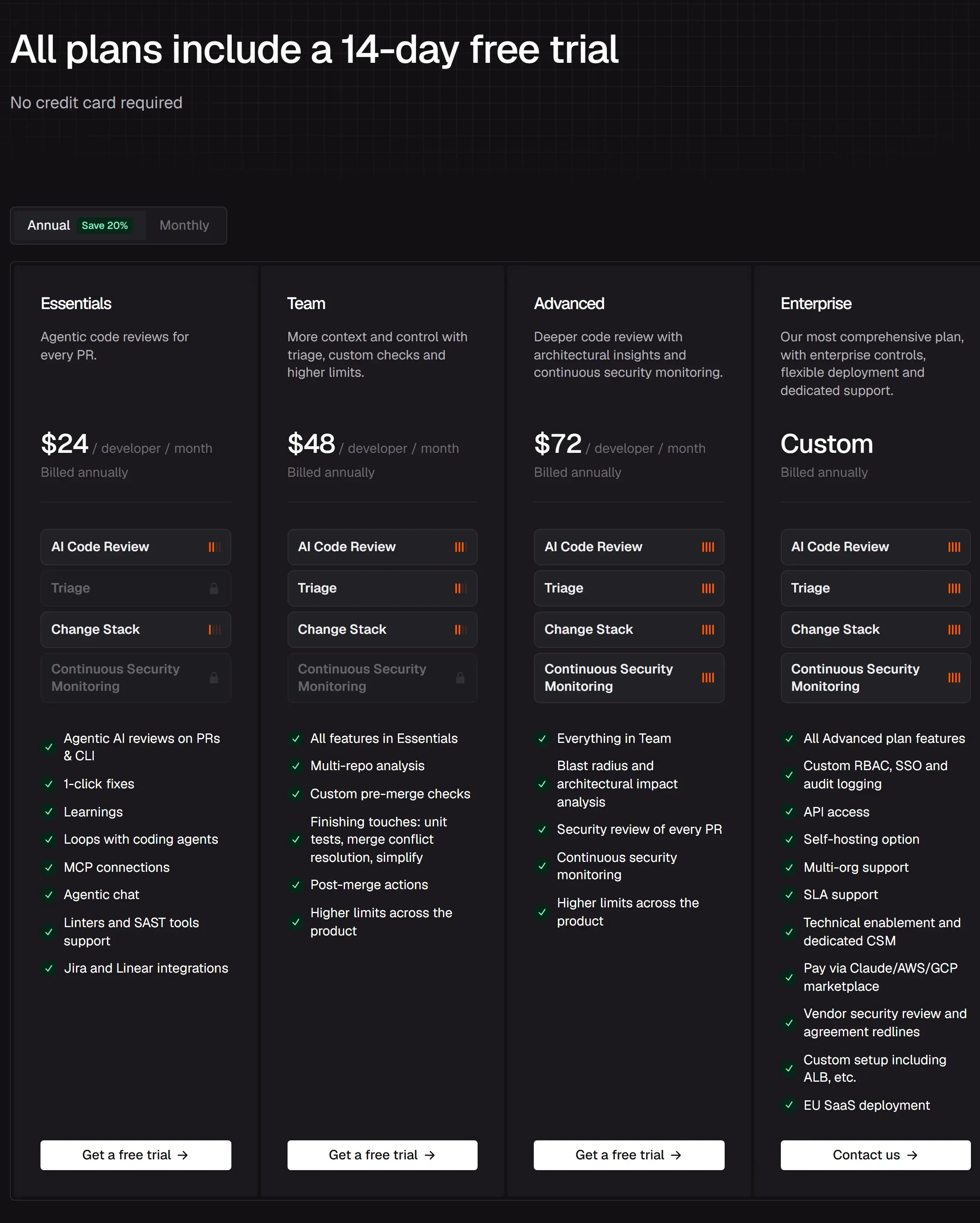
Essentials from $24 per PR author a month (annual)
Trial: 14 days, no card
Where it does well
A patch with 68.3% of its findings in the DEV Community study; Greptile, next, managed 32.5%.
Few wrong calls: 2.3% false positives in the same study.
One .coderabbit.yaml controls comment volume, per-directory rules and merge-blocking checks.
Billing counts PR authors, not everyone in the organisation.
Where it falls short
A 9.5-minute mean wait for a first finding in the DEV study, the longest of four tools.
No plan reviews a pull request of more than 300 files; Essentials covers 150 a review.
A bot account that opens every pull request shares one developer’s hourly allowance.
About one vulnerable sample in five flagged in DeepSource’s competitor-run CVE test.
Each figure names its source; numbers that come from CodeRabbit itself are marked vendor-reported.
No credit card. Free PR reviews on public repositories.
Trial links here are affiliate links: if you start a trial through
one, OfficeBooks may be paid. Prices and scores are the same either way.
1. Scorecard
4.5/ 5Editorial score
Each row is our editorial judgement out of five, with the evidence it rests on underneath. The overall 4.5 is a judgement of the whole, not a calculation from the rows; it leans most on detection, fixes and platform fit. The DEV Community figures in the rows come from tools run on their default settings; section five covers what configuration changes.
Finding real issues4.5
Highest online recall in Martian’s v0 results and the most findings of four tools in the DEV Community study. Held back by a weaker offline result, which CodeRabbit concedes, and a low catch rate in DeepSource’s CVE test.
Comment volume3.5
Few of its findings were wrong (2.3% false positives in the DEV study), and few carried a top label: 12 of 281 were critical or high, 96% Major or Minor, at 3.4 per PR it commented on.
Ready-made fixes4.5
Greptile attached suggestions to 32.5% of its findings in the DEV study; CodeRabbit attached unified-diff patches to 68.3%. About two-thirds of those patches were mechanical: formatting, docblock or naming changes and the like.
Time to first finding3.0
Last of four on speed in the DEV study: 9.5 minutes on average and 41.3 minutes at P95 from commit to first finding. Its own docs say a review takes longer than five minutes on most projects.
Tuning in .coderabbit.yaml5.0
Nearly everything in section five, from how much it posts to whether a failed rule blocks a merge, is a key in .coderabbit.yaml.
Git hosts and editors4.5
GitHub (including Enterprise Server), GitLab (including self-managed), Bitbucket Cloud and Data Center, and Azure DevOps, plus an IDE extension and a CLI. Cursor Bugbot and Qodo cover the same four platforms.
Data handling and security record4.0
Annual SOC 2 Type II audit and ISO 27001; private code is excluded from training by contract. Marked down for review caching on by default, training on open-source code and the RuboCop flaw in section six.
Price per PR author4.5
$24 per developer a month on Essentials (annual), charged only for people who open pull requests. Team and Advanced cost two and three times as much, and overflow reviews cost $0.25 per file.
2. What CodeRabbit does
CodeRabbit reviews code in two places. Inside a pull request it runs automatically; on a developer’s machine, its CLI and VS Code extension review changes that have not been pushed. CodeRabbit sells the package as “agentic change management”, made up of Review, Triage (a ranked queue of open pull requests), Change Stack and Security.
Screenshot of coderabbit.ai. How CodeRabbit positions itself on its homepage.
Every review gets a sandboxed cloud environment with a full clone of the repository. CodeRabbit runs more than 50 static analysers, linters and SAST tools alongside agents that explore the codebase, with separate specialised agents working in parallel on review, verification, chat, pre-merge checks and finishing touches. Context comes from Codegraph, which maps the code a change can affect, and from a code index holding vector representations of your code. Several AI models share the work: the docs say code is sent to OpenAI and/or Anthropic for review only, and the Trust Center also lists Baseten as an AI subprocessor.
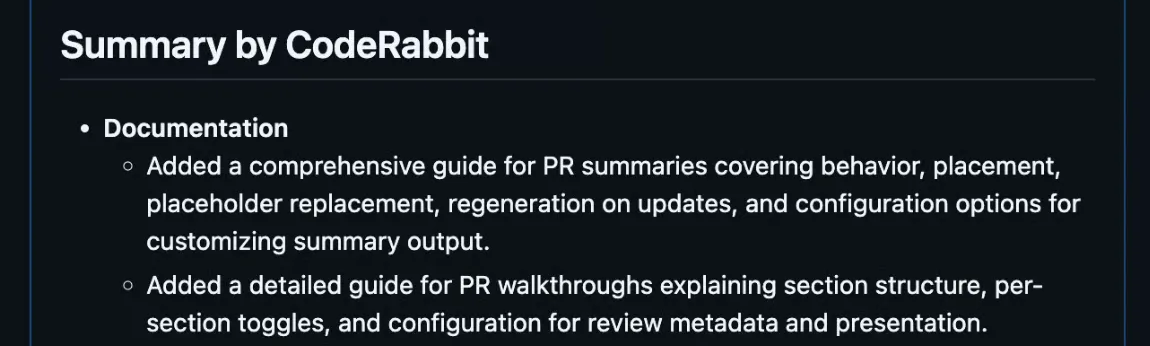
Results appear in three places: a summary added to the PR description, a walkthrough comment at the head of the thread, and inline findings on the changed lines. A Mermaid sequence diagram is included only when a change alters how components interact, for example API calls, event flows or async workflows. The review environment is discarded after the review is posted, with two exceptions. Review caching is on by default, so cached copies of the repository and its dependencies can be kept for up to seven days (encrypted, except for open-source projects, and never used for training) unless you set reviews.disable_cache: true. CodeRabbit also keeps the vector code index and the learnings it uses for context. Opening a pull request triggers a full analysis; each further push triggers an incremental review of the commits it has not reviewed, until automatic reviews pause (after five reviewed commits by default). CodeRabbit also writes code: its Coding Agent, in open beta, runs a request, a review finding, a coding plan or a failing CI check as a cloud task and returns a direct commit or a stacked pull request, and Autofix and the other finishing touches run the same way.
CodeRabbit’s GitHub App requests read and write access to checks, code, commit statuses, issues, pull requests and workflows.
Founders
Harjot Gill and Guritfaq Singhnamed as founders in the press kit; Harjot Gill is CEO
Series C
$143Mat a $1.5B valuation, co-led by Atomico and Smash Capital
Series B
$60Mled by Scale Venture Partners with NVIDIA’s NVentures, at a $550M valuation
Customers
17,000+CodeRabbit’s figure, with no split for paying customers; logos shown include Adyen, Indeed and NVIDIA
Repositories
6MCodeRabbit’s homepage figure; its CLI and IDE pages say 3M
Review volume
2M+ PRs a weekand 75M+ code issues found, per the press kit (vendor-reported)
NVIDIA CEO Jensen Huang’s line on the homepage (“We’re using CodeRabbit all over NVIDIA.”) is a customer quote CodeRabbit chose. “Most installed AI App” on GitHub and GitLab is also CodeRabbit’s own wording, not a GitHub Marketplace ranking, so we give no Marketplace position. CodeRabbit is private and files no public accounts: its funding rounds come from its newsroom, which also names BMW i Ventures, Datadog, CRV and Scale Venture Partners among the Series C investors.
3. Four outside tests, read together
Single benchmark figures for CodeRabbit circulate widely, and on their own they mislead. Four sources are worth reading together, one of them with two arms, because they disagree, and the disagreements say more about the tool than any one score does.
Code Review Bench: online results
Merged open-source PRs that review bots commented on
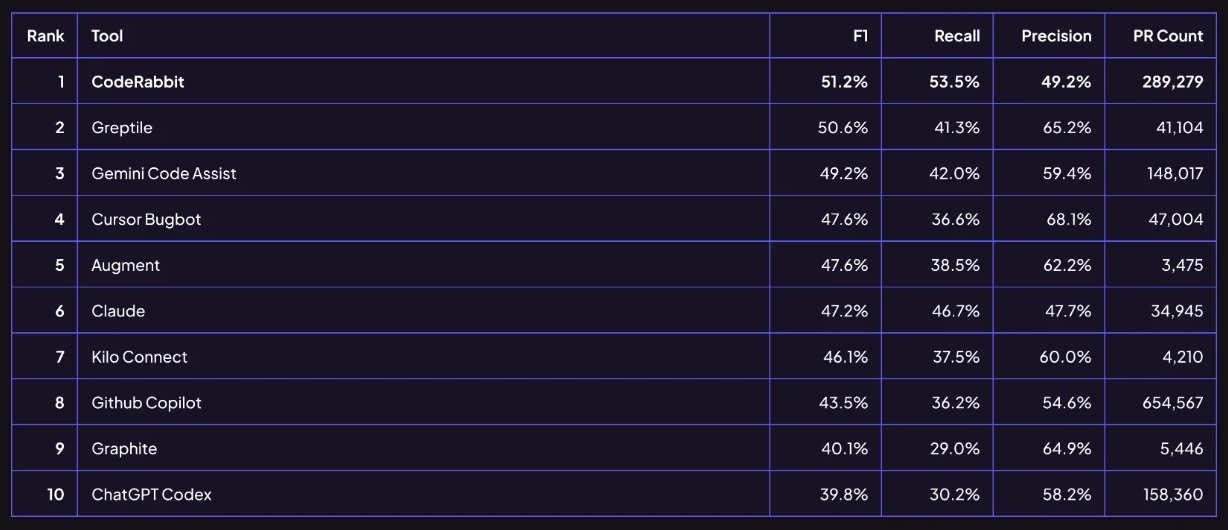
Martian’s write-up of its v0 results says CodeRabbit had the highest recall in the online data (0.54) and the most PRs reviewed (5,035). CodeRabbit’s own table of the same results (vendor-reported) puts it first of ten on F1 at 51.2%, with 53.5% recall and 49.2% precision; only Claude, at 47.7%, had lower precision. Martian recomputes its board, so its own figures can differ from the vendor’s table; the board is linked in the sources.
50 PRs from five open-source projects, 173 human-verified golden comments
Every tool reviews the same PRs from Cal.com, Discourse, Grafana, Keycloak and Sentry, and an LLM judge matches its findings against the golden list. CodeRabbit’s own post says its F1 in this 50-PR comparison was lower than in the online analysis. Martian’s write-up says its offline data seems to show tools that comment more having lower precision, and describes the offline results as diverging significantly from the online data. The offline table can be scored with more than one LLM judge, so we link to Martian’s board rather than quote a rank from it.
146 merged PRs, 679 findings, 446 review events, one PHP/React team
CodeRabbit produced the largest number of findings: 281 across 82 PRs, about 3.4 on each PR it commented on, and 259 of them (92.2%) sat where no other reviewer had flagged anything. 2.3% were false positives, the lowest rate among the reviewers that produced any. A unified-diff patch came with 68.3% of them. Its 9.5-minute mean and 41.3-minute P95 from commit to first finding were the slowest of the four. CodeRabbit labelled 96% of its findings Major or Minor, and 12 critical or high.
165 JavaScript and TypeScript entries, vulnerable and patched variants
DeepSource ran CodeRabbit’s CLI through its own harness, judged by Claude Opus 4.5. Its comparison article reports 59.39% accuracy and 36.19% F1; its benchmark page lists a slightly different row: F1 36.00%, recall 21.95%, precision 100%. Accuracy also counts correct “nothing wrong” answers on patched code, so it is not a catch rate: by DeepSource’s own recall figure, CodeRabbit caught about one vulnerable sample in five. Semgrep CE, the rule-based baseline, scored 36.70% F1, essentially level, and CodeRabbit’s F1 was the lowest of the eight tools on that page. DeepSource ranks its own product first at 84.51%.
309 PRs, four tools at default settings, 10 developers and a GPT-5 judge
AIMultiple compared CodeRabbit, Cursor Bugbot, GitHub Copilot and Greptile. CodeRabbit had the top judge score on 51% of the 309 PRs, more than any other tool, and AIMultiple says it scored highest in both the human and the LLM-judge evaluations, followed by Greptile and GitHub Copilot. The “1/5 completeness, 2/5 depth” scores that circulate for CodeRabbit come from a hypothetical “Tool B” in AIMultiple’s example judging prompt; they are not CodeRabbit’s.
The “nearly 300,000 pull requests” in CodeRabbit’s post is CodeRabbit’s own PR count in the table it published (289,279). It is not the size of the benchmark, which Martian describes as 200K+ PRs refreshed daily, and it is not the number of CodeRabbit-reviewed PRs in Martian’s online data, which was 5,035.
Who ran each test matters as much as the score. DeepSource sells a competing product and built the harness it scored, on 165 JavaScript and TypeScript entries (82 vulnerable and 83 patched variants) drawn from an OpenSSF set of more than 200 CVEs. The DEV Community authors call their own study N=1: one team, one codebase. Martian’s online recall can count only fixes developers made after a review, an imperfect proxy in Martian’s own words, because nobody knows how many bugs a pull request really contains.
CodeRabbit’s table of Martian’s v0 online results, transcribed from the graphic above
#
Tool
F1
Recall
Precision
PRs
1
CodeRabbit
51.2%
53.5%
49.2%
289,279
2
Greptile
50.6%
41.3%
65.2%
41,104
3
Gemini Code Assist
49.2%
42.0%
59.4%
148,017
4
Cursor Bugbot
47.6%
36.6%
68.1%
47,004
5
Augment
47.6%
38.5%
62.2%
3,475
6
Claude
47.2%
46.7%
47.7%
34,945
7
Kilo Connect
46.1%
37.5%
60.0%
4,210
8
Github Copilot
43.5%
36.2%
54.6%
654,567
9
Graphite
40.1%
29.0%
64.9%
5,446
10
ChatGPT Codex
39.8%
30.2%
58.2%
158,360
Two arms, two different answers
Martian’s online arm samples merged open-source pull requests that review bots commented on. An LLM judge pairs each bot suggestion with the changes the developer made after the review. Precision is the share of a tool’s suggestions that line up with a real fix; recall is the share of the developer’s post-review fixes that the tool had pointed to. A match does not prove that the comment caused the change. In Martian’s v0 results CodeRabbit’s recall led on this measure, and its own blog reads its 49.2% precision as roughly one comment in two leading to a code change (vendor-reported).
Martian’s write-up reports that some comments it had scored as false positives in the offline arm were real issues missing from its answer key, a list of known bugs verified by human annotators. Every tool’s offline precision is therefore understated.
Martian offers two possible reasons for CodeRabbit’s gap between the arms without choosing between them. One is that a talkative tool finds real issues that quieter tools miss, which the offline key counts against it. The other is that developers on repositories with high-volume bots build different habits about which comments they act on. Both are hypotheses, and both are worth keeping in mind when a vendor quotes only one arm.
CodeRabbitmean 9.5 min · P95 41.3 min
Greptilemean 4.9 min · P95 38.0 min
Cursor Bugbotmean 6.1 min · P95 13.3 min
Sentry Seermean 3.7 min · P95 6.8 min
Solid bar: mean. Pale bar: 95th percentile. Same scale for all four.
Commit to first finding, four reviewers on the same 146 merged pull
requests (DEV Community study). CodeRabbit’s tail is the story: a 41.3-minute P95
means that on one commit in twenty, CodeRabbit took at least that long to post its
first finding.
CodeRabbit68.3% (unified diff)
Greptile32.5% (suggestion block)
Cursor Bugbot0% (“Fix in Cursor” link instead)
Sentry Seer0% (prose only)
Pale track: 100% of each tool’s findings. Solid bar: share with an applyable fix.
Findings that arrived with a fix you could apply in GitHub, DEV Community
study. CodeRabbit’s 68.3% are unified diffs; Greptile’s 32.5% are one-click suggestion
blocks. Cursor Bugbot attached “Fix in Cursor” links instead, and Sentry Seer wrote
prose only.
The benchmark that matters is your repository
The trial needs no card. Point it at the repository where reviews pile up.
Plan names follow CodeRabbit’s pricing page: Essentials, Team, Advanced and Enterprise.
4.1 Pull-request reviews
Review comments with a summary and walkthrough
Every paid plan · free on public repositories
Does
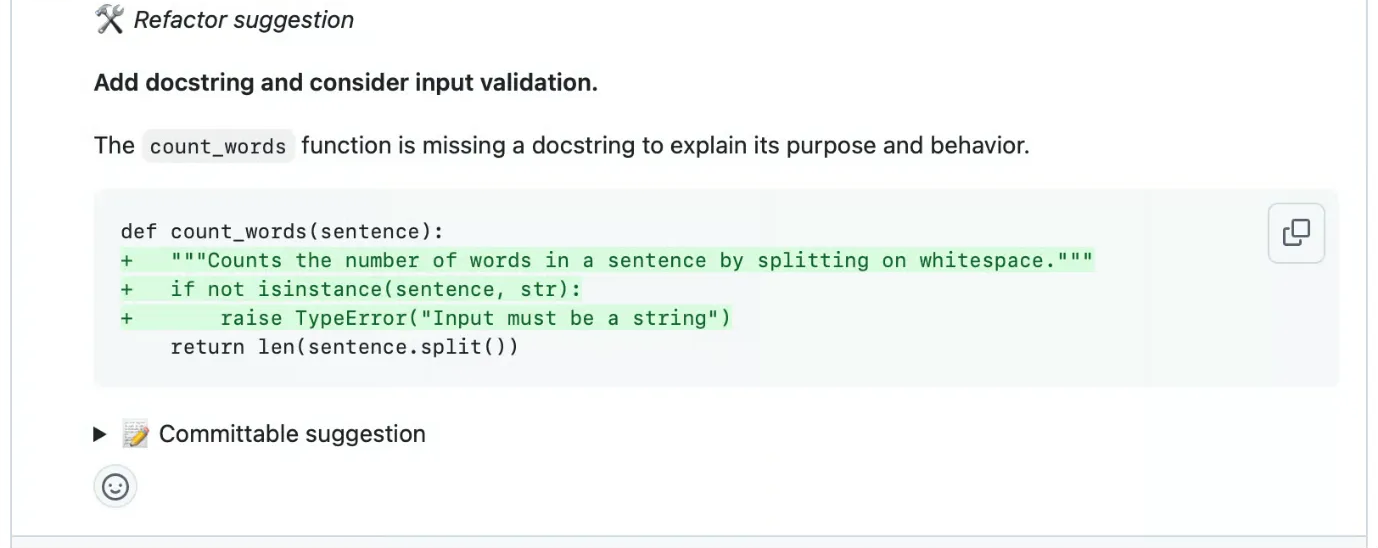
Posts a summary in the PR description, a walkthrough comment (changed files, an estimated review effort from 1 to 5, related issues and PRs) and inline findings. Each finding carries a severity (Critical, Major, Minor, Trivial or Info) and a category such as Security & Privacy or Functional Correctness. A sequence diagram appears only when the change alters how components interact. In the DEV study, 68.3% of its findings came with a unified-diff patch, and 27.8% of those also carried a GitHub one-click suggestion block.
Limits
A review covers up to 150 files on Free and Essentials and 300 on Team, Advanced and Enterprise, counted after path filters; no plan reviews a PR of more than 300 files. Hourly PR reviews per developer: Essentials 5, Team 8, Advanced 10, Enterprise 12. The Free plan only summarises PRs. In the DEV study the wait averaged 9.5 minutes, with a 41.3-minute P95.
Best for
Small, frequent pull requests, where the file cap never bites and most findings can be committed from the diff.
Cross-file and cross-repository context
Linked repos: 1 · 5 · 10 · 20
Does
Codegraph maps the code a change can affect, so a finding can take callers and dependencies elsewhere in the repository into account. Multi-repo analysis checks a change against linked repositories for breaking changes, API mismatches and dependency issues that cross repository boundaries.
Limits
Linked repositories: none on Free, 1 on Essentials, 5 on Team, 10 on Advanced, 20 on Enterprise. Automatic linking is available from Team and is off by default (knowledge_base.automatic_linking_mode defaults to disabled); manual links are unaffected.
Best for
Services that call each other’s APIs from separate repositories.
4.2 Bundled analysers and CodeRabbit Security
Bundled third-party analysers
Essentials and above
Does
Runs third-party tools in sandboxes, picked automatically for the languages in the repository. The language row of the docs’ tool list opens with ESLint, Biome, Oxlint and React Doctor, then Ruff, Pylint, Flake8, golangci-lint, Clippy and RuboCop; infrastructure-as-code files get Checkov, Trivy, TFLint and Hadolint, and secret scanning uses Betterleaks and TruffleHog.
Limits
The docs say 50+ tools; the marketing FAQ says 40+. Microsoft Presidio (PII detection) is opt-in according to its own docs page, while the generated configuration reference lists its default as on, so set reviews.tools.presidio.enabled explicitly. Each tool switches on or off with reviews.tools.<tool>.enabled, and many accept your own config_file.
Best for
Repositories with little linting in CI, where one install brings the usual analysers for each language.
API contract checks with oasdiff
On by default
Does
When a pull request changes an OpenAPI or Swagger spec, compares it with the base version and reports breaking API changes as review comments.
Limits
Compares only spec files that match its patterns, such as **/openapi.yaml or **/swagger.json, and only when the pull request changes them.
Best for
Flagging a removed endpoint or field during review, before an API client breaks.
CodeRabbit Security
Advanced and Enterprise · Deep Scan billed by usage
Does
A security review of every PR and continuous security monitoring are included in Advanced and Enterprise. AI Deep Scan scans a whole codebase and is billed by usage.
Limits
AI Deep Scan does no dependency or software composition analysis (SCA) and produces no SBOM. We found no independent benchmark of these security features.
Best for
An additional check alongside a dedicated scanner.
4.3 Chat, planning and automation
Chatting with the reviewer, and learnings
Chat: 50 · 75 · 100 · 100 · 25 on open source
Does
When you explain a preference in a reply, CodeRabbit can keep it as a learning that it applies when reviewing, noted under “Learnings added”; admins can require approval first. Learnings are scoped local (repository), global (organisation) or auto, the default: local for public repositories, global for private ones. Replying to a CodeRabbit comment or mentioning @coderabbitai gets a finding explained, a code example shown or an alternative proposed. @coderabbitai resolve resolves all its comments, and @coderabbitai generate unit tests (Team) writes tests.
Limits
Each developer has a rolling chat allowance: Essentials 50 messages, Team 75, Advanced and Enterprise 100, open-source repositories 25. The Free plan includes no chat.
Best for
Stating a team rule in a single reply instead of dismissing the same comment on every pull request.
Issue Planner (CodeRabbit Plan)
Team plan
Does
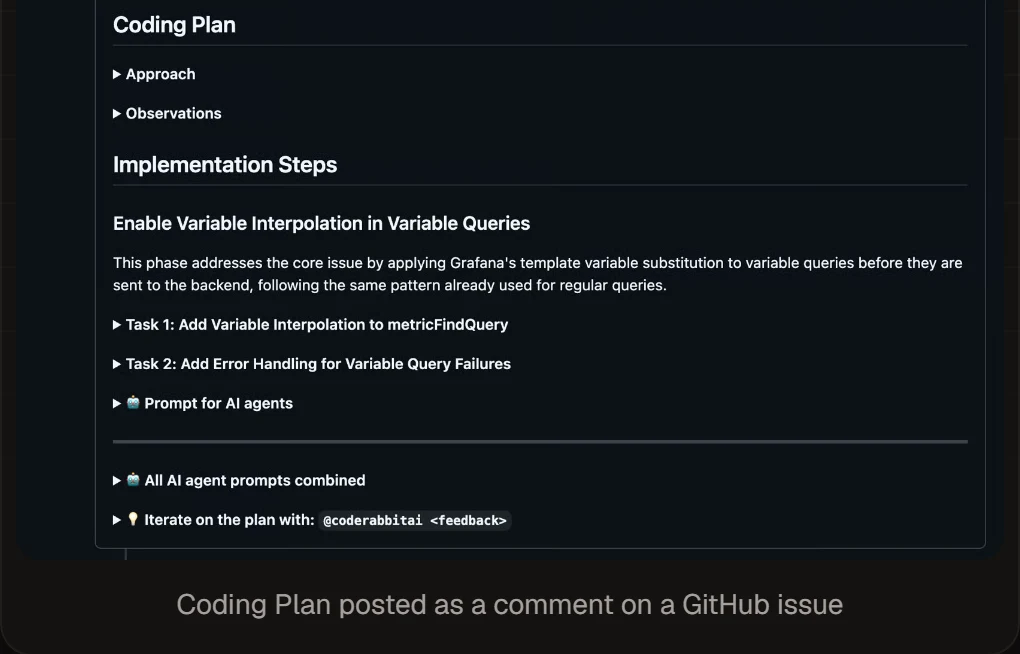
Write @coderabbitai plan in an issue comment, or turn on auto-planning, and CodeRabbit produces a Coding Plan: summary, codebase research, design choices, phases, tasks and prompts ready for a coding agent. It works with GitHub, GitLab, Azure DevOps, Jira and Linear, and plans can also start from free-form text, a PRD or a design spec in the web app or the VS Code extension.
Limits
Team plan and above. CodeRabbit says a plan typically takes 5 to 10 minutes. On GitHub and GitLab the plan is posted as an issue comment; for Azure DevOps, Jira and Linear it lives in the CodeRabbit web app.
Best for
Teams that hand implementation work to coding agents and want the codebase research and task split done first.
Ranks open pull requests from many repositories in one queue, so reviewers can see what to look at next.
Limits
Needs Team or higher and an active Review seat. Runs on GitHub Cloud and, in beta, on GitLab Cloud and self-managed GitLab; Bitbucket is not supported.
Best for
Organisations whose open-PR queue has outgrown sorting by hand.
Fix CI failures
Team · open beta · GitHub and Azure DevOps
Does
Comment @coderabbitai fix-ci on a pull request with a failing check. The fix arrives as a stacked pull request or, with @coderabbitai fix-ci commit, as a commit on the PR branch.
Limits
Open beta, Team plan and above, on GitHub (Cloud and Enterprise Server) and Azure DevOps only.
Best for
Lint and build failures that need no design decision.
Post-merge actions
Team plan
Does
Instructions written in plain language, which CodeRabbit carries out when a pull request merges into the default branch: open a follow-up pull request (a changelog entry, for example), post a report, or file a ticket or Slack message through a connected MCP integration.
Limits
Up to five. Runs on GitHub Cloud, GitLab Cloud, Azure DevOps and Bitbucket Cloud; not on self-hosted GitHub or GitLab, or on Bitbucket Data Center.
Best for
Routine follow-up work after a merge, such as changelog entries or tickets.
Finishing touches
Autofix, docstrings: Essentials · the rest: Team
Does
Autofix implements fixes for unresolved review findings; the other touches generate docstrings or unit tests, simplify code, resolve merge conflicts, fix CI, or run custom recipes you define.
Limits
Autofix and docstrings on Essentials; unit tests, Simplify, merge-conflict resolution, Fix CI and custom recipes need Team, and most are open beta. Custom recipes per repository: 10 on Team, 20 on Advanced and Enterprise, and up to 10 on public, non-trial Essentials repositories. Simplify must be switched on. Platform matters: GitHub and Azure DevOps get all seven, GitLab all but Fix CI, Bitbucket Cloud only Autofix and docstrings, Bitbucket Data Center only docstrings.
Best for
Filling docstring gaps and applying routine fixes in bulk.
4.4 On the developer’s machine
Local reviews in the editor and terminal
Free and above
Does
Reviews local changes before they are pushed, in VS Code and editors that take VS Code extensions (Cursor, Windsurf), or from the terminal. coderabbit review --agent returns structured findings for coding agents, and CodeRabbit documents integrations with Claude Code, Codex, Cursor and Gemini. Review modes are plain text (the default), --agent and --deep; --dir limits a review to one directory.
Limits
CLI reviews per developer per hour: 3 on Free and open source, 5 on Essentials, 8 on Team, 10 on Advanced, 12 on Enterprise. IDE reviews: 3 on Free, 1 on open source, and 5, 8, 10 and 12 on Essentials, Team, Advanced and Enterprise. The docs warn a CLI review can take 7 to 30+ minutes.
Best for
Developers who want a second reviewer on unpushed work, from the terminal or inside VS Code.
Reviews can draw on other tools through MCP server connections; the Connections picker prefills ClickUp, Context7, DeepWiki, GitHub Copilot and Monday.com. Agent Skills belong to CodeRabbit Agent, the Slack and Discord agent: procedures it writes for itself and reuses across sessions.
Limits
MCP connections: 5 on Essentials, 10 on Team, 15 on Advanced, 20 on Enterprise. Skills belong to CodeRabbit Agent, which is billed separately from review plans, and are in early access.
Best for
Bringing library documentation (Context7, DeepWiki) or task details (ClickUp, Monday.com) into a review.
5. Configuration
On default settings, the DEV study recorded 281 CodeRabbit findings across the 82 pull requests it commented on, about 3.4 each, with 96% labelled Major or Minor; the authors advise planning for five to six review cycles on a non-trivial pull request.
CodeRabbit documents several settings that change how much it posts, and they all live in one file, .coderabbit.yaml.
5.1 Choose how much it says
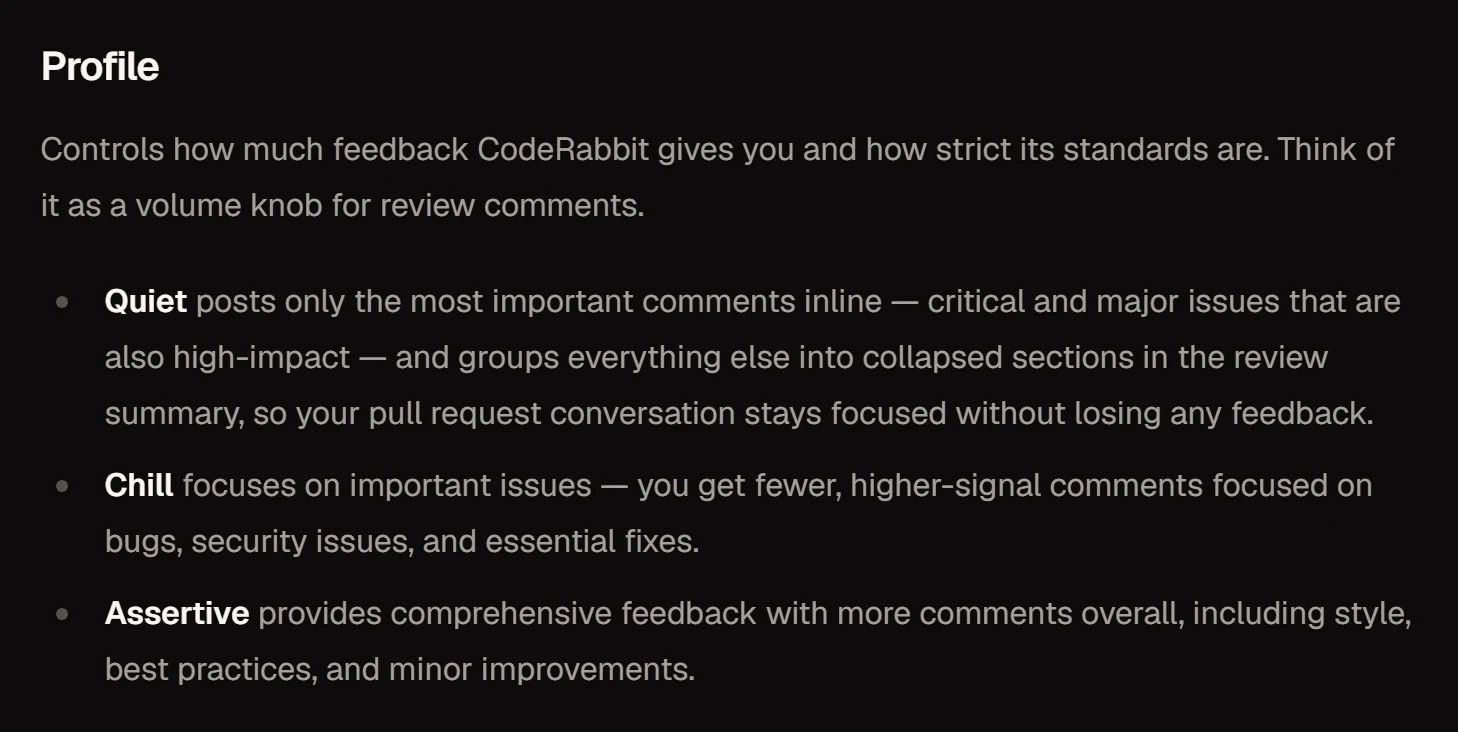
reviews.profile has three settings. Chill, the default, gives fewer, higher-signal comments on bugs, security issues and essential fixes. Assertive adds comments on style, best practices and minor improvements. Quiet posts inline only critical and major issues that are also high-impact, and collects the rest in collapsed sections of the review summary, so nothing is discarded.
Fewer inline comments, nothing lost: high-impact findings stay on the diff and the rest are folded into the review summary.
reviews:
  profile: quiet
  auto_review:
    auto_pause_after_reviewed_commits: 2
  path_filters:
    # Examples only: list paths CodeRabbit's defaults do not already skip.
    - "!**/__snapshots__/**"
    - "!**/fixtures/**"
Key notes
profile: quiet
Only critical and major findings that are also high-impact post inline; everything else is grouped in collapsed sections of the summary.
auto_pause_after_reviewed_commits
CodeRabbit reviews pushes, not commits, and each automatic incremental review uses one PR review from the hourly allowance. The default pause comes after 5 reviewed commits; the docs suggest 1 or 2 on active branches, with @coderabbitai review to ask for feedback when you want it. In the DEV study CodeRabbit posted findings on more than one commit in 49% of multi-commit PRs, and the authors advise planning for five to six review cycles per non-trivial PR on default settings.
path_filters
CodeRabbit already skips build output, node_modules, lock files and *.generated.* files, so listing those changes nothing. Use filters for paths its built-in list misses. Excluded files drop out of the review and do not count toward the per-review file limit. Think twice before excluding migrations: Squawk checks them for unsafe PostgreSQL schema changes.
What is left out
language: en-US, auto_review.enabled: true, auto_incremental_review: true and drafts: false are already the defaults, so repeating them does nothing.
5.2 Give each directory its own rules
Each path_instructions entry pairs a glob with plain-English guidance and is applied only to files that match the glob.
Recipe 2 — Rules per directory
.coderabbit.yaml
Separate checklists for controllers, migrations and Terraform.
tone_instructions: "Write for a senior reviewer: name the risk, its impact and the smallest fix."
reviews:
  path_instructions:
    - path: "app/controllers/**"
      instructions: |
        - Check that every action authorises the user before reading or writing data.
        - Flag SQL assembled from strings; require parameterised queries.
    - path: "db/migrations/**"
      instructions: |
        - Flag dropped tables or columns that application code reads.
    - path: "infra/**/*.tf"
      instructions: |
        - Flag security groups open to 0.0.0.0/0.
        - Flag storage buckets without encryption at rest.
knowledge_base:
  code_guidelines:
    enabled: true
Key notes
path_instructions
Guidance of up to 20,000 characters per glob, used only for the files that match it.
tone_instructions
Sets the tone of reviews and chat in up to 250 characters. It changes how comments are worded, not how many there are; the profile controls the count.
code_guidelines
On by default. CodeRabbit reads agent instruction files already in the repository (AGENTS.md, CLAUDE.md, .cursorrules, .github/copilot-instructions.md and others) as review criteria, and filePatterns can add your own documents. Listing it here only makes the default visible. knowledge_base.learnings.scope: auto is also the default, so it is not repeated.
5.3 Turn key rules into merge checks
A pre-merge check is a plain-English rule that CodeRabbit marks Passed, Failed or Inconclusive in the review summary. Out of the box a failure is only a warning; Recipe 3 shows the two settings that make it block.
Recipe 3 — Checks that can block a merge
.coderabbit.yaml
Two rules in error mode, plus the workflow switch that lets a failed rule hold the merge.
reviews:
  request_changes_workflow: true
  pre_merge_checks:
    custom_checks:
      - name: "Public API docs"
        mode: "error"
        instructions: |
          Fail if the PR changes files under api/public/ and does not
          update docs/api.md. Pass if api/public/ is untouched or
          docs/api.md is updated.
      - name: "Destructive migrations"
        mode: "error"
        instructions: |
          Fail if a migration drops a table or a column. Pass if the PR
          adds no migration, or if its migrations drop neither.
  finishing_touches:
    simplify:
      enabled: true   # off by default; needs Team
Key notes
custom_checks
Natural-language conditions that return Passed, Failed or Inconclusive. They need Team (10 per organisation) or Advanced and Enterprise (20); public, non-trial repositories on Essentials get up to 10. The four built-in checks (docstring coverage, title, description and linked-issue assessment) come with every paid plan. Names can run to 50 characters and instructions to 10,000.
mode: "error" + request_changes_workflow
A check defaults to warning mode, which never blocks a merge. In error mode, with request_changes_workflow on, a failing check blocks the merge until it is fixed or someone explicitly ignores it. With that workflow on, CodeRabbit also approves the PR when its comments are resolved, the latest commit is reviewed and no checks fail.
What checks cannot do
They run in a read-only sandbox. They cannot run your test suite, see build output or node_modules, or post inline comments; results appear only in the summary table.
finishing_touches
These live under reviews.finishing_touches. Docstrings and autofix work on Essentials; Team is needed for unit tests, merge-conflict resolution, Fix CI and simplify. All are on by default except simplify.
Who maintains the config
Give .coderabbit.yaml an owner: someone who watches which comments the team dismisses and turns them into path filters, path instructions or learnings.
6. Security, data handling and the RuboCop flaw
Two sets of facts belong here: what CodeRabbit’s certifications and contracts promise, and the RuboCop flaw Kudelski Security found in its review pipeline.
Controls and data handling
CodeRabbit says it is SOC 2 Type II audited annually, and its Trust Center lists SOC 2 Type 2, ISO 27001 and GDPR; the reports themselves are available on request. Each review runs in an isolated environment that is discarded after the review is posted. Two things can outlast the review: review caching, on by default (encrypted except for open-source projects, never used for training, expiring within seven days, switched off with reviews.disable_cache: true), and the vector code index and learnings CodeRabbit keeps for context (knowledge_base.opt_out: true turns off the knowledge-base features that need retention, learnings among them, and deletes their stored data).
The no-training commitment sits in the Terms of Service, not the DPA: it rules out training AI models on customer code, by CodeRabbit and by its third-party model providers alike, and CodeRabbit says it has a zero-data-retention policy with each provider. The privacy policy makes an exception for open-source projects, which it says CodeRabbit uses to train its systems. CodeRabbit’s docs say code under review goes to OpenAI and/or Anthropic for reviewing only; its Trust Center also lists Baseten as an AI subprocessor, with a zero-data-retention document of its own.
Enterprise adds SSO with custom roles and audit logs, API access, multi-organisation support, SLA support and a dedicated CSM, payment through the Claude, AWS or GCP marketplace, vendor security review with agreement redlines, and deployment on EU SaaS. Self-hosting is offered only to Enterprise customers with 500 or more seats; a self-hosted install can opt out of all data retention, and code and prompts leave your environment only to reach the LLM provider you configure. The DPA commits CodeRabbit to notify customers of a security incident “without undue delay”, with no fixed number of hours, and its vulnerability disclosure programme pays $5,000 to $20,000 for critical findings.
The RuboCop flaw: a linter config that ran code on CodeRabbit’s servers
Critical · fixed
The mechanism
Kudelski Security found that CodeRabbit handed any .rubocop.yml in a pull request to RuboCop. That file’s require directive can load a Ruby file, so a pull request could run Ruby code of its author’s choosing. CodeRabbit confirmed that RuboCop, alone among its analysers, ran outside the sandbox; the code executed on production servers, where the researchers read the environment variables.
What was exposed
Kudelski lists Anthropic and OpenAI API keys, a GitLab personal access token, a Jira secret, a Pinecone API key, the PostgreSQL host, username and password, other service tokens, and the CodeRabbit GitHub App private key with its client ID and secret. With that key, an access token could be generated for any installation of the app, as often as needed. Kudelski reported more than 80,000 installations of the GitHub App. Its headline figure, read and write access to 1 million repositories including private ones, is the number CodeRabbit’s website gave for repositories in review, and Kudelski noted that this number likely also covers repositories on GitLab and on-premises Git providers.
How CodeRabbit responded
Kudelski reported the flaw through CodeRabbit’s disclosure programme. By CodeRabbit’s account, it confirmed the flaw and disabled RuboCop within 1 hour, rotated all relevant credentials within 3 hours, and deployed the fix, which runs RuboCop inside its sandbox, within 12 hours. It also audited every service, reports that RuboCop was the only one running outside the sandbox, and added automated sandbox enforcement and deployment gates. Kudelski singled out the response, writing that being quick to respond and remediate, “as the CodeRabbit team was”, is a critical part of addressing vulnerabilities.
What to take from it
Kudelski exploited the flaw to demonstrate its impact: it ran code on the production servers, read the environment, and used the App key on a couple of installations to confirm its proof of concept. CodeRabbit says its investigation found no evidence that customer data was accessed or that any malicious activity took place. The broader point comes from Kudelski’s remediation advice: assume users can run untrusted code through any external tool a reviewer executes, and isolate those tools with no environment variables and restricted network egress.
Pull requestadds .rubocop.yml
require:loads attacker Ruby
RuboCopruns outside sandbox
Environmentkeys, tokens, App key
This path is closed: RuboCop runs inside the sandbox.
How the RuboCop flaw worked, and why a linter configuration file counts as
executable input.
Reading the incident
The question to put to every vendor is how the linters and other tools it runs on pull-request code are isolated. CodeRabbit’s answer, by its own account, is that every analyser runs inside the sandbox, with automated enforcement and deployment gates to keep it there. Kudelski’s write-up and CodeRabbit’s response, both linked in the sources, give the full detail.
7. Prices, seats and per-developer limits
Annual billing takes 20% off Essentials, Team and Advanced. The hourly, file, chat, MCP and linked-repository limits on each card come from CodeRabbit’s plans documentation.
Summarises pull requests but does not review them. Any number of public and private repositories.
Open source
$0public repositories
PR reviews per hour
1–10 by stars
IDE / CLI reviews per hour
1 / 3
Files a review can cover
100–300
Chat allowance
25
MCP connections / linked repositories
—
Same features as Team; the hourly allowance depends on star count. Repositories under 10 stars must trigger reviews by hand, and the privacy policy says open-source code is used for training.
Essentials
$24per developer a month billed yearly; $30 billed monthly
PR reviews per hour
5
IDE / CLI reviews per hour
5 / 5
Files a review can cover
150
Chat allowance
50
MCP connections / linked repositories
5 / 1
AI reviews on PRs and in the CLI, 1-click fixes, learnings, agentic chat, MCP connections, linters and SAST tools, and Jira and Linear. Its finishing touches are autofix and docstrings.
Team
$48per developer a month billed yearly; $60 billed monthly
PR reviews per hour
8
IDE / CLI reviews per hour
8 / 8
Files a review can cover
300
Chat allowance
75
MCP connections / linked repositories
10 / 5
Adds Triage, issue planning, unit tests, merge-conflict resolution, the CI fixer, 10 custom pre-merge checks, post-merge actions, Change Stack AI chat and coding-agent tasks.
Advanced
$72per developer a month billed yearly; $90 billed monthly
PR reviews per hour
10
IDE / CLI reviews per hour
10 / 10
Files a review can cover
300
Chat allowance
100
MCP connections / linked repositories
15 / 10
Adds blast-radius and architectural-impact analysis, a security review of every PR, continuous security monitoring and 20 custom checks.
Enterprise
Custombilled annually
PR reviews per hour
12
IDE / CLI reviews per hour
12 / 12
Files a review can cover
300
Chat allowance
100
MCP connections / linked repositories
20 / 20
SSO, custom roles and audit logs; API access and multi-organisation support; self-hosting (500+ seats) or EU SaaS; SLA support, a dedicated CSM and payment through the Claude, AWS or GCP marketplace.
Every plan comes with a 14-day free trial and no card. CodeRabbit’s pages disagree on which plan the trial runs: the docs say trials start on Advanced, the website FAQ says Team. The pricing page marks none of the four paid plans as recommended, so neither do we.
Only developers who open pull requests need a seat, and admins can assign purchased seats by hand. Beyond the hourly limits, Essentials, Team and Advanced organisations can let eligible PR and CLI reviews continue at $0.25 per reviewed file, sold as $1 credits that cover four files each; admins choose Automatic, On demand or Off and set a monthly cap. Overflow has limits of its own: INR-billed and marketplace subscriptions are excluded, and no plan reviews a PR of more than 300 files.
Agent minutes cost $0.40 each and are charged outside the review plans. CodeRabbit Agent covers cloud coding tasks, Slack and automations, and its page offers $50 of free minutes per user.
Annual cost by team size
Cost per year with annual billing, charged per developer who opens pull requests
Each developer identity has its own allowance, refilled on a rolling window rather than on the hour, so a colleague’s reviews never draw on yours. Two patterns burn through it. CodeRabbit reviews pushes, not commits: on default settings, five commits pushed one at a time trigger five reviews, a whole hour’s allowance on Essentials. And if one bot, service account or coding-agent account opens every pull request, every review lands on that one identity, so the whole organisation shares one developer’s allowance.
Fair usage adds a second limit, based on review activity over a rolling window that the docs say can cover the past 24 hours or the past seven days. The published bands count reviews over seven days, and heavy weeks slow how fast reviews refill: on Essentials a developer keeps 5 an hour up to 29 reviews in the last seven days, drops to 4, 3 and 2 at 30, 40 and 50, and from 60 reviews gets 1 an hour, one at a time. Team falls to 1 an hour at 70 reviews and Advanced at 80. Some subscriptions have review schedules of their own, including 10 PR reviews an hour on some Team subscriptions. Comment @coderabbitai rate limit to see where you stand without spending a review.
Fair usage on Essentials: the refill rate falls as weekly volume rises
PR reviews in the last 7 days
Refill rate
0–29 reviews
5 per hour
30–39
4 per hour
40–49
3 per hour
50–59
2 per hour
60 or more
1 per hour, one at a time
5 an hour
Essentials1/hr at 60+
8 an hour
Team1/hr at 70+
10 an hour
Advanced1/hr at 80+
12 an hour
Enterprisedepends on contract
PR reviews per developer, rolling. “1/hr at” = reviews in the last seven days (fair usage).
Hourly PR-review allowance per developer on each paid plan, from
CodeRabbit’s plans and rate-limit docs. The line under each column is the seven-day review count
at which that plan bottoms out at one review an hour; for Enterprise it depends on the contract.
Is Team worth twice the price?
Team costs $24 more per developer a month on annual billing. At $0.25 a file, the same money buys 96 overflow files on Essentials, but overflow adds only review capacity. Features that private repositories get only from Team upwards: Triage, custom pre-merge checks, post-merge actions, the Team finishing touches, issue planning and the beta CI fixer (GitHub and Azure DevOps only), plus 300-file reviews and 8 reviews an hour instead of 5. More than 5 linked repositories needs Advanced. On GitHub, Essentials can review a 151–300-file PR on demand at usage pricing; other platforms show only the file-limit message.
Continuous security monitoring and PR security reviews come with Advanced and Enterprise; full-codebase scans are sold separately on usage. Upgrades take effect immediately with prorated billing, and downgrades at the end of the billing cycle.
8. How it compares with other AI reviewers
The table sets CodeRabbit beside four other AI pull-request reviewers: Greptile, Cursor Bugbot, Graphite and Qodo.
CodeRabbit
Greptile
Cursor Bugbot
Graphite
Qodo
Price
$24 per developer a month (Essentials, annual; $30 monthly); Team $48, Advanced $72
$30 per seat a month with 50 credits; extra credits $1; a review costs 1, 3 or 10 credits
No seat fee; billed by usage on paid Cursor plans (Individual from $20 a month, Teams $40 per user)
Team, with unlimited AI reviews: $40 per user a month annual, $50 monthly. Starter ($20 annual) has limited reviews
Usage-based credit pool at $0.012 a credit; Pro Team packs from $30 for 2,500 credits (about 18 reviews a month, by Qodo’s estimate)
Hosts supported
GitHub (incl. Enterprise Server), GitLab (incl. self-managed), Bitbucket Cloud and Data Center, Azure DevOps
GitHub, GitLab, Bitbucket Cloud and Data Center, Gitea; Perforce on-premises. No Azure DevOps
GitHub, GitLab, Bitbucket, Azure DevOps; Gerrit on Enterprise
Context (vendor-described)
Cloned repository, code graph and code index
“Builds a graph of your entire repository”
“Analyzes PR diffs”
Stacked-PR workflow; says its AI reviews analyse the entire codebase
Markets cross-repo review and a context engine
Findings (DEV study)
281 across 82 PRs
120 across 55 PRs
128 across 50 PRs
Not in the study
Not in the study
False positives (DEV study)
2.3%
0% of 118 judged
4.8%
Not in the study. Martian’s v0 write-up reports Graphite’s precision as the highest in both arms and its recall as the lowest
Not in the study
Patch attached (DEV study)
68.3% carried a unified diff
32.5% carried a suggestion block
“Fix in Cursor” links, no GitHub suggestions; Cursor also lists Fix in Web and Autofix
Not in the study
Not in the study
Wait for first finding (DEV study)
9.5 min (P95 41.3)
4.9 min (P95 38.0)
6.1 min (P95 13.3)
Not in the study
Not in the study
Free option
Free plan (PR summaries only); free PR reviews with Team features on public repositories
Starter: one active developer, unlimited repositories, 50 credits a month; free use, on application, for qualifying non-commercial projects with an OSI-approved licence
Not on Cursor’s free Hobby plan
Hobby, free for personal repositories, with limited AI reviews
No permanent free tier; 14-day trial; an open-source programme for public GitHub repositories with 200+ stars
On precision, CodeRabbit’s ten-tool table of Martian’s online results (section 3) puts Cursor Bugbot (68.1%) and Greptile (65.2%) slightly above Graphite (64.9%).
8.1 CodeRabbit and Greptile side by side
CodeRabbitGreptile
How much it findsEdge: CodeRabbit
CodeRabbitOn 82 of the 146 PRs it raised 281 findings, and no other tool flagged 259 (92.2%) of them.
GreptilePosted 120 findings; 96 (80.0%) were ones no other tool raised, and by the authors’ count about 92% were bug-shaped.
How often it is wrongEdge: Greptile
CodeRabbitOnly 2.3% of its findings were false positives.
GreptileNo false positives among 118 judged findings. It rated 51 findings P1, its top tier; CodeRabbit labelled 12 critical or high on a different scale, so compare with care.
Wait for a first findingEdge: Greptile
CodeRabbitAveraged 9.5 minutes; 41.3 minutes at P95.
GreptileMean 4.9 minutes against CodeRabbit’s 9.5; at P95 the two are close (38.0 and 41.3 minutes).
Fix formatEdge: CodeRabbit
CodeRabbitA unified-diff patch came with 68.3% of findings.
GreptileOne-click suggestion blocks on 32.5% of findings.
HostsEdge: Split
CodeRabbitAdds Azure DevOps.
GreptileAdds Gitea and on-premises Perforce. Both cover GitHub, GitLab and Bitbucket.
How you payEdge: Depends on volume
CodeRabbit$24 a month for each developer who opens PRs (Essentials, annual); overflow reviews are optional at $0.25 per file.
Greptile$30 per seat with 50 credits, and $1 for each extra credit; a review costs 1 to 10 credits.
Azure DevOps settles it for CodeRabbit. On GitHub, GitLab or Bitbucket, choose by output: a patch with most findings (CodeRabbit, 68.3% in the DEV study) or a shorter list with no false positives among 118 judged findings (Greptile).
8.2 Where Cursor Bugbot differs
Bugbot works outside the Cursor editor too. It reviews pull requests on all four major Git platforms, covers every contributor to an enabled repository whether or not they are on the team, and has no seat fee of its own. Its fixes can open in the Cursor editor, open on the web at cursor.com/agents, or be pushed by Bugbot Autofix: to a separate branch or the PR branch on GitHub, to the PR branch only on GitLab and Bitbucket, and to neither on Azure DevOps. In the DEV study its findings carried “Fix in Cursor” links rather than GitHub suggestion blocks.
Billing is where the two part ways. Bugbot is billed by usage, so its cost follows review volume, while CodeRabbit bills a fixed seat for each PR author and sells extra capacity per reviewed file. Steady volume from a small group of authors is easier to budget on CodeRabbit; occasional reviews spread across many contributors may cost less on Bugbot.
8.3 Copilot’s built-in reviewer
Copilot code review comes with Copilot Pro ($10 a month), Pro+ ($39), Max ($100), Business ($19 per user) and Enterprise ($39 per user), though not with the Free plan, and each review also spends GitHub AI credits and Actions minutes. GitHub estimates $0.05 to $1 of credits per review at Lite effort and $0.25 to $5 at Balanced, the default.
GitHub says its reviewer analyses the whole repository for context, not just the diff, and it can be steered with repository and path-specific instruction files, AGENTS.md, agent skills, MCP servers and two effort levels. Where CodeRabbit pulls ahead is reach (Copilot code review covers GitHub, plus Azure DevOps in public preview, but not GitLab or Bitbucket) and the more than 50 linters, analysers and security scanners it runs.
Quick picks by situation
Situation
Consider
Reason
Your repositories are hosted outside GitHub (GitLab, Bitbucket, Azure DevOps)
CodeRabbit, Cursor Bugbot or Qodo
All three support the four major platforms. Greptile has no Azure DevOps support and Graphite works only with GitHub.
False positives cost your reviewers the most time
Greptile
None of its 118 judged findings were false positives in the DEV study. Martian’s v0 write-up says Graphite had the highest precision and lowest recall in both arms, though CodeRabbit’s table of the online results puts Bugbot and Greptile slightly higher on precision.
Missing an issue costs more than reading extra comments
CodeRabbit
Most findings and 68.3% patch coverage in the DEV study; highest online recall in Martian’s v0 results.
Your developers already pay for Cursor
Cursor Bugbot
No seat fee; billed by usage on the Cursor plan you have.
All your code is on GitHub and every developer has a paid Copilot plan
Copilot’s built-in reviewer
Review is part of Copilot Pro, Pro+, Max, Business and Enterprise; each review spends AI credits and Actions minutes rather than a separate seat.
You need a security gate
A dedicated scanner, with any AI reviewer on top
CodeRabbit flagged about one vulnerable sample in five in DeepSource’s test, and its Deep Scan does no SCA and produces no SBOM.
Hosting your code outside GitHub?
CodeRabbit covers GitLab, Bitbucket and Azure DevOps alongside GitHub, including
self-managed GitLab and Bitbucket Data Center. Try it on the platform you use.
Teams whose code is not only on GitHub. CodeRabbit covers GitLab (including self-managed), Bitbucket Cloud and Data Center, and Azure DevOps alongside GitHub. Cursor Bugbot and Qodo cover the same four, so it is not alone there.
Teams leaning heavily on AI coding agents. coderabbit review --agent returns structured findings that Claude Code, Codex, Cursor or Gemini can read and act on; CodeRabbit’s CLI page pitches the CLI as a quality gate for Codex, Claude and Gemini.
Reviewers who would rather commit than rewrite. In the DEV study 68.3% of its findings arrived with a patch ready to apply, the highest share of the four tools.
Maintainers of public repositories. Open-source projects pay nothing for the Team feature set. Star count decides how many PR reviews an hour they get (1 to 10), and below 10 stars every review is requested by hand. The privacy policy says CodeRabbit uses open-source code to train its systems.
Where it struggles
You expect design-level critique. CodeRabbit sells blast-radius and architectural-impact analysis on Advanced and Enterprise, but that is the vendor’s description; we found no independent measurement of it.
Review latency matters to you. Reviews averaged 9.5 minutes in the DEV study (41.3 at P95), and CodeRabbit’s docs say most projects wait more than five minutes. If merges are held for the bot, that is the wait.
You plan to rely on it for security. In DeepSource’s competitor-run CVE test it scored 59.39% accuracy and 36.19% F1, and the PR security review and monitoring on Advanced and Enterprise have no independent benchmark we could find. Run a dedicated scanner as well.
Your pull requests are very large. PRs over 150 files on Essentials, or 300 on the higher plans, are skipped, not partly reviewed. On GitHub a PR of up to 300 files can be reviewed on demand at usage pricing; nothing reviews a PR above 300.
A bot account opens most of your PRs. Limits are per identity, so the whole organisation would share one developer’s allowance.
10. Common questions
What happens to private code after a review?
It is not used for training: CodeRabbit’s Terms of Service bar training on customer code, by CodeRabbit or by its model providers. Open-source projects are the exception, and the privacy policy says CodeRabbit uses them to train its systems. Review caching is on by default and keeps copies (encrypted, except for open-source projects) for up to seven days unless you set reviews.disable_cache: true. Self-hosting, which can opt out of all data retention, needs Enterprise with 500 or more seats.
What was the CodeRabbit RuboCop vulnerability?
A .rubocop.yml committed in a pull request could load and run arbitrary Ruby on CodeRabbit’s production servers, because RuboCop was the one analyser running outside the sandbox; Kudelski Security demonstrated it. That exposed secrets in the server environment, among them the private key of CodeRabbit’s GitHub App, which can generate access tokens for any installation. Kudelski exploited the flaw to prove its impact. CodeRabbit says it disabled RuboCop within an hour, rotated credentials within three hours and shipped the sandbox fix within 12 hours, and that it found no evidence of malicious use or customer data access.
Which three .coderabbit.yaml keys change comment volume most?
Three keys in .coderabbit.yaml do most of the work: reviews.profile: quiet (inline comments only for critical and major issues that are also high-impact), path_filters for paths the defaults do not already skip, and auto_pause_after_reviewed_commits set to 1 or 2, after which you ask for a review with @coderabbitai review.
Does CodeRabbit work with self-hosted Git servers?
Yes. GitHub Enterprise Server, self-managed GitLab and Bitbucket Data Center are supported, along with GitHub.com, GitLab.com, Bitbucket Cloud and Azure DevOps. Some features stop at the cloud editions: post-merge actions do not run on self-hosted GitHub or GitLab or on Bitbucket Data Center, and Bitbucket Data Center gets only the docstring finishing touch. Away from the pull request, the VS Code extension (which also installs in Cursor and Windsurf) and the CLI review local changes before they are pushed.
What does CodeRabbit cost per developer?
Essentials is $24 per developer a month on annual billing or $30 billed monthly; Team is $48 or $60, and Advanced $72 or $90. Enterprise pricing is custom and billed annually. Only developers who open pull requests need a seat.
Can you use CodeRabbit without paying?
For a public repository, yes: open-source projects get the Team plan’s features free. Star count sets the hourly PR-review allowance, from 1 up to 10, and a repository with fewer than 10 stars has to request each review by hand. For private code the Free plan only summarises pull requests; its reviews run in the IDE extension and the CLI, three an hour each. Paid plans start with a 14-day trial and no card; the docs say trials run on Advanced, the website FAQ says Team.
When does Greptile suit a team better than CodeRabbit?
When the team does not use Azure DevOps and wants fewer findings it can trust: in the DEV Community study Greptile had no false positives among 118 judged findings and a 4.9-minute mean wait, against CodeRabbit’s 9.5. CodeRabbit attached patches to more of its findings (68.3% against Greptile’s 32.5%), and Martian’s v0 write-up gave it the highest online recall. Greptile’s seat includes 50 credits, extra credits cost $1, and a review uses 1 to 10 credits.
Should merges wait for CodeRabbit?
Expect minutes, not seconds: CodeRabbit’s docs say most projects wait more than five. In the DEV Community study (146 PRs; its author works at Sentry, which makes Seer) the mean from commit to first finding was 9.5 minutes and the P95 41.3, the longest of the four tools.
Does a bot or coding-agent account get its own review allowance?
No. Limits apply per developer identity, so if one bot, service account or coding-agent account opens every pull request, the whole organisation shares that identity’s hourly allowance. Comment @coderabbitai rate limit to see where it stands without spending a review.
Can a team merge on CodeRabbit’s approval alone?
CodeRabbit itself says it is designed to complement human review, not replace it. In the DEV Community study only 12 of its 281 findings carried a critical or high label. Its benchmark recall measures how many of the fixes developers made after a review it had flagged, not what share of all bugs it catches.
11. Our verdict
4.5 out of 5, for a team willing to configure it. Buy it if your code lives on more than one Git platform, or if your reviewers want a patch with most findings: it attached one to 68.3% of them in the DEV Community study, and Martian’s v0 write-up gave it the highest online recall.
Look elsewhere, or pair it with something else, if merges are held for the bot (a 9.5-minute mean in the DEV study) or you need a security gate (about one vulnerable sample in five flagged in DeepSource’s test). The RuboCop flaw Kudelski found is closed; CodeRabbit says it deployed the fix within 12 hours and found no evidence of malicious use or customer data access.
Our recommendation: trial it with the quiet profile switched on, and judge it by the share of findings that lead your team to change code.
Run your own test
Two numbers decide it, and the 14-day trial can produce both: how many findings per pull request your team receives with reviews.profile: quiet, and what share of them led to a code change. Set them beside the 3.4 per PR and the figures in section three.
CodeRabbit’s documentation: plans and pricing, review rate limits and fair usage, usage-based reviews, self-hosting, caching, and the .coderabbit.yaml reference.
CodeRabbit’s pricing page, security page, Trust Center, Terms of Service, privacy policy and DPA.
The studies in section 3, each described there with who ran it: Martian’s v0 write-up, leaderboard and methodology; the DEV Community four-reviewer study; DeepSource’s OpenSSF CVE run; AIMultiple’s RevEval.
Kudelski Security’s own write-up of the RuboCop flaw and CodeRabbit’s published response, rather than secondhand news coverage.
Greptile, Cursor, Graphite, Qodo and GitHub Copilot, from their own pricing and docs pages (listed under Sources).
The section order of TrackerTools’ CodeRabbit review. We checked each of its claims against the original source and list below the ones we left out, with the reason; the wording here is our own.
Limits of this review
Hands-on testing. OfficeBooks measured nothing on this page; each figure sits next to the name of whoever produced it.
Claims we checked and did not publish
A “4.6 out of 5” score and an “840 reviews” count from TrackerTools. The score is theirs and the review count names no platform; we publish only our own score and no user-review count.
“Misses roughly 41% of real vulnerabilities.” That reads DeepSource’s accuracy figure as a catch rate. DeepSource’s own benchmark page puts CodeRabbit’s recall at 21.95%.
AIMultiple scores of 1/5 completeness and 2/5 depth. They belong to a hypothetical “Tool B” in AIMultiple’s example judging prompt.
A Martian leaderboard rank, online or offline. The board is recomputed and its offline table can be scored by more than one judge, so no single rank holds; the board is linked below.
“Last on precision” in Martian’s offline arm. It holds under Martian’s default judge and its GPT-5.2 judge but not under its Claude Sonnet 4.5 judge, so we state no rank.
An annual-revenue estimate from Sacra; this page gives no revenue figure.
“About 30 comments on a 10-file PR.” The 3.4 figure is per pull request, not per file.
“90-second reviews” and “45 to 90 minutes” of setup time. Neither names a source.
“No competitor matches its platform coverage” and “the only serious option outside GitHub”. Cursor Bugbot and Qodo cover the same four platforms.
“Number one AI app on GitHub Marketplace by installs.” “Most installed AI App” is CodeRabbit’s own claim, not a Marketplace ranking.
An average cost per Bugbot review. Cursor gives one ($1.00 to $1.50 a run, depending on PR size and complexity) only in an announcement post, not in its Bugbot docs or on its pricing page, so we do not use it.
A third co-founder. CodeRabbit’s press kit names Harjot Gill and Guritfaq Singh.
A cumulative count of pull requests processed; the press kit’s weekly figure is used instead, labelled vendor-reported.
Sources
Every figure on this page traces to one of these pages. Where a source did not
support a claim, the claim was dropped rather than published.
Tailwind schedules Pins, finds Pinterest keywords and drafts new Pins with AI; new accounts are Pinterest-only. Start free with no credit card, using a one-time set of trial actions.
Affiliate link: OfficeBooks may earn a commission if you buy, at no cost to you. It opens Tailwind’s standard homepage, with no extra discount, and it never changes a score or a ranking.
Affiliate link: OfficeBooks may earn a commission if you buy, at no cost to you. It never changes a score or a ranking.