The full review
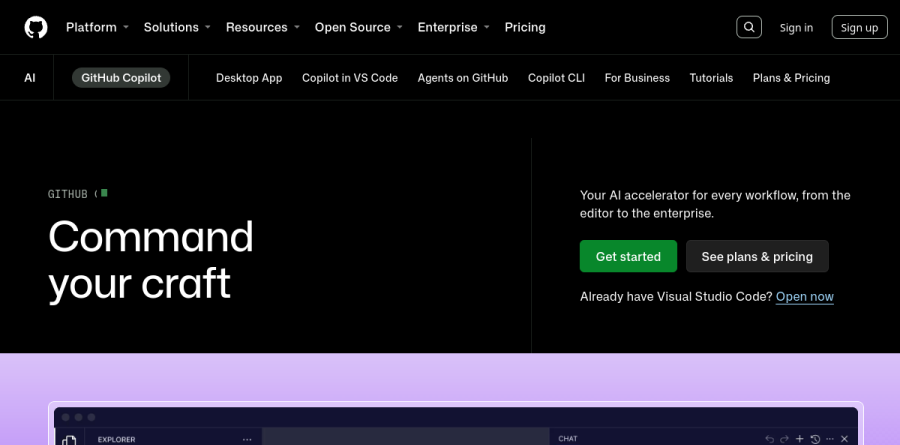
What is GitHub Copilot?
GitHub Copilot is the AI coding layer GitHub builds into its own platform and into the editors most developers already use. The current product page leads with the line "Command your craft" and calls Copilot "Your AI accelerator for every workflow, from the editor to the enterprise."
GitHub groups the product into assistive features, agentic features, customization, and administration. In practice that means GitHub Copilot can finish the line you are typing, answer a question about an unfamiliar file, review a pull request, or take a task and work through it unattended. Copilot reaches the GitHub website, GitHub Mobile, GitHub Desktop, Windows Terminal, and supported IDEs including VS Code, Visual Studio, Xcode, JetBrains, Neovim, and Eclipse.
Suggestions and chat where you already work
The everyday value of GitHub Copilot is still inline suggestions. Beyond plain completions, GitHub lists next edit suggestions for VS Code, Xcode, and Eclipse, which propose the follow-on change after you accept an edit rather than waiting for you to type it. Copilot Chat sits alongside that on github.com, in GitHub Mobile, in supported IDEs, and in Windows Terminal, so a question about a stack trace does not require a browser detour. Copilot pull request summaries draft the description reviewers actually read, and Copilot in GitHub Desktop generates commit messages from the changes in your working tree.
Agents that take on whole tasks
Agent mode turns GitHub Copilot from a suggester into a worker: it operates across files in the IDE and pauses for your approval before changes land. The Copilot cloud agent goes further, and the vendor describes it as researching the repository, creating a plan, and making code changes on its own. Copilot code review adds AI-generated review suggestions on pull requests, Copilot CLI brings the same agent into the terminal, and the GitHub Copilot desktop app runs parallel agent sessions across repositories. Third-party coding agents, including Claude Code and Codex, are listed in public preview.
Tuning Copilot to your codebase
Copilot Spaces let you organize and centralize relevant content — code, docs, specs, and more — into Spaces that ground Copilot's responses in the right context for a specific task. Custom instructions and prompt files encode house conventions once rather than restating them in every chat. MCP servers connect Copilot to outside tools and data, agent skills and custom agents shape how it works, and Copilot Memory, in public preview, stores useful information about a repository that Copilot cloud agent and Copilot code review can reuse to improve their output.
Plans, credits, and admin controls
GitHub Copilot ladders from a Free plan with a monthly completion allowance up through Pro, Pro+, and Max, with each step raising premium model access and the GitHub AI Credits balance that funds heavier agent runs; Pro+ also adds audit logs. Organizations move to Copilot Business or Copilot Enterprise, which layer on policy management, access management, usage reporting, and file exclusions. Separately, GitHub describes an optional code referencing filter and a duplication detection filter that detect and suppress suggestions matching public code on GitHub. GitHub notes that starting April 22, 2026, new self-serve sign-ups for Copilot Business are temporarily paused for organizations on GitHub Free and GitHub Team plans, so those teams have to contact sales.
Who should choose GitHub Copilot
GitHub Copilot is the default pick for teams whose work already lives on GitHub. If your issues, pull requests, and reviews happen there, the Copilot cloud agent and Copilot code review slot into an existing loop instead of adding another tool to babysit. Solo developers can start on the Free plan, which is limited to 2,000 completions per month and auto model selection, while verified students get Copilot's features free through the Copilot Student plan.
It is less compelling if your repositories live on GitLab or Bitbucket, because most of the platform-side value evaporates and you are left with completions you can get elsewhere. Heavy agent users should also watch credit consumption for a month before settling on a tier.
Strengths
- Cheapest full-featured entry among major AI coding tools at $10/month, and code completions stay unlimited without consuming credits
- Works inside the tools you already use: VS Code, Visual Studio, JetBrains, Neovim, Xcode, Eclipse, github.com, mobile, and the CLI
- Multi-model choice (Claude Opus/Sonnet, GPT-5 family, Gemini) plus a cloud coding agent that takes issues and opens pull requests
- Genuinely free access: free tier for everyone, free Student plan, and free Pro for verified teachers and open source maintainers
Watch out for
- The June 1, 2026 switch to metered AI credits makes monthly costs unpredictable — frontier models like Claude Opus burn credits 5-10x faster than budget models
- Pro's 1,500 credits (~$15 of usage) run out quickly with agent-mode workflows, pushing heavy users toward $39 Pro+ or $100 Max
- G2 reviewers repeatedly cite incorrect or suboptimal output needing manual review (31 mentions) and weak context awareness on large codebases
- Free tier is genuinely restrictive: 50 chat requests/month, auto model selection only, no code review and no coding agent
Key features
| Feature | What it does |
|---|
| Code completions & Next Edit suggestions | Inline multi-line completions and follow-on edit predictions; unlimited on all paid plans and never consume AI credits (Free plan capped at 2,000/month). |
| Copilot Chat | Conversational coding help in the IDE, on github.com, in the CLI, and on GitHub Mobile; Free plan allows 50 chat requests per month. |
| Agent mode & cloud coding agent | Agent mode makes multi-file changes in your editor; the cloud coding agent works asynchronously on assigned issues and opens pull requests. |
| Copilot code review | AI-generated pull request reviews on paid plans; consumes AI credits plus GitHub Actions minutes. Free tier gets 'review selection' in VS Code only. |
| Multi-model selection | Pick models from Anthropic (Claude Opus, Sonnet), OpenAI (GPT-5 family), and Google (Gemini) on paid plans; premium frontier models unlock at Pro+. |
| MCP and third-party agent delegation | Model Context Protocol support and the ability to delegate tasks to third-party coding agents, including Claude by Anthropic. |
How GitHub Copilot compares
| Alternative | How it differs |
|---|
| Cursor | AI-first standalone editor with strong whole-codebase context, but it costs roughly twice Copilot Pro and requires abandoning your current IDE. |
| Claude Code | Anthropic's terminal-based agentic tool goes deeper on autonomous multi-file work, but has no free tier and costs more for sustained heavy use. |
| Amazon Q Developer | Generous free tier and tight AWS integration make it compelling for AWS-centric stacks, but it is weaker outside the AWS ecosystem. |
Head-to-head: GitHub Copilot vs Cursor
Frequently asked questions
Is GitHub Copilot free?
Yes, partly. The permanent free plan includes 2,000 code completions and 50 chat requests per month with auto model selection only. Verified students get the free Copilot Student plan with unlimited completions, and verified teachers and open source maintainers get Copilot Pro (normally $10/month) at no cost. Full paid features start at $10/month.
How much does GitHub Copilot cost?
Individual plans cost $10/month (Pro), $39/month (Pro+), or $100/month (Max). Organizations pay $19 per user/month for Copilot Business or $39 per user/month for Copilot Enterprise. Since June 1, 2026 every plan includes monthly GitHub AI Credits — roughly $15, $70, and $200 of model usage on Pro, Pro+, and Max — with paid overage available.
What are GitHub AI Credits?
GitHub AI Credits replaced premium requests on June 1, 2026. One credit equals about $0.01 of model usage, metered on input, output, and cached tokens at each model's published API rate. Pro includes 1,500 credits monthly, Pro+ 7,000, and Max 20,000. Code completions and Next Edit suggestions remain unlimited and never consume credits.
GitHub Copilot vs Cursor: which is better?
Copilot wins on price ($10/month Pro versus Cursor's roughly $20) and works inside your existing editor — VS Code, JetBrains, Visual Studio, Neovim, or Xcode — plus github.com. Cursor is a standalone AI-first editor many developers prefer for large, whole-codebase edits. Choose Copilot for GitHub-native workflow and value; choose Cursor if you will switch editors for deeper project context.
Can GitHub Copilot use Claude?
Yes. Paid Copilot plans include a model picker with Anthropic (Claude Opus and Sonnet), OpenAI (GPT-5 family), and Google (Gemini) models for chat and agent mode. Premium frontier models such as Claude Opus unlock at Pro+ ($39/month) and above. Copilot can also delegate whole tasks to third-party coding agents, including Claude by Anthropic.
GitHub Copilot ratings on other platforms
Independent user ratings from third-party review sites, linked here for transparency.
These are not our editorial score, are captured on the date shown, and may have changed since.