Zapier Alternatives, Ranked by What One Unit of Work Actually Costs
Affiliate disclosure: some links here are affiliate links and we may earn a commission at no cost to you. The order below follows the stated criterion and nothing else; no vendor paid for a position or saw this page before it went up.
Zapier’s Professional plan reads “Starting from $19.99 /month” with the “Pay yearly (Save 33%)” toggle showing; the same 750-task tier billed monthly is “$29.99 /month”. Zapier counts one task per successful action, so a five-action Zap spends about five tasks, roughly 13 cents a run on yearly billing. Make charges $9/mo (Pay annually), or $10.59/mo (Pay monthly), for 10,000 credits at one credit per module action: under half a cent for the same five-action run. The saving is roughly thirtyfold. What you hand back is Zapier’s 9,000+ integrations, the largest catalogue any vendor here publishes.
This page ranks ten platforms drawn from a fact sheet of thirteen, every price read on 17 September 2026, against three published things: what one unit of work costs once each vendor’s own meter is translated into something comparable, how many integrations the vendor itself publishes, and whether the software can be run on your own infrastructure. Nobody installed or subscribed to anything; this compares what the vendors print. Where a vendor does not publish a number the ranking needs, that silence costs it position rather than earning it the benefit of the doubt.
What this ranking measures
Measured: the translated cost of one unit of work at each vendor’s published entry allowance, with tasks, credits, executions, requests, runs and Actions all converted into a comparable per-run figure; the integration count the vendor publishes, not one a third party estimates; and whether a self-hosted build exists and at what price. Deliberately not measured: how the builder feels to use, AI model quality, support responsiveness, and uptime, since not one vendor on this list publishes an SLA percentage on its pricing page. Prices in different currencies are never converted, because none of these vendors publishes an exchange rate. A vendor that does not publish a figure the criterion needs is marked not published and ranks below one that does.
The short answer
One execution bills the same whether the workflow has three steps or thirty, so the unit price cannot inflate as your automation grows. Starter is 20€/mo, billed annually for 2,500 executions with unlimited steps. It is also the only vendor here that publishes an actual overage rate, 4,000 EUR per 300,000 additional executions, and the only one whose free route is the self-hosted product rather than a capped demo.
$9/mo (Pay annually), $10.59/mo (Pay monthly) for 10,000 credits is the cheapest published per-action rate among the general-purpose platforms, and 3,000+ apps are available on every plan including Free. It loses the top spot on the third leg only: Make cannot be self-hosted on any tier, and the credit meter charges you for workflow depth.
$0/mo for 1,000 credits a month with no time limit and the full 3,000+ app catalogue. Compare that with Zapier Free at $0 /month for 100 tasks and two-step Zaps only. The cost is 2 active scenarios and a 15-minute minimum interval between scheduled runs, which is a scheduling limit rather than a usage cliff.
All 10 compared
| # | Product | Best for | Price from | What decides its place | |
|---|---|---|---|---|---|
| 1 | Multi-step workflows you want to run on your own server | 20€/mo, billed annually (Starter) | 2,500 executions with unlimited steps — step count never bills | Visit | |
| 2 | Cheap per-action automation with the widest app list | $9/mo (Pay annually) / $10.59/mo (Pay monthly) — price for 10k credits/mo (Core) | 10,000 credits for $9/mo annual — one module action, one credit | Visit | |
| 3 | Teams already paying for Microsoft 365 seats | $15.00 user/month, paid yearly (Power Automate Premium) | 40,000 requests per user per 24 hours — roughly 1.2M a month | Visit | |
| 4 | Self-hosting an LLM workflow builder for nothing | $59 Per workspace/month (Professional, billed monthly); $590 per workspace / year billed annually | Priced per workspace, not per seat — 3 members on Professional | Visit | |
| 5 | The connector you cannot find anywhere else | Starting from $19.99 /month (Professional, Pay yearly Save 33%); $29.99 /month at the same 750-task tier billed monthly | 9,000+ integrations, about 2.7 cents a task on yearly billing | Visit | |
| 6 | Automations that live beside your own database | $20 per seat /month billed annually (Team); $24 per collaborator/ per month billed monthly | 25,000 automation runs a month, but no integration count at all | Visit | |
| 7 | Agent work with a verified integration count | $19 / month annual, $29 / month monthly (Pro) | Top-ups are $80 per 1,000 Actions — about 10x the in-plan rate | Visit | |
| 8 | Unlimited runs when you already pay for tokens | $20 /month + usage (monthly); $16 /month + usage (Pay yearly Save 20%) — Individual | Unlimited runs on Individual; model tokens billed on top at cost | Visit | |
| 9 | Agent credits with a published cash value | Starts at $37 / month (Pro) | 20,000 credits plus an 8% orchestration fee on usage; no free plan | Visit | |
| 10 | A 30-day, one-million-task trial with no card | not published — no dollar figure appears anywhere on the pricing page | No price, no task allowance, no overage rate published anywhere | Visit |
1. n8n
Why it sits at 1 2,500 executions with unlimited steps — step count never bills
n8n bills one workflow execution regardless of how many steps it contains. Starter is 20€/mo, billed annually for 2,500 executions with unlimited steps; Pro is 50€/mo, billed annually for 10,000. That works out near €0.008 and €0.005 a run, and the figure does not move when you add a step. All paid plans include unlimited users, unlimited workflows and the full catalogue of 2,177 nodes, with no integration gating between tiers.
Self-hosting is not an upsell here: the open-source Community Edition is free on GitHub, and the Business plan, 667€/mo, billed annually, is itself listed as self-hosted. n8n is also the only vendor on this list that publishes a real overage rate, 4,000 EUR per 300,000 additional executions, invoiced 45 days after they occur. Against that: no monthly-billed price is published at all, the page renders only in EUR, the trial’s length in days is never stated, and “n8n does not offer pro-rata refunds.”
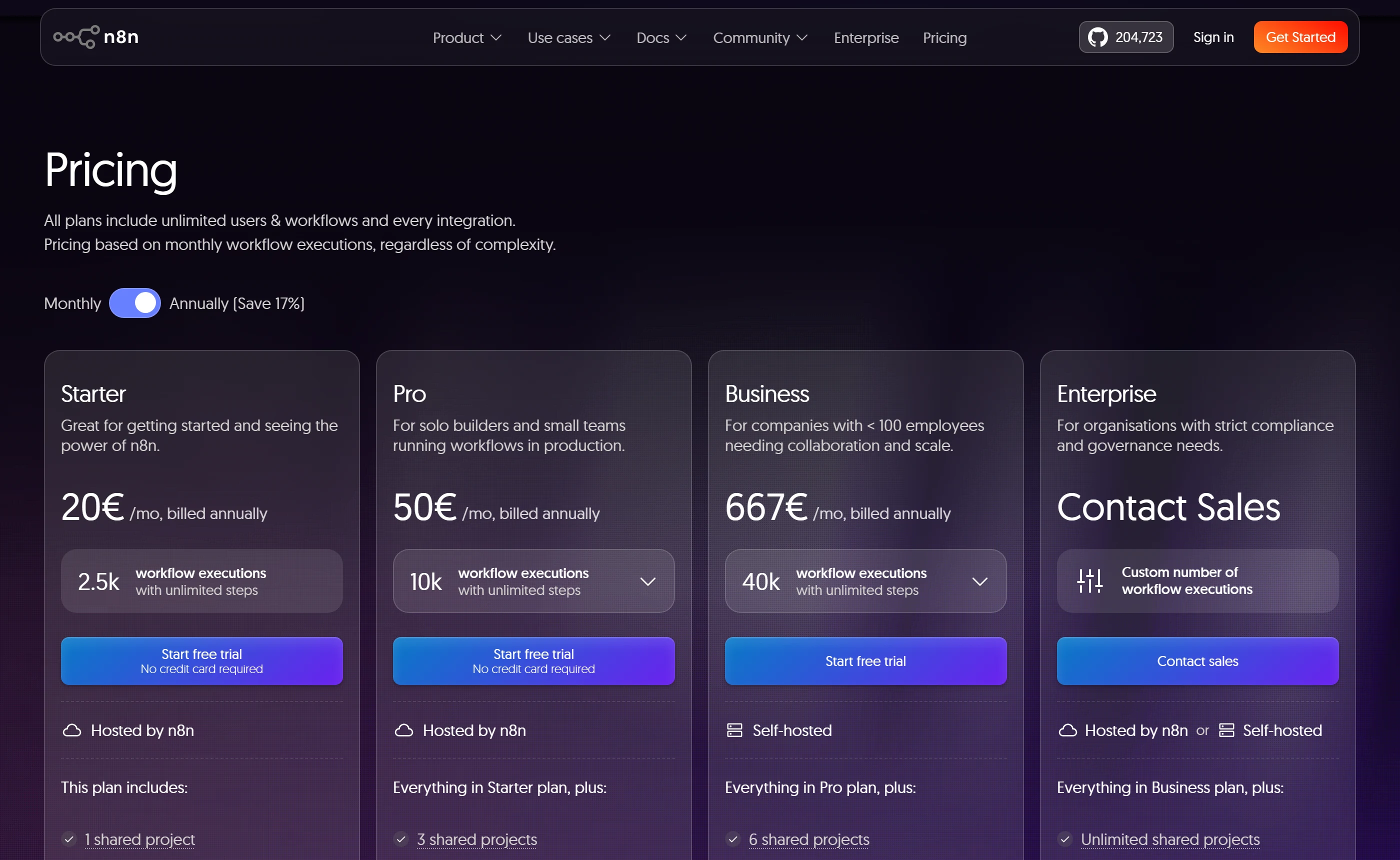
- One execution covers unlimited steps, so deepening a workflow never raises the per-run price, and the free Community Edition is the same self-hosted product the Business plan runs on.
- The monthly-billed price is not published anywhere, so the 20€ figure is only available on an annual commitment, and there is no pro-rata refund if you change your mind mid-term.
2. Make
Why it sits at 2 10,000 credits for $9/mo annual — one module action, one credit
Make meters in credits, one credit per module action, and sells credits on a slider independent of the plan tier. Core is $9/mo (Pay annually) or $10.59/mo (Pay monthly) for 10,000 credits, roughly $0.0009 each, so a five-module scenario costs under half a cent on yearly billing. Every paid tier offers the identical 10k-to-8M+ credit ladder, so the tiers differ on features and limits rather than on included usage. 3,000+ standard apps are on every plan, Free included.
The meter scales with complexity: a thirty-module scenario costs thirty credits a run, where n8n would charge one execution. And Make cannot be self-hosted at any price. The comparison table lists the same vendor-run AWS hosting on all five tiers, and the Enterprise “On-prem agent” is a connector reaching into your network, not a Make installation. Unused credits are forfeited at the end of the term, scenarios stop when credits run out, and credit overage protection is Enterprise-only.
- 3,000+ apps on every plan including Free, and a free tier of 1,000 credits a month with no time limit.
- No self-hosted or on-premise deployment exists on any tier, and when credits run out scenarios simply stop, because overage protection is reserved for Enterprise.
3. Microsoft Power Automate
Why it sits at 3 40,000 requests per user per 24 hours — roughly 1.2M a month
Premium is $15.00 user/month, paid yearly, and allows 40,000 Power Platform requests per user per 24 hours, about 1.2 million actions a month on a single seat. Nothing else published on this page is in the same range. The meter counts every connector call, HTTP action and built-in action, not just flow runs, and Microsoft claims more than 1,400 prebuilt certified connectors, with premium and custom connectors gated to the paid licences.
The allowance is per user and not poolable across users, it is a sliding 24-hour window with no rollover, and failed actions and retries bill exactly like successes, so a flaky integration burns quota twice. There is no self-hosted Power Automate: the on-premises data gateway bridges into Microsoft’s cloud, and Hosted Process at $215.00 bot/month, paid yearly, removes your infrastructure rather than giving you any. No monthly-billed price is published for any plan. And the same product’s consumption route is $0.60 per flow run, $3 per unattended desktop flow run.
- 40,000 requests per user per 24 hours for $15.00 user/month, paid yearly, is the cheapest published action rate anywhere on this list.
- The cheapest and the dearest published rates in this roundup belong to the same vendor: miss a seat licence and you land on pay-as-you-go at $0.60 per cloud flow run and $3 per unattended desktop flow run.
4. Dify
Why it sits at 4 Priced per workspace, not per seat — 3 members on Professional
This is the second platform here you can run yourself for nothing: the open-source Community Edition deploys with a single Docker command, and Enterprise supports VPC and on-prem via Helm chart. On the cloud side, Professional is $59 Per workspace/month, or $590 per workspace / year with annual billing marked “Save $118 with annual billing”; Team is $159 Per workspace/month or $1590 per workspace / year. It prices per workspace rather than per seat, with 3 Team Members on Professional and 50 on Team.
Dify publishes no integration count anywhere, on its own site or its Marketplace, so the second leg of this criterion cannot be scored for it at all: plugins are listed by category and never totalled. Message credits cover only Dify-hosted models, 5,000 a month on Professional, and when they run out you must supply your own LLM API key, because no overage price is published for credits, trigger events, storage or seats. The pricing page also flags app-level version control as not yet shipped on either paid cloud tier.
- The Community Edition self-hosts free with a single Docker command, and cloud pricing is per workspace rather than per seat, so a small team’s bill does not multiply with headcount.
- No integration count is published anywhere, and there is no way to buy more message credits: exhaust the 5,000 on Professional and you must bring your own LLM API key.
5. Zapier
Why it sits at 5 9,000+ integrations, about 2.7 cents a task on yearly billing
The incumbent holds fifth place on one leg, and it is a substantial one: 9,000+ integrations on its integrations counter, with the app directory headline reading “Over 10,000+ connections”. Free is $0 /month with 100 tasks per month and two-step Zaps only. Professional reads “Starting from $19.99 /month” with “Pay yearly (Save 33%)” showing, and $29.99 /month at the same 750-task tier billed monthly. Team starts at $69 /month yearly, $103.50 monthly at the 2,000-task tier.
Divide the price by the tier and a task costs roughly 2.7 cents on yearly billing, 4 cents billed monthly. Tasks count only on success, so a five-action Zap runs about 13 cents; Make does comparable work for roughly a thirtieth of that. There is no self-hosted or on-premise Zapier, the only deployment flexibility published being VPC Peering plus bring-your-own-model AI. And there is no way back out: “All purchases are considered non-refundable.” Exceeding your chosen tier does not stop anything, it switches you to pay-as-you-go unless you turn that off.
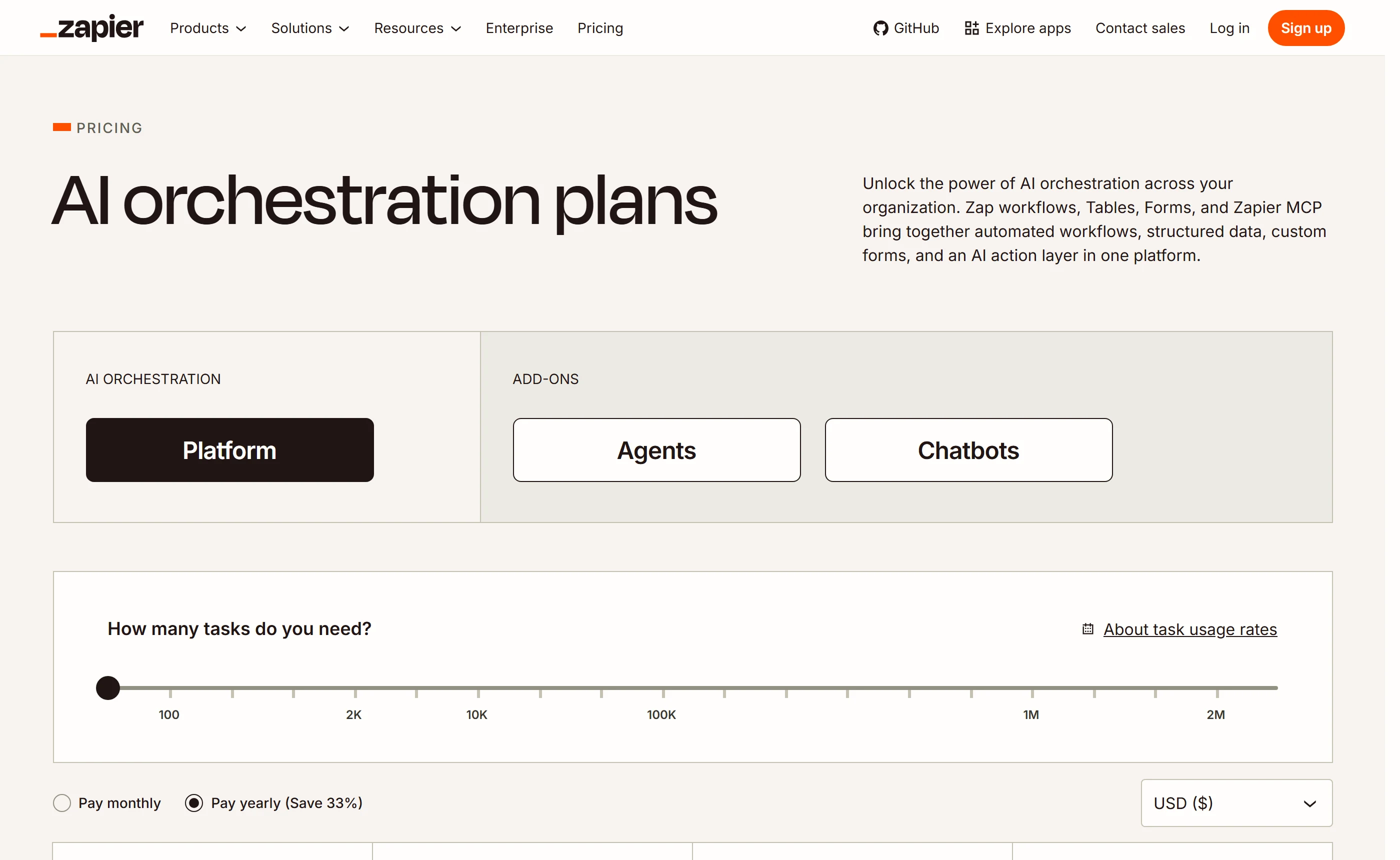
- 9,000+ integrations is the largest published catalogue on this list, and tasks are only counted on success, so failed actions do not consume the allowance.
- “All purchases are considered non-refundable”, and the named plans publish only a “Starting from” price with no table mapping Professional or Team to a fixed task allowance.
6. Airtable (Airtable AI / Omni)
Why it sits at 6 25,000 automation runs a month, but no integration count at all
Airtable automates next to your data rather than between other people’s apps, and the numbers reflect that. Team is $20 per seat /month billed annually, and the help centre publishes the monthly rate as $24 per collaborator/ per month billed monthly. That buys 25,000 automation runs per workspace each month plus 15,000 AI credits per paid user. A run is a whole automation rather than a step, so on a single seat the run rate lands under a tenth of a cent. Business is $45 per seat /month billed annually, $54 monthly.
No integration count is published anywhere. The directory names 26 connectors and the pricing page grades sync depth only as Standard, Premium or Enterprise Scale, which is the weakest showing on the second leg among vendors that publish anything at all. There is no self-hosted, on-premises or private-cloud option; Airtable is described only as its online hosted services. A run is counted at trigger time, so failed automations still burn the workspace allowance, and no retry or backoff behaviour is published.
- The Free plan is unusually good for evaluation: 500 AI credits per editor each month, 100 automation runs, and building apps and agents with Omni consumes no AI credits even after the monthly allotment is gone.
- A run is counted at trigger time, so a failing automation burns the workspace allowance repeatedly while Airtable publishes no automatic retry or backoff behaviour to fix it.
7. Relevance AI
Why it sits at 7 Top-ups are $80 per 1,000 Actions — about 10x the in-plan rate
Pro is $19 / month annual, $29 / month monthly, which buys 30,000 Actions a year (2,500 a month) plus $240 of Vendor Credits a year ($20 a month). An Action is one tool run by an agent; Vendor Credits are pass-through LLM and tool costs billed at wholesale with no markup, so model spend is a stated dollar allowance rather than an open-ended surcharge. In-plan that is about $0.0076 an Action. Its integration claim is the most precise here: over 2,000, with the directory itself stating 2,728.
Step outside the allowance and the rate changes sharply: top-ups are $80 per 1,000 Actions, roughly ten times the in-plan rate, though top-up Actions carry forward while plan Actions reset each period. There is no self-hosting, and the vendor states that even single-tenant dedicated infrastructure is not yet available; the substitute is a data-residency region chosen at signup, permanently. Team is a steep next step at $234 / month annual, $349 / month monthly.
- Model cost is a published dollar allowance billed at wholesale with no markup, and the integration count is a stated 2,728 rather than a rounded floor.
- The Free plan is retired and closed to new signups and the word “trial” appears nowhere on the pricing pages, so there is no published way to try it without paying.
8. MindStudio
Why it sits at 8 Unlimited runs on Individual; model tokens billed on top at cost
MindStudio removes the run cap rather than raising it. Free is $0/month + usage with one agent and 1,000 runs a month; Individual is $20 /month + usage billed monthly, or $16 /month + usage on the “Pay yearly Save 20%” toggle, and gives unlimited agents and unlimited runs. On the subscription side alone, the cost per run falls toward zero as volume rises. Over 1,000 pre-built integrations are claimed, plus access to over 200 AI models without managing API keys.
Every headline price on the page carries the literal suffix “+ usage”. Model tokens are billed on top at provider cost on every tier including Free, and no tier bundles any model spend in dollars or credits, so the published price is not the cost of running anything and the total cannot be computed from published information. You cap it with per-agent and total budget limits instead of an included allowance. Self-hosting exists, on-premise or private cloud, but only inside the custom-priced Business tier, with no published cost or minimum.
- Individual removes the run cap entirely rather than raising it to a numbered allowance, and the free tier is a real plan with one agent and 1,000 runs a month.
- No tier bundles any model spend, so the free plan is not free to actually run and no total cost of ownership can be derived from the pricing page.
9. Gumloop
Why it sits at 9 20,000 credits plus an 8% orchestration fee on usage; no free plan
Gumloop publishes a fixed cash value per credit and a concrete allowance: 20,000 credits a month for “Starts at $37 / month”, which puts the nominal rate near $0.00185 a credit. But a credit charge is assembled from four metered components, one of which is a flat 8% orchestration fee on the other three, and Gumloop bills per successful tool call on top of the underlying tool’s own cost, so integration-heavy agents meter faster than the headline implies. Wall-clock compute time is metered separately again.
There is no free plan. The only free access is a 14-day Pro trial, and the vendor’s own subscription docs note that cancelling during it stops the card being charged, which means a card is taken up front. “Starts at $37” is never broken down, so what pushes the price above $37 is not published, and Enterprise is Custom Pricing with no floor. Self-hosting is not offered; the nearest control is an Enterprise Virtual Private Cloud marked Optional. The integration claim is a floor rather than a count: 100+ MCP integrations on the homepage, and no number at all on the integrations page.
- A credit has a published fixed cash value and Pro states a concrete 20,000-credit monthly allowance, which is more than several rivals disclose.
- There is no free plan, the 14-day trial takes a card up front, and the “Starts at” in “Starts at $37 / month” is never broken down, so the real price is unknowable before signup.
10. Tray.ai
Why it sits at 10 No price, no task allowance, no overage rate published anywhere
No dollar figure appears anywhere on Tray’s pricing page. Pro, Team and Enterprise all end in “Get a demo” or “Talk to sales”, every add-on is listed unpriced, and the FAQ directs you to sales for a customised quote. No tier states a monthly task quota either: entitlement is contract-specific and shows up in your usage dashboard rather than on the plan card. Under a criterion built on cost per unit of work, that is not a low score, it is no score at all.
There is a genuine upside. The 30-day trial includes 1 million tasks and the full 700+ connector library, and the trial page promises “No card, no call, no qualification form.”, which is more evaluation headroom than any paid entry tier here gives you. Automatic retries are explicitly not billed as tasks. But the AI token-to-task conversion ratio is deliberately withheld and available only from support, retry counts and backoff intervals are referenced as a table with no numbers, concurrency is unpublished, and the platform is not self-hostable, since “Advanced on-premise” means a connectivity agent.
- The 30-day trial includes 1 million tasks and the full 700+ connector library with “No card, no call, no qualification form.”
- The pricing-page FAQ says the trial is sales-gated while the trial page promises no call, a contradiction the vendor has not resolved, and no price for any tier or add-on is published at all.
Which one fits your situation
Make’s Free plan, and nothing else. $0/mo, 1,000 credits a month, no time limit, 3,000+ apps. You give up a third active scenario and any schedule tighter than 15 minutes. The free tier is enough; do not buy anything yet.
n8n. Per-action meters charge you for depth, so thirty modules costs thirty Make credits or about thirty Zapier tasks every single run. n8n bills one execution with unlimited steps: 20€/mo, billed annually for 2,500 of them.
n8n Community Edition or Dify Community Edition, both free, both genuine self-hosted builds. Everything else here sells a connectivity agent, a VPC add-on or nothing. MindStudio will self-host, but only inside its custom-priced Business tier with no published figure.
Power Automate Premium at $15.00 user/month, paid yearly, with 40,000 requests per user per 24 hours. Confirm you actually get a seat licence first: the pay-as-you-go route is $0.60 per cloud flow run and $3 per unattended desktop flow run.
Stay put for that workflow. 9,000+ integrations is the largest published count here, and rebuilding a missing connector costs far more than roughly 13 cents a five-action run. Move only the high-volume Zaps to a cheaper meter.
Tray’s 30-day trial: 1 million tasks, the full 700+ connector library, “No card, no call, no qualification form.” Dify’s Sandbox is the free fallback at 200 message credits and 3,000 Trigger Events. Skip Gumloop’s 14-day trial, which takes a card up front.
What this market gets people for
- Reading a yearly rate as a monthly one Zapier’s “Starting from $19.99 /month” only holds with “Pay yearly (Save 33%)” showing; the same 750-task tier billed monthly is “$29.99 /month”. Make is $9/mo annual against $10.59/mo monthly, MindStudio $16 against $20, Relevance AI $19 against $29, Airtable $20 per seat against $24 per collaborator. Committing to a full year is the actual purchase behind the headline number.
- Assuming you can get your money back Zapier publishes the opposite of a guarantee: “All purchases are considered non-refundable.” n8n states “n8n does not offer pro-rata refunds.” Airtable offers no general money-back window, only courtesy refunds for accidental collaborator additions or upgrades within 7 days of a monthly invoice or 14 days of an annual one. Make, Dify, Power Automate, Relevance AI, MindStudio, Gumloop and Tray publish no refund window at all.
- Comparing meters without translating them first A Zapier task is one successful action, a Make credit is one module action, an n8n execution is an entire workflow with unlimited steps, and an Airtable run is counted at trigger time so failures still burn it. Bardeen, on the same fact sheet, meters one credit per row of output: its own worked example shows a 5-step, 10-profile workflow consuming 64 credits, about two-thirds of a full month’s free allowance in a single run.
- Buying a product that is already being shut down Flowise still showed paid tiers on its homepage on 17 September 2026, with Starter at $35/month and the CTA “Get Started - First Month Free”, yet its published End of Life date of August 31, 2026 had already passed and the repository was archived on August 10, 2026. The sunset notice says nothing about what happens to paid cloud subscriptions, and no post-promotional renewal price is published anywhere.
Questions buyers ask
What does one Zapier task actually cost me?
At the 750-task tier, Professional is “Starting from $19.99 /month” with “Pay yearly (Save 33%)” showing and “$29.99 /month” billed monthly, which works out around 2.7 cents and 4 cents a task. A task counts once per successful action, so failures are free and a five-action Zap spends about five tasks. But consumption is not flat one-per-step: AI model tier, code runtime and connector type change how many tasks an action burns, and Zapier publishes no table mapping Professional or Team to a fixed allowance.
Which of these can I genuinely self-host?
n8n and Dify. n8n publishes a free open-source Community Edition on GitHub, and Business and Enterprise are its self-hosted paid plans. Dify’s Community Edition deploys with a single Docker command, with VPC and on-prem available to Enterprise via Helm chart. MindStudio offers on-premise or private cloud but only inside the custom-priced Business tier. Zapier, Make, Power Automate, Airtable, Relevance AI, Gumloop and Tray publish only a connectivity agent, a VPC option, or nothing.
Is there a free plan that is actually usable for real work?
Make Free is the strongest: $0/mo, 1,000 credits a month, no time limit, 3,000+ apps, but 2 active scenarios and a 15-minute minimum interval between scheduled runs. Zapier Free is $0 /month with 100 tasks and two-step Zaps only. Airtable Free gives 500 AI credits per editor each month and 100 automation runs, and building apps and agents with Omni consumes no AI credits at all. Dify Sandbox gives 200 message credits and 3,000 Trigger Events. MindStudio Free gives one agent and 1,000 runs, but model tokens are billed on top even there.
What happens when I blow through my allowance?
It differs sharply. Zapier switches you to pay-as-you-go unless you turn it off. n8n keeps running and invoices overage 45 days later at 4,000 EUR per 300,000 additional executions. Make stops the scenarios, with credit overage protection reserved for Enterprise. Relevance AI sells top-ups at $80 per 1,000 Actions, roughly ten times its in-plan rate. Dify gives you no purchase option at all: you supply your own LLM API key. Airtable, Gumloop, MindStudio, Power Automate’s capacity packs and Tray publish no per-unit overage rate.
Does any of these advertise a first-term price that jumps at renewal?
Only one on the sheet: Flowise sells Starter at $35/month with “Get Started - First Month Free” and publishes no post-promotional figure, which is why it did not make this list. Every other vendor here publishes a single recurring price with no first-term-versus-renewal split, so the listed number is the ongoing rate. Zapier does flag a second mechanism, though: non-USD billing is converted from the USD base price at the time of payment, so a non-USD renewal amount can differ from period to period.
Why does n8n rank first when Power Automate has the cheaper action rate?
Because the criterion is three-legged and Power Automate fails two of them. Its $15.00 user/month, paid yearly, buying 40,000 requests per user per 24 hours is unbeatable on cost, but the quota is per user and not poolable, runs on a sliding 24-hour window with no rollover, and bills failed actions and retries like successes. There is no self-hosted Power Automate, no monthly-billed price is published for any plan, and the same vendor’s pay-as-you-go rate is $0.60 per flow run and $3 per unattended desktop flow run.
What none of them publish
These are the questions a buyer would want settled that no vendor on this page answers in public. If one of them decides your purchase, ask the vendor and hold them to the answer.
- Zapier publishes no table mapping Professional or Team to a fixed task allowance — the numbers appear only when you move the slider — and no overage rate per task in absolute currency, only a multiplier of the base rate.
- n8n publishes no monthly-billed price for any tier: the toggle defaults to annual, so the cost of month-to-month commitment is unknown. The length of its free cloud trial in days is never stated either.
- n8n’s pricing page is geo-localised and rendered entirely in EUR with no currency selector, so its per-execution rate cannot be compared against USD-priced rivals without an exchange rate neither vendor publishes.
- Make publishes no credit cost for AI-provider modules beyond a statement that some “may use more” than 1 credit, no per-credit overage rate, and no seat pricing at all, so its per-seat cost cannot be compared to seat-based competitors.
- Microsoft publishes no monthly-billed price for any Power Automate plan, no enforcement date for the official Power Platform request limits (every tenant sits in an open-ended transition period), and no pay-as-you-go rates on either the pricing page or the Learn overview.
- Dify and Airtable publish no integration count anywhere, and Gumloop’s “100+ MCP integrations” and Tray’s “700+” are floors rather than counts. Airtable’s directory names 26 connectors with no total claimed.
- Tray publishes no price for any tier or add-on, no per-tier task allowance, no overage pricing, and explicitly withholds the token-to-task conversion ratio for AI connectors, which is available only from support.
- Almost nobody publishes retry behaviour numerically. Zapier does not publish Autoreplay’s retry count or backoff schedule; Power Automate and Tray describe retry policies without default values; Airtable and Dify document no retry mechanism at all. Make is the exception, publishing eight escalating backoff intervals.
- No vendor on this list publishes an uptime or SLA percentage on its pricing page, and Relevance AI and Tray publish no per-tier concurrency limits despite both saying limits exist.
- Enterprise pricing is unpublished for every single vendor here — Zapier, Make, n8n, Power Automate, Dify, Airtable, Relevance AI, MindStudio, Gumloop and Tray all show “Contact” or “Custom” with no floor, band or starting figure.
Reading this from the other direction? Workflow Automation With Error Handling and Retries: What 10 Platforms Publish covers the same market against a different rule.