The full review
What is n8n?
n8n is a workflow automation platform for technical teams who want automation they can open up and inspect. Work happens on a visual canvas where every step is a node: a trigger fires, data flows through transformations, integrations and AI steps, and the inputs and outputs of each node sit beside its settings.
What separates n8n from most no-code tools is fair-code licensing and the deployment choice underneath. The entire source code is on GitHub, the Community Edition is a standard self-hosted version you deploy with Docker, and a hosted version is also available. Teams that cannot hand data to a third party keep everything on their own infrastructure.
AI agents you can follow, step by step
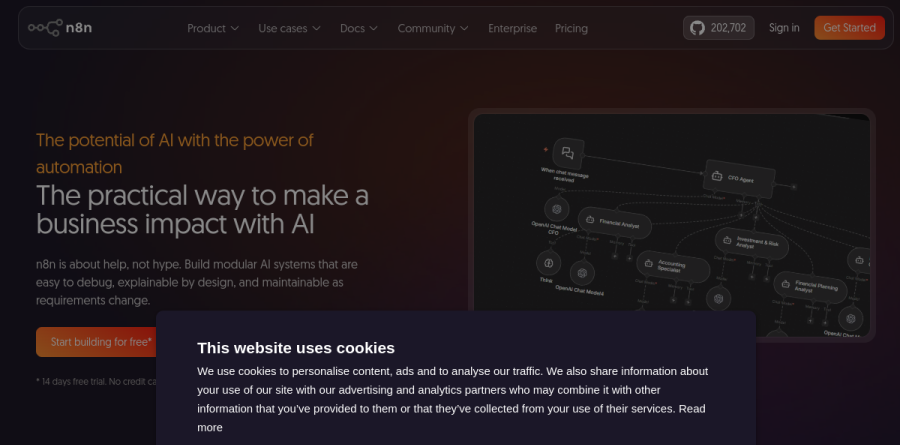
AI in n8n is a first-class part of the canvas, not one generic node bolted on. Connect any cloud or offline model, wire up multi-agent setups and RAG systems, and switch on MCP support so workflows become callable by clients such as Claude, or so n8n can call other MCP-enabled tools mid-flow.
The control layer makes this usable in production. Human-in-the-loop approvals sit at any point in a workflow or in front of any agent tool, structured inputs and outputs constrain what reaches a model, and every execution can be inspected for the prompt sent and the response returned. Native evaluations test workflows against defined metrics before customers meet the result.
Code when you need it, UI when you do not
n8n refuses to make developers choose. Drop a Code step running JavaScript or Python anywhere in a workflow, import cURL commands, hit any HTTP or GraphQL endpoint, and drive the instance through its API or CLI. The vendor reports over 500 integrations shipped as pre-built nodes, with custom API connections covering whatever is missing.
Debugging follows the same instinct: re-run a single step rather than an entire workflow, replay or mock data instead of waiting on an external system, and read the logs view rather than clicking blindly through past executions.
Templates, AI Workflow Builder and Chat Hub
Nobody needs to begin on an empty canvas. The n8n template library covers simple and genuinely complex patterns alike, from deep research agents that assemble Notion reports to self-improving email support with a human review gate. AI Workflow Builder goes further: describe an automation in plain English, get a working workflow back, then refine it by conversation. Chat Hub gives an organisation one interface onto multiple models and internal agentic workflows.
Governance and DevOps for production teams

Larger deployments are where n8n stops resembling a hobby tool. The enterprise material describes SSO with SAML and LDAP, enforced 2FA, granular per-project roles, and external secret stores including HashiCorp Vault, AWS Secrets Manager and Azure Key Vault. Git-based version control, isolated development and production environments, and side-by-side workflow diffs bring familiar CI/CD discipline to automation.
Log streaming pushes events into a SIEM or observability stack, Insights surfaces execution volume and failure rate, and queue mode with multi-main instances handles scaling and failover. The vendor states the platform is SOC 2 audited.
How the plans are structured
Cloud billing meters full workflow executions rather than steps or seats, so a sprawling workflow costs the same as a trivial one. Every paid plan includes unlimited users, unlimited workflows and all integrations. n8n positions Starter as the plan for getting started and Pro as the one for solo builders and small teams running workflows in production; moving up raises the shared-project and concurrent-execution limits and adds workflow history and execution search on Pro, SSO with SAML and LDAP, separate environments and Git version control on Business, and unlimited shared projects, external secret store integration, log streaming and dedicated support with an SLA on Enterprise. The pricing page also lists a Community Edition, described as a standard, self-hosted version of n8n available on GitHub.
Who should choose n8n
n8n suits technical teams best, DevOps, IT operations, security engineering and product developers, who want AI agents in production but need to constrain exactly what those agents do. It rewards anyone comfortable reading an API doc, a JSON payload or a Docker command, and it is unusually good value where data policies rule out hosted SaaS. It is not ideal for non-technical users who want a few app-to-app triggers with no configuration, since that audience moves faster on a lighter consumer-grade tool. The jump from the mid-tier plan to Business is steep, so confirm you need the governance features first.
Strengths
- Execution-based pricing: unlimited steps per run, so complex workflows cost far less than Zapier's per-task or Make's per-operation billing
- Free self-hosted Community Edition with an almost complete feature set and no execution limits
- Native LangChain-based AI agent nodes with multi-agent and RAG support, usable with cloud or local models
- Unlimited users on every cloud plan, including the €20/mo Starter
Watch out for
- Steeper learning curve than Zapier or Make; non-technical users report friction with advanced features
- ~500 native integrations trails Zapier (7,000+) and Make (2,000+), so more custom HTTP work is needed
- Huge price cliff from Pro (€50/mo) to Business (€667/mo) just to get SSO and environments
- Fair-code Sustainable Use License is source-available, not true open source; commercial redistribution is restricted
Key features
| Feature | What it does |
|---|
| Visual workflow editor | Drag-and-drop canvas with 500+ integrations; write JavaScript or Python anywhere in a workflow |
| AI agents and RAG | LangChain-based AI nodes for multi-agent setups and RAG systems, with every reasoning step traceable on the canvas |
| Execution-based billing | One full workflow run counts as a single execution regardless of how many steps it contains |
| Self-hosting | Deploy free on your own infrastructure (Docker/npm) so data never leaves your servers; registered free version adds Folders and in-editor debugging |
| Template library | 10,000+ community workflow templates to start from instead of building from scratch |
| Debugging tools | Re-run single steps instead of whole workflows, and replay or mock data to avoid waiting on external systems |
How n8n compares
| Alternative | How it differs |
|---|
| Zapier | 7,000+ integrations and the easiest onboarding, but per-task pricing gets expensive on complex or high-volume workflows |
| Make | 2,000+ apps and a visual scenario builder with a cheaper entry point, but bills per operation so every step counts against quota |
| Activepieces | MIT-licensed true open-source alternative for teams that find n8n's fair-code license too restrictive; smaller ecosystem |
Head-to-head: n8n vs Make
Frequently asked questions
Is n8n free?
Partially. The self-hosted Community Edition is free with an almost complete feature set and unlimited executions on your own server. n8n Cloud is paid, starting at €20/month (billed annually) for 2,500 executions, though Starter and Pro plans offer a free trial with no credit card required.
How much does n8n cost?
n8n Cloud costs €20/month for Starter (2,500 executions), €50/month for Pro (10,000 executions), and €667/month for Business (40,000 executions, SSO) when billed annually; monthly billing runs higher. Enterprise pricing is custom. Every plan includes unlimited users and unlimited workflow steps. Self-hosting the Community Edition is free apart from server costs.
n8n vs Zapier: which is better?
n8n wins on cost for complex automations: one execution covers a full workflow with unlimited steps, while Zapier charges per task. Zapier wins on breadth and ease, with 7,000+ integrations versus n8n's 500+, plus gentler onboarding. Choose n8n if you're technical or want self-hosting and AI agents; choose Zapier for quick no-code automations.
Is n8n open source?
Not strictly. n8n is fair-code, distributed under the Sustainable Use License plus an Enterprise License. The source code is always visible on GitHub (196k stars), you can self-host it free and extend it with your own nodes, but commercial redistribution is restricted, so it doesn't meet the OSI open-source definition.
How do n8n executions work?
One execution equals one complete workflow run, no matter how many steps or nodes it contains — unlike Make or Zapier, which count each operation or task separately. Cloud plans include 2,500 (Starter), 10,000 (Pro), or 40,000 (Business) executions per month. Self-hosted n8n has no execution limits beyond your server's capacity.
n8n ratings on other platforms
Independent user ratings from third-party review sites, linked here for transparency.
These are not our editorial score, are captured on the date shown, and may have changed since.