Serverless Database Pricing Without Bill Shock: Ten Vendors Ranked by What They Publish and What They Cap
Affiliate disclosure: some links here are affiliate links and we may earn a commission at no cost to you. The order below follows the stated criterion and nothing else; no vendor paid for a position or saw this page before it went up.
Bill shock with a serverless database is rarely caused by an expensive rate. It is caused by a rate nobody showed you, attached to a meter that nothing stops. Here is the short answer, taken from what these vendors publish: of the ten managed and serverless databases below, three can stop spending on a paid plan. Supabase ships a spend cap enabled by default on Pro, so passing a plan limit triggers service restrictions instead of overage charges. MongoDB Atlas Flex has a built-in maximum of $30 for a month’s usage. Turso lets you switch overages off entirely, which stops usage at the plan quota. A fourth, Azure SQL Database, caps spend only on its free offer, where the default setting pauses the database until next month. Free plans stop hard elsewhere too: Neon suspends compute until the next billing month, Turso’s Free plan blocks databases at quota, and an AWS Free plan account cannot incur charges at all. On every other paid plan here, nothing stops the meter — the strongest published control is an alert, and CockroachDB and Redis Cloud publish not even that.
This page ranks those ten on bill predictability alone: which unit rates a vendor publishes, whether any control actually halts spend, and what the invoice does when traffic triples overnight. Every figure was read on 17 September 2026 from the vendors’ own pricing pages, or from their public documentation and price feeds where the pricing page does not publish it, and is quoted as published. Nothing here was installed, subscribed to or benchmarked. This is a comparison of what these companies are willing to put in writing, which is the thing that decides whether next month’s invoice surprises you.
What this ranking measures
Three things, in order. First, which unit rates the vendor publishes on a page a prospective customer can open: compute, storage, egress, backups, and any per-operation meter. Second, whether a spend cap or hard limit exists, meaning a control that stops service or stops charging, as opposed to an alert telling you money is already gone. Third, what the invoice does on a traffic spike: does the meter run faster, does the plan throttle, or does nothing move because compute is a fixed monthly rate. A vendor that does not publish a rate ranks below one that publishes an expensive one, which is why Google Cloud SQL’s $0.19 per GiB internet egress scores above a rival that bills egress and prices it nowhere. Deliberately not measured: performance, latency, feature depth, migration effort, support quality, or whether the database is any good. Scope is databases billed by usage or by instance, so seat-priced no-code platforms are excluded.
The short answer
It is the only vendor here whose paid plan arrives with a spend cap already switched on. With the cap left alone, exceeding Pro limits produces service restrictions — project pausing, a read-only database, 402 responses — rather than overage charges, and you have to disable it deliberately to let the bill grow. Every meter it does charge carries a published number, from $0.09 per GB of egress to $0.01344 an hour for Micro compute, and reads and writes are not metered at all.
Almost every billable line has a published figure: $4.8971/month (West US 2, USD) for a DTU Basic database, $0.0001450 per vCore-second on General Purpose serverless, $0.115 per GB-month of storage, and $0.10 or $0.20 per GB-month of backup. That DTU Basic figure is a flat compute charge that query volume cannot move — but it is not the whole invoice, because egress is not included: the SQL pricing page defers to Azure’s standard data transfer rates, which give the first 100 GB a month of internet egress free and then charge $0.087 per GB from North America or Europe. It also has a free offer that pauses until next month by default. It loses the top spot because that pause is the only real cap: the Azure spending limit does not apply to pay-as-you-go.
At $0.011 an hour, Flex climbs a five-step ladder from $8.00 to $30.00 for a month’s usage and then stops. It is the only cheap metered tier in this roundup whose worst case is a dollar figure published before you sign up, which is exactly what buying without bill shock means.
All 10 compared
| # | Product | Best for | Price from | What decides its place | |
|---|---|---|---|---|---|
| 1 | Teams who want a spike to hit limits, not the invoice | from $25/month | Pro ships with a spend cap on by default; overage needs opt-out | Visit | |
| 2 | A fixed monthly compute charge, with egress billed apart | $4.8971/month (West US 2, USD) | Free-offer databases auto-pause until next month by default | Visit | |
| 3 | A metered tier with a published maximum charge | $0.011/hour (“Up to $30/month”) | Flex has a built-in maximum of $30 for a month’s usage | Visit | |
| 4 | Row-level metering with a published price per unit | $5.99/month billed monthly; $4.99/month billed yearly ($59.88/year) | Paid plans created after 19 March 2025 start with overages on | Visit | |
| 5 | Databases idle most of the day, busy in bursts | “Pay for what you use” — $0.106/CU-hour compute, $0.35/GB-month storage, no monthly minimum | Spend alerts at 80% and 100%; auto-suspend is not yet shipped | Visit | |
| 6 | Buyers who want every line item priced upfront | $0.0105 / 1 hour (db-f1-micro, Iowa us-central1) | Internet egress is $0.19/GiB and budgets only send alerts | Visit | |
| 7 | A compute line that does not move with traffic | Single node — Starting at $5/month | Egress and volume rates sit behind a per-region API endpoint | Visit | |
| 8 |  | AWS shops that need no plan and no commitment | “0.0160000000” USD per hour (db.t4g.micro, Single-AZ, On-Demand, US West (Oregon)) | Reserved Instances revert to On-Demand rates at term end | Visit |
| 9 | Multi-region SLAs, if unknown egress is acceptable | $0.092 per vCPU-hour (Standard, AWS us-east-1) | Egress is billed with no per-GB rate published anywhere | Visit | |
| 10 | One small cache, free forever, and nothing bigger | From $0.007 /hour — Total $5/month | No published rate for storage, egress or operations | Visit |
1. Supabase
Why it sits at 1 Pro ships with a spend cap on by default; overage needs opt-out
Supabase bills a Postgres database, auth, storage and edge functions as one organisation subscription, then meters everything above the included allowance with a published number: $0.125 per GB of database storage, $0.09 per GB of egress, $0.03 per GB of cached egress, $0.0213 per GB of file storage, $0.00325 per monthly active user, $2 per million Edge Function invocations, and compute from $0.01344 an hour for a Micro instance.
It wins on one setting. Pro accounts arrive with a spend cap already enabled, and with it on, exceeding a plan limit produces service restrictions — project pausing, a read-only database, 402 responses — rather than overage charges. You must switch it off deliberately. Reads and writes are not metered at all; API requests are listed as unlimited on every plan, so the most volatile thing a database does is not a billable event here.
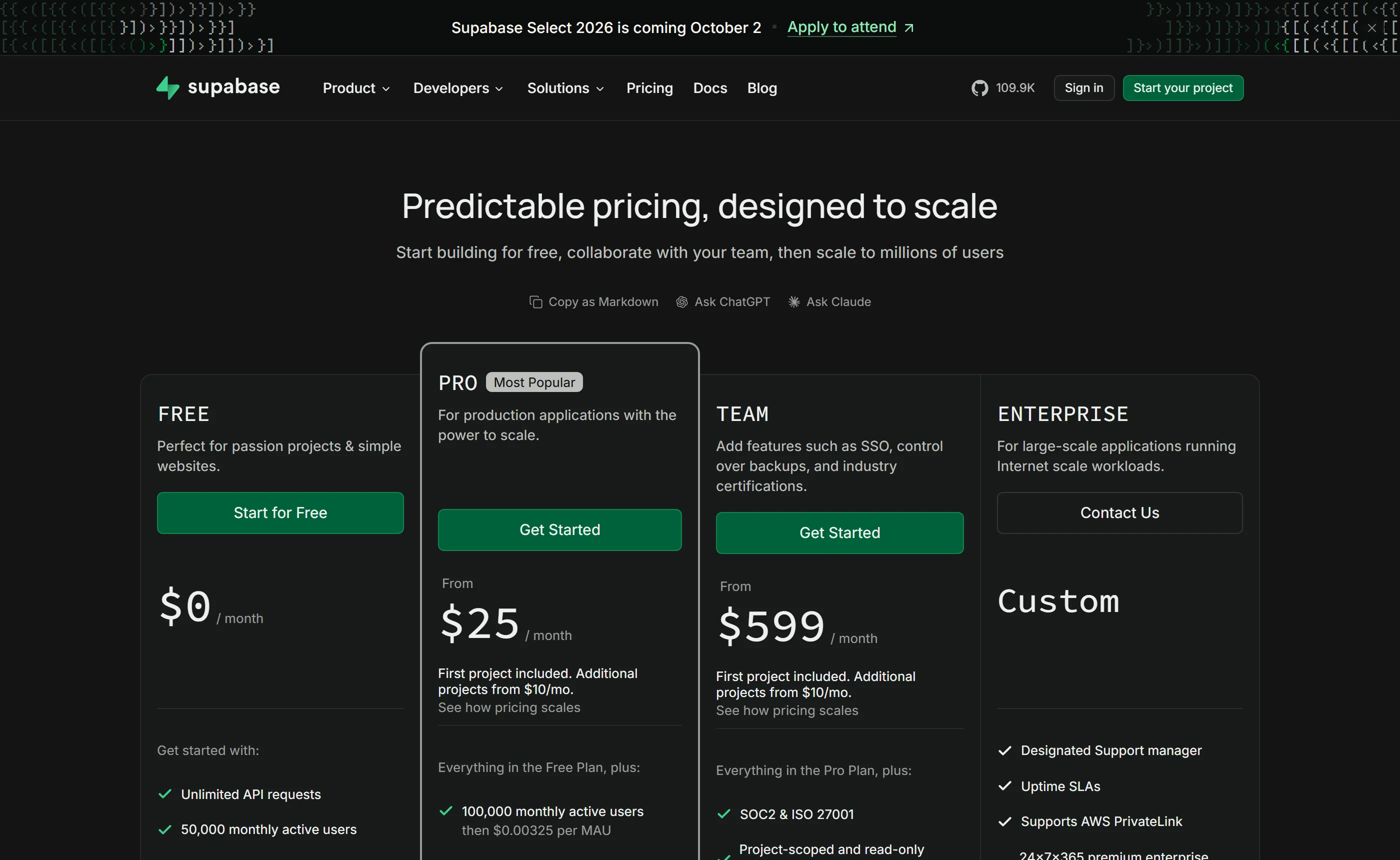
- The spend cap on Pro is on by default, so the failure mode of a traffic spike is degraded service rather than a larger invoice.
- There are no refunds under any circumstance — the Billing FAQ states that Supabase does not provide them, and cancelling converts unused subscription time into non-expiring account credits instead.
2. Azure SQL Database
Why it sits at 2 Free-offer databases auto-pause until next month by default
Azure sells this database under two purchase models and the pricing page opens on the metered one. Switch the selector to DTU and Basic is $4.8971 per month (West US 2, USD) for 5 DTUs and 2 GB of storage — a flat compute charge that query volume cannot move. Note the two qualifiers. The page is geo-localised, with a 62-entry region selector and a 16-entry currency selector, so that figure is specific to West US 2 in dollars. And the invoice around that charge does move: egress is not included, because the SQL pricing page defers to Azure’s standard data transfer rates, which give the first 100 GB a month of internet egress free and then charge $0.087 per GB from North America or Europe, while backup storage beyond an allowance equal to the database’s maximum data size runs $0.10 or $0.20 per GB-month. On the vCore side, General Purpose serverless is $0.0001450 per vCore-second and storage is $0.115 per GB-month.
Its hard stop lives in the free offer, documented in Microsoft Learn and never mentioned on the pricing page: 100,000 vCore seconds, 32 GB of data and 32 GB of backup per database each calendar month, on up to ten General Purpose databases, for the lifetime of the subscription. The default behaviour when that runs out is to pause the database until next month. On a paid pay-as-you-go subscription there is no equivalent, because Azure’s spending limit does not apply there.
- Every billed line carries a published number, and the DTU Basic compute charge of $4.8971 per month cannot move with query volume — though internet egress is billed separately at Azure’s standard rates, free to 100 GB a month and then $0.087 per GB.
- The auto-pause is the only genuine cap, it is invisible on the pricing page, and choosing the alternative setting — keep running and pay standard serverless rates — cannot be reversed.
3. MongoDB Atlas
Why it sits at 3 Flex has a built-in maximum of $30 for a month’s usage
Atlas publishes a complete hourly ladder — $0 an hour for the free M0, $0.011 for Flex, $0.08 for the M10 entry dedicated tier and up to $33.26 for M700 — billed hourly with monthly invoices, so the entry rate is also the ongoing rate. The free 512 MB cluster is hard-limited to 100 operations per second, 10 GB in and 10 GB out per rolling seven days and 500 connections; past 100 ops/sec Atlas throttles the network rather than charging.
Flex earns the position: usage climbs a five-step ladder from $8.00 to $30.00 for a month’s usage and stops there, the only built-in dollar ceiling in this roundup. That is a deliberate tiebreak, and worth naming. MongoDB fails the first test twice — no per-GB rate for dedicated storage beyond a tier default, and two conflicting floors for the same M10 entry tier — and it still places above Turso, which prices all four of its meters, because a hard dollar ceiling you can read before signing up is worth more under the second test than a complete rate card with nothing behind it. Above Flex that ceiling dissolves into threshold alerts and a Cost Explorer, and a paused dedicated cluster still bills storage. Egress is not charged at all on M0 or Flex, and is charged at published flat per-GB rates that vary by destination on dedicated clusters.
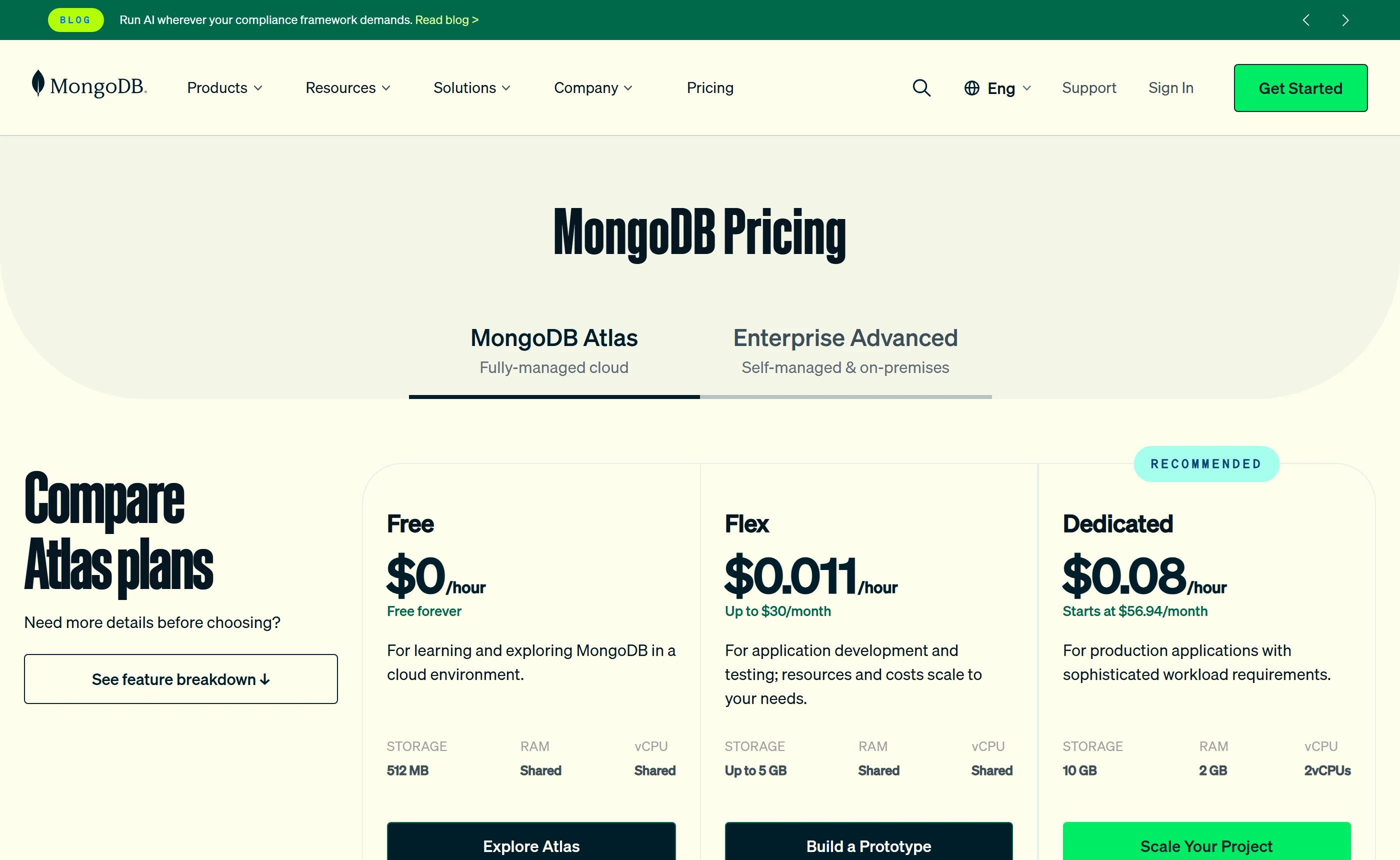
- Flex publishes a maximum charge of $30 for a month’s usage, so the worst case is a number you can read before signing up.
- MongoDB publishes two different floors for the same dedicated entry tier, $56.94 per month on the pricing card and $60 per month in its own docs, and no per-GB rate for storage beyond a tier default.
4. Turso
Why it sits at 4 Paid plans created after 19 March 2025 start with overages on
Turso is the clearest rate card in the set for anyone who thinks in rows. Four meters, each priced per plan: Developer is $0.75 per GB of storage, $1 per billion rows read, $1 per million rows written and $0.35 per GB of Embedded Syncs; Scaler cuts those to $0.50, $0.80, $0.80 and $0.25; Pro to $0.45, $0.75, $0.75 and $0.15. Every row touched while answering a query counts, not only the rows returned.
The Free plan is a real hard stop: overages cannot be enabled, so exhausting any single metric blocks the databases until the cycle resets, even with the other metrics well under quota. That protection inverts on paid plans, which are created with overages already switched on if the plan was created after 19 March 2025. There is no dollar budget anywhere — the control is binary, not numeric. An idle database is not shut down; it simply stops accruing anything but storage, and a Free plan database is archived after ten days of inactivity rather than deleted.
- All four metered units carry a published per-plan rate, and a Free plan database physically cannot generate an overage charge.
- The only spend control is an on/off overages switch that defaults to on for paid plans created after 19 March 2025, with no dollar budget or alert threshold published at all.
5. Neon
Why it sits at 5 Spend alerts at 80% and 100%; auto-suspend is not yet shipped
Neon charges no flat entry fee and publishes the fullest rate card of any pure-usage vendor here: Launch meters compute at $0.106 per CU-hour and storage at $0.35 per GB-month with no monthly minimum, Scale at $0.222 per CU-hour. Around that sit instant restore at $0.20 per GB-month, snapshots at $0.09 per GB-month, extra branches at $1.50 per branch-month, and 500 GB of public egress per project before $0.10 per GB.
The bill has a genuinely different shape. Compute scales to zero after five minutes idle and suspended compute accrues nothing, so a quiet database costs storage alone, and exceeding a Free plan limit suspends compute until the next billing month without deleting data. On paid plans that discipline disappears: the organisation spending control sends email at 80% and 100%, and Neon states that automatic suspension at a threshold is not yet shipped.
- Every meter has a published number and suspended compute accrues no charge, so the floor of a Neon bill is storage alone.
- Paid plans cannot be hard-capped — the spending control only emails alerts, so charges keep accumulating past the threshold you set.
6. Google Cloud SQL
Why it sits at 6 Internet egress is $0.19/GiB and budgets only send alerts
Few vendors itemise this thoroughly. A shared-core db-f1-micro is $0.0105 an hour in Iowa and carries no SLA; dedicated Enterprise compute is $0.0413 per vCPU hour plus $0.007 per gibibyte hour of memory, doubling for high availability; SSD storage is $0.000232877 per GiB-hour; Hyperdisk adds $0.000027397 per IOPS-hour; an idle reserved IPv4 address costs $0.01 an hour whether or not the database serves anyone; internet egress is $0.19 per GiB and $0.12 per GiB cross-region.
Publishing an expensive rate counts for more here than hiding a cheap one, which is why Cloud SQL sits above PlanetScale in this order even though its numbers are the higher ones: nothing on a Cloud SQL invoice is a rate you have to go looking for. What it lacks is a brake. Standard Cloud Billing budgets are alerts only, Google’s enforceable spend-cap budgets are a preview limited to four other services, and even where they apply they do not pause persistent compute and storage. There is no always-free tier either, only a 30-day trial instance on a fixed, unmodifiable configuration.
- Almost every billable unit has a published rate, down to $0.01 an hour for an idle reserved IPv4 address.
- There is no cap of any kind: Cloud SQL is explicitly excluded from Google’s enforceable spend-cap preview, nothing scales to zero, and instances bill every second they run.
7. PlanetScale
Why it sits at 7 Egress and volume rates sit behind a per-region API endpoint
PlanetScale bills compute as a flat monthly cluster rate prorated to the millisecond, which makes the biggest line on the invoice insensitive to query volume: $5 a month for a single-node PS-5 Postgres, $15 for the cheapest highly available cluster of one primary and two replicas across three availability zones, $39 for the cheapest three-node Vitess, $50 for the cheapest Metal, all benchmarked to AWS us-east-1. Backup storage equal to twice the disk size is included, with overage at $0.023 per GB-month.
Then the criterion bites. The two lines that do move with traffic — public egress overage and the per-GB price of network-attached storage — appear on no human-readable pricing page; PlanetScale points you at a per-region endpoint, which returned 0.06 and 0.125 respectively for AWS us-east-1. That is precisely why it sits below Cloud SQL here: publication is the first test, and a rate you have to query an API to discover is not published to a buyer. IOPS and throughput rates are visible only after signing in. There is no free tier, a valid card is mandatory, pre-paid cards are refused, and spend controls stop at email alerts at 75% and 100%.
- Compute is a fixed monthly cluster rate, so query volume cannot change the largest line on the bill.
- The public egress overage rate and the per-GB storage rate are printed on no public pricing page — you have to query a per-region endpoint to find out what traffic will cost you.
8. Amazon RDS
Why it sits at 8 Reserved Instances revert to On-Demand rates at term end
RDS is priced per instance-hour with no plan and no term: a db.t4g.micro Single-AZ On-Demand is 0.016 USD an hour in US West (Oregon), billed per second after a 10-minute minimum charge. Storage, backups and transfer are separate published lines — gp3 Single-AZ at $0.115 per GB-month, backups at $0.095 per GB-month, io1 at $0.125 per GiB plus $0.10 per provisioned IOPS, cross-AZ traffic at $0.01 per GB. Reads and writes are not metered on SSD storage at all.
Two things cost it position. The hourly instance rates do not render in the pricing page’s HTML — the tables are a JavaScript widget, and the figures above come from the feed that widget loads. And a Reserved Instance does not renew at the reserved rate: at term end it reverts to the On-Demand rate for that instance class and region. The real hard stop is the Free plan, which cannot incur charges and closes the account at six months or when credits run out.
- The Free plan cannot incur charges at all — it closes the account at six months or when credits run out rather than billing you — and RDS meters no reads or writes on SSD storage.
- Stopping an idle database does not stop the bill — storage, provisioned IOPS, backups and any public IPv4 keep charging, and AWS restarts the instance after seven days.
9. CockroachDB
Why it sits at 9 Egress is billed with no per-GB rate published anywhere
Cockroach Continuum meters provisioned vCPUs by the minute: $0.092 per vCPU-hour for Standard in AWS us-east-1 and $0.162 for Mission Critical, with add-ons stacked per vCPU-hour on top — change data capture at $0.006 on Standard or $0.023 on Mission Critical, physical cluster replication and cluster virtualisation at $0.023. Mission Critical provisioned storage is $0.155 per GiB-month billed against a 4.5x durability multiplier, so 100 GiB bills as 450 GiB.
The gaps are where the criterion hurts. Data transfer is billed, carries no published per-GB rate, and is excluded from the cost calculator entirely. Standard’s usage-based storage has no published figure either. The page advertises Standard from $0.057 per vCPU-hour, a rate matching no region, edition or storage model in Cockroach’s own table, whose lowest Standard figure is the $0.092 above. There is no spend cap and nothing scales to zero.
- Compute, add-ons and Mission Critical provisioned storage all carry explicit per-unit rates, metered by the minute rather than by the month.
- Egress is billed with no published rate anywhere and is left out of the calculator, so the one line that reacts hardest to a traffic spike is the one you cannot price in advance.
10. Redis Cloud
Why it sits at 10 No published rate for storage, egress or operations
The free plan is real and precisely bounded: a single 30 MB database, free forever, with 30 concurrent connections, one CIDR allow rule, 5 GB of monthly network bandwidth and a 100 ops/sec throughput ceiling, one per account. Essentials starts at $0.007 an hour totalling $5 a month for 250 MB to 100 GB in a single database; Pro starts at $0.014 an hour against a $200 monthly minimum, with the first $200 free.
Above the free plan almost nothing is priced in public. There is no per-GB storage rate, no per-GB egress rate — the calculator concedes outbound transfer may be charged and refers you to support — no per-operation price, and no compute rate separated from the bundled dataset-size hourly figure. The calculator disclaims its own outputs as estimates. There is no spend cap, and a subscription keeps billing after every database inside it has been deleted.
- The free 30 MB plan is free forever and its four hard limits are published exactly, so its ceiling is fully knowable before you start.
- Beyond the free plan Redis publishes no storage, egress, operation or compute unit rate, offers no spend cap, and keeps billing the subscription after every database in it is deleted.
Which one fits your situation
The free tier is enough. Supabase Free gives unlimited API requests, 50,000 monthly active users, a 500 MB database and 5 GB of egress, and exceeding it restricts service rather than charging you. Do not buy anything yet.
MongoDB Atlas Flex is the cleanest answer: its metered usage cannot exceed $30 for a month, whatever the traffic does. Azure SQL Database DTU Basic at $4.8971 per month (West US 2, USD) fixes the compute charge so query volume cannot move it, but it is not a whole-invoice ceiling — budget separately for internet egress, which Azure bills at its standard rates, free to 100 GB a month and then $0.087 per GB.
Supabase Pro, from $25 per month, with the default spend cap left switched on. A spike then arrives as service restrictions — pausing, read-only, 402 responses — instead of an overage line you discover after the fact.
Neon Launch. Compute scales to zero after five minutes and suspended compute accrues nothing, at $0.106 per CU-hour while it runs. Accept that the only paid-plan control is email at 80% and 100%.
Price egress before anything else. Supabase publishes $0.09 per GB, Neon $0.10 per GB past 500 GB per project, Google Cloud SQL $0.19 per GiB, Azure $0.087 per GB past the first 100 GB a month. CockroachDB and Redis Cloud publish no egress rate at all; PlanetScale publishes one only through a per-region API endpoint, which returned 0.06 per GB for AWS us-east-1, so you cannot price it from a public page.
Redis Cloud’s free plan: a single 30 MB database, free forever, with 30 connections, 5 GB of monthly bandwidth and 100 ops/sec, one per account. The free tier is enough, and the paid tiers publish no unit rates to compare.
What this market gets people for
- Reading the advertised entry price as the whole bill Supabase Pro is from $25 a month per organisation before metered usage. PlanetScale’s $5 single node is compute only, with storage, backups and egress on top. Azure’s $4.8971 DTU Basic charge is fixed, but egress is billed separately at Azure’s standard rates. An RDS bill assembles from at least six separately metered lines, and AWS publishes no bundled figure. The number on the card is a floor, not a total.
- Assuming a spend alert stops the spend Neon emails at 80% and 100% and says automatic suspension at a threshold is not yet shipped. PlanetScale emails at 75% and 100%. AWS Budgets only alerts and runs actions once a target is already exceeded, and Cloud SQL is excluded from Google’s enforceable spend-cap preview. An alert is a notification, not a brake.
- Assuming an idle database is a free database Cloud SQL bills an idle reserved IPv4 at $0.01 an hour and bills every second an instance runs. A stopped RDS instance keeps charging for storage, provisioned IOPS and backups, and AWS restarts it after seven days. A paused Atlas dedicated cluster still bills storage. Redis keeps billing a subscription after every database in it is deleted.
- Treating an annual-cadence rate as the monthly price Turso’s Developer plan is $5.99 a month billed monthly and $4.99 a month billed yearly, with an annual total of $59.88. Same plan, two different numbers, and only one of them applies if you pay month to month.
Questions buyers ask
Which of these can actually stop a bill rather than just warn me?
Three on a paid plan, plus one that caps only its free offer. Supabase’s Pro plan ships with a spend cap on by default, turning limit breaches into service restrictions. MongoDB Atlas Flex has a built-in maximum of $30 for a month’s usage. Turso lets you switch overages off, which stops usage at the plan quota. Azure SQL is the fourth, but only on the free offer, where a database pauses until next month once the free allowance is gone — the default setting; a paid pay-as-you-go subscription has no equivalent. Free plans stop hard elsewhere too: Neon suspends compute until the next billing month, Turso blocks the databases at quota, and an AWS Free plan account cannot incur charges at all. Everything else offers alerts only, and CockroachDB and Redis Cloud publish not even an alert.
Do any of these charge me per read and per write?
None of the ten publishes a per-read or per-write unit rate on current pricing. Turso comes closest by metering rows read and rows written as a proxy for compute, at $1 per billion rows read and $1 per million rows written on Developer. Supabase lists API requests as unlimited on every plan. RDS does not meter I/O on SSD storage. CockroachDB’s Request Units at $0.20 per million exist only on its older Basic plan.
What happens to my free database if I stop using it?
It varies and the difference matters. Supabase pauses a Free project after a week of inactivity; its pausing docs give a one-year restore window. Turso archives free databases after ten days of inactivity. MongoDB auto-pauses a Free cluster after 30 days with zero connections and reserves a broader right to deactivate idle free clusters. Neon suspends compute after five minutes but deletes no data. CockroachDB trial clusters are deleted after a 30-day grace period if no payment method is added.
Is there a refund if I overspend?
No vendor here publishes a money-back window. Supabase publishes the opposite: it does not provide refunds, issuing non-expiring account credits for unused subscription time instead. Redis states that charges are generally non-refundable. PlanetScale prorates the plan fee when you delete a database rather than refunding. Neon, Turso, MongoDB, CockroachDB, AWS, Google and Azure are silent on the subject entirely.
Which is the cheapest to start paying for?
By hourly rate, Google Cloud SQL’s db-f1-micro at $0.0105 an hour in Iowa (us-central1) and Amazon RDS’s db.t4g.micro at 0.016 USD an hour in US West (Oregon), though both are instance-only with storage, backups and egress billed on top. By published monthly figure, Azure SQL DTU Basic at $4.8971 (West US 2, USD — the page is geo-localised across 62 regions and 16 currencies) and PlanetScale’s single node at $5 in AWS us-east-1. Turso Developer is $5.99 monthly or $4.99 a month billed yearly. None of these is a total.
Does committing to a year make any of them cheaper?
Three publish committed rates. Google Cloud SQL lists 1-year and 3-year committed use discounts — $0.0413 per vCPU hour on demand against $0.030975 and $0.019824 — explicitly excluding storage, network, shared-core instances and extended support. Azure publishes a 1-year savings plan and 1- and 3-year reservations. AWS advertises up to 69% off with Reserved Instances but publishes no renewal rate and reverts you to On-Demand at term end. Turso’s yearly billing is a cadence discount, not a term commitment.
What none of them publish
These are the questions a buyer would want settled that no vendor on this page answers in public. If one of them decides your purchase, ask the vendor and hold them to the answer.
- No vendor in this roundup publishes a refund or money-back window. Supabase and Redis publish the opposite, and the other eight say nothing at all.
- Whether any spend threshold will ever stop service rather than send email. Neon says automatic suspension at a threshold is coming but publishes no date.
- CockroachDB’s data transfer rate. Egress is billed, carries no per-GB figure anywhere, and is excluded from the cost calculator entirely.
- CockroachDB’s usage-based storage rate for Standard edition, and whether the from $0.057 per vCPU-hour figure on its own page corresponds to anything purchasable — no region, edition or storage model in its rate card matches it.
- PlanetScale’s public egress overage rate and per-GB network-attached volume rate as numbers on a readable page, plus IOPS and throughput overage rates, dedicated PgBouncer SKU prices, and the Business support add-on price.
- Redis Cloud’s per-GB storage rate, per-GB egress rate, per-operation rate and compute rate broken out from the bundled hourly figure — and what the dangling asterisk on its $200 monthly minimum qualifies, since the page carries no matching footnote.
- MongoDB’s per-GB rate for dedicated storage beyond a tier default, its Azure and Google Cloud data transfer rates, which of its two published M10 floors ($56.94 or $60 per month) is correct, and whether Flex clusters auto-pause or are deleted when idle.
- Amazon RDS hour, GB or instance-class allowances for accounts created after 15 July 2025 — only a dollar credit amount is published, with the detail deferred to a widget inside the signed-in console.
- Azure’s free-offer overage rate as a number: the alternative setting is described only as the standard General Purpose serverless rates, and there is no egress allowance specific to Azure SQL Database beyond Azure’s account-wide first 100 GB a month.
- Turso’s free-plan concurrency, connection and request-rate limits, and what becomes of an archived free database that is never unarchived.
- Supabase’s authoritative restore window for a paused Free project: the pausing docs say one year while its own changelog announced 90 days, and the pricing page states neither.
- Enterprise or custom pricing at every vendor here that offers it — Supabase, Neon (including its Agent Plan), PlanetScale, CockroachDB’s volume discounts, Turso, MongoDB and Redis Cloud all price it as contact sales with no starting figure.
Reading this from the other direction? Supabase Alternatives: What You Actually Give Up When You Leave covers the same market against a different rule.