The full review
What is MongoDB Atlas?
MongoDB Atlas is the fully managed cloud version of MongoDB, run by the company that builds the database itself. Instead of provisioning servers and patching replica sets, you create a cluster and MongoDB handles failover, upgrades, and backups. The site describes Atlas as the modern multi-cloud database, and that multi-cloud framing is literal: clusters run on AWS, Azure, and Google Cloud across more than 125 regions, with multi-region and multi-cloud deployments managed from the same control plane.
At the core sits the document model. Data lives in JSON-like documents that map onto the objects in your application code, so a nested order with its line items stays a single record rather than five joined tables. MongoDB positions this as a way to evolve schemas without heavy migrations, which matters most when the shape of your data is still moving.
Deploying and scaling a cluster

MongoDB Atlas offers several front doors. You can create a database from the Atlas UI, the Atlas CLI, the Kubernetes Operator, or infrastructure-as-code through HashiCorp Terraform and AWS CloudFormation. Teams that already keep environments in version control can therefore treat clusters as another Terraform resource rather than a hand-clicked exception. Dedicated clusters add auto-scaling that adjusts cluster tier and storage based on real-time CPU and memory utilization, plus zero-downtime upgrades and workload isolation, which MongoDB lists alongside distributed deployments and fault tolerance. MongoDB lists dedicated headroom scaling up to 4 TB of storage, 768 GB of RAM, and 96 vCPUs per node.
What separates MongoDB Atlas from a plain hosted database is the surrounding suite of data services. Atlas Vector Search powers semantic retrieval and retrieval-augmented generation (RAG), and MongoDB lists native support for full-text search, vector search, and stream processing in the database itself. MongoDB Search handles relevance-based full-text queries; the vendor reports that teams build relevance-based search 4x faster and at 77% lower cost than with alternative search solutions. Atlas Stream Processing, Atlas Data Federation, Online Archive, and Atlas Charts round things out, covering event streams, queries across cloud object storage, tiered cold data, and embeddable dashboards.
The unified Query API gives you one interface for CRUD, aggregation pipelines, time series, and geospatial lookups. You write those queries in the MongoDB Shell, in Compass, or directly in your programming language of choice through the official libraries. For analysts who would rather not learn aggregation syntax, the Atlas SQL Interface lets BI tools point at the same data natively.
Security and day-two operations
Built-in access controls, full-lifecycle encryption, and automatic updates come standard, and MongoDB publishes an Atlas Shared Responsibility Model that spells out which duties stay with the customer. MongoDB states a 99.995% uptime SLA, describing Atlas as guaranteeing high availability for production workloads with automated failovers, including cross-region and cross-cloud failovers.
Plans and deployment choices
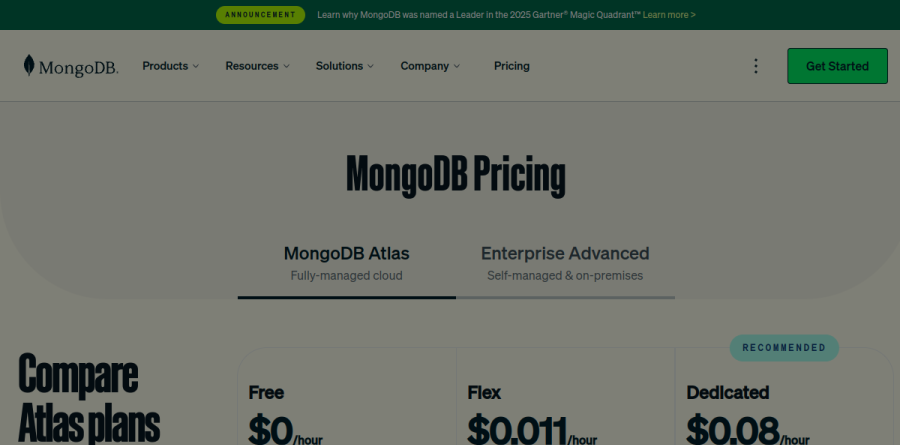
MongoDB Atlas ships a Free tier for learning and exploring, a Flex tier whose resources and costs scale with usage for development and testing, and Dedicated clusters for production workloads. A Pricing Calculator on the site helps estimate monthly spend before you commit. Separately, Enterprise Advanced covers self-managed and on-premises installations with Ops Manager and the Enterprise Kubernetes Operator, and it is quoted through sales rather than published on a page.
Who should choose MongoDB Atlas
MongoDB Atlas suits teams building document-shaped applications who want search, vector retrieval, and analytics without stitching together four vendors, and it suits anyone with a multi-cloud or multi-region requirement that a single-provider database cannot meet. The free tier makes evaluation genuinely low-friction, and the CLI and Terraform paths mean a proof of concept can graduate into real infrastructure without a rewrite. It is a weaker fit for workloads that are fundamentally relational, where heavy multi-table joins, strictly normalized schemas, and an existing SQL reporting stack will feel more at home on managed Postgres. Budget-sensitive teams should also model dedicated costs early, since the jump from shared to dedicated capacity is where spend starts to climb.
Strengths
- Genuinely free M0 tier (512 MB) with no card and no expiry — unlike PlanetScale, which dropped its free tier
- Runs on AWS, Azure, and Google Cloud with multi-region and cross-cloud clusters
- Built-in Atlas Search (full-text) and vector search — no separate search service to bolt on
- Flexible document model scales from prototype to production without schema migrations
Watch out for
- Dedicated cluster costs climb fast and are hard to predict for high-throughput workloads
- Data-egress and cross-region transfer charges add hidden cost on dedicated tiers
- Document model and MongoDB query language have a learning curve for SQL/Postgres teams
- No bundled auth, storage, or auto-generated APIs — you assemble those (vs. Supabase's all-in-one BaaS)
Key features
| Feature | What it does |
|---|
| Document database | JSON-like BSON documents with flexible schema; the managed cloud version of MongoDB. |
| Multi-cloud & multi-region | Deploy and replicate across AWS, Azure, and Google Cloud, including cross-cloud clusters. |
| Atlas Search & Vector Search | Built-in Lucene-based full-text search and native vector search for AI/RAG apps. |
| Flex usage-based tier | Pay-as-you-go dev/testing tier from $0.011/hr, capped at $30/mo, with 5 GB storage and burst capacity. |
| Automated backups & scaling | Continuous/point-in-time backups, auto-scaling compute and storage on dedicated clusters. |
| Data Federation & Atlas SQL | Query across clusters and cloud object storage at $5 per TB processed; SQL interface for BI tools. |
How MongoDB Atlas compares
| Alternative | How it differs |
|---|
| Supabase | All-in-one Postgres BaaS (auth, storage, realtime, auto APIs) from ~$25/mo; better if you want a bundled backend on relational data. |
| Neon | Serverless Postgres with scale-to-zero and Git-style branching; better for pure Postgres and ephemeral dev/preview branches. |
| Firebase Firestore | Google's serverless NoSQL document DB with tight mobile/web SDKs; simpler for small realtime apps but weaker querying and single-cloud. |
Frequently asked questions
Is MongoDB Atlas free?
Yes. The M0 free tier is free forever with no credit card required, giving you 512 MB of storage on a shared cluster. It's ideal for learning, prototypes, and small side projects. Unlike PlanetScale, which removed its free tier, MongoDB has kept M0 free, though backups and advanced features require a paid Flex or dedicated cluster.
How much does MongoDB Atlas cost?
Atlas starts at $0 for the free M0 tier. The usage-based Flex tier runs $8 to $30 per month (from $0.011/hr, capped at $30). Dedicated production clusters begin at about $57/month for an M10 ($0.08/hr, 2 GB RAM), scaling up through M20 (~$146/mo) to large multi-region clusters costing thousands per month, plus data-transfer fees.
What replaced MongoDB Atlas serverless and shared tiers?
In 2024–2025 MongoDB consolidated its old Shared (M2/M5) and Serverless options into a single Flex tier. Flex costs $8–$30 per month based on operations per second, includes 5 GB of storage, and adds burst capacity with a predictable monthly cap. The free M0 tier and dedicated M10+ clusters remain unchanged around it.
MongoDB Atlas vs Supabase vs Neon — which should I pick?
Choose Atlas if your data is document-shaped and you want built-in full-text and vector search across multiple clouds. Pick Supabase (from ~$25/mo) for a full Postgres backend with auth, storage, and realtime bundled in. Choose Neon for pure serverless Postgres with scale-to-zero and instant branching. The core split is document (Atlas) vs relational (Supabase/Neon).
What is the cheapest way to run MongoDB Atlas in production?
The cheapest true production option is a dedicated M10 cluster at roughly $57/month ($0.08/hr), which adds network isolation, backups, and dedicated resources. The Flex tier ($8–$30/mo) is cheaper but intended for development and testing, not production traffic. Watch for extra data-egress and cross-region transfer charges, which aren't included in the base cluster price.
MongoDB Atlas ratings on other platforms
Independent user ratings from third-party review sites, linked here for transparency.
These are not our editorial score, are captured on the date shown, and may have changed since.