LastPass Alternatives: What Leaving Actually Costs You
Affiliate disclosure: some links here are affiliate links and we may earn a commission at no cost to you. The order below follows the stated criterion and nothing else; no vendor paid for a position or saw this page before it went up.
If you are leaving LastPass, the short answer is Bitwarden. Its free plan holds unlimited passwords on unlimited devices at $0.00, LastPass is an out-of-the-box import source, and it is the only vendor here that names four separate audit firms from a single year. If you want email aliases bundled in, Proton Pass Free is the runner-up. If you never need a phone, KeePassXC costs nothing and meters nothing. Everything else on this page costs you something specific, and the point of this ranking is to say exactly what.
Most alternatives lists rank products by general goodness, which is useless once you already have a vault to move. Three questions decide it instead: can the new vendor read a LastPass export, what does its free plan take away compared with the LastPass Free plan you may be on right now, and what is it willing to publish about its own security. Those three questions are the ranking, in that order, with LastPass itself placed at the end as the baseline rather than as a score. Every price below is quoted as the vendor prints it, with the first term and the renewal kept separate, read on 17 September 2026.
What this ranking measures
This ranking measures three things and refuses to measure anything else. First, the import path: whether the vendor publishes a named LastPass importer, which file formats it accepts, and whether its free plan can hold the export at all. Second, the free tier measured against what LastPass Free already gives you — unlimited passwords, one user, one-to-one sharing, 50 MB of file storage and access on one device type. Third, the security record each vendor publishes about itself: named auditors, dates, certifications and its own incident disclosures. Where a vendor does not publish one of these, the absence is scored as an absence and costs it position. Where two vendors split the three legs, the tiebreak is whether the second-year price is published, because that is part of what moving costs too. LastPass itself is listed last by construction: it is the baseline the other nine are measured against, not a tenth candidate scored against them. Deliberately not measured: autofill quality, interface design, support responsiveness and speed. Nobody installed, subscribed to or ran any of these products. This is a comparison of published information, read on 17 September 2026.
The short answer
It is the only product that wins all three legs of the criterion. LastPass is a built-in import source covering .csv, .json, .kdbx, .xml and .1pux; the free plan carries unlimited passwords on unlimited devices at no cost, where LastPass Free allows one device type; and its published security record names four 2025 assessors — Cure53, ETH Zurich’s Applied Cryptography Group, Unit 42 and Fracture Labs — alongside ISO 27001, SOC 2 Type 2 and SOC 3, plus a self-disclosed April 2026 npm compromise of its CLI package.
Its free plan also clears the one-device-type limit — unlimited logins, notes and credit cards on unlimited devices — and adds 10 hide-my-email aliases, with LastPass among 16 named import sources. Its auditors are named and dated, including Recurity Labs between January and April 2026. It sits second because free users cannot share individual items at all, free vaults stop at 2, and the importer’s accepted file formats are not published.
Nothing to pay and nothing to renew, with no device, item or storage cap published anywhere, and a dated ANSSI CSPN certification for 2.7.9 valid to November 2028. The catch is real: the download page lists macOS, Windows, Linux, source and a browser extension with no iOS or Android app, and there is no recovery if the key file is lost. If you want a paid seat whose second year you can read before buying, RoboForm publishes $19.90 for the first year, then $29.88/yr.
All 10 compared
| # | Product | Best for | Price from | What decides its place | |
|---|---|---|---|---|---|
| 1 | A LastPass Free user who wants to pay nothing | $1.65 per month — “Billed annually at $19.80” (Premium, personal); Free plan “Always free” | Free: unlimited passwords and devices; four named 2025 auditors | Visit | |
| 2 | Free users who want email aliases too | $2.99/month (Pass Plus, Yearly) — “Billed at $35.88 every 12 months.”; Proton Free “$0.00/month” | Free: unlimited logins, unlimited devices, 10 aliases, 2 vaults | Visit | |
| 3 | Desktop-only users who want no vendor at all | Free and open source — no paid tier, nothing to renew | $0 with nothing metered — and no iOS or Android app | Visit | |
| 4 | Buyers wanting the widest named importer list | $2.99 USD — “Per month. Paid annually.*” (Individual), with the regular price shown alongside as $3.99 USD | No free tier: 14-day trial, then $2.99, renewing at $3.99 | Visit | |
| 5 | Small vaults kept in your own cloud | $2.19 /month — “Billed annually at $26.39” (Premium Plan, Annual); Free Plan “$0 forever” | Free plan stops the import at 25 items, in 1 vault | Visit | |
| 6 | Buyers who want an audited vendor and will pay | $3.58 / month, “$42.99 billed annually” (Personal) | Free plan: 10 records, 1 mobile device, no sync, no sharing | Visit | |
| 7 | Knowing year two’s price before you buy | $1.66 /mo Billed annually — “New users: $19.90 for the first year” / “Then renews at $29.88/yr” | $19.90 first year, then renews at $29.88/yr — both published | Visit | |
| 8 | One-device free use with unlimited passwords | $1.39/month (Premium, 2-year plan) — “$80.73 $37.53 for the first 27 months”; Free plan “$0.00/month” | $37.53 for the first 27 months; no renewal price published | Visit | |
| 9 | Readers who value full incident disclosure | $5.42 / Per month / Billed annually (Premium, personal) | No free tier at all; $5.42 per month, billed annually | Visit | |
| 10 | The baseline the other nine are measured against | $3.00 /month billed annually* (Premium); Free plan “$0.00” | Free works on 1 device type: computer or mobile, not both | Visit |
1. Bitwarden
Why it sits at 1 Free: unlimited passwords and devices; four named 2025 auditors
Bitwarden’s free plan removes the limit most people are leaving LastPass over: unlimited passwords on unlimited devices, at no cost. LastPass is an out-of-the-box import source alongside 1Password, Chrome, Edge, Firefox, Keeper, Dashlane, KeePass and Password Safe, covering .csv, .json, .kdbx, .xml and .1pux files.
The trade-off is what free withholds — the integrated TOTP authenticator, file attachments, emergency access and vault health reports, all Premium at $1.65 per month, billed annually at $19.80, with no renewal figure published anywhere. On the security leg nothing here matches it: 2025 assessments by Cure53, ETH Zurich’s Applied Cryptography Group, Unit 42 and Fracture Labs, ISO 27001 with SOC 2 Type 2 and SOC 3, and a self-disclosed April 2026 npm supply-chain compromise of its CLI package that it says reached no vault data and no production systems.
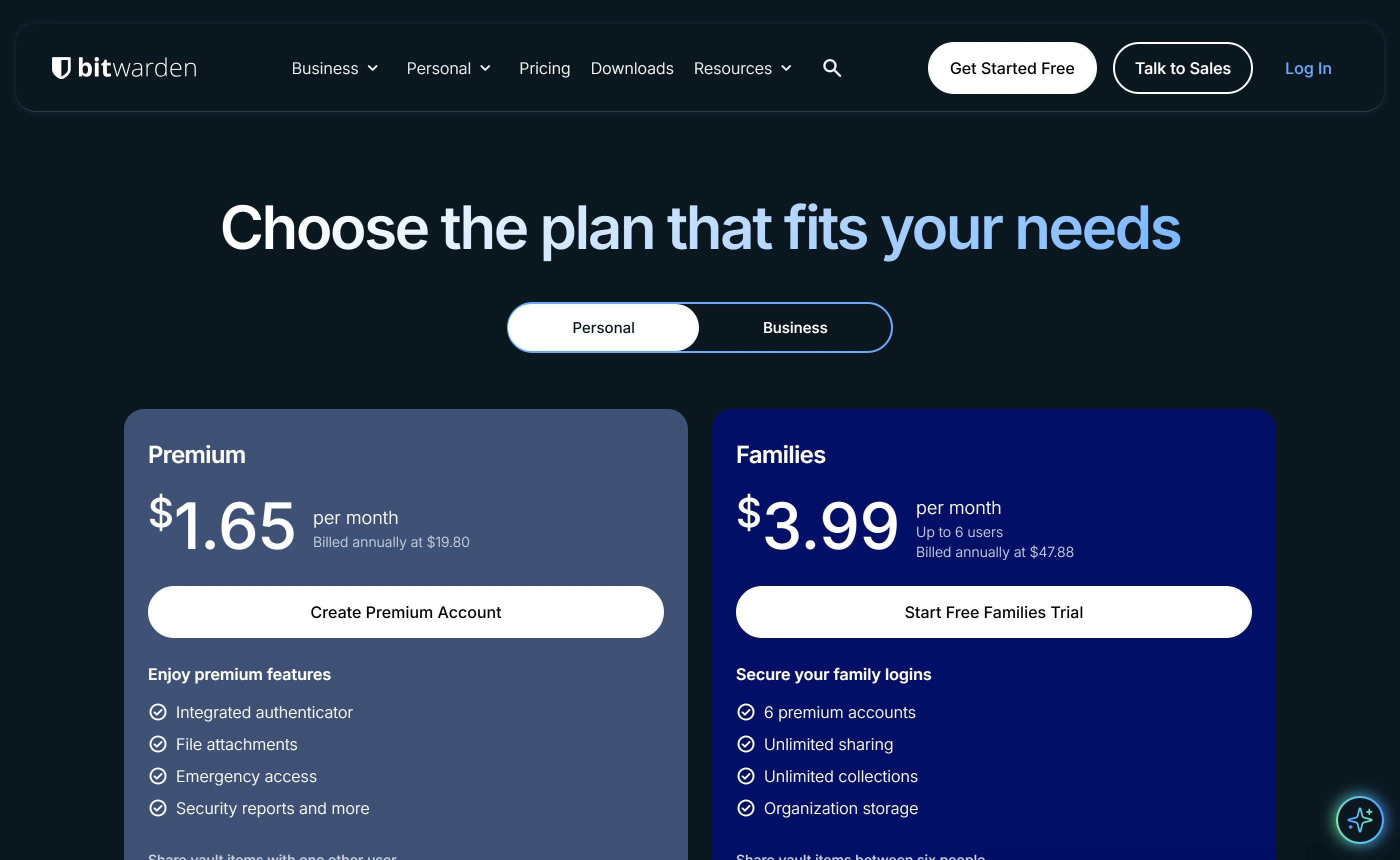
- Clears LastPass Free’s one-device-type limit at no cost, and names LastPass as a direct import source.
- Free sharing stops at one other person, and TOTP, attachments and emergency access are Premium-only; the 30-day refund is buried in the Terms of Service rather than shown beside the price.
2. Proton Pass
Why it sits at 2 Free: unlimited logins, unlimited devices, 10 aliases, 2 vaults
Proton Pass Free also beats LastPass Free on devices — unlimited logins, notes and credit cards across unlimited devices — and adds 10 hide-my-email aliases. LastPass is one of 16 named import sources. The published free caps are specific: 2 vaults, vault sharing with 2 other people, 1 GB of Pass storage, 1 user.
Individual item sharing is paid-only, a step down from the one-to-one sharing LastPass Free already gives you. Against that, Proton names and dates its auditors: Cure53 across mobile apps, extensions and API, and Recurity Labs between January and April 2026, which reported no remotely exploitable flaws. It also discloses an unresolved medium-severity Android finding rather than omitting it. Pass Plus is $2.99/month, billed at $35.88 every 12 months, with a 30-day money-back guarantee stated on the pricing page itself.
- Names and dates its auditors, and publishes a finding it could not fix instead of quietly dropping it.
- Free users cannot share individual items at all and are capped at 2 vaults and 10 aliases, and the importer’s accepted file formats are not listed.
3. KeePassXC
Why it sits at 3 $0 with nothing metered — and no iOS or Android app
KeePassXC is not a subscription with a free tier; it is the entire product under GPLv3, current release 2.7.12, with no account, no server and no signup. Nothing is metered: no device cap, no item cap, no storage cap. Measured against LastPass Free’s one device type and 50 MB of storage, that is the largest free entitlement on this page.
Two things keep it off the top. The download page offers macOS, Windows, Linux, source and a browser extension — no iOS or Android app — so a LastPass user who lives on a phone has nowhere to land. And import is documented as six Import Wizard formats rather than a named LastPass connector, with a warning to delete the plaintext export afterwards. Its evidence is dated where rivals are vague: an ANSSI CSPN certification for 2.7.9 valid to November 2028, and an independent code review of 2.7.4 completed January 2023.
- Costs nothing and meters nothing, and carries a dated certification valid to November 2028 rather than an undated claim.
- Desktop and browser extension only, with no mobile app published, and no recovery of any kind: lose the key file or password and the database is gone permanently.
4. 1Password
Why it sits at 4 No free tier: 14-day trial, then $2.99, renewing at $3.99
1Password documents the widest import path here: named importers for LastPass, Bitwarden, Dashlane, KeePass, KeePassXC, Keeper, RoboForm, Delinea and the major browsers, plus CSV, its own .1pux and the legacy .1pif. The certification list is the longest too — SOC 2 Type 2 and ISO 27001:2022, 27017, 27018 and 27701, an Onica AWS infrastructure audit and a HackerOne programme.
The free-tier leg is a zero, and that is what costs it three places. There is no free plan at all, only a 14-day trial, so a LastPass Free user moving here goes from nothing to $2.99 USD per month paid annually — with $3.99 USD printed beside it as the year-two rate, one of the few second-year numbers published anywhere on this list. No refund is available for past charges or for unused time. Certification dates are not stated, and the Okta-related incident 1Password disclosed sits on its blog, not its security page.
- Names LastPass among a long list of direct importers, and publishes the regular price next to the promotional one so year two is visible before you buy.
- No free tier at any level, only a 14-day trial, and the refund policy explicitly rules out refunds for past charges and for time remaining after cancellation.
5. Enpass
Why it sits at 5 Free plan stops the import at 25 items, in 1 vault
Enpass’s argument is architectural: encrypted vaults live in the customer’s own iCloud, Google Drive, OneDrive, Dropbox, Box or Nextcloud rather than on Enpass servers, with AES-256 over SQLCipher at 320,000 PBKDF2 rounds. Its import page names Lastpass directly, alongside 1Password, Keepass, Roboform, mSecure, Sticky Password, Chrome and CSV/Excel, and it publishes SOC 2 Type II and ISO/IEC 27001.
What holds it at fifth is the free plan: up to 25 items in 1 vault, and the import itself is capped at 25 items, so a real LastPass export cannot land there without paying $2.19 /month, billed annually at $26.39. It still places above Keeper on the first two legs. Both name LastPass as an import source, but Enpass adds CSV/Excel and ten other named managers, and its free vault holds 25 imported items against Keeper’s 10 records. Free Enpass also runs on every desktop and mobile app it publishes, with browser extensions, the generator and autofill included, where Keeper’s free plan is one mobile device with no sync and no extension. Premium publishes no renewal price, unlike Family, which states $39.59 with the discount and then $52.79 billed yearly. No auditor, date or report appears beside those certifications, there is no incident or transparency page at all, and personal plans have no account recovery whatsoever.
- Vaults stay in the customer’s own cloud storage rather than on vendor servers, and the Family plan is one of the few here to print its renewal price.
- Free import stops at 25 items, and the personal comparison table has no sharing row at all — sharing appears only under the Business plan, so a LastPass user cannot tell what they would get.
6. Keeper
Why it sits at 6 Free plan: 10 records, 1 mobile device, no sync, no sharing
Keeper publishes more about how its security gets checked than most: SOC 2 Type 2 for more than a decade, ISO 27001, 27017 and 27018, quarterly third-party penetration tests with full source-code access, and FedRAMP authorization at the High impact level for its government platform. It imports from CSV and browsers and names LastPass, 1Password, Bitwarden and Dashlane directly.
It sits sixth because the free-tier leg decides it. The free plan is worse than having none, because it looks like somewhere to land and is not: 10 records on 1 mobile device, with no sync, no sharing, no browser extension, no web vault, no record deletion and no password generator. It is absent from the pricing page entirely — you reach it by letting the 30-day trial lapse, not by signing up. That is what puts it behind Enpass, whose free plan is capped at 25 items but runs on every app and extension Enpass publishes, and which at least prints a renewal price for Family. Personal is $3.58 / month, $42.99 billed annually, with no renewal price published and no money-back window: the terms treat fees as earned on receipt.
- Quarterly third-party penetration tests with full source-code access, plus FedRAMP authorization at the High impact level for its government platform.
- The free plan holds 10 records on one mobile device with no sync or browser extension, is not advertised on the pricing page, and there is no refund window at all.
7. RoboForm
Why it sits at 7 $19.90 first year, then renews at $29.88/yr — both published
RoboForm publishes both halves of the price in dollars, on both of its personal plans: $1.66 /mo billed annually, shown as $19.90 for the first year for new users, then renewing at $29.88/yr, with Family at $31.95 for the first year and $47.75/yr after. Only Enpass’s Family plan and 1Password’s struck-through regular price come close, and 1Password’s is a per-month rate rather than a yearly total. The free plan keeps unlimited passwords but restricts you to a single device, with data breach monitoring capped at 5 email addresses.
The security leg drops it. The only third-party assessment RoboForm publishes is a penetration test by Secfault Security, linked as a 2025 summary PDF — no SOC 2, no ISO 27001, no incident history page. Its bug bounty commits to acknowledging reports within 10 business days but bars researchers from publishing findings without written approval, so what you can read about RoboForm’s security is what RoboForm has approved. Import is claimed from any browser or major password manager without a published format specification.
- Publishes both halves in dollars on both personal plans — $19.90 for the first year, then $29.88/yr — where 1Password prints only a per-month regular rate and Enpass prints a renewal for Family but not Premium.
- No SOC 2 or ISO 27001 certification is claimed, no incident history is published, and researchers are contractually barred from disclosing findings without written approval.
8. NordPass
Why it sits at 8 $37.53 for the first 27 months; no renewal price published
NordPass Free matches LastPass Free on the thing free plans usually ration: it puts no limit on how many passwords, passkeys or personal details you store. It publishes a LastPass import guide alongside 1Password, Dashlane and KeePass, though direct browser import covers Chrome and Firefox only, and encryption is XChaCha20 with Argon2id key derivation.
What it takes away is what a LastPass Free user already has. Multi-device access is marked not included on the free plan, and so are Password Health, the Data Breach Scanner, the authenticator and file attachments, while LastPass Free includes a security dashboard and dark web monitoring. NordPass says it is independently audited but names no firm, no date and no report, and publishes no incident page. The $1.39/month headline is $37.53 charged for the first 27 months against an $80.73 list, and no renewal price appears on the pricing page or the discount terms.
- The free vault has no ceiling on passwords, passkeys or personal information, unlike Enpass’s 25 items or Keeper’s 10 records.
- Free marks multi-device access, Password Health, the Data Breach Scanner and file attachments as not included, and no audit firm, date or report is named anywhere on the site.
9. Dashlane
Why it sits at 9 No free tier at all; $5.42 per month, billed annually
Dashlane discloses more about its own incidents than almost anyone here: a May 2026 brute-force in which attackers guessed the 6-digit device-registration token and downloaded encrypted vaults belonging to fewer than 20 personal-plan users, and a separate 2025 theft of business contact data from its Salesforce CRM through a compromised Drift integration. Its iOS, Android and web-extension client code is source-available on GitHub.
It still ranks ninth on this criterion. The Free plan is discontinued and monthly billing is gone, so the entry point is $5.42 per month billed annually, the highest personal price here, with no renewal figure published. Import is the narrowest on the page: Credential Exchange Protocol, a CSV, or Dashlane’s own DASH file, with no ability to read a competitor’s proprietary export, and Credential Exchange requires iOS 26, macOS 26 or Android 10+ and does not work in the browser extension. Penetration-test summaries are NDA-gated to enterprise customers.
- Publishes the mechanics of two of its own incidents and makes its client code source-available for independent review of its zero-knowledge claims.
- No free tier, no monthly billing, the highest personal entry price here, and an importer that reads only Credential Exchange, CSV or Dashlane’s own DASH file.
10. LastPass
Why it sits at 10 Free works on 1 device type: computer or mobile, not both
LastPass sits at the end of the list as the baseline, not as a score against the other nine: a list of alternatives is worthless unless the incumbent sits the same three tests. Free gives unlimited passwords, one user account, one-to-one sharing and 50 MB of file storage — but access on 1 device type only, computer or mobile, not both, and it includes a 30-day Premium trial for first-time trialers. Premium is $3.00 /month billed annually, Families $4.00 /month billed annually for six seats.
On the disclosure leg it is the most candid and the most expensive. LastPass states that an attacker copied a backup of customer vault data, that unencrypted website URLs sat inside that backup alongside the encrypted fields, and that customer names, billing addresses, email addresses, phone numbers and IP addresses were taken. It names SOC 2 Type II, SOC 3, ISO 27001:2022, ISO 27701:2019 and BSI C5 but publishes no report, auditor or date. Payments are final and non-refundable, and cancelling auto-renewal requires 30 days’ notice.
- Unlimited stored items on every plan including Free, plus a 30-day Premium trial that takes no credit card for first-time trialers.
- Free runs on one device type only, payments are final and non-refundable, and the disclosed incident included unencrypted website URLs plus customer names, billing addresses, emails, phone numbers and IP addresses.
Which one fits your situation
Bitwarden Free: unlimited passwords on unlimited devices at $0.00, with LastPass as a built-in import source. The free tier is enough — do not buy anything yet.
Bitwarden Families at $3.99 per month, billed annually at $47.88, is the closest like-for-like for 6 users. Proton Pass Family covers 6 at $4.99/month, billed at $59.88 every 12 months, and gives each person their own Pass Plus account.
1Password or Bitwarden — both publish LastPass as a direct import source. Do not assume Dashlane will do it: it reads only Credential Exchange Protocol, a CSV, or its own DASH backup, and Credential Exchange needs iOS 26, macOS 26 or Android 10+.
RoboForm publishes $19.90 for the first year then $29.88/yr, and 1Password prints $3.99 USD beside its $2.99 USD promotional rate. NordPass, Keeper, Dashlane, Bitwarden and LastPass publish no renewal figure at all.
KeePassXC: GPLv3, no account, nothing metered, and an ANSSI CSPN certification valid to November 2028. If you do need a phone, it is not the pick — the download page has no iOS or Android app. Enpass keeps vaults in your own cloud but stops free imports at 25 items.
Set one up before you move anything. None of these vendors can reset a forgotten master password. Keeper’s 24-word Recovery Phrase, Dashlane’s 28-character recovery key, Proton’s 12-word phrase and Bitwarden’s emergency access, which is Premium-only at $1.65 per month, must exist before lockout — on Bitwarden Free the fallbacks are the master password hint, an already-unlocked device or an encryption-enabled passkey. Enpass and KeePassXC publish no personal recovery path at all.
What this market gets people for
- Reading a “/month” price as a monthly bill Every personal price on this list is an up-front commitment of a year or more. LastPass publishes no month-to-month rate for Premium or Families. Dashlane states it no longer offers monthly subscriptions for any plan. NordPass’s $1.39/month is $37.53 for the first 27 months against an $80.73 list — a 27-month term, not an annual one — and Enpass Premium offers a 3-year option alongside its annual one.
- Assuming the advertised price is also the renewal price Only RoboForm ($19.90 for the first year, then $29.88/yr), 1Password ($2.99 USD promotional against a $3.99 USD regular) and Enpass’s Family plan ($39.59 with the discount, then $52.79 yearly) publish both halves. LastPass’s own terms concede that promotional pricing may expire at renewal, without naming the new figure; Nord’s terms say you are charged whatever price is valid at renewal.
- Migrating before switching on a recovery method No vendor here can reset a forgotten master password. Keeper says losing both the master password and the 24-word Recovery Phrase makes the vault permanently unrecoverable. Enpass publishes no account recovery for personal users at all. Dashlane’s three recovery mechanisms must be enabled before lockout, and passwordless accounts have exactly one. KeePassXC treats a changed key file like a forgotten password.
- Signing up for a free tier that cannot physically hold your vault Enpass caps free accounts at 25 items and caps the import at 25 items too. Keeper’s free plan holds 10 records on 1 mobile device with no sync, no sharing, no browser extension and no web vault — and it is not offered on the pricing page, only reached by letting a 30-day trial lapse.
Questions buyers ask
Is there a free plan that actually beats LastPass Free?
Three of them. Bitwarden Free carries unlimited passwords on unlimited devices and lets you share with one other user. Proton Free carries unlimited logins, notes and credit cards on unlimited devices, plus 10 hide-my-email aliases, capped at 2 vaults and sharing with 2 others. KeePassXC is the whole product for nothing, but desktop only. LastPass Free is limited to one device type — computer or mobile, not both.
Which of these can import a LastPass export directly?
Bitwarden lists LastPass as an out-of-the-box source (.csv, .json, .kdbx, .xml, .1pux). 1Password ships a named LastPass importer. Keeper names LastPass, 1Password, Bitwarden and Dashlane. Proton Pass lists LastPass among 16 named sources. Enpass names Lastpass on its import page. NordPass publishes a LastPass guide. Dashlane accepts only Credential Exchange Protocol, CSV or its own DASH file. RoboForm claims any major password manager but publishes no format specification.
Which vendors publish who audited them, and when?
Bitwarden names four 2025 assessors: Cure53, ETH Zurich’s Applied Cryptography Group, Unit 42 and Fracture Labs. Proton Pass names Cure53 and Recurity Labs, the latter dated January to April 2026. KeePassXC holds an ANSSI CSPN certification for 2.7.9 valid to November 2028 and a code review of 2.7.4 completed January 2023. RoboForm publishes a Secfault Security penetration test as a 2025 summary PDF. 1Password dates one assessment, an Independent Security Evaluators test from April to June 2020. NordPass, Enpass and LastPass name standards but no auditor, date or report; Dashlane’s summaries are NDA-gated.
Which vendors admit to a security incident of their own?
LastPass discloses that an attacker copied a backup of customer vault data, including unencrypted website URLs plus names, billing addresses, emails, phone numbers and IP addresses. Dashlane discloses a May 2026 brute-force that downloaded encrypted vaults of fewer than 20 personal-plan users, and a 2025 Salesforce theft of business contact data via Drift. Bitwarden discloses an April 2026 npm supply-chain compromise of its CLI package with no vault data reached. 1Password discloses an incident on its Okta instance with no user data accessed. Keeper states it has never been breached. NordPass, Proton, RoboForm and Enpass publish no incident page at all.
What replaces LastPass Families at $4.00 /month billed annually for six seats?
Bitwarden Families is $3.99 per month, billed annually at $47.88, up to 6 users. Proton Pass Family is $4.99/month, billed at $59.88 every 12 months, up to 6 users. Enpass Family is $3.29/month, billed annually at $39.59 with the discount, then $52.79 yearly, 6 accounts. 1Password Families is $4.49 USD per month paid annually, regular $5.99, but up to 5 members. RoboForm Family is $3.98 /mo billed annually, renewing at $47.75/yr, up to 5. Keeper Family is published as $91.99 for up to 5 users, with no billing period attached. Dashlane Friends & Family is $8.13 per month for 10 members, billed annually.
If I buy and regret it, can I get my money back?
A 30-day window is published by Bitwarden (in its Terms of Service, not on the pricing page), Proton Pass (on the pricing page), NordPass, RoboForm, Enpass (in its Terms of Use) and Dashlane (personal plans only, self-serve for card purchases made on its own site). None is published by 1Password, whose policy rules out refunds for past charges and for time remaining; by Keeper, whose terms treat fees as earned on receipt and offer a 30-day free trial instead; or by LastPass, whose payments are final and non-refundable except if it discontinues a service.
What none of them publish
These are the questions a buyer would want settled that no vendor on this page answers in public. If one of them decides your purchase, ask the vendor and hold them to the answer.
- What year two costs, almost everywhere. Bitwarden, NordPass, Keeper, Dashlane and LastPass publish no renewal figure for any personal plan. Only RoboForm ($29.88/yr), 1Password’s regular $3.99 USD / $5.99 USD and Enpass’s Family plan (then $52.79 yearly) print one.
- Who performed the audits behind the certification badges. NordPass names no firm, date or report at all. Enpass and LastPass name standards such as SOC 2 Type 2 and ISO 27001 but publish no auditor, date or document. Dashlane’s penetration-test summaries are visible only to enterprise customers under NDA. 1Password dates only its 2020 penetration test.
- How many devices a free plan actually allows. NordPass marks multi-device access as not included but never states a device or session count. Enpass never uses the word “device” on its pricing page. LastPass defines a “device type” rather than a device count.
- Whether RoboForm’s free plan includes sharing or Emergency Access. The comparison table draws its checkmarks client-side, so the free column’s entitlements could not be read.
- What happens to items a LastPass Free user has already shared once the bundled 30-day Premium trial ends, and whether the six Families seats can be reassigned or extended past six.
- Whether Keeper’s $91.99 Family price is annual — the knowledge base prints “/yr” for Personal but attaches no period to the Family figure — and whether $42.99/yr is an introductory or standing rate, which Keeper never distinguishes.
- Which file extensions Proton Pass’s importer accepts. Its support page lists source applications only. RoboForm publishes no format specification either, and the Help Center pages naming individual managers are not publicly fetchable.
- Monthly-billed prices, which mostly do not exist. Dashlane says it no longer sells monthly subscriptions on any plan, LastPass publishes no month-to-month rate, and Bitwarden quotes every plan annually. Proton Pass’s monthly tab was not opened.
- Business and Enterprise pricing at Keeper, which renders client-side and returned placeholders; 1Password’s Enterprise, SaaS Manager, Privileged Access and Device Trust tiers, shown only as “Request a quote”; Dashlane Omnix Enterprise, listed only as custom; and RoboForm and Enpass enterprise tiers, both contact-sales.
- Whether the silent vendors have had incidents. NordPass, Proton, RoboForm and Enpass publish no incident or transparency page at all. Absence of a disclosure is not evidence of an absence of incidents — it is an absence of disclosure, and it is scored as one here.
Reading this from the other direction? The Best Password Manager for Families, Ranked by Cost per Person covers the same market against a different rule.