The full review
What is ClickUp Brain?
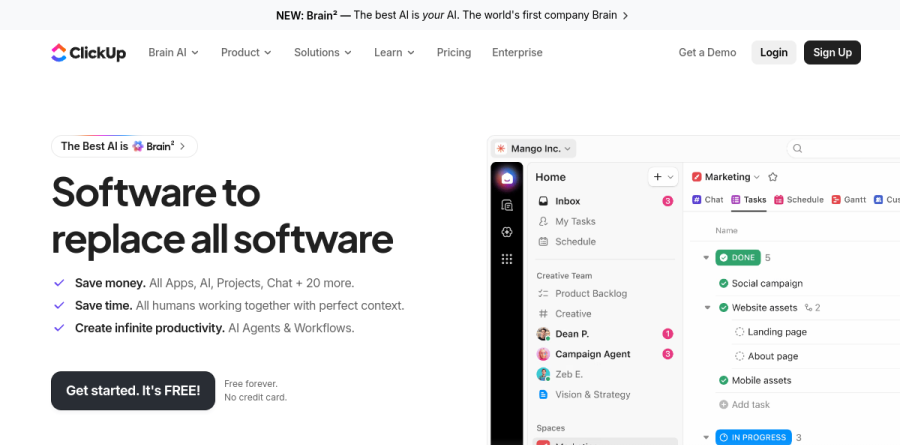
ClickUp Brain is the AI layer built into ClickUp, the work platform that bundles Tasks, Docs, Chat, Whiteboards, Dashboards and Automations into a single workspace. Instead of running in a separate window, ClickUp Brain reads the workspace around it — tasks, documents, comments, chat threads — and answers questions, drafts content and takes actions against that material.
The vendor now brands the current generation Brain 2, describing it as a self-updating Company Brain with a context engine that reorganises itself from live workspace events. ClickUp also states on its AI page that customer data never trains third-party models.
Connected context and search

ClickUp Brain earns its place once it can see past ClickUp itself. Deep Search and Enterprise Search extend queries into connected applications, and the platform supports Connected Apps plus any MCP server, so Brain can reach a drive, a repository or an internal system without custom engineering. For a project lead, one Deep Search prompt checks the workspace, connected apps and the web at once, which is how ClickUp frames the feature.
Reporting benefits too. AI Fields auto-fill summaries and real-time progress updates on tasks, and AI Cards can automatically summarise activity, analyse data or provide progress updates, so the manual status doc effectively maintains itself.
Super Agents and AI Automations
Super Agents are the autonomous end of ClickUp Brain. The vendor lists ready-made roles including an Intake Agent, Triage Agent, PM Agent, Brief Agent and Codegen Agent, and reports that agents work around the clock with persistent memory and hundreds of tool integrations. ClickUp describes Super Agents as AI teammates that automate workflows and handle complex tasks autonomously.
Paired with AI Automations, this covers the unglamorous middle of a workflow: routing an inbound form to the right list, drafting a first-pass brief when a request lands, flagging a sprint item that has stalled. ClickUp Brain adds the judgement step that rule-based automation never handled well.
Brain MAX for capture and meetings

Brain MAX is the companion desktop and mobile app, giving one Brain across every device. Talk to Text replaces typing with dictation, and the AI Notetaker joins calls and turns them into summaries and follow-up tasks that land in the workspace rather than a stray transcript folder.
For distributed teams this is where ClickUp Brain quietly pays off: meeting output becomes assigned work, and whoever ran the call stops being the write-up bottleneck.
Plans, models and how buying works
ClickUp sells AI as an add-on rather than folding it into every seat. The workspace plan — Free Forever, Unlimited, Business or Enterprise — sets the foundation, and Brain AI or Everything AI layers the intelligence on top. Everything AI is the tier ClickUp marks as recommended, bundling the fuller stack with AI Notetaker, AI Fields, Automations and Super Agents.
Model choice is a real strength: one subscription covers premium models from ChatGPT, Claude and Gemini, and heavier usage is metered through AI Super Credits, with an allowance included at the Brain AI level. Budget for both lines, though, because ClickUp prices the AI plan per user separately from the workspace plan — Brain AI at $9/user/month and Everything AI at $28/user/month.
Who should choose ClickUp Brain
ClickUp Brain suits teams that already run most of their work inside ClickUp. The value comes from context, and context comes from adoption — a thinly used workspace with sparse documentation will get thin answers back. Agencies, product groups and operations teams juggling many parallel workstreams feel the difference fastest, especially while consolidating away from a scattered tool stack.
It is a weaker fit for anyone who wants a standalone assistant without committing to ClickUp as their project management system, or for very small teams whose coordination load does not yet justify paying separately for an AI plan on top of the workspace plan. Trial it through the Free Forever tier, and confirm your critical applications appear among the connected apps before standardising on it.
Strengths
- Deeply embedded in ClickUp — AI has native context from tasks, docs, chat and dashboards
- Multi-model routing to Claude, GPT and Gemini included, so you're not locked to one LLM
- No-code Super Agents and Autopilot Agents build from plain-English prompts with triggers and multi-step actions
- Single bundled price covers premium model access that would otherwise require separate subscriptions
Watch out for
- Billed per paid member across the workspace, not per AI user — cost balloons when only some staff use it
- Two-tier AI pricing effectively stacks a second subscription on top of your workspace bill
- Super Credit consumption makes heavy agent/image use unpredictable to budget
- Only valuable if you commit to ClickUp; not a standalone automation platform you can point at other stacks
Key features
| Feature | What it does |
|---|
| Brain2 context engine | Rebuilt AI platform (June 2026) that pulls context from every task, doc, decision and conversation, then routes each query to the best-fit model. |
| Super Agents | Autonomous AI teammates you assign, message and @mention; built in plain language with 500+ skills, persistent memory and no coding. |
| Autopilot Agents | Trigger-based agents that fire on task changes, chat messages or calendar events and run multi-step workflows across Spaces, Lists and Chats. |
| Brain MAX + Talk to Text | Standalone desktop app connecting ClickUp, Google Drive, GitHub and OneDrive for cross-tool search plus voice dictation. |
How ClickUp Brain compares
| Alternative | How it differs |
|---|
| Notion AI | The closest embedded-workspace-AI rival; cleaner docs/knowledge experience but weaker on autonomous, trigger-driven agents. |
| Zapier (AI Agents) | Purpose-built cross-app automation and agents that work across your whole stack, not tied to one PM suite; less native task context. |
| Asana AI Studio | Same play — AI and no-code agents baked into a PM tool; comparable lock-in, generally pricier at the enterprise end. |
Frequently asked questions
Is ClickUp Brain free?
There's a limited free trial tier, but real use requires the Brain AI add-on at $9/user/month annual ($18 monthly) on top of a paid ClickUp workspace plan. It is not free for ongoing use.
Does Brain bill only the people who use AI?
No. The AI add-on is charged on every paid member in the workspace, not just active AI users, so costs scale with headcount even if only a few people use it.
ClickUp Brain ratings on other platforms
Independent user ratings from third-party review sites, linked here for transparency.
These are not our editorial score, are captured on the date shown, and may have changed since.