The full review
What is Visme?
Visme is a browser-based visual content platform from Easy WebContent that covers a wider spread of formats than most design tools attempt. From one editor you can build presentations, professional documents, infographics, charts and graphs, social graphics, videos, whiteboards, and forms and surveys, then publish the result as a shareable link, a website embed or a download.
The positioning is deliberate: Visme sells itself as an AI content system for teams rather than a casual graphics app, aimed at groups producing branded reports, proposals and decks on a schedule. Projects need not end as flat files either, since designs can carry animation and interactivity, pull from live data and sit behind a password. The vendor says it is trusted by 35M+ companies and creators.
The AI Designer handles the first draft
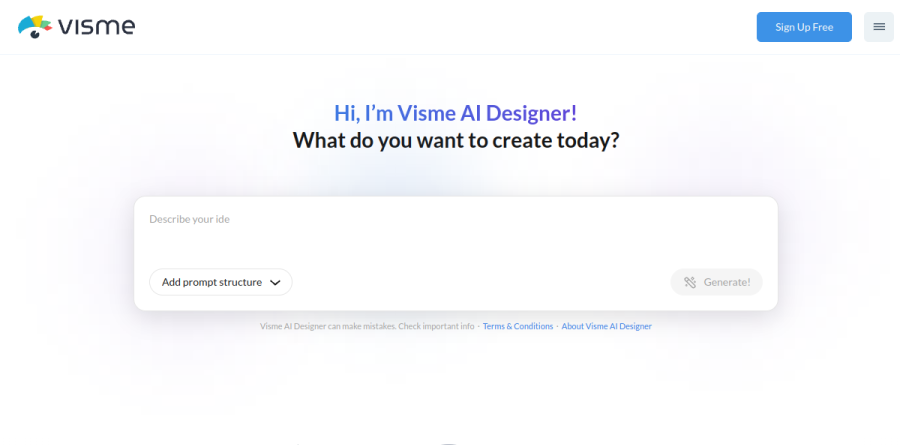
The Visme AI Designer sits at the front of the workflow. You choose a project type, describe what you need, and the chatbot asks a few clarifying questions and offers style options before generating a complete design. Visme says the generator covers over 100 project types. One detail matters more: the chatbot can source content from a document you upload or a URL you paste, so a generated deck starts from an existing report instead of invented copy.
Supporting tools are narrower and more practical. AI Writer drafts, proofreads, summarises and switches tone, the AI Image Generator fills gaps in the stock library, and AI TouchUp Tools handle background removal, object erase and replace, unblurring and enlargement.
Charts, maps and live data

Data visualization is where Visme earns its keep. The chart library runs past the usual bar and pie set into funnel, bubble, radar polygon and concentric charts, and adds interactive regional maps with heat map colouring, design-driven tables and drag-and-drop 2D and 3D data widgets. Charts connect live to Google Sheets and Excel Online, so a published dashboard refreshes without anyone rebuilding it, while Dynamic Fields push a changed figure or name across projects at once.
Brand control that survives a growing team

The Brand Wizard turns Visme from a design tool into brand infrastructure. Feed it your website address and it pulls your logo, colours and fonts, then generates a branded template set spanning presentations in the Modern, Simple and Creative themes, infographics, reports and proposals, charts, printables and social posts. Administrators can lock brand guidelines so colleagues outside the design team cannot drift off-palette, and the My Files tab hosts all approved brand assets and files in one place, with 10 to 25 GB of cloud storage depending on plan.
Review and publishing without the email loop
Feedback happens on the canvas. Reviewers drop pin, rectangle, circle, arrow, line or freehand annotations onto a design, tag colleagues and resolve threads when the round closes, with notifications firing only for threads you are tagged in. Roles are granular enough that one collaborator edits copy while another adjusts layout. Output is broad: public or private links, embed code, and downloads as PDF, high-resolution image, editable PPTX, HTML5, GIF or video, plus SCORM and xAPI for training teams. Visme Analytics reports views and average time on shared work.
What the plans unlock
Plan boundaries are drawn around output and control rather than volume, since even the free Basic tier allows unlimited projects. Basic limits template access and stamps designs with the Visme logo. Starter opens full access to templates and all premium assets, which Basic limits. Pro is the first tier built for teams, adding PPTX, HTML5, video and GIF export, the Brand Kit, privacy controls and most integrations. Enterprise adds a custom subdomain, approval workflows, single sign-on with two-factor authentication and a dedicated success manager.
Who should choose Visme
Visme fits marketing, communications, HR and learning teams that ship many content formats, need everything on-brand, and have no designer to spare; nonprofits and agencies included. It rewards data-heavy reporting most, because live connections and Dynamic Fields remove rework. It is not ideal for professional design studios needing precise vector control and print production, or for anyone who only ever makes one kind of asset, where a dedicated tool will feel lighter. If every project ends as a static PDF, much of what makes Visme distinctive goes unused.
Strengths
- One of the widest format ranges in a single tool — presentations, infographics, documents, charts, and short video/GIF
- Strong data-viz engine with 30+ chart types plus live data import from Google Sheets, Excel, and CSV
- Brand Kit (Pro+) locks fonts, colors, and logos across every project for team-wide consistency
- Generous free plan with unlimited projects, unlike many rivals that cap project counts
Watch out for
- Pro runs $24.75/mo billed annually — pricier than Canva Pro, and monthly billing nearly doubles it to ~$59
- Editor is heavier and slower than Canva, with a steeper learning curve for new users
- Free-plan exports all carry a Visme watermark, making the free tier unusable for client-facing work
- Storage is modest — 1GB on Starter and 10GB on Pro — tight for teams working with lots of video
Key features
| Feature | What it does |
|---|
| Presentation & document editor | Drag-and-drop editor for slide decks, reports, ebooks, and printables with thousands of templates. |
| Infographics & data visualization | 30+ chart types, maps, and data widgets with live import from Google Sheets, Excel, and CSV. |
| AI design tools | Built-in AI text-to-design generation, AI writer, and AI image tools inside the editor. |
| Brand Kit | Store brand fonts, colors, and logos (Pro and up) to auto-apply across every project. |
| Export formats | JPG/PNG/PDF on Starter; PPTX, HTML5, MP4 video, and GIF unlocked on Pro. |
| Analytics & collaboration | Content view analytics, real-time team editing, comments, and password/privacy controls (Pro+). |
How Visme compares
| Alternative | How it differs |
|---|
| Canva | Cheaper (~$15/mo Pro) and faster for quick social graphics, but weaker on infographics and live data visualization. |
| Piktochart | Dedicated infographic maker; simpler to learn but far fewer formats and templates than Visme. |
| Venngage | Infographic and report specialist with strong templates at a similar price, but a narrower overall feature set. |
Frequently asked questions
Is Visme free?
Yes — the Basic plan is free forever with unlimited projects and access to the core editor and templates. The catch is that every export carries a Visme watermark, and premium templates plus formats like PDF are locked. To remove the watermark you need the Starter plan at $12.25/month billed annually ($147/year).
How much does Visme cost?
Paid plans start at $12.25/month for Starter and $24.75/month for Pro, both billed annually ($147 and $297/year). On monthly billing the prices nearly double, to about $29 and $59. Enterprise is custom-priced with a 10-user minimum. Students pay $48/year and educators $96/year.
Is Visme better than Canva?
It depends on the job. Visme wins on infographics, data visualization, and interactive branded documents, with 30+ chart types and live data import. Canva is cheaper (about $15/month for Pro), faster, and better for high-volume social graphics. Pick Visme for data-heavy reports; pick Canva for quick, simple design work.
Does the Visme free plan have a watermark?
Yes. Every design you download or share on the free Basic plan includes a Visme watermark, which makes it unsuitable for client work. Removing it requires at least the Starter plan at $12.25/month billed annually, which also unlocks JPG, PNG, and PDF downloads, premium templates, and 1GB of storage.
What is Visme used for?
Visme is an all-in-one tool for creating presentations, infographics, reports, social graphics, charts, and short videos from one editor. Marketing teams, educators, and businesses use it to produce branded visual content. Pro plans ($24.75/month) add a Brand Kit, analytics, and export to PPTX, HTML5, MP4, and GIF.
Visme ratings on other platforms
Independent user ratings from third-party review sites, linked here for transparency.
These are not our editorial score, are captured on the date shown, and may have changed since.