The full review
What is OpenCode?
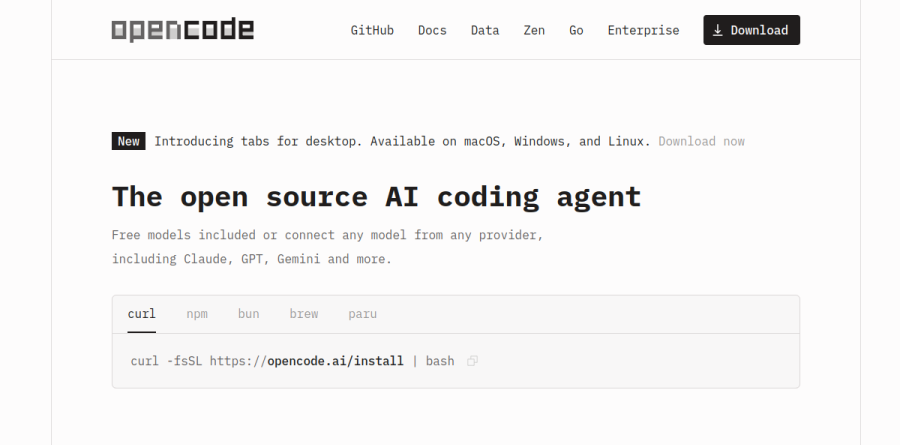
OpenCode is an open source AI coding agent, described on its homepage as an agent that helps you write code in your terminal, IDE, or desktop. Instead of shipping as a closed app welded to one model vendor, it separates the agent from the model, so the same tool can drive Claude, GPT, Gemini, a Copilot seat, or something running on your own machine.
The practical effect is that OpenCode behaves less like a subscription and more like a client you install and point at whatever inference you already pay for. Setup is a one-line curl script, with npm, bun, and Homebrew as alternatives, and development happens in the open on GitHub.
Where OpenCode actually runs

The download page lists four numbered groups: OpenCode Terminal, OpenCode Desktop, OpenCode Extensions, and OpenCode Integrations. Desktop builds cover macOS on Apple Silicon and Intel, Windows x64, and Linux through .deb and .rpm packages. Extensions cover VS Code, Cursor, Zed, Windsurf, and VSCodium, with separate GitHub and GitLab integrations beside them. The homepage frames this as "Any editor": the agent is available as a terminal interface, desktop app, and IDE extension.
Model choice without lock-in

OpenCode reaches 75+ LLM providers through the AI SDK and the Models.dev catalog. Adding one is a /connect command that stores the key locally. Some providers skip keys altogether: the docs state that ChatGPT Plus, GitHub Copilot, and GitLab Duo subscriptions work with zero setup, so a seat you already hold becomes the budget. Local inference is documented for Ollama, LM Studio, and llama.cpp over OpenAI-compatible endpoints.
For people who would rather not audit the whole field, OpenCode Zen is the team's own gateway, a curated set of models the vendor reports it has tested and benchmarked for coding agents, billed per million tokens with auto-reload and optional monthly spend limits. The OpenCode Go plan is a subscription — $5 for the first month, then $10/month — that the vendor describes as "a curated model lineup tested for agentic coding", with named entries including Kimi K3, Qwen3.8 Max, GLM-5.2, DeepSeek V4 Pro and MiniMax M3, and allowances shown as requests per 5 hours.
Daily driving in the terminal
The terminal client turns on two modes. Plan mode proposes an implementation approach without touching files, Build mode carries out the edits, and Tab flips between them. That split earns its keep on unfamiliar code, where a proposal beforehand beats a surprise diff. The homepage lists LSP support, with OpenCode automatically loading the right LSPs for the LLM, and LSP servers are configurable in the docs.
Smaller touches add up: /undo reverts a change and /redo restores it, the @ key fuzzy searches files in the project, /init analyses the project and writes an AGENTS.md, and images can be dragged and dropped into the terminal to add them to the prompt. Multi-session support keeps parallel threads apart, and /share turns a conversation into a link, though the docs note that conversations are not shared by default.
Controls for larger teams
OpenCode Enterprise addresses organisations that need code and context to stay on internal infrastructure. The named pieces are Central Config for standardising setup across an organisation, SSO against an existing identity provider, and an internal AI gateway that every request can be routed through. Self-hosting for share pages is presented as roadmap work rather than a shipped feature. The vendor states that OpenCode stores none of your code or context data, and that enterprise billing follows a per-seat model.
Who should choose OpenCode
OpenCode fits developers who already hold model access, whether an API key, a Copilot seat, or a ChatGPT Plus subscription, and want an agent that respects it rather than reselling inference back to them. It suits terminal-first engineers, mixed teams scattered across VS Code, Zed, and Cursor, and security-conscious organisations that need requests routed through their own gateway.
It is a weaker fit for teams that want a single supported vendor, one invoice, and a support contract attached. Picking among 75+ providers and the long endpoints and pricing tables in the Zen docs is genuine work, and the configuration surface, from auth files to provider blocks to LSP servers, rewards people comfortable editing config.
Strengths
- Fully open source (MIT) with a very large, active community (160k+ GitHub stars)
- Model-agnostic — works with Claude, GPT, Gemini, open-weight and local models, no lock-in
- Transparent Zen gateway sells tokens at cost with zero markup beyond payment fees
- Free core plus a genuinely cheap $10/mo Go plan for open-weight models
Watch out for
- BYOK means you manage API keys and pay provider usage separately from the free tool
- Output quality depends entirely on the model you pick, not on OpenCode itself
- Terminal-first workflow has a steeper learning curve than GUI IDEs like Cursor
- Managed Go and Zen offerings are newer and less battle-tested than the open-source core
Key features
| Feature | What it does |
|---|
| Multi-provider model support | Connect any provider (Anthropic, OpenAI, Google), open-weight models, or run models locally — swap freely per session. |
| LSP integration | Automatically loads Language Server Protocol data so the model gets real symbol and type context, not just raw text. |
| Multi-session & shareable links | Run parallel agent sessions and share a session via link for collaboration or review. |
| Privacy-first design | Does not store your code or context data; usable with your own keys or local models for full data control. |
How OpenCode compares
| Alternative | How it differs |
|---|
| Claude Code | Anthropic's terminal agent — more polished and consistent, but Claude-only and subscription/usage priced with no open-source core. |
| Aider | Open-source terminal pair-programmer with the same BYOK ethos; leaner feature set and smaller community than OpenCode. |
| Cursor | Proprietary AI-first IDE — easier onboarding and richer GUI, but closed-source with more vendor lock-in. |
Frequently asked questions
Is OpenCode free?
The core agent is open source and free to use. You pay only for model usage — either through your own API keys, the pay-as-you-go Zen gateway, or the $10/mo Go plan.
Which AI models can OpenCode use?
Almost any: hosted providers like Claude, GPT and Gemini via your keys, curated open-weight models through Zen or Go, or models running locally on your machine.
OpenCode ratings on other platforms
Independent user ratings from third-party review sites, linked here for transparency.
These are not our editorial score, are captured on the date shown, and may have changed since.