The full review
What is LinkedIn Sales Navigator?
LinkedIn Sales Navigator is the sales-intelligence product LinkedIn builds on top of its own member graph. Instead of selling a scraped contact database, it turns the network into a prospecting surface: sellers search across a member base the vendor describes as more than a billion people, save results as lead and account lists, and get notified when something shifts at the companies they care about.
The vendor lists iOS and Android mobile apps alongside the desktop product, plus an alerts stream that notifies sellers when saved leads and accounts have important updates. LinkedIn aims Sales Navigator squarely at B2B revenue teams, and the plan ladder of Core, Advanced, and Advanced Plus maps roughly to the solo seller, the managed team, and the enterprise with CRM obligations.
Search filters and list building
The starting point is advanced search, where Sales Navigator exposes the 50+ filters the site advertises across seniority, function, headcount, geography, and company attributes. That is a different exercise from filtering a static export, because the underlying profiles are maintained by the people in them. Sellers convert a result set into Custom Lists, define Personas for the buying roles they target again and again, and let lead and account recommendations run against those saved definitions. Real-time alerts flag job changes and account news, so a rep hears that a champion has moved while the information is still useful.
Account IQ, Lead IQ, and pre-call prep
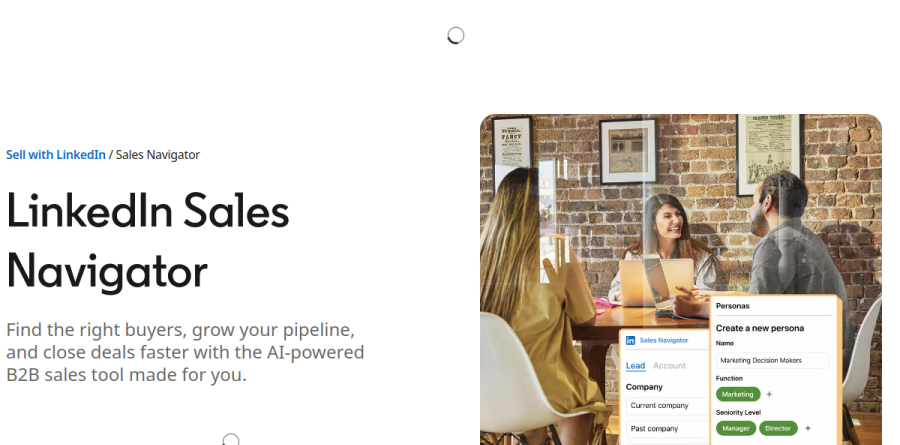
On Advanced and Advanced Plus, Sales Navigator layers AI summaries over that data. Account IQ assembles a company briefing covering priorities and challenges a rep would otherwise piece together by hand, while Lead IQ produces a short read on an individual buyer. Relationship Explorer, which the vendor describes as helping you quickly find the right decision-maker, is included on Core as well, while Buyer Intent showing which companies are actively showing interest starts on Advanced. The vendor reports a 45 percent average increase in deal size and a 29 percent lift in sales opportunities, figures best read as directional.
InMail, Message Assist, and Smart Links
Every plan carries a monthly InMail allowance, listed at 50 messages, and that is the practical unlock for reaching buyers outside a seller's existing connections. Message Assist, still flagged as public beta on the plan comparison, drafts an opening from profile and account context. Smart Links, an Advanced and Advanced Plus feature, lets a rep share a bundle of content with prospects and see who is engaging with it, which the vendor frames as context for a more informed follow-up. LinkedIn also cites Forrester work from 2023 claiming the product pays for itself inside six months.
Team seats, TeamLink, and CRM workflow

The Advanced plan is where Sales Navigator becomes a team tool: centralized billing, team seat management, TeamLink for surfacing which colleague already knows a buyer, Relationship Map for charting a buying committee, and team reporting for managers. The heavier CRM work sits one tier up on Advanced Plus, through Advanced CRM Integrations, Lead/Contact Creation, and CRM Embedded Experiences and Profiles, which keep the CRM current with real-time updates across Salesforce, HubSpot's Smart CRM, Microsoft Dynamics 365, and Oracle Sales. Advanced Plus is the quote-only tier, adding a dedicated account team and tailored training for larger rollouts.
Who should choose LinkedIn Sales Navigator
If your buyers keep active LinkedIn profiles and your motion is relationship-led B2B, Sales Navigator is hard to route around: the underlying records are maintained by the members themselves, and the vendor surfaces job and role changes on saved leads through real-time alerts. Independent sellers and small teams get most of the value from Core, while anything involving shared accounts, manager reporting, or CRM sync belongs on Advanced or above.
It is a weaker fit for teams running high-volume outbound on verified emails and direct dials, since Sales Navigator keeps engagement inside LinkedIn and you will still need a separate data provider for those channels. Transactional, consumer-facing, or low-value selling will also struggle to justify the per-seat commitment.
Strengths
- Direct access to LinkedIn's live professional graph — the freshest, hardest-to-replicate B2B dataset available
- 50+ granular lead and account filters, saved searches, and real-time alerts (job changes, buyer intent, Account IQ summaries)
- 50 InMail credits per month to reach prospects outside your network with above-average response rates
- Strong CRM integration on higher tiers, with automated CRM writeback on Advanced Plus
Watch out for
- No native email or phone export — you get profiles, not verified contact data, so a separate enrichment tool is usually required
- No outreach automation, and LinkedIn actively restricts third-party automation that plugs into it
- Expensive per seat with a steep jump to Advanced, and Advanced Plus is opaque, quote-only enterprise pricing
- AI features (Account IQ, AI-assisted search) are useful but shallow next to purpose-built AI-SDR platforms
Key features
| Feature | What it does |
|---|
| Advanced lead & account search | 50+ filters (seniority, function, headcount, geography, tech, intent) with saved searches and lead recommendations. |
| Real-time alerts & Account IQ | Job-change, news and buyer-intent alerts, plus AI-generated account summaries to prep for outreach. |
| InMail messaging | 50 credits/month to message prospects outside your network; unused credits roll over up to 150 (90-day expiry). |
| CRM integration & writeback | Sync leads/accounts to Salesforce, HubSpot and Dynamics; automated CRM writeback on Advanced Plus. |
How LinkedIn Sales Navigator compares
| Alternative | How it differs |
|---|
| Apollo.io | All-in-one prospecting database with verified emails/phones, sequences and dialer — far cheaper and adds the contact data and automation Sales Navigator lacks. |
| ZoomInfo | Enterprise B2B data and intent platform with deeper firmographics and direct dials, but pricey and less current on people-level data than LinkedIn. |
| Clay | AI enrichment/waterfall platform that orchestrates many data sources (including LinkedIn) into automated GTM workflows Sales Navigator can't run alone. |
Frequently asked questions
Does Sales Navigator give you prospects' email addresses and phone numbers?
No. It surfaces LinkedIn profiles and lets you message via InMail, but it does not export verified emails or direct dials. Most teams pair it with an enrichment tool like Apollo, ZoomInfo or Clay to get contact data.
Is there a free version or trial?
There is no permanent free tier, but Core and Advanced offer a 30-day free trial (a credit card is required). Referral links from existing subscribers can extend that to 60 days.
LinkedIn Sales Navigator ratings on other platforms
Independent user ratings from third-party review sites, linked here for transparency.
These are not our editorial score, are captured on the date shown, and may have changed since.