The full review
What is Grain?
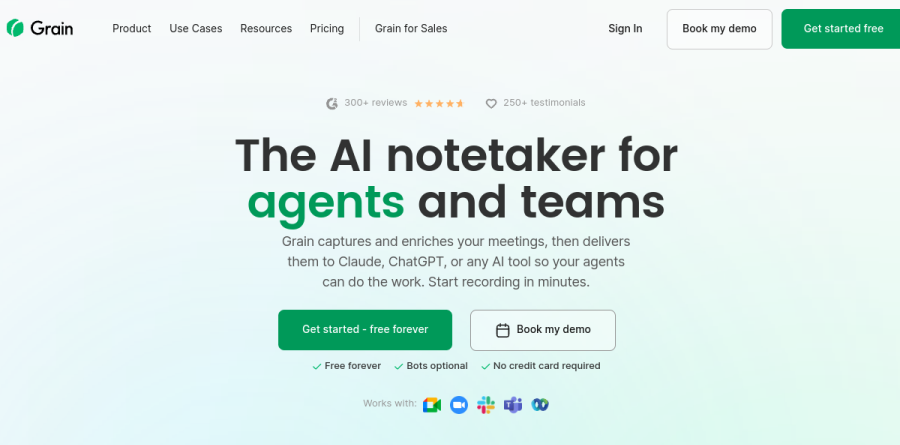
Grain is an AI notetaker from Grain Intelligence built for teams that live on customer and internal calls. It records, transcribes, and summarizes meetings across Zoom, Google Meet, Microsoft Teams, and Webex, returning structured, searchable material instead of raw text.
That last part is what separates Grain from a plain recorder. Alongside AI notes, action items, and shareable video clips, it exposes an MCP server and an API so agents can query the meeting library directly. The vendor describes the product as the AI notetaker for agents and teams, organized around four pillars: universal capture, context for AI, agent integrations, and team collaboration.
Capture that adapts to how your team meets
Grain offers two recording modes, and the choice matters more than it appears. Bot-less transcription captures your computer audio without a visible notetaker joining the call, the diplomatic option for candid internal reviews or clients who dislike a bot in the participant list. When you cannot attend, the Grain bot joins on your behalf and produces a full video recording. Capture rules decide in advance which meetings get recorded, so coverage stays consistent without anyone pressing a button.
Transcription covers more than 100 languages and arrives as clean Markdown, which pastes straight into docs, tickets, and prompts. Free accounts get unlimited meetings with a 45-minute cap per session; unlimited duration and unlimited history begin at the Starter plan.
Meeting context your AI agents can use
This is where Grain earns its tagline. Enriched transcripts carry participant details and cross-meeting context, so a summary knows who was speaking and what happened on the previous call, not just the current one. Notes, clips, and action items added during meetings sync to the transcript and flow to your AI agents.
One-click AI export then bulk-downloads enriched Markdown or opens a meeting directly in Claude or ChatGPT. The Grain MCP server and API let agents search across meetings programmatically, with basic MCP access on the Free plan and advanced MCP access on Business. Ask anything inside Grain answers questions across your library with precise citations, useful when someone needs the exact moment a commitment was made.
Sales coaching and CRM hygiene

For revenue teams, the Business plan is where Grain becomes conversation intelligence. CRM sync pushes notes and properties into HubSpot or Salesforce contacts and deals, removing the after-call data entry reps quietly skip. Trackers, AI coaching, and team interaction metrics give managers something concrete to review, while custom AI follow-up email drafts the recap in one click.
Grain also supports SPICED deal analysis and connects to Aircall for phone conversations. On that page the vendor benchmarks itself against Gong, Clari, Otter.ai, and Fathom on starting price, time to ROI, and commitment terms, listing its own commitment as none against the annual contracts and minimum spends it attributes to Gong and Clari.

Video clips are one of the most useful things Grain produces. Any moment becomes a shareable clip, and clips sit alongside projects and full meeting recordings that can be shared with teammates and clients, a useful format for product managers assembling customer evidence or onboarding reps on real calls. Teams enable automatic group sharing, and free viewer seats let stakeholders watch without a paid seat.
The Grain integrations page lists Zoom, Google Meet, Microsoft Teams, Webex, HubSpot, Salesforce, Aircall, Slack, Productboard, and Zapier, which runs at personal scope on Starter and workspace scope on Business. Grain is SOC 2 audited and GDPR compliant, with SAML-based SSO, priority API support, and a dedicated CS manager arriving on Enterprise.
Who should choose Grain
Grain suits growing teams that record constantly and want the output to flow somewhere useful, into a CRM, Slack, or an AI agent, rather than an archive nobody opens. Sales and customer success teams get the fullest version on Business; product, design, and research groups are well covered by Starter. The unusually generous Free plan makes evaluation low-risk, and the vendor reports that 97% of teams stay on Grain after 12 months.
It is a weaker fit for enterprises needing deep forecasting, deal scoring, and rigorous revenue analytics, since Grain is deliberately lighter than the incumbents it benchmarks against. Occasional solo note-takers will also find a simpler recorder sufficient.
Strengths
- Best-in-class video clipping: click a transcript line, jump to that exact moment, clip it, and drop it into Slack
- Desktop capture records locally with no bot joining the call — no awkward 'Notetaker has joined' announcement
- Native two-way CRM sync with HubSpot, Salesforce and Pipedrive auto-logs summaries, transcripts and notes to deals
- Genuine free plan (20 meetings) plus a 14-day trial and 30-day money-back guarantee lower the risk of trying it
Watch out for
- Transcription accuracy dips with heavy accents and industry jargon, so important calls still need a manual skim
- Cannot translate transcripts into other languages — a real gap for global, multi-market teams
- Downgrading can lock you out of past recordings until you re-upgrade a month to export them
- AI coaching, deal boards and analytics are gated behind the $29/seat Business tier, not Starter
Key features
| Feature | What it does |
|---|
| AI notes, recaps & action items | Auto-records and transcribes calls with speaker ID, then generates summaries and next steps from custom or prebuilt templates |
| Transcript-to-video clips | Highlight any transcript line to create a shareable video clip; organize highlights into playlists and stories |
| CRM sync | Native integrations push notes, transcripts and custom fields to HubSpot, Salesforce and Pipedrive contacts and deals |
| Ask-your-library AI search | Query your entire meeting library in natural language and get answers with precise citations back to the recording |
| AI coaching & deal boards | Business tier adds team interaction insights, smart topic trackers, deal boards and AI follow-up emails for sales teams |
| Integrations & MCP | Connects to Slack, Notion, Zapier and Aircall, plus an MCP server that pipes meeting data into Claude, ChatGPT and Cursor |
How Grain compares
| Alternative | How it differs |
|---|
| Fathom | Generous unlimited free AI notes; cheaper for solo users but weaker video-clip and coaching tooling |
| Fireflies.ai | Strong search, transcription and CRM sync from ~$10/seat, but less video-first than Grain |
| Gong | Deep revenue intelligence for enterprise sales, far more powerful but much pricier and heavier to deploy |
Frequently asked questions
Is Grain free?
Yes. Grain's free plan costs $0 and includes 20 meetings with AI notes, recaps and unlimited free viewer seats who can watch and comment on shared calls. Paid plans start at $15/seat/month (billed annually) for unlimited meetings, and every paid plan has a 14-day trial and 30-day money-back guarantee.
How much does Grain cost per month?
Grain has four tiers: Free at $0 (20 meetings), Starter at $15/seat/month billed annually ($19 monthly), Business at $29/seat/month annually ($39 monthly), and custom Enterprise pricing. Business adds AI coaching, deal boards and CRM sync. Annual billing saves roughly 20% versus paying month-to-month on both paid tiers.
Does Grain integrate with HubSpot and Salesforce?
Yes. Grain has native two-way CRM integrations with HubSpot, Salesforce and Pipedrive that auto-sync meeting summaries, transcripts, notes and custom properties to the matching contacts and deals. It also connects to Slack, Notion, Zapier and Aircall, plus an MCP server that feeds meeting data into Claude and ChatGPT.
Does Grain join meetings as a bot?
It can, but it doesn't have to. Grain sends a notetaker bot to Zoom, Google Meet, Microsoft Teams and Webex calls, but its desktop capture app records the call locally with no bot joining — so there's no 'Notetaker has joined' announcement that prospects sometimes dislike.
Is Grain's transcription accurate?
For clear, standard English calls Grain is generally accurate, but users report quality drops with heavy accents and industry jargon or product names, so important meetings warrant a quick review. Grain also cannot translate transcripts into other languages, which limits it for global teams working across markets.
Grain ratings on other platforms
Independent user ratings from third-party review sites, linked here for transparency.
These are not our editorial score, are captured on the date shown, and may have changed since.