The full review
What is Sunsama?
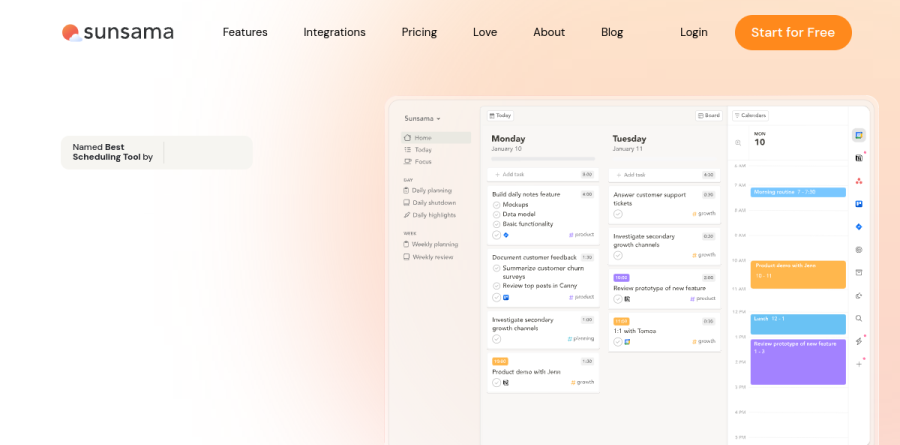
Sunsama is a daily planner that folds a task manager and a calendar into one guided workflow. Instead of handing you an open-ended list, it walks you through a planning routine each morning and a shutdown at the end of the day, so the plan you commit to reflects the hours you actually have available.
The product pulls tasks, emails and meetings out of the tools you already run and lays them into a single daily view. Sunsama has been named best scheduling tool by the New York Times Wirecutter, according to the company homepage.
How the guided planning ritual works

Sunsama structures daily planning around five steps the company labels Process, Plan, Prioritize, Prepare and Publish. The vendor describes those steps as reflecting on what you accomplished the previous day, deciding what you want to get done today, figuring out what can wait, finalizing the plan, and publishing it to Slack. Because tasks carry time estimates, Sunsama can preview how today's list fills the time you actually have available. The vendor calls that preview Task Projections, and it surfaces an overloaded day before you live through it.
Bringing scattered work into one view
Sunsama does not ask you to abandon your existing stack. You can drag tasks in from Asana, ClickUp, GitHub, Jira, Linear, Monday, Notion, Todoist and Trello, and the vendor reports that imported tasks stay in sync, so finishing an item in Sunsama updates the source tool. Calendar sync is bi-directional with Google, Outlook and Apple. Gmail and Outlook messages become scheduled tasks rather than lingering unread, and Slack or Microsoft Teams threads can be turned into follow-ups with time set aside for them.
Timeboxing and Focus Mode

Timeboxing is where Sunsama earns its keep for meeting-heavy roles. Drag a task onto a slot and it blocks time on the calendar you choose, with remaining tasks shifting automatically. You can also keep everything on the built-in Sunsama calendar if you would rather not clutter a shared work calendar.
Focus Mode strips the interface down to the one task in front of you, backed by a task timer, a floating focus bar and planned versus actual time. Sunsama can sync your Slack status while Focus Mode is active, which quietly sets expectations with teammates.
AI that trims the planning overhead
Sunsama keeps its AI narrow and practical. When you create a task, Sunsama automatically tags it into the proper channels and assigns it a time estimate based on previous work you have done in the app — features the timeboxing page labels AI Task Estimates and AI Channel Recommendations. The vendor reports the estimates grow more accurate the longer you use the product. Channels are a useful organizing layer in their own right, letting you filter a day down to one client, project or context.
Weekly rhythm, analytics and rollout
Above the daily loop sits Weekly Objectives, which the company describes as setting and tracking weekly goals to focus on what truly matters, alongside a weekly review and planning step. The daily shutdown closes the loop by tracking what you finished and showing where the time went, with Analytics for longer-term patterns.
Sunsama ships desktop apps for macOS, Windows and Linux alongside iOS and Android. The Pro plan covers unlimited usage and integrations plus AI, MCP and Zapier access, while the Enterprise plan is aimed at organizations needing SSO and SAML, SCIM, audit logs and custom data requirements. A 14-day trial runs without a credit card.
Who should choose Sunsama
Sunsama fits knowledge workers whose days fragment across meetings, several project tools and a busy inbox, and who want a repeatable routine rather than another backlog to maintain. The site frames the product for executives, managers and individual contributors alike, but the common thread is someone with real autonomy over their own calendar.
It is not ideal for teams shopping for a shared project management system with boards, dependencies and assignment workflows, because Sunsama deliberately sits on top of those tools instead of replacing them. Anyone unwilling to spend a few minutes planning each morning will get little from it, since the ritual is the product.
Strengths
- Best-in-class guided daily and weekly planning ritual that builds intentional focus habits
- Unifies tasks from 20+ tools with your calendar in one time-boxed view
- Built-in focus timer and automatic per-task time tracking
- 14-day full-feature trial with no credit card required to start
Watch out for
- No permanently free tier — you must subscribe after the 14-day trial
- Premium price rose in 2026 ($22/mo monthly) and is steep for a single-user planner
- Not a standalone calendar; depends on connecting Google or Outlook
- Built for individuals — minimal team collaboration outside the Enterprise tier
Key features
| Feature | What it does |
|---|
| Daily planning ritual | Guided morning routine that pulls tasks from your integrations and helps you plan a realistic day. |
| Unified tasks + calendar | Drag tasks onto your calendar to time-box them alongside your Google or Outlook events. |
| Workload warnings | Flags when your planned day exceeds available hours so you stop over-committing. |
| Focus mode & time tracking | Pomodoro-style focus timer that logs actual time spent on each task. |
| 20+ integrations | Syncs with Asana, Trello, Jira, Todoist, Notion, Gmail, Slack, plus AI, MCP and Zapier. |
| Evening shutdown & weekly review | End-of-day reflection and weekly objectives to close loops and reset. |
How Sunsama compares
| Alternative | How it differs |
|---|
| Motion | AI auto-scheduler that rebuilds your calendar for you; pricier and less about mindful ritual. |
| Akiflow | Similar task+calendar consolidation with a command bar; cheaper, lighter on planning rituals. |
| Morgen | Calendar-first planner with tasks and scheduling; offers a free tier Sunsama lacks. |
Frequently asked questions
How much does Sunsama cost?
Sunsama costs $22/user/month billed monthly, or $17/user/month billed annually ($204/year) — about 20% cheaper. There is one Pro plan with every feature included, plus an Enterprise tier (contact sales) for SSO and SCIM. Verified students and nonprofits can request discounted pricing.
Does Sunsama have a free trial?
Yes. Sunsama offers a 14-day free trial with unlimited access to every feature and no credit card required to start. When the trial ends you lose workspace access unless you upgrade. Paying requires a bank-issued card, and there is no permanently free tier afterward.
Does Sunsama have a free plan?
No. Sunsama has no permanently free plan — only the 14-day trial. After it ends you must subscribe to Pro at $22/month (monthly) or $17/month (annual, $204/year) to keep access. Enrolled students and verified nonprofits can request reduced pricing by contacting support.
Is Sunsama worth it?
For people who struggle to plan their day, Sunsama's guided daily ritual, task-plus-calendar view, workload warnings, and shutdown routine justify the $17-22/month cost. If you only need a simple to-do list or already plan well with a free tool, the premium price and missing free tier make it hard to justify.
What's the difference between Sunsama's monthly and annual plans?
Both give identical access to every feature. Billing monthly costs $22/user/month; committing to a year drops it to $17/user/month, billed as $204 up front — roughly 20% cheaper. The annual plan is the only way to reach the lower rate advertised on Sunsama's pricing page.
Sunsama ratings on other platforms
Independent user ratings from third-party review sites, linked here for transparency.
These are not our editorial score, are captured on the date shown, and may have changed since.