The full review
What is Slack AI?
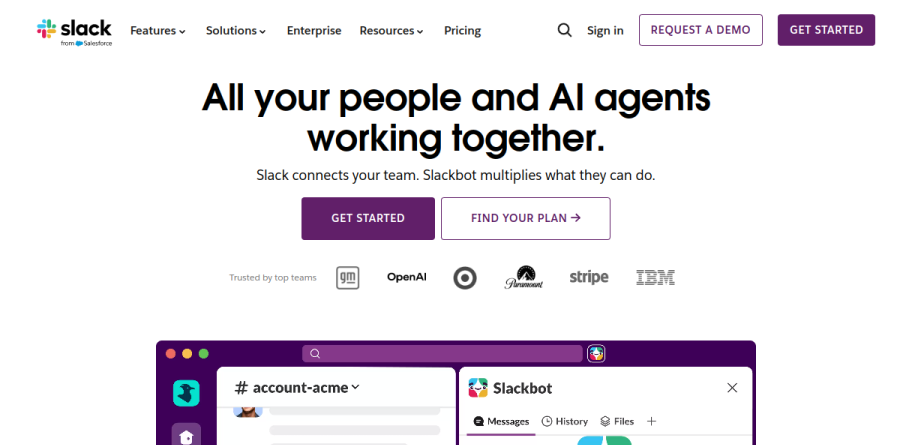
Slack AI is the intelligence layer built directly into Slack rather than bolted on beside it. The system reads the messages, channels, files and connected apps a person already has permission to see, then answers questions, condenses long discussions and drafts on top of that context. The framing on the Slack homepage is blunt about the ambition: all your people and AI agents working together, with Slackbot cast as the personal agent for work.
In practice, Slack AI covers a defined set of jobs the vendor lists on its AI features page: Today, channel recaps, thread summaries, AI search, meeting notes, translation and workflow automation. Slack states these capabilities run across its paid plans and that customer data is never used to train large language models.
Slackbot as a personal agent

Slackbot is the front door to most of this. Slack describes it as a personal agent that already understands you and your workspace, and the feature page spells out the jobs it takes on: finding answers across messages, channels, files and connected apps; prepping meetings by pulling channel activity into context; suggesting times against Google or Outlook calendar availability; analyzing documents, spreadsheets and charts to extract action items; building briefs drafted in your own tone of voice; and managing records through Slack CRM. The vendor argues the advantage is inherited context, since Slackbot draws on years of accumulated conversations and decisions instead of needing a briefing.
Catching up without reading everything
The clearest day-to-day payoff is triage. Today is positioned as an intelligent briefing that signals what needs your attention based on your priorities. Channel recaps compress a noisy channel into a few lines, and thread summaries do the same for a sprawling reply chain. AI can take meeting notes so a call produces a written record without anyone volunteering as scribe, and translation turns conversations — including individual in-line messages — into any language. Slack puts the figure at 97 minutes as the average time users can save weekly with AI, based on an internal pilot analysis of channel recaps, thread summaries and AI search answers.
Search across every connected app

Retrieval is the other half of the story. AI search works over Slack content itself, and Enterprise Search extends the same bar across outside systems, with the page showing connectors for Google Drive, Salesforce, Jira, Confluence, GitHub, Asana, Box, Gmail, Microsoft apps, Notion and Dropbox. Slack describes the approach as retrieval-augmented, returning conversational answers while honoring each person's existing access and permissions, and it supports Custom Sources for home-grown and self-hosted systems. One caveat worth flagging: Slack lists Enterprise Search under Enterprise+, not the mid-tier plans.
Agents and automation in the flow of work
Beyond Slackbot, Slack presents itself as an agentic platform. Agentforce brings Salesforce agents natively into Slack, and Slack Code is aimed at teams that write and ship code with agents in the loop. Workflow Builder covers the deterministic half of automation, letting teams create time-saving automations in a few clicks, while canvases provide rich, flexible docs and Lists organize, track and manage projects. The consistent idea is that the agent lives in the conversation rather than in a separate tab.
How the plans differ
Slack packages its AI by plan tier rather than selling it separately, and every plan carries its own AI label. Free and Pro both carry what Slack labels Basic AI. Business+ moves up to Advanced AI. Enterprise+ tops the range with Enterprise-Grade AI plus the cross-app search described above. Because capability tracks plan level, the real decision is which Slack plan the organization needs overall.
Who should choose Slack AI
Slack AI fits teams that already live in Slack, where years of channel history function as the de facto knowledge base. Support, sales and engineering groups drowning in channels and calendar invites see value fastest. It is not ideal for organizations standardized on Microsoft Teams or Google Chat, or for small teams whose real conversations happen in email and shared documents, because a thin message archive gives the model very little to reason over. Anyone counting on cross-app Enterprise Search should also plan around Enterprise+.
Strengths
- AI is embedded directly in existing Slack workflows, so there is near-zero adoption friction
- Slackbot (GA Jan 2026) is a genuinely context-aware personal agent that draws on channels, files and connected systems
- Deep Agentforce integration lets HR, IT and sales agents take real actions inside Slack
- Bundling AI into Business+ removed the old $10/user add-on, improving value for paid teams
Watch out for
- Not a true standalone automation/agent-building platform - it is a collaboration app with AI layered on, tied to the Salesforce ecosystem
- The meaningful AI (Slackbot, search, recaps) is gated behind Business+ at $15/user/mo; Free and Pro get only basic summaries
- Gets expensive at scale - effective Enterprise+ pricing runs ~$26/user/mo and contracts reach six figures
- Third-party sources report a Slackbot usage cap (~15 messages/user/week) on Business+ that Slack does not clearly publish
Key features
| Feature | What it does |
|---|
| Slackbot personal agent | Context-aware AI agent (GA January 2026) that reasons over your conversations, files, calendar and connected apps to answer questions and take action without leaving Slack. |
| AI search, recaps and summaries | Natural-language search across messages, files and apps, plus channel/thread recaps, huddle transcription and file summaries on Business+ and above. |
| AI Workflow Builder | Turn repeatable processes into conversational, no-code workflows that pull the right data and trigger actions in connected apps. |
| Agentforce agent orchestration | Build and deploy custom Salesforce Agentforce agents (HR, IT, sales) that operate inside Slack channels, lists and canvases. |
How Slack AI compares
| Alternative | How it differs |
|---|
| Microsoft 365 Copilot (Teams) | Direct collaboration-plus-AI rival; broader Office data reach but pricier at ~$30/user/mo. |
| Zapier | Stronger dedicated cross-app automation and AI agents; better if you need orchestration rather than a chat surface. |
| Lindy | Purpose-built AI agent builder; more flexible autonomous agents but without Slack's native collaboration base. |
Frequently asked questions
Is Slack AI still a paid add-on?
No. The separate Slack AI add-on stopped being sold on August 17, 2025. Advanced AI and the Slackbot agent are now bundled into Business+ and Enterprise+, while Free and Pro get only basic summaries and huddle notes.
Which plan do I need for the Slackbot agent?
Business+ ($15/user/mo annual) is the entry point for the full AI feature set including the Slackbot personal agent, AI search and recaps. Enterprise+ adds enterprise search and org-wide agent controls.
Slack AI ratings on other platforms
Independent user ratings from third-party review sites, linked here for transparency.
These are not our editorial score, are captured on the date shown, and may have changed since.