The full review
What is Chanty?
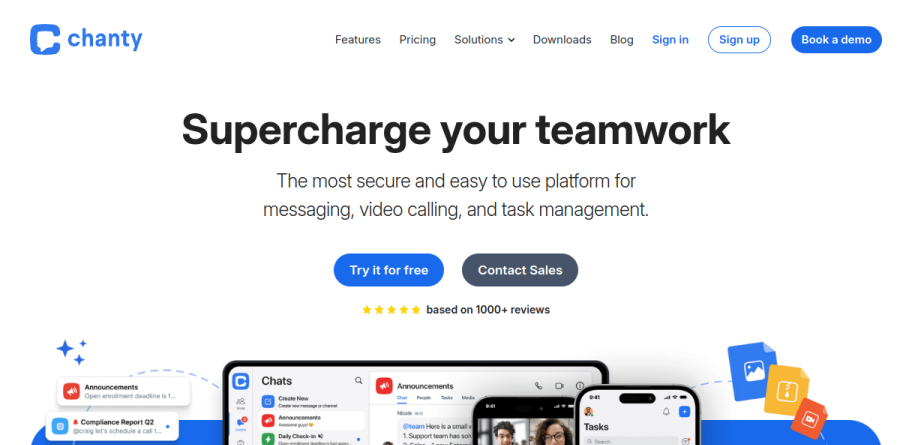
Chanty is a team chat platform that folds task management into the same workspace as the conversation. Its homepage describes the product as a secure and easy to use platform for messaging, video calling and task management, and that three-part scope is a fair summary of what you actually get: unlimited public and private chats, channels, threaded discussions, and a built-in place to turn talk into assigned work.
The positioning is aimed at teams who find general-purpose messengers either too expensive per seat or too thin on execution. Rather than pairing a chat app with a separate project tracker, Chanty keeps the Kanban board in the same workspace as the chat, which the vendor pitches as a flexible, visual and simple way to manage all your tasks in one place.
Conversation that stays organized
Chanty covers the messaging fundamentals without much ceremony. Threads keep context-based discussions out of the main channel, @mentions pull specific people in, and pins preserve ideas that would otherwise scroll away. Code snippets get dev-friendly formatting, a small touch that signals who the product expects in the room.
Search is a quieter strength. Even the Free plan includes unlimited searchable history, so old decisions stay retrievable instead of aging out behind a message cap. Announcement channels give team leads a broadcast lane separate from everyday chatter, and scheduled and disappearing messages round out the set.
Turning messages into tasks

The task layer is the main thing separating Chanty from a pure messenger. Any message can be converted into a task, which closes the familiar gap between someone requesting work and someone tracking it. Tasks carry assignees, due dates, status and priority, and the Kanban board view shows the whole queue in columns instead of a flat list.
On the Business plan this widens into to-do lists and task boards, sitting alongside employee onboarding and directory tools, calendar and events, and polls and forms. Chanty will not replace a dedicated project tool once dependencies get complicated, but for an agency or a marketing team running weekly work it is usually enough.
Calls, voice messages and remote habits
Chanty handles audio and video calls natively, with one-on-one calls unmetered on the Free plan and group calling plus unlimited screen sharing on Business. Voice messaging is the underrated piece here: unlimited voice messages are included even on the Free plan, and for distributed teams spanning time zones a recorded note often beats trying to schedule a live call.
Security and admin controls
Anyone weighing Chanty as an organization-wide tool should look at the Business and Enterprise plans, where the governance features live. Business adds customizable roles and permissions, customizable data retention policies, SSO, 2FA and access controls, IP allowlist and location-based access, plus HIPAA compliance and a BAA. The vendor advertises a 99.9% uptime guarantee and a 24x7 support line on that plan.
Enterprise extends this with SAML, SCIM provisioning, directory sync, data residency across US, EU and APAC regions, an enterprise API, advanced permissions, dashboards and reporting, and an on-premise option.
Who should choose Chanty
Chanty suits small and mid-sized teams that would rather buy one seat covering chat, calls and task tracking than maintain three separate subscriptions. The Free plan is genuinely workable for a team of up to five members with community support, and the vendor reports that customer feedback points to a 55% productivity gain, a marketing figure rather than an independent benchmark but a clear signal of who the tool is sold to.
It is a weaker fit for large enterprises already committed to a Microsoft or Google collaboration stack, and for teams whose workflow depends on a deep integration ecosystem, since the Free plan caps integrations at ten and only Enterprise lists them as unlimited. Start on Free, then move to Business when guest seats, group calling or compliance controls become the real constraint.
Strengths
- Free plan covers up to 10 members with unlimited searchable message history and a built-in Kanban task board
- Very cheap paid tier: $3/user/mo billed annually (or $4/user/mo monthly), well under Slack
- Turn any message into an assignable, trackable task via the Teambook Kanban board
- Audio/video calls with screen sharing on Business, plus a 14-day money-back guarantee and 50% nonprofit discount
Watch out for
- Free plan's 20GB storage is shared across the whole team, filling fast with frequent file sharing
- Far fewer integrations than Slack (2,600+ apps) or Microsoft Teams
- Group conference calls (3+ participants) and screen sharing are locked to the paid Business plan
- Limited customization and admin controls; weaker fit for regulated or complex enterprise workflows
Key features
| Feature | What it does |
|---|
| Teambook Kanban tasks | Built-in task manager on every plan; convert any message into a task, assign owners, and track it across a Kanban board. |
| Unlimited message history | Full searchable message and file history on all plans, including the free tier — no history caps like some rivals impose. |
| Audio & video calls | One-on-one audio/video on the free plan; group conference calls with 3+ participants and screen sharing on Business. |
| Smart Search | Single search across messages, files, links, tasks, and people to surface content quickly, available on all plans. |
| Integrations | Connect tools like Google Drive, Trello, Asana, GitHub, and Zapier; integrations are unlimited on the Business plan. |
How Chanty compares
| Alternative | How it differs |
|---|
| Slack | Market-standard team chat with 2,600+ integrations and enterprise compliance, but materially pricier than Chanty. |
| Microsoft Teams | Bundled with Microsoft 365; strong for Office-centric orgs but heavier and more complex than Chanty. |
| Pumble | Another budget Slack alternative with a generous free tier; competes directly on price with Chanty. |
Frequently asked questions
Is Chanty free?
Yes. Chanty's Free plan is free forever for up to 10 members and includes unlimited messages and searchable history, 20GB of team storage, one-on-one audio and video calls, and the built-in Kanban task board. To add more members or unlock group conference calls, the Business plan costs $3 per user per month billed annually.
How much does Chanty cost?
Chanty's paid Business plan is $3 per user per month billed annually, or $4 per user billed monthly. A 5-person team pays about $180 per year on the annual plan versus $240 monthly. The Free plan stays $0 for up to 10 members, and Chanty offers a 14-day money-back guarantee plus a 50% nonprofit discount.
Is Chanty a good Slack alternative?
Yes, for budget-focused teams. Chanty delivers Slack-style channels, direct messages, and voice/video calls at $3 per user per month, well under Slack's paid tiers, and adds a free built-in Kanban task board. The trade-off is integrations: Chanty's catalog is modest versus Slack's 2,600-plus apps, so integration-heavy teams may still prefer Slack.
What is Chanty's storage limit?
It depends on the plan. The Free plan gives 20GB of storage shared across the entire team, which can fill quickly with frequent file sharing. The paid Business plan raises this to 20GB per user, so a 10-person team gets roughly 200GB total. There are no separate per-message file-size upgrades beyond the plan allowance.
Does Chanty have video calls?
Yes. Every plan includes one-on-one audio and video calls. Group conference calls with three or more participants, plus screen sharing, require the paid Business plan at $3 per user per month billed annually. Chanty also supports voice messages and can turn calls or messages into tasks via its Teambook Kanban board.
Chanty ratings on other platforms
Independent user ratings from third-party review sites, linked here for transparency.
These are not our editorial score, are captured on the date shown, and may have changed since.